
Twenty-Four Hours of Being Signed In to Nothing
A crew signs out at the end of a shift and drives back to a site with no coverage. Whether they can open the app at all comes down to a twenty-four hour window, a sealed envelope, and a password check that never leaves the device.
- Written by
- AWRA OpsHub TeamOperations Insights
- Issued
- Build
- Initial
Signing in is the one part of an app that assumes a network without ever saying so. Everything else has an offline story; the sign-in screen just sits there with a spinner. Which is fine until the people using it are the ones who work where there is no signal — at which point the app has an offline mode that nobody can reach.
That was true here, and the way it was true is instructive. Signing out destroyed the token, the trust marker and every identity key, because that is what signing out means. So a crew that signed off at four and drove back to a site with no coverage could not open the app at all until somebody found a bar of signal. The offline mode was intact and unreachable.
What an offline unlock can honestly prove
Start with what it cannot. With no network, nothing can check that the account still exists, that the password has not been changed, or that the person was not removed from the workspace an hour ago. Any product claiming otherwise is describing a request it did not make.
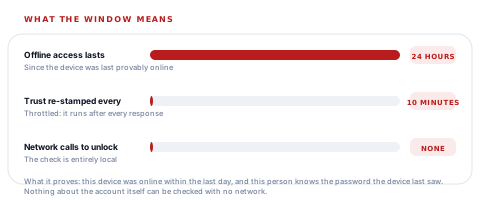
What it can establish is narrower and still worth having: this device was provably online within the last day, and the person holding it knows the password that device last saw. Those two facts, together, are what an offline unlock is.
Why the marker is throttled
The trust marker is written on a path that runs after every authenticated response, and writing to disk that often would be a cost on every screen in the app. Ten minutes is far below the twenty-four hour window it feeds, so throttling it changes nothing about what the window means: this device was online within the last day.
The sealed envelope
Keeping a session alive through sign-out would be the easy fix and the wrong one, because then signing out would not mean anything. The two states have to stay distinguishable.
So the session is moved, not left. At sign-out it is sealed into a separate record that only an offline unlock may open. While it exists, the app is genuinely signed out: the live credential slot is empty, no request carries a token, no background prefetch runs, and nothing on screen belongs to the last user. Opening the envelope is what puts the session back — and until somebody does, there is nothing to open.
Signed out with a sealed envelope is a different state from signed in. The whole design depends on the app never confusing the two, including in what it shows on screen.
One thing is deliberately left out of the envelope: the profile photo. It is the single identity value large enough to matter for a secure-storage entry, and it is the one nothing depends on.
A password check with nothing to ask
Verifying a password with no server means the device has to hold something derived from it. Which immediately raises the question of what happens if the phone is lost, and the answer is in how the check is built.
What the device actually stores
Stored so that it is readable only while the phone itself is unlocked, and never synced to a cloud keychain or another device. The rounds are there to make a stolen verifier expensive to attack offline; the binding to account and workspace is what stops one being carried anywhere useful even if it were.
The comparison is constant-time for the ordinary reason — a check that returns faster for a nearly-right answer leaks the answer — and it is the kind of detail that separates a security control from a security-shaped one.
Six ways an unlock is refused, each with its own sentence
| Situation | What the person is told | What to do |
|---|---|---|
| This device has never been online with this account | Offline unlock is not ready on this device | Connect and sign in online once. |
| The stored trust belongs to somebody else | This unlock belongs to a different user or organisation | The previous person signs in, or connect once. |
| Wrong password | Incorrect password for offline unlock | Try again; nothing is sent anywhere. |
| More than a day since the device was online | Offline access expired | Connect to the internet and sign in again. |
| Biometrics offered but never enrolled here | No biometric enrolment recorded for offline unlock | Use the password, then enrol. |
| No workspace context cached | No organisation context on this device | Connect once — there is nothing local to unlock into. |
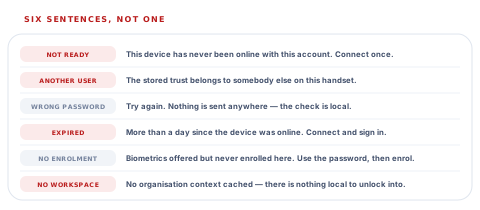
Six sentences rather than one is not verbosity. "Cannot sign in offline" would cover every row above and help with none of them: two are fixed by connecting once, one by a different person signing in, one by typing again, and one is not a failure at all but a setup step nobody has done yet.
Biometrics, and the account nobody switched
Face and fingerprint unlock persist across an ordinary sign-out, because otherwise enrolling would be pointless for anyone who signs out at the end of a shift. That persistence creates one specific hazard: a shared device where the next person signs in with their own password, and the old enrolment is still sitting there.
So the enrolment records which account it belongs to, and the next password sign-in compares. A different account drops the old enrolment rather than inheriting it. It is a small piece of bookkeeping that prevents the worst outcome on a ward tablet or a shared van phone.
The app never promises a sensor it cannot name
Where the platform says which biometric this device has, the prompt says it too — Face ID, Touch ID, face unlock, fingerprint, iris. Where it does not, the wording falls back to "biometrics" rather than guessing. A button offering Face ID on a phone with a fingerprint reader is a small thing that makes people distrust the whole screen.
Asking does not change the answer
There is a distinction in here worth stealing for your own systems. Checking whether an offline unlock could work and actually performing one are separate operations, and the check deliberately does not open the envelope. A question that changes the state it is asking about is not a question, and a screen that quietly signs somebody in because it was working out whether to show a button is a bug you find much later.
Questions worth asking about offline sign-in
Can somebody sign in to the app with no network?
What you will hear
"They stay signed in."
How to read it
That is an answer about a session that was never ended, not about signing in. Ask about the crew that signs out at four and starts work at seven the next morning somewhere with no coverage — that is the case that decides whether the offline mode is reachable.
How long does offline access last?
What you will hear
Silence, or "until they connect".
How to read it
There should be a stated window and a clock it runs on. Without one, a device that has been off the network for a month is as trusted as one that synced this morning, which is the same as having no rule.
What is stored on the device to check the password?
What you will hear
"It is encrypted."
How to read it
Encrypted with what key, stored where? The useful answers are: a derived verifier rather than the password, salted per device, bound to the account, iterated enough to be expensive, and held in hardware-backed storage that never leaves the phone.
What happens on a shared device when the next person signs in?
What you will hear
A pause.
How to read it
This is the question that finds out whether biometric enrolment is bound to an account or to the handset. On a ward tablet or a shared van phone, the difference is whether one person's face opens another person's session.
Our take
Offline sign-in is where field software either takes its own premise seriously or does not. The honest version admits what it cannot prove — nothing about the account can be checked with no network — and then states precisely what it does prove: this device was online within the last day, and this person knows the password it last saw. Twenty-four hours, re-stamped every ten minutes while online, with the sign-out session sealed rather than kept alive and a verifier that never leaves the phone. We would rather explain that window to a security team than explain why a crew stood in a yard unable to open an app that had all their work in it.
The window is a constant, and the policy around it is yours to set
Everything on this page is one file with its reasoning beside it, which is what makes these defined pieces of work rather than research.
An offline window you choose
Your own trust period per workspace or per role — twelve hours for finance, a week for a survey crew that is genuinely away that long.
Offline unlock limited by role
Permission to unlock without a network granted to the roles that need it, so an administrator account cannot be opened on a lost phone in a hotel room.
Offline unlocks in the audit trail
Each unlock recorded on the device and posted with the next sync, so the security log covers the hours the device spent away from the network.
Remote revocation that lands on next contact
A device marked as lost refusing its sealed session the moment it next reaches the network, before anything else it does.
The trust marker, the verifier and the sealed session are three named pieces in one module, so changing who controls them is a small and well-bounded job.
Tell us how long your crews are actually offlineTry the shift-change test
Sign in on a phone, sign out, put it in flight mode, and try to start work. What happens in the next ten seconds is the whole of whether your field team can use the app on a site with no coverage.
Talk to us about field accessFrequently asked questions
Can I sign in to the app with no internet connection?
Yes, if this device has been online with your account within the last twenty-four hours. The unlock is local: it checks a verifier derived from your password against one stored on the phone, and makes no network call at all. Beyond that window the device asks you to connect and sign in again.
What does an offline unlock actually prove?
Two things: that this device was provably online within the last day, and that you know the password the device last saw. It cannot prove your account still exists, that the password has not been changed, or that you have not been removed from the workspace, because none of those can be checked without a network. Anything claiming otherwise is describing a request it did not make.
Is my password stored on the phone?
No. What is stored is a verifier derived from it — salted with a value unique to this device, bound to your account and workspace, and iterated a couple of thousand times — held in the device keychain so it is readable only while the phone itself is unlocked and never synced to another device. The comparison is constant-time, so a nearly-right password does not take a measurably different amount of time to reject.
What happens to my session when I sign out?
It is sealed into a separate record rather than kept alive. While that record exists the app is genuinely signed out — no request carries a token, no background prefetch runs, and nothing on screen belongs to the last user. An offline unlock is what opens it and puts the session back, which is how a crew that signs out at the end of a shift can start the next one somewhere with no coverage.
Does fingerprint or face unlock survive signing out?
Yes — otherwise enrolling would be useless to anyone who signs out at the end of a shift. The enrolment records which account it belongs to, so when a different person signs in with their password on that device the old enrolment is dropped rather than inherited. That matters most on shared handsets and ward tablets.
Why does the app sometimes say "biometrics" instead of Face ID?
Because the platform did not tell it which sensor this device has. Naming a specific method the phone may not have is a small dishonesty that makes people distrust the whole screen, so the wording falls back to the general term rather than guessing.
Can the offline window be changed for our organisation?
Not as a setting today, and it is among the more frequently requested pieces of commissionable work — usually alongside limiting offline unlock by role. The window, the verifier and the sealed session are three named pieces in one module, which is what makes moving ownership of them a small job.
