
Ask AwraIQ about features, pricing, onboarding, login, integrations, security, demos, mobile apps, automation, reports, or support.
Gallery
Awra OpsHub Product Gallery
Browse visual previews of AWRA OpsHub modules. These images highlight the workflows and dashboards teams use every day across inventory, procurement, sales, and accounting.
Watch it run
See how AWRA works
Six steps. One record trail, from request to ledger.
- 1 Request stock
- 2 Approve purchase
- 3 Compare suppliers
- 4 Create PO
- 5 Receive stock
- 6 Update accounts
Inventory Management
Stock visibility, adjustment workflows, and reorder signals.


Procurement & Vendors
RFQs, quotations, and vendor analysis in one place.


Sales & POS
Customer pipelines, invoicing, and POS performance.


Accounting & Finance
Journal views, cash flow, and balance sheet summaries.


Teams & Service Operations
The people, delivery, and support workspaces that run beside the stock chain.


Assets & Field Operations
What the organization owns, and how work is captured when the network is not there. Warehouse screens sit under Inventory Management above.


Operations Hub
The layer over everything else: what is waiting, what is late, and what looks wrong this morning.


Automation & Integrations
The rules and connections that carry work between the modules above. The command board moved to its own section — it is the Hub, not an automation.
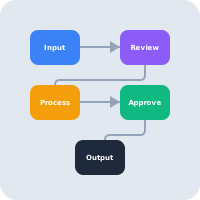 Automation Rules & triggers
  Integrations Connected systems
 Insights Highlights
Dedicated previews of Awra Intelligence Insights across modules.


Want a tailored walkthrough?
We can prepare a guided demo with your own workflows and data.
Schedule a DemoHelp Center
Need a quick answer while you read?
Run inventory, procurement, assets, sales, and field work with approved AWRA guidance for setup, migration, integrations, security, pricing, and support.