
Ask AwraIQ about features, pricing, onboarding, login, integrations, security, demos, mobile apps, automation, reports, or support.
Automation Library
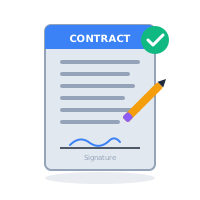
Prebuilt workflows for approvals, queues, alerts, and exceptions
Start from repeatable automation patterns that move work forward: approve low-risk requests, escalate stockout risk, remind owners, route exceptions, and keep teams out of manual follow-up loops.
Choose a workflow pattern, connect it to your operating rules, and let AWRA keep the next step visible, owned, and audit-ready.
6
starter patterns
Live
task queues
Safe
exceptions
Why automation compounds ROI
Most teams automate a single task and call it done. AWRA treats automation as a system of connected workflows that remove handoffs, reduce delays, and keep approvals moving without manual follow‑ups. Start with the Workflow Automation product page to see how triggers, routing, and exception handling fit together.
Each workflow is designed around a measurable business outcome: lower stockout risk, faster procurement cycles, cleaner audit trails, and tighter cash collection. That means automation isn’t just convenience — it’s a financial lever. Explore the inventory automation patterns that remove manual checks.
As your organization scales, the same workflows continue to run with the same precision. You add users and locations without multiplying admin work, because the engine handles the repetitive steps in the background. If you want a tailored path, review the full automation feature set.
You remain in control: every automated action is logged, reversible, and tied to roles and permissions, so compliance and accountability stay intact. For a deeper look, read the automation documentation.
The Trigger Engine
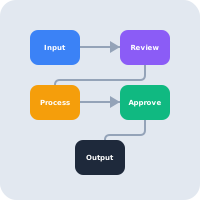
AWRA's automation isn't just about simple 'if-then' statements; it's a multi-vector trigger engine. We monitor thousands of data points across your organization in real-time. When a specific threshold is crossed—such as a reorder point being hit while a vendor's reliability score is high—the engine fires.
This allows for 'Intelligent Autonomy.' Instead of human operators manually checking spreadsheets, our engine performs the heavy lifting, only involving your team when a human decision (like an approval or a complex override) is truly necessary.

Mechanical Workflow Precision
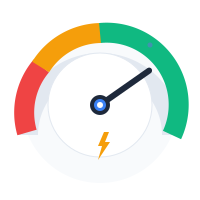
Every operational business has a 'rhythm.' AWRA's precision workflows map to that rhythm. We automate the repetitive, error-prone tasks that eat up your team's time. From auto-generating RFQs when stock reaches critical levels to escalating overdue invoices to the collections team, our workflows move with the precision of a high-performance engine.
Standardizing these workflows across your organization ensures consistency, reduces operational lag, and provides an audit trail for every action taken, ensuring total accountability.
Real-Time Responsive Dashboard
Automation isn't a black box. Our real-time dashboards provide a window into every active workflow. You can see which triggers have fired, which actions are pending approval, and the overall efficiency gain for your organization. This transparency ensures that you remain in control of your intelligence engine at all times.
With soft amber and teal indicators, the dashboard tells you at a glance that your operational engine is healthy, synchronized, and moving at the speed of your business.
Drag-and-Drop Workflow Builder
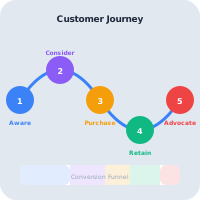
Complexity shouldn't require coding. AWRA's visual workflow builder allows operations managers to design complex logic using a simple drag-and-drop interface. Connect triggers (e.g., "Invoice Approved") to actions (e.g., "Update Ledger" -> "Email Vendor") in seconds.
Our library of pre-built nodes covers everything from inventory checks to external API calls, giving you the power of a developer without writing a single line of code.
Resilient Exception Handling
In the real world, things break. APIs timeout, emails bounce, and stock levels fluctuate wildly. AWRA's automation engine is built with resilience at its core. You can define specific "fallback paths" for every workflow.
If a vendor's system is down during a PO sync, our engine can automatically retry later, route the request to a secondary vendor, or escalate the issue to a human manager via SMS—ensuring that a technical glitch never becomes a business stoppage.

Prebuilt Workflow Library
These are ready-to-adapt workflow patterns. For the orchestration layer behind them, go to Workflow Automation.
Procurement
Auto-approve Low-Risk RFQs
"Review-less sourcing for trusted partners."
Inventory
Stockout Risk Escalation
"Critical alerts when velocity exceeds supply."
Sales
Overdue Invoice Auto-Ping
"Automatic reminders for collections teams."
Vendor Mgt
Lead-Time Slip Notification
"Immediate alerts for supply chain delays."
Accounting
Margin Anomaly Review
"Spotting leakage before it impacts P&L."
Executive
Weekly Ops Recap
"Automated cross-team efficiency reporting."
Need a custom automation?
Start with the full Workflow Automation feature page, then bring us the workflow you want configured for your team.
Help Center
Need a quick answer while you read?
Run inventory, procurement, assets, sales, and field work with approved AWRA guidance for setup, migration, integrations, security, pricing, and support.