
Two Policies Arrive and the Stricter One Wins
A workspace policy and an MDM profile can both reach the same phone, and they answer different questions. The rule is that the stricter one wins on every setting, and that neither can be used to loosen the other.
- Written by
- AWRA OpsHub TeamOperations Insights
- Issued
- Build
- Initial
Two people can decide how locked down an app should be on a given phone, and they are rarely the same person. There is whoever runs the workspace, setting a rule for everybody. And there is whoever runs the device fleet, hardening the tablets their department bought. On a shared ward tablet those two answers are different, and both are right.
Most software resolves that by having one source. Whichever it is, somebody ends up unable to express what they need: either the workspace rule is forced onto every personal phone, or the fleet profile is ignored on the devices IT actually issued.
The alternative is to take both, and settle the collisions with a rule that cannot be gamed in either direction.
Stricter wins, and only stricter
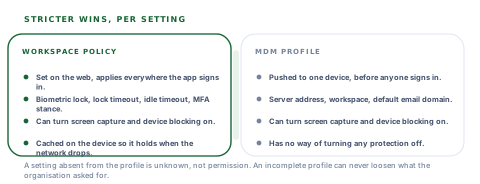
The workspace policy
- Set on the web, in Settings, by somebody responsible for the organisation.
- Applies everywhere the app is signed in, including phones nobody in IT has ever touched.
- Carries the settings only the server can know about — session idle timeout, the multi-factor stance.
- Fetched when the app foregrounds, and cached for the times it cannot be.
The MDM profile
- Pushed by device management to a specific device, before anyone signs in.
- Applies to the handsets that department issued and to nothing else.
- Can set the server address, the workspace and a default email domain, so nobody types a URL.
- Can turn protections on. It has no way of turning any of them off.
The absent key is not a "no"
The merge is deliberately written so that a setting missing from the MDM profile is not read as permission. An absent key is unknown, not false — and a merge that treated the two the same would let an incomplete profile quietly switch off a protection the organisation asked for. That is a one-character distinction in the code and the whole safety property in practice.
What the policy actually controls
| Setting | What it does on the device | Who can set it |
|---|---|---|
| Screen capture blocked | Screenshots and screen recording refused by the operating system | Either source, and either can turn it on |
| Compromised devices blocked | A rooted or jailbroken handset is refused a session | Either source, and either can turn it on |
| Biometric lock required | The app demands a face or fingerprint on resume | The workspace |
| Lock timeout | How long away from the app counts as away | The workspace |
| Session idle timeout | When an idle session ends outright | The workspace |
| Multi-factor stance | Whether a second factor is recommended or insisted on | The workspace |
| Server address, workspace, email domain | What a freshly enrolled device points at | The MDM profile |
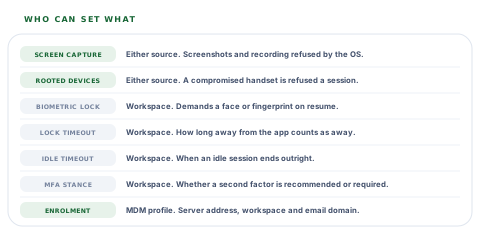
Only the first two are shared, and they are shared precisely because they are the two an IT department has a legitimate reason to harden on hardware it owns without touching anyone's personal phone.
The first frame after launch
A policy fetched from the server has a gap in front of it: the moment between the app appearing and the answer arriving. It is a fraction of a second, and it is enough to screenshot a payslip.
So the last known policy is restored from the device before anything renders, and applied immediately. The network fetch then confirms or updates it. The order matters more than the freshness — a slightly stale policy in force from the first frame beats a current one that arrives second.
Losing a connection must never switch a protection off. If the policy fetch fails, the last known policy stays in force — the absence of an answer is not an answer.
Permissive before the first contact, strict after
There is one state where nothing is enforced: a device that has never reached the server and has no cached policy. First launch, or a fresh install in a place with no signal. Every restriction there is off, and that is a deliberate choice with an argument behind it.
The alternative — default to locked down — sounds obviously safer and produces a specific failure: a field worker whose connection dropped finds the app refusing to open, on a device that has done nothing wrong, in a place where they cannot fix it. There is nothing on that device yet to protect. The protections attach to the data, and the data arrives with the first sync.
What the device says about itself
Posture reporting is the other half. The device tells the server what it knows about itself — whether it looks rooted or jailbroken, whether it is an emulator, whether screen capture is currently blocked, whether biometric hardware exists, and which operating system and app version it is running.
If the organisation blocks compromised devices and this one says it is compromised, the server has already revoked the session by the time the refusal comes back, and the app signs out. The interesting case is the other one.
The device reports it is compromised
Refuse, and revoke
The session is ended on the server first, so the outcome does not depend on the app cooperating with its own sign-out.
The report cannot be delivered at all
Carry on
An unreachable server is not evidence of a compromised device. Treating a dropped connection as a security event locks out exactly the field staff this product is for.
The platform cannot answer the question
Say so rather than guess
A build without the native security piece reports that it has nothing to report, instead of sending a confident "not rooted" that nothing checked.
The lock timer, and the missing timestamp
When a biometric lock is required, the app records the moment it went to the background and compares on resume. Longer than the timeout and it asks for a face or a fingerprint; shorter and it does not, because demanding one every time somebody glances at a message makes people stop using the lock.
How the resume check decides
That last row is the one to copy. A missing timestamp means either the write failed or the process was killed and restarted — and in both cases the app cannot prove it was away for less than the timeout. For a policy that asked for a lock at all, the safe reading of "cannot prove" is to ask.
Enrolment, and the one honest caveat
The most common reason a mobile rollout stalls in an organisation large enough to have an MDM is that every member of staff has to type a server address by hand. A managed profile removes that: the address, the workspace and a default email domain arrive with the app.
The caveat is small and worth stating rather than discovering. The address is read from a native value as the app loads, while the managed profile is fetched asynchronously — so on the very first launch of a freshly enrolled device, requests fired in the first moments may still use the default host. The profile is cached the instant it is read, so every launch after that has it immediately. In practice a managed device is configured before anyone signs in, and nobody meets it.
Administrators type the site root as often as the API root
So both are accepted. A profile pointing at the site and a profile pointing at the API resolve to the same place, because a support ticket about an undocumented trailing path is a bad way to start a fleet rollout.
Questions for a security team evaluating a field app
If our MDM and your workspace settings disagree, which wins?
What you will hear
"They should be the same."
How to read it
They will not be, on the devices IT issued. The answer you want is a stated rule — stricter wins, per setting — and confirmation that a profile cannot loosen anything the workspace insisted on.
What is enforced before the app has spoken to your server?
What you will hear
"Everything."
How to read it
Ask specifically about screenshot blocking on the first frame. A policy applied only after a network round trip leaves a window, and that window is long enough to capture whatever is on screen.
What happens to your protections when the network drops?
What you will hear
"They keep working."
How to read it
Ask how. The failure to avoid is a fetch failing and the app falling back to permissive, which turns a bad connection into a security downgrade. The last known policy staying in force is the answer.
Do you block rooted devices, and what if the check cannot run?
What you will hear
"We detect rooted devices."
How to read it
Detection is best-effort on every platform and a vendor claiming certainty has not thought about it. What matters is where the decision is made — the server, so a refusal also revokes the session — and that an undeliverable report is not treated as a compromised device.
Our take
Mobile security policy goes wrong in two directions, and both are avoidable with one rule. Too permissive, and an IT department that bought a hundred tablets cannot harden them without hardening every personal phone in the organisation. Too rigid, and a field worker whose connection dropped is locked out of an app that has nothing on it yet. Taking both sources, letting either turn a protection on, letting neither turn one off, and keeping the last known policy in force when the network goes is the shape that survives both. The part we would put in front of a security team first is the failure behaviour: a dropped connection is not a security event, and an app that treats it as one will be worked around within a week.
Policy is a small surface with a lot of legitimate variation
The merge, the cached policy and the posture report are three named pieces. These are the extensions security teams ask for once a fleet is real.
Policy by role or by device group
Different rules for warehouse handsets, finance phones and ward tablets, set once centrally instead of per device profile.
A posture history per device
What each handset reported over time — operating system, app version, integrity — so a fleet audit reads from one screen.
Conditions of your own
Rules that take account of network or location, for organisations whose policy genuinely differs on site and off it.
Managed enrolment for more of the profile
More of the sign-in journey pre-filled by the MDM payload, for fleets where staff should never see a server field at all.
Every item here builds on the merge rule already in place, which is the piece that is awkward to add later — a policy system with one source has to be rebuilt to accept two.
Tell us how your fleet is managedBring your MDM profile
The quickest way to find out whether this fits is to push a profile at a test device and watch what the app does with it — before the first sign-in, not after.
Talk to us about device policyFrequently asked questions
What happens if our MDM profile and the workspace security settings disagree?
The stricter value wins, per setting. Both sources can turn screenshot blocking and compromised-device blocking on, and neither can turn them off. That way an IT department can harden the tablets it issued without forcing the same rule onto every personal phone, and an incomplete profile can never loosen something the organisation asked for.
Is screenshot blocking active before the app has contacted your server?
Yes, when the device has a policy cached. The last known policy is restored and applied before anything renders, and the network fetch then confirms or updates it — otherwise there is a window between launch and the answer arriving in which whatever is on screen can be captured.
What happens to the security policy when the phone loses its connection?
The last known policy stays in force. A failed fetch never falls back to permissive, because that would turn a bad connection into a security downgrade — the absence of an answer is not an answer.
Why is nothing enforced on a brand new device that has never been online?
Because there is nothing on it yet to protect, and the alternative fails badly: defaulting to locked down means a worker whose connection dropped finds the app refusing to open in a place where they cannot fix it. The protections attach to the data, and the data arrives with the first sync.
Do you block rooted or jailbroken devices?
If your organisation switches it on. The device reports what the platform tells it about itself and the server decides; a refusal revokes the session before the app is told, so the outcome does not depend on the app cooperating. A report that cannot be delivered is not treated as evidence of a compromised device — an unreachable server means an unreachable server.
Can we pre-configure the server address so staff never type it?
Yes — an MDM profile can set the server address, the workspace and a default email domain, and both the site root and the API root are accepted because administrators type each about equally often. One honest caveat: on the very first launch of a freshly enrolled device, requests in the first moments may still use the default host, because the address is read as the app loads and the profile arrives just after. It is cached immediately, so every later launch has it from the start.
How often does the app ask for a fingerprint when a biometric lock is required?
Only after the app has been in the background for longer than the lock timeout — five minutes where the policy sets none, and never less than fifteen seconds whatever it says. If there is no record of when the app went away, it asks: that means either the write failed or the process was restarted, and neither can prove the app was away for less than the timeout.
