
Disconnecting Should Actually Disconnect
Most products disconnect an integration by deleting their copy of the credential. The grant stays live in your account, listed among your connected apps, indefinitely — and the difference between that and a real revocation is which token you send back.
Open the security page of your Google or Microsoft account and look at the list of applications with access. There will be things on it you disconnected years ago. Not because anybody was careless — because disconnecting, in most products, means forgetting the credential rather than telling the provider you are done with it. The user cannot tell the difference, and the two are not the same.
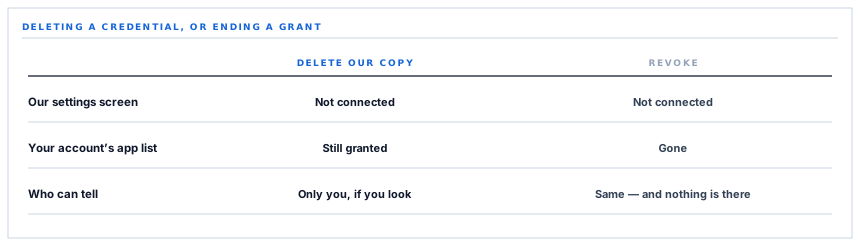
Two things that both look like disconnecting
| Deleting our copy | Revoking the grant | |
|---|---|---|
| What happens here | The credential is removed | The credential is removed |
| What the settings screen shows | Not connected | Not connected |
| What your Google account shows | Still granted | Gone |
| If our database were ever exposed | The credential is not there — but the grant was live until now | There was nothing to use |
| Who can tell | Only somebody checking their account | Same, and they find nothing |
The distinction only becomes concrete in the fourth row, and it is the row that matters. A grant nobody is using is not harmless — it is a standing permission whose only protection is that the credential is stored somewhere safe.
Disconnecting should mean the permission is gone, not that we have stopped holding the key to it.
Which token you send matters
The revocation call takes a token, and the two you hold do different things.
Send the short-lived access token and you revoke that token. It had minutes left anyway. The grant continues, and a refresh would produce a new one.
Send the long-lived refresh token and you revoke the whole grant — every token issued under it, and the standing permission itself. The application disappears from the account's list.
So the connector sends the refresh token, and falls back to the access token only when there is no refresh token to send. That fallback is a partial revocation and it is better than nothing, which is the only reason it is there.
One line, one preference, and it is the difference between the third row of that table saying still granted and saying gone.
A refusal that means it worked
A detail that would otherwise produce a confusing failure at the worst moment.
Sending a token that is already invalid — expired, or revoked earlier — produces an error response rather than a success. Which is technically correct: you asked to revoke something that does not exist.
From the caller's point of view the two outcomes are identical. The grant is gone. Reporting the second as a failure would tell somebody their disconnection did not work at the exact moment it definitively had.
So that specific refusal is treated as success. The question is not whether the call succeeded but whether the goal was achieved, and those are different questions more often than the code usually admits.
What is deliberately not treated as success is being unable to reach the provider at all. Then the grant's state is genuinely unknown, and reporting a failure is the honest answer — somebody may want to go and revoke it in their account directly.
The other half: send-only mail
The same connection can send email from your own mailbox, and the permission is the narrowest one available for that.
It can send. It cannot read a mailbox, list messages, search, or see what has arrived. There is no read scope on the request and none can be added later, because a scope is fixed at consent.
That is worth checking in your own account settings rather than believing, and it is checkable in about ninety seconds. A connection that says it can read, compose, send and permanently delete your mail is a very different arrangement from one that can only send — and both are described by vendors as connecting your Gmail.
Two details in assembling the message
Sending this way means constructing the whole message yourself — headers, body, attachments — and handing it over as one encoded blob. Two parts of that are easy to get wrong.
-
The encoding is the URL-safe variant
Two characters differ from ordinary encoding and the padding is removed. Send the ordinary form and it is refused, with a message about the payload rather than about the encoding.
-
Blind copies are handled by the provider
The addresses go in a header, and the provider delivers to them and strips that header from the copies everyone else receives — which is what makes them blind.
-
Non-ASCII headers are encoded
A sender name or subject with an accent in it is encoded to the form headers require, rather than sent raw and arriving as mojibake.
-
Empty recipients are dropped
A blank entry in a copy list is removed rather than becoming an empty address, which some providers refuse and others deliver oddly.
The second point is the one that would otherwise be a genuine privacy failure. Assembling a message by hand and putting blind copy addresses in a header they can see is how everybody on a distribution list learns who else is on it.
What is in place, layer by layer
Connecting and disconnecting
Revocation, not just deletion
Disconnecting tells the provider the grant is finished rather than only removing our copy of the credential.
The token that revokes everything
The long-lived credential is sent, because it ends the whole grant; the short-lived one is a fallback that ends only itself.
An already-invalid token treated as done
The provider's refusal for a token that no longer exists means the grant is gone, which is what was asked for.
Unreachable reported as unknown
Failing to contact the provider is reported as a failure rather than assumed to have worked, because the grant's state is genuinely unknown.
A send-only mail permission
The connection can send from your mailbox and cannot read it, list it or search it — enforced by the provider and readable in your own account settings.
Messages assembled correctly
The encoding the provider requires, headers encoded for non-ASCII names and subjects, and empty recipients removed.
Blind copies that stay blind
Addresses are placed where the provider delivers to them and strips the header from other recipients' copies.
Failures logged with the provider's reason
A refused revocation records the status and the response, so a policy refusal reads differently from an outage.
A grant that is revoked disappears from the list of connected applications in your own account. That is the check worth doing after disconnecting anything, from any vendor.
Three positions held on purpose
- Disconnecting revokes the grant rather than deleting our copy of the credential. A standing permission nobody is using is not harmless, and the only person who can see it is the one who has to go looking.
- A provider refusal that means the goal was achieved is treated as success. The question is whether the grant is gone, not whether the call returned cleanly, and those diverge exactly when somebody is disconnecting for the second time.
- An unreachable provider is reported as a failure. It is the one case where the grant's state is genuinely unknown, and reporting success would tell somebody a permission was withdrawn when nobody knows whether it was.
Five questions to ask about disconnecting
Does disconnecting revoke the grant?
A good answer sounds like
Yes, at the provider.
What ours actually is
The long-lived credential is sent to the revocation endpoint, which ends the whole grant.
Will it disappear from our account's app list?
A good answer sounds like
Yes.
What ours actually is
That is what revoking the grant does, and it is the check worth doing afterwards.
What if the token was already invalid?
A good answer sounds like
Still a success.
What ours actually is
The provider refuses, and that refusal means the grant is gone — which is what was asked for.
What if you cannot reach the provider?
A good answer sounds like
You are told.
What ours actually is
Reported as a failure, because the grant's state is unknown and you may want to revoke it directly.
Can the connection read our mailbox?
A good answer sounds like
No — a send-only scope.
What ours actually is
Send only. No reading, listing or searching, enforced by the provider and readable in your settings.
Our take
Revoking on disconnect is four lines and almost nobody does it, because the product looks identical either way and nothing ever reports the difference. The honest way to think about it is that a grant is a permission you gave, and only you can see the list of them — so a vendor who does not revoke has quietly made cleaning up their integration your job, without telling you. It is worth spending twenty minutes on that account page this week. Everything on it that you do not recognise is a standing permission somebody still holds, and the only reason it is still there is that a disconnection somewhere deleted a credential instead of ending a grant.
Check your connected applications list
Everything on it you do not recognise is a live permission. Most of them were disconnected years ago, in products that deleted a credential rather than ending the grant.
Talk through connector securityFrequently asked questions
What actually happens when we disconnect?
The grant is revoked at Google rather than merely forgotten here, so the application disappears from the list of connected apps in your own account. That is checkable in about a minute, and it is the difference between a permission that is gone and one that is simply not being used.
Can the connection read our email?
No. The permission requested for mail is send-only — it cannot read a mailbox, list messages or search. A scope is fixed at the moment of consent and cannot be widened later, and you can read the exact wording in your Google account's security settings.
What if disconnecting fails?
It depends which failure. A refusal because the credential was already invalid means the grant is gone and is reported as success. Being unable to reach Google at all is reported as a failure, because the grant's state is genuinely unknown — and in that case revoking it directly in your account settings is the certain route.
Do blind copy recipients stay hidden?
Yes. The addresses are placed where Gmail delivers to them and removes the header from the copies other recipients receive, which is what makes them blind. Assembling a message by hand and leaving those addresses visible is the way that goes wrong.
Will accents in a subject line or sender name come through?
Yes — headers carrying non-ASCII characters are encoded to the form the mail format requires rather than sent raw, which is what would otherwise arrive as unreadable characters in somebody's inbox.
