
The Credential That Changes Every Time You Use It
Most refresh tokens are issued once and used for years. Microsoft issues a new one every time you spend the old one, which turns a stored credential into a relay baton — and means the only way to break the connection permanently is to drop it.
Two lines in the OneDrive connector look like housekeeping and are the difference between a connection that lasts and one that dies in a fortnight for no reason anybody can reconstruct. They exist because Microsoft does something with credentials that Google and Dropbox do not, and doing it their way requires noticing.
How a refresh token is normally supposed to work
The standard arrangement is two credentials with different jobs. An access token, short-lived — an hour, four hours — which is what actually accompanies a request. And a refresh token, long-lived, whose only job is to obtain fresh access tokens.
The refresh token is the connection. Store it, and you can keep producing access tokens indefinitely without asking anybody to sign in again. On Google and on Dropbox, that is exactly what happens: the refresh token you were handed at consent is the one you are still using two years later, and a refresh call gives you back a new access token and nothing else.
Microsoft hands you a new one every time
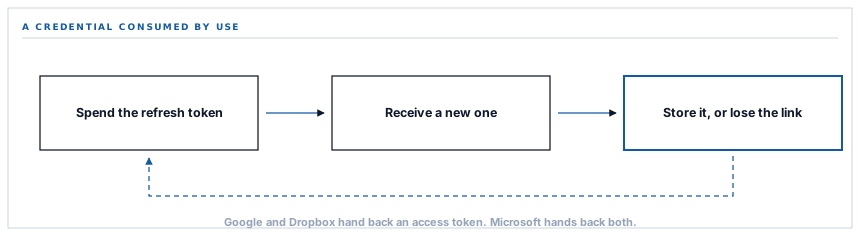
Spend a Microsoft refresh token and the response contains a new access token and a new refresh token. The one you just used is now spent. The connection continues through the new one, or it does not continue.
This is a real security improvement and it is not controversial — a rotating credential limits what a stolen copy is worth, because using it invalidates it and the theft becomes visible as a broken connection rather than staying quiet. But it changes what storing the credential means.
A credential that survives being used is a thing you keep. A credential that is consumed by use is a thing you must replace, correctly, every single time.
So the connector writes the returned refresh token back alongside the access token, and falls back to the one it already holds when Microsoft returns none. Two clauses. Miss the first and the connection works beautifully until the stored token is rejected, and then it is dead with no way back but a fresh sign-in. Miss the second and a response that legitimately omits the field wipes the connection instantly.
Why this is worth a post rather than a code comment
Because it is invisible from every angle you would normally look at.
| Where you would look | What you would see with the rotation handled | What you would see without it |
|---|---|---|
| The connection screen, day one | Connected, account shown, test file written. | Connected, account shown, test file written. |
| The archive folder, week one | Documents arriving. | Documents arriving. |
| The logs, week one | Nothing of note. | Nothing of note. |
| Week three, unpredictably | Documents arriving. | Silence, and a credential the provider no longer recognises. |
The failure has no relationship to anything anybody did. It arrives whenever the previously stored token happens to be spent and rejected, which depends on refresh timing rather than on usage. That is the signature of a whole family of integration faults: correct on the day it was built, correct in every test, wrong later, for reasons that are not in the traceback.
A second Microsoft peculiarity in the same call
While we are here, the refresh request itself is shaped differently. Google and Dropbox want the refresh token, the client credentials and the grant type. Microsoft wants those and the scope list, repeated.
That is not decoration. The scope on a Microsoft refresh is a request, and what you get back is a token good for what you asked for. Omit it and you are relying on a default; send it and the token that comes back covers the same ground as the original grant.
The connector sends the same scope list on the initial exchange and on every refresh thereafter, so the token issued after two years of rotation grants exactly what the person who clicked Connect agreed to and nothing more. That property is worth having deliberately rather than by inheritance.
Which Microsoft account, and whose
The consent request goes to the common endpoint, which is Microsoft's way of saying: any account. A work or school account belonging to an organisation, or a personal Microsoft account. The person clicking Connect chooses, in Microsoft's own dialog, and that choice is the connection.
The connector then asks Microsoft who that turned out to be, and displays it. It reads the mail address, and where a Microsoft account carries none — which happens, particularly with personal accounts — it falls back to the user principal name. Something readable is always shown, because a settings screen that says Connected without saying to whom is not telling you the thing you came to find out.
This is a live consideration in an organisation. A OneDrive connection made with somebody's personal account archives your purchase orders into a Drive that leaves with them. The account name on the settings screen is how anybody notices, and it should be checked once by whoever owns the risk rather than assumed by whoever set it up.
What is in place, layer by layer
The OneDrive credential, end to end
Rotation handled explicitly
Each refresh writes back the new refresh token Microsoft returns, so the connection carries forward through a credential that is consumed by every use.
A fallback when none is returned
A response that omits the field leaves the stored credential intact rather than clearing it, so an unusual reply cannot end the connection.
Scope re-sent on every refresh
The same permission list accompanies the initial exchange and each renewal, so a token issued long afterwards covers exactly what was consented to.
Renewal ahead of the call
A stored token with under a minute left is renewed before the request rather than being discovered as expired by a failing upload.
Both credentials encrypted at rest
Access token and refresh token are stored through an encrypted cast, on a row scoped to a single workspace.
Any Microsoft account, chosen at consent
The common sign-in endpoint accepts work, school and personal accounts, and which one is used is decided in Microsoft's dialog rather than in a configuration field.
The connected identity shown by name
The mail address is read after connection, with the user principal name used where an account carries no mail, so the settings screen always names whose Drive this is.
A missing refresh token reads as not connected
A configuration without one is treated as unusable rather than as connected-but-failing, because those two states look identical and have different fixes.
Google and Dropbox issue a refresh token once and keep issuing access tokens against it. Microsoft replaces it on every use. The connector treats each provider the way that provider actually behaves rather than assuming one model.
Three positions held on purpose
- The provider's model is followed rather than normalised. A shared token-handling layer that assumed refresh tokens are permanent would be right on two providers and quietly fatal on the third, and the failure would surface weeks later in a place that has nothing to do with the assumption.
- A credential is never cleared as a side effect of a call that was meant to renew it. Where the response is ambiguous, the existing credential is kept, because reconnecting is a person's decision and the cost of an unnecessary one is somebody's afternoon.
- The account is displayed, always. A connection is a statement about whose storage now holds your documents, and that statement belongs on the screen rather than in the memory of whoever clicked the button.
Five questions about how a connection stays alive
Does this provider rotate refresh tokens?
A good answer sounds like
They know, per provider.
What ours actually is
Microsoft does; Google and Dropbox do not. Each is handled as it behaves.
What happens to the new one?
A good answer sounds like
Stored immediately.
What ours actually is
Written back in the same save as the access token and expiry.
What if the response omits it?
A good answer sounds like
The old one is kept.
What ours actually is
The stored credential stands, so an unusual reply does not end the connection.
Does the permission drift over time?
A good answer sounds like
No — it is re-stated.
What ours actually is
The same scope list goes out on every refresh, so a two-year-old connection grants what was agreed on day one.
Whose account is it?
A good answer sounds like
Shown on screen.
What ours actually is
Read from the provider after connection and displayed, with a fallback so the field is never blank.
Our take
The general lesson is worth more than the Microsoft detail. Integrations are usually built against one provider first, and the shape of that provider becomes the shape of the code. The second provider fits, mostly. The third fits in the places you tested. What survives is a set of assumptions nobody wrote down — refresh tokens are permanent, folders have identities, writing to an occupied name is safe — each of which is true somewhere and false somewhere else. There is no clever fix for that. There is only reading the provider's own documentation about the thing you assumed, once, per provider, before you ship it rather than after somebody's archive goes quiet.
Ask how a connection survives its first month
Anyone can demonstrate an integration working on the day it is built. The interesting question is what keeps it working in week five, and it usually comes down to two lines.
Talk through connecting Microsoft 365Frequently asked questions
Do I have to reconnect OneDrive periodically?
No. The connection renews itself, carrying the rotating credential forward on each renewal. A reconnection is needed only if the grant is revoked from the Microsoft side — by you, or by an administrator applying a policy — which is a deliberate act rather than an expiry.
Can I connect a SharePoint document library rather than a personal OneDrive?
The connection is made through Microsoft Graph, which is the same interface behind both, and the account you sign in with determines the drive that is written to. If you want documents landing somewhere the whole organisation reaches, that is a decision about which account authorises the connection — and it is worth making deliberately, because it is not easily changed afterwards.
What happens if the person who connected it leaves?
Their account is the connection. When it is disabled the grant stops working and archiving to that destination stops. This is a good argument for connecting with an account the organisation controls rather than an individual's, and the account name on the settings screen is there so anyone can check which you have.
Does a token refresh show up anywhere I can see?
Not as an event, no — it happens inside the ordinary run of work, many times a day, and surfacing it would be noise. What is visible is the outcome: the connection status, the connected account, and whether documents are arriving.
Is the access token ever written to a log?
No. Failures log the provider's error message and nothing else, and both tokens are stored through an encrypted cast rather than in plain text. A database export is not a working credential.
