
One API for the Whole of Microsoft 365
The OneDrive connector talks to one base URL. The same address answers who is signed in, which drive is theirs, whether a file is already there, and takes the bytes — which is why archiving to Microsoft is a couple of hundred lines rather than a subsystem.
Microsoft spent years with a different API for every product, and then replaced them all with one. Whether that was a good idea in general is somebody else's argument. What it means for a small integration is concrete and slightly startling: the code that archives a purchase order into OneDrive is shorter than the code that archives the same purchase order into Google Drive, and the reason is that it asks fewer questions.
Four things, one address
A document archive needs to establish four facts. Who authorised this. Which storage is theirs. Is this document already filed. Here are the bytes. On Graph, all four are the same host, the same version prefix, and the same bearer token.
| The question | Where it is asked | What comes back |
|---|---|---|
| Who is this? | The identity endpoint for the signed-in user | The account, from which the connector takes the mail address to display |
| Is this file already there? | The drive root, addressed by path | An item, or nothing — which is the whole idempotency check |
| Where do I put it? | The same path, with a content suffix | The upload target — and missing folders are created on the way |
| Did it work? | The response to that upload | An item, or a Microsoft error message passed straight through |
Compare that with the folder machinery a different provider needs — create an archive folder, store its identifier, verify the identifier still resolves and has not been binned, search for a subfolder by name inside it, create it when absent, cache the answer so a batch does not repeat the search — and the shape of the difference is clear. Path addressing collapses four operations into one string.
The folders are created by the act of writing into them. There is nothing to set up, because setting up is what the upload does.
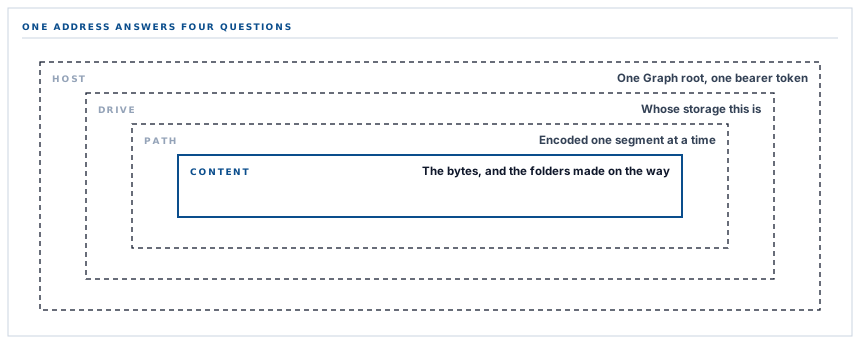
The part of path addressing that has to be got right
Putting a path inside a URL is convenient and has one sharp edge. A path contains slashes that mean folder boundary, and it contains other characters — spaces, brackets, ampersands, apostrophes — that mean something else entirely inside a URL and must be encoded.
Encode the whole path in one pass and the slashes get encoded too. The request is then perfectly valid and completely wrong: it asks for a single file whose name happens to contain slashes, rather than for a file inside two folders. Nothing errors. You get a flat drive full of oddly named documents.
The connector splits the path on its slashes, encodes each piece on its own, and joins them back with real slashes. It is a one-line function. It is also the entire difference between a folder tree and a mess, and it is the kind of thing that works during testing because test data does not have brackets in it.
Filenames are separately reduced to a conservative alphabet before they ever reach a path, so in practice the encoder rarely has work to do. Both defences are present because the one that never fires is the one covering the case you did not think of.
A ceiling worth knowing about
The upload used here is Graph's simple upload, which takes the whole file in one request and is documented up to 250 MB. Above that, Microsoft wants a resumable session — a different endpoint and a chunking loop.
For what this connector archives, that ceiling is not close. An invoice PDF is measured in tens of kilobytes; a rendered purchase order likewise; a point-of-sale receipt is a narrow strip of monospaced text. The document types that could conceivably approach it are exported reports and files a supplier uploaded, and even a long register export is a small fraction of it.
It is stated here because a limit you know about is a fact and a limit you do not is a surprise. If your prequalification process collects scanned engineering drawings, that is a number worth having in mind.
What the grant actually covers
The permission this connector requests is read and write access to the signed-in user's own files, alongside the ability to read their basic profile and to keep the connection alive between sessions.
That is worth stating precisely, in both directions. It is not access to the whole organisation — there is a broader Microsoft permission that reaches every drive in a Microsoft 365 organization, and this is not it, which means an administrator reviewing the consent is looking at one user's storage rather than everybody's. It is also broader than the narrowest thing Microsoft offers, and broader than the equivalent Google grant, which is scoped to files the application itself created.
What the connector does inside that grant is narrow by construction: it writes into one folder tree, and it reads metadata only to decide whether it is about to duplicate something. There is no listing of your drive, no traversal, no delete path in the connector at all.
If the difference between what a grant permits and what an application does matters to your organisation — and in a regulated one it should — the useful controls are on your side rather than ours. Microsoft lets an administrator decide which applications may be consented to and by whom, and that decision is more durable than any assurance from a vendor about their own restraint.
What is in place, layer by layer
The OneDrive connector as it stands
One API surface for the whole job
Identity, drive, file metadata and upload are all reached through a single Graph root with a single bearer token.
Path addressing, per-segment encoded
Each folder and filename is encoded on its own and rejoined, so awkward characters in a document number cannot flatten the tree.
Folders created by the upload
Missing folders in the target path are made by Graph as the file is written, so there is no folder-provisioning step to fail.
Existence checked at the same address
The idempotency read is the write URL without its content suffix, which keeps the two in step by construction rather than by care.
A folder per document type
Under a root you choose, one folder per type, named consistently with the other storage connectors so the trees look alike.
The provider's error passed through
A rejected upload surfaces Microsoft's own message and status rather than a generic failure, so a permission or quota problem reads as what it is.
A test that writes a real file
The connection test uploads a small dated text file to your root, proving credential, path and write access in one visible step.
Per-type opt-in
Five document types, five independent switches, and a connected account that archives nothing until one is chosen.
Simple upload is used throughout, which Microsoft documents to 250 MB. Every document type this connector archives sits far below that.
Three positions held on purpose
- The scope is described exactly rather than favourably. It is narrower than organisation-wide and broader than the narrowest available, and a reader deciding whether to approve it deserves that sentence rather than a reassuring adjective.
- The connector reads metadata and writes files, and does nothing else. There is no traversal and no delete path, so the operations a person might worry about are absent from the code rather than merely unused.
- Provider errors are surfaced verbatim. A quota message, a policy refusal and a bad path are three different problems with three different fixes, and flattening them into "upload failed" costs whoever has to solve it an afternoon.
Five questions about an integration built on a large platform API
What permission are you asking for?
A good answer sounds like
The literal scope, not a summary.
What ours actually is
Read and write to the signed-in user's files, their basic profile, and offline access. Not organisation-wide.
What does it do inside that permission?
A good answer sounds like
Less than it could.
What ours actually is
Writes into one folder tree and reads metadata to avoid duplicates. No listing, no traversal, no delete.
How are folders created?
A good answer sounds like
A clear mechanism.
What ours actually is
By the upload itself. There is no provisioning step, so there is no provisioning step to go wrong.
Is there a file size limit?
A good answer sounds like
A number.
What ours actually is
Simple upload, documented to 250 MB — far above anything in the five archived types.
What do I see when it fails?
A good answer sounds like
The real reason.
What ours actually is
The provider's own status and message, passed through rather than replaced.
Our take
There is a habit of judging integrations by how much code they contain, as though more meant more thorough. The opposite is usually true. A connector is mostly a translation layer between what a provider offers and what your product needs, and every line in it is a place where the two models disagree. The Microsoft connector is short because Graph's model happens to fit this job well — paths instead of identities, folders made by writing, one address for everything. Where a provider fits less neatly, the connector grows, and each of those extra lines is worth being able to point at and explain. What you should never accept is a large connector nobody can account for, because that is not thoroughness, it is a pile of workarounds for disagreements nobody wrote down.
Archive to the storage your organisation already runs
Most teams already have a Microsoft 365 organization, a Google Workspace or a storage bucket. The right destination is usually the one your own administrators already control.
Talk through document archivingFrequently asked questions
Does this write to OneDrive or to SharePoint?
It writes to the drive belonging to the account that authorised the connection, reached through Microsoft Graph — the same interface that sits behind both products. Which drive that turns out to be is decided by which account signs in, so it is worth deciding deliberately before the first connection rather than after.
Can an administrator restrict what this connection may do?
Yes, and that is the right place for the control. Microsoft lets administrators govern which applications can be consented to and by whom, across the whole Microsoft 365 organization. A restriction you apply is more durable than an assurance we give, because it does not depend on us.
What happens if my drive is full?
The upload is rejected and Microsoft's own message is recorded, which will say so. Because filenames are deterministic and existing files are skipped, clearing space and re-running the sync picks up exactly what did not land, with no duplicates.
Why do the folder names match the other storage connectors exactly?
They are derived from the internal document type rather than configured per provider. Consistency across destinations is worth more than per-provider naming, because it means somebody who knows one archive can navigate any of them.
Does anything get read back out of OneDrive into my workspace?
No. The only read is a metadata check on the exact path the connector is about to write, used to avoid archiving the same document twice. Nothing in the folder is ever treated as an instruction, so editing or deleting a file there cannot change a record in your workspace.
