
A UPN Is Not an Email Address
Signing in with a provider is safe when the provider tells you the address was verified. Microsoft's directory interface does not carry that field at all, which turns a one-line check into a question about what a corporate username actually proves.
The rule for accepting a social sign-in is well known: take the email address the provider hands you, and refuse it unless the provider also says the address was verified. Without the second half you have built an account takeover, because anybody who can create an account at that provider with somebody else's address inherits their access. The rule is one line of code and it is correct. It also assumes the provider tells you, and there is one common provider whose relevant interface does not.
The claim that is not there
Microsoft does publish a verification claim. It has a name, it is well documented, and it appears in the identity token issued during a sign-in.
The profile interface a sign-in integration typically reads afterwards — the one that answers who is this and what is their address — does not include it. Neither do the two more common field names that other providers use.
So a verified-email check written the standard way looks at three possible fields, finds none of them, and refuses. Every Microsoft sign-in fails, for every account, forever — correctly, by the letter of the rule, and uselessly.
That leaves two options. Wire up a second code path to read the identity token as well, or find something else in the profile that carries an equivalent guarantee. This connector does the second, and the argument for why it is safe is worth setting out properly, because it is the part that is normally waved through.
What a corporate username actually guarantees
Every account in a Microsoft directory has a principal name, and it looks exactly like an email address — a name, an at sign, a domain.
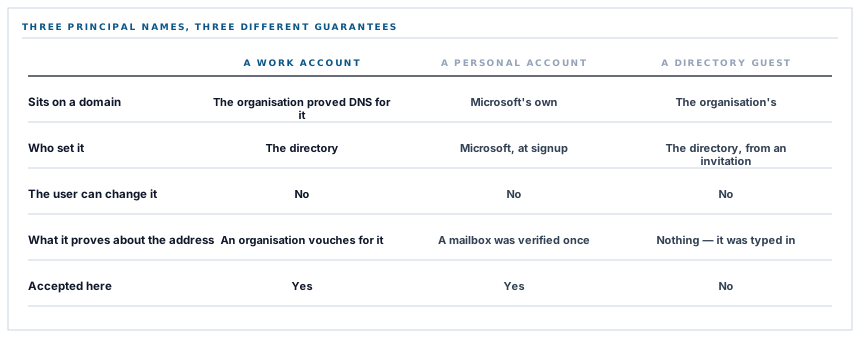
The guarantee is in the domain. Microsoft will not issue a principal name on a custom domain until the organisation has proved it controls that domain's DNS. And a user cannot change their own principal name; it is set by the directory.
Put those together and a principal name on a company domain is an assertion by that company's directory that this person is that person there. That is a stronger claim than a self-service email verification, because a mailbox verification proves somebody could read one message once, and a directory-issued principal name means an organisation vouched for the identity and continues to.
Except for guests, which is why the check is a rejection
Directories invite outsiders. A contractor with a personal address is added as a guest, and the directory mints a principal name for them — by mangling their outside address into a local one, marked with a distinctive fragment.
That principal name still looks like an address and still sits on a domain the organisation owns. It proves nothing about the address inside it, because the organisation did not verify that address; somebody typed it into an invitation form.
So the check is not is there a principal name but is there a principal name that its own directory owns, and a guest marker is a refusal. Which means the rule is written as an exclusion rather than an allowance — and the marker is matched case-insensitively, because nothing guarantees which case it arrives in.
A username on a domain you own tells you about the domain. It only tells you about the person when the domain is where the person actually lives.
And the part that is weaker, said plainly
The same button accepts personal Microsoft accounts, and this is where the honest description matters.
A personal account has no directory and no domain ownership behind it. What its principal name proves is that Microsoft made the person verify that mailbox when the account was created — which is genuinely a verification, and is the same class of proof as the sign-in link this product sends by email.
It is not the same class of proof as a corporate directory vouching for an employee. And the two cannot be told apart at this point, because the profile interface returns an identical field shape for both. There is no flag saying which kind of account this is.
So accepting one means accepting both, and the rule has to be justified at the strength of the weaker one. It is: mailbox-verified is the bar this product already sets for its own email sign-in link, so a personal Microsoft account clears the same bar by the same reasoning. Anybody who needs the stronger guarantee is asking a different question, and the answer to it is in the next post rather than in this rule.
One more asymmetry, and it is deliberate
There is a detail in the surrounding check worth knowing, because it looks like an oversight.
Most providers are held to a format check on the address before anything else happens: an address that is not shaped like one is refused outright. Microsoft is exempt from that check.
The reason is that the format check applies to the address field, and for Microsoft the address field is not what the decision rests on — the principal name is, and that is validated as an address in its own right inside the principal-name rule. Applying both would mean refusing accounts whose profile address is absent or oddly shaped even though the directory has issued them a perfectly good verified principal name.
The general shape is worth taking away: a per-provider verification rule needs per-provider preconditions, and a check applied uniformly to providers whose payloads are not uniform is either too weak somewhere or too strict somewhere else.
The default is refuse
One structural point that makes all of the above safe to have written.
The verification check runs through the declared claims, then the principal-name rule, then the one remaining provider-specific case — and if none of them applies, it returns a refusal.
So a provider added tomorrow with no verification rule declared cannot be signed in with. Not is treated as unverified and allowed through with a warning — cannot be used. The failure mode of forgetting to think about a new provider's verification story is a sign-in button that refuses everybody, which somebody notices in a minute.
That is the correct direction for this particular check, and it is the reason the Microsoft rule had to be written down deliberately rather than arrived at: the default refused, and making it stop refusing required stating exactly what was being trusted.
What is in place
How a Microsoft sign-in is accepted
Declared claims checked first
The three field names Microsoft may use for a verification flag are read before anything else, so a payload that does carry one is believed directly.
A claim value read tolerantly
A flag arriving as a boolean, the word true, or the number one is treated the same, because providers disagree about how to encode yes.
The principal name as the working rule
Since the profile interface carries no verification flag, a directory-issued principal name is what the decision rests on.
The principal name validated as an address
It is checked to be well formed in its own right rather than assumed, because it is the value being trusted.
Guest principal names refused
A guest account's name carries a distinctive marker and is rejected, because the address inside it was typed into an invitation rather than verified by the directory.
The marker matched case-insensitively
The exclusion lowercases before comparing, so a differently cased marker cannot slip past it.
The address format check applied per provider
Microsoft is exempt from the general check because the value it is applied to is not the value the decision uses.
The rule declared beside the provider
Which verification strategy a provider uses is part of its registry entry rather than a branch buried in the callback, so it can be read next to the provider it belongs to.
Refusal as the default
A provider with no declared verification rule cannot be signed in with at all, so forgetting one produces a refusal rather than a bypass.
The reasoning recorded in the code
The argument for what a principal name proves, and the exception for guests, is written where the rule is, because a future reader will otherwise see a string comparison against a marker and simplify it away.
The last item is doing more work than it looks. Every part of this rule is a few characters of string handling; without the reasoning beside it, the guest exclusion in particular reads as an arbitrary special case rather than as the line between an address a directory owns and one it merely stores.
Three positions held on purpose
- A verification rule is declared per provider, and the default is refusal. Providers do not agree on how to say that an address was verified, and some do not say it at all, so a single uniform check is either too weak for one of them or too strict for another.
- Guest accounts are excluded from the principal-name rule. Their address sits on a domain the organisation owns and was never verified by that organisation, which is exactly the distinction the rule depends on and exactly the one that a presence test would miss.
- The weaker of two indistinguishable account types sets the bar. Corporate and personal Microsoft accounts are identical in this payload, so the rule is justified at the strength of the personal one — which is the same bar this product's own email sign-in link already sets.
Five questions about accepting a provider sign-in
Do you check that the address was verified?
A good answer sounds like
Yes, per provider.
What ours actually is
A declared rule for each provider, with refusal as the default when none applies.
What do you do when the provider sends no such flag?
A good answer sounds like
Find an equivalent guarantee.
What ours actually is
A directory-issued principal name, which cannot exist on a domain whose ownership was not proved.
What about guest accounts in a directory?
A good answer sounds like
Refused.
What ours actually is
Their principal name carries a marker and is rejected, because the directory did not verify that address.
Can you tell a corporate account from a personal one?
A good answer sounds like
Honestly, probably not.
What ours actually is
Not at this point — the payload is identical, so the rule is justified at the weaker one.
What happens if somebody adds a provider and forgets this?
A good answer sounds like
It should not work.
What ours actually is
The check returns a refusal, so the button rejects everybody rather than letting anybody in.
Our take
The verified-email rule for social sign-in is one of those pieces of advice that is completely correct and slightly too short. It tells you to read a flag, and the moment you integrate a provider whose relevant interface has no such flag you are past the end of the advice and making a judgement about what else in the payload is worth trusting. The judgement here is that a username issued by a directory that proved it owns the domain is at least as good as a mailbox verification, and that a guest account is the case where that stops being true. Neither half of that is visible in the resulting code, which is a string comparison and a marker. Which is why the reasoning is written next to it: the failure mode of a rule nobody understands is not that it breaks, it is that somebody tidies it.
Ask what happens when the provider sends no verified flag
Every integration hits that case eventually, and the answer is either a refusal, a documented equivalent, or a silent assumption.
Talk through single sign-onFrequently asked questions
How do you know a Microsoft account really owns the address it signs in with?
Microsoft's profile interface carries no verification flag, so the decision rests on the account's directory-issued principal name. Microsoft will not issue one on a custom domain until the organisation has proved it controls that domain's DNS, and users cannot change their own — so the name is an assertion by that directory.
Are guest accounts in our directory able to sign in?
Not on the strength of their principal name. A guest's name is minted from an outside address and carries a distinctive marker, so the address inside it was typed into an invitation rather than verified by your directory. Those are refused.
Can somebody sign in with a personal Microsoft account?
Yes. The profile interface returns an identical shape for personal and corporate accounts, so the two cannot be distinguished at this point, and the rule is justified at the strength of the weaker one — a mailbox Microsoft required the person to verify, which is the same bar as our own email sign-in link.
What stops somebody creating a Microsoft account with my address and signing in as me?
A personal account requires the mailbox to be verified before it exists, and a corporate account's name can only sit on a domain whose ownership was proved. On top of that, single sign-on matches an account that already exists here — it does not create one.
What happens if a new sign-in provider is added without a verification rule?
It refuses every sign-in. The check runs through each provider's declared rule and returns a refusal when none applies, so an omission produces a button that lets nobody in rather than one that lets anybody in.
