
Connected, Active, Verified
A connection can hold an address, be switched on, and have proved it works — and those are three separate facts. Collapsing them into one green tick is how a screen ends up claiming something nobody ever checked.
Almost every integration screen has a status indicator, and almost all of them are lying slightly. Not deliberately — it is just that "connected" is doing several jobs at once. It might mean somebody typed an address in. It might mean the address was accepted. It might mean a message was successfully delivered through it, at some point, possibly to a different address. This connector keeps those apart, and the interesting part is what happens to the third one when you edit the first.
Three facts, stored separately
The first is whether there is an address at all. A connection with no webhook address is incomplete: there is nowhere to send to, and every send path refuses locally rather than attempting a call to nothing.
The second is whether it is switched on. An address can be present and the connection deliberately paused — somebody debugging a scenario, or a workspace that has stopped using it for a month but does not want to re-enter anything.
The third is whether we have ever proved it works, and this one is a timestamp rather than a flag: not is it verified but when was it last verified.
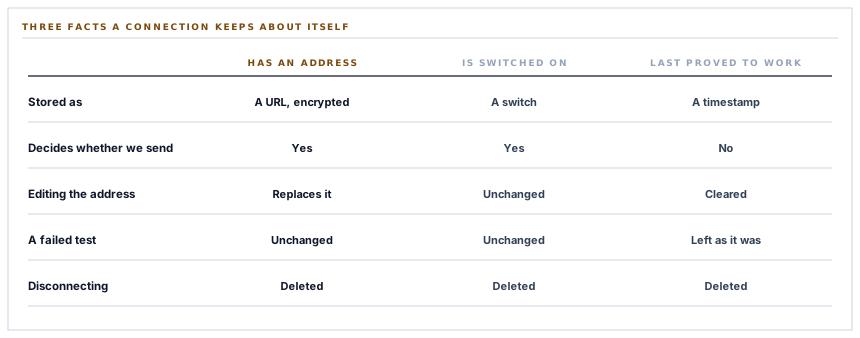
A date answers questions a boolean cannot. Verified tells you somebody once pressed a button. Verified three months ago tells you the scenario on the other end has had a whole quarter to be renamed, rebuilt or deleted since anybody last checked.
And changing the address erases the proof
This is the decision the whole post is here for, and it is one line of code.
When a new webhook address is saved, the verification timestamp is cleared. Not preserved, not left alone — cleared, so the screen goes back to saying this has not been tested.
The reason is that the old timestamp was a fact about the old address. Keeping it after an edit produces a connection that displays a verified state it has never earned, which is worse than displaying nothing, because somebody reading that screen concludes there is nothing to do.
A verification is a fact about a specific address. Edit the address and the fact is about something that is no longer there.
It is a small, cheap invariant with a general form: a stored proof must be invalidated by every change to the thing it was proving. The failure it prevents is entirely invisible — the screen is green, the events are going to the wrong scenario, and nothing anywhere disagrees.
The mirror-image decision is also deliberate: a failed test does not clear an existing timestamp. A failure is not evidence that the address is wrong — the platform could have been briefly unavailable — so the record of a genuine past success survives a bad afternoon.
Verified is a record, not a gate
Worth being precise about, because it would be easy to assume otherwise.
Nothing consults the verification timestamp when deciding whether to send. An unverified connection with an address, switched on, sends. The timestamp exists to be shown to a person.
That is the right way round. Requiring a successful test before sending would mean a workspace whose platform had a bad ten minutes during setup cannot use the connector at all, and it would make a display value into a functional dependency — the kind of coupling that produces a support conversation ending in press the test button again.
So: two of the three facts are gates, and the third is information. Keeping display state and control state apart is unglamorous and it is why the test button is safe to press at any time and safe never to press.
Editing the modules cannot blank the address
A validation detail that prevents a specific and annoying loss.
The address is required when there is no connection yet and optional afterwards. So somebody changing which modules forward — the thing you actually come back to this screen to do — submits the form without re-entering the address, and the address is left exactly as it was.
The obvious alternative, requiring the field on every save, has two bad outcomes: either the form has to show the stored address in a text box, which puts a bearer credential on screen every time anybody opens the page, or the field comes back empty and saving the form wipes the connection. Both are common and both are avoidable by making the field optional once it is set.
The address itself must be secure, and that is enforced rather than suggested — an address that is not one is refused with a message saying so, rather than saved and left to fail at send time.
Disconnecting deletes, rather than switching off
There are two ways to stop a connection and they are both available on purpose.
Switching it off keeps the address and the module selection, so turning it back on restores the arrangement. That is the right operation for a pause.
Disconnecting removes the record entirely. The address goes, the selection goes, and reconnecting means entering a new address. That is the right operation for stop using this, because the stored address is a credential: anybody holding it can post to that scenario, so a disconnected connector should not be quietly keeping one on file.
The address is encrypted at rest for the same reason, and the argument for treating a URL as a secret is made at length in the Slack post in this series rather than repeated here.
Two rights, not one
Seeing a connection and changing it are separate permissions.
One right lets somebody look at the integrations screen and see that an automation connection exists and which modules it forwards. A different right is needed to edit the address, send a test or disconnect.
That split matters more than it looks for this particular connector, because the thing being edited is a destination. Changing the address does not break anything visible — events keep being sent, successfully, to somewhere else. It is the quietest way to redirect a workspace's operational activity, and it is behind its own permission for exactly that reason.
One implementation, two connectors
Both automation platforms in this series run on the same controller, the same service, the same model and the same screen. Only the labels differ.
The platform is bound by the route rather than submitted with the form, which is the detail that makes this safe: it is not a value a caller can supply, so there is no request that can address a platform the system does not have.
And an unrecognised platform is refused with a not-found rather than accepted. That guard exists for a mistake nobody makes at a keyboard and somebody eventually makes in a route definition — a typo in a bound value, producing a connection row for a platform with no screen, no name and no way to reach it. A shared implementation needs its list of valid subjects checked, or the sharing is what lets an invalid one through.
What is in place
What a connection knows about itself
Has an address
Checked before every send, so an incomplete connection is refused locally rather than by attempting a call to nowhere.
Is switched on
A separate fact from having an address, so a connection can be paused without losing its configuration.
Was last proved to work, and when
A timestamp rather than a flag, so the screen can say how long ago rather than merely yes.
A changed address clears the proof
The verification belonged to the previous address, so it is erased rather than carried over onto one nobody has tested.
A failed test preserves an earlier one
A failure is not evidence the address is wrong, so a genuine past success survives a temporary outage.
Verification is not a gate
Sending depends on an address and the switch, never on the timestamp, so a display value cannot become a functional dependency.
The address optional once set
Editing the module selection does not require re-entering it, so the form neither displays a credential nor blanks one on save.
A secure address enforced
An address that is not one is refused with a message rather than stored and left to fail at send time.
Pause and disconnect as different operations
One keeps the configuration for later and the other removes the stored address, because a credential should not sit switched off on file.
The address encrypted at rest
Stored encrypted and hidden from serialisation, on the basis that anybody holding it can post to the scenario.
Viewing and changing as separate rights
Redirecting a workspace's events breaks nothing visible, so editing the destination is behind its own permission.
The platform bound by route, and checked
It is not a value a caller can submit, and an unrecognised one is refused, so a shared implementation cannot mint a connection nobody can manage.
The first three items are the three facts and the next three are what keeps them from being confused with each other. Everything after that follows from one observation: the value being edited on this screen is a credential and a destination at the same time.
Three positions held on purpose
- A stored proof is invalidated by any change to what it proved. Clearing the verification when the address changes is one line, and it is the difference between a screen that reports a fact and a screen that reports a fact about something that is no longer there.
- Display state is not control state. Nothing about sending depends on whether a test has been passed, so pressing the test button is always safe and never pressing it never blocks anybody.
- Disconnect means delete. A paused connection keeps its address because that is what a pause is for; a disconnected one gives it up, because the address is a bearer credential and keeping one on file switched off is a liability with no benefit.
Five questions about a connection status
What does "connected" mean on that screen?
A good answer sounds like
Something specific.
What ours actually is
Three separate facts: an address exists, the switch is on, and when a test last passed.
If I change the address, does it still say verified?
A good answer sounds like
No.
What ours actually is
The timestamp is cleared, because it was a fact about the previous address.
Does a failed test lose my earlier verification?
A good answer sounds like
It should not.
What ours actually is
It does not — a failure is not proof the address is wrong.
Must I test before events will send?
A good answer sounds like
No.
What ours actually is
Sending needs an address and the switch. The timestamp is information for a person.
What does disconnecting actually remove?
A good answer sounds like
The credential.
What ours actually is
The whole record, address included, rather than leaving it stored and switched off.
Our take
The status indicator is the part of an integration screen nobody specifies and everybody reads. It is where three different questions get answered by one colour, and the version of the bug worth caring about is not the screen saying disconnected when it is connected — somebody notices that within a minute. It is the screen saying verified about an address that was edited afterwards, which nobody notices at all, because events are being sent successfully to a scenario that no longer belongs to anybody. One line clears that timestamp. The reason it is worth a section rather than a comment is that the pressure runs the other way: preserving it makes the screen look better, makes the customer feel finished, and makes the claim false.
Ask what the green tick is actually asserting
Address present, switch on, and last proved to work are three facts. A single indicator is answering at most one of them.
Talk through automation connectionsFrequently asked questions
Why did my connection go back to unverified after I updated the webhook URL?
Because the verification was a fact about the previous address. Carrying it over would leave the screen claiming a new address had been proved to work when nothing had ever been sent to it, so the timestamp is cleared and the test is available whenever you want to re-establish it.
A test failed. Have I lost my earlier verification?
No. A failure is not evidence that the address is wrong — the platform may simply have been unavailable — so an existing timestamp is left alone and a failed test reports the reason without changing the record.
Do I have to pass a test before events will be sent?
No. Sending requires an address and the connection being switched on. The verification timestamp is there to tell a person how long ago the path was last proved, and nothing consults it when deciding whether to send.
What is the difference between switching it off and disconnecting?
Switching off keeps the address and the module selection so you can resume later. Disconnecting removes the record entirely, because the webhook address is a credential — anybody holding it can post to your scenario — and one that is no longer in use should not remain on file.
Can anybody who can see the integrations screen change where events go?
No. Viewing the connection and editing it are separate permissions. Changing the destination breaks nothing visible — events keep sending successfully to somewhere else — which is exactly why it needs its own right.
