
Two Producers, One Hook
Two entirely separate parts of the product post to the same webhook, and they obey different rules about when to send. One is filtered by the tick boxes on the settings screen and the other is not, which reads as a bug and is the correct behaviour.
A webhook is usually described as if one thing sends to it. In practice a mature system has several parts that want to tell the outside world something, and if they all reach the same address then the question of what may be sent has to be answered separately by each of them. Here there are three producers on one hook, they answer that question differently, and the difference between two of them is the most likely source of a confused support ticket in the whole connector.
Three things send to your Zap
The first is notifications. Something happens in the business, the system raises a notification, and that notification is offered to every channel the workspace has connected — chat, messaging, push, and the automation platforms.
The second is the workflow engine. A rule somebody built says when a purchase order is approved, send an event to Zapier, and that action fires as part of the rule.
The third is the connection test, which is an ordinary send with different words in it.
All three arrive at the same address, in the same envelope, and each names itself in the event field — so a scenario can tell a notification from a workflow action from a test by reading one value.
The tick boxes only govern one of them
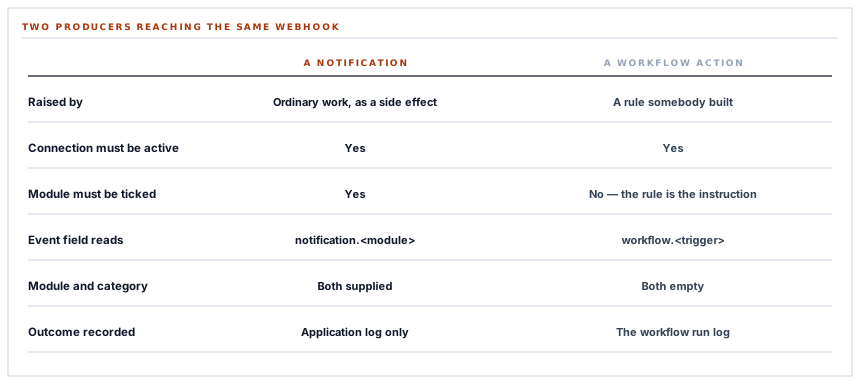
The settings screen offers seven modules to select, and a notification is forwarded only if its module is among them. That is the filter, and it works exactly as it looks.
A workflow action does not consult it. A rule that names this connector fires whether or not the module is ticked, and the only thing checked is that the connection exists and is switched on.
Which is worth stating clearly because the first reaction to it is that something is broken. You untick inventory, events keep arriving, and the screen says inventory is off.
The tick boxes are a subscription. A workflow rule is an instruction. An instruction does not need a subscription.
The reasoning holds up. The module list exists because notifications happen whether you want them forwarded or not — the system raises them as a consequence of ordinary work, so somebody has to choose which ones leave. A workflow action is the opposite: it exists because a person built a rule whose entire purpose is to send this event to this platform. Filtering it through a module subscription would mean a rule that does nothing, silently, with both screens looking correct.
The distinction to keep hold of: one path is a firehose you filter, the other is a pipe somebody laid deliberately. They should not be governed by the same control, and the switch that governs both is the connection's own on and off.
And only one of them tells you what happened
The second asymmetry is about reporting, and it runs the other way.
A workflow action records its outcome. The send returns a result, the workflow run log gets a line, and it distinguishes three states: sent, refused by the platform with the status it gave, or skipped because the connection was absent or switched off. Somebody debugging a rule can see which.
A notification forward does not. It is queued, it sends, and the result is discarded. There is no per-notification record of whether the automation platform accepted it.
That is a defensible position for a courtesy channel — the notification itself is the record and forwarding is a copy — and it is honest to say that the two paths give you different amounts of information about the same operation. A failed workflow send is visible in the run log; a failed notification forward is visible in the application log and nowhere a customer looks.
Making the notification path report per-event outcomes the way the workflow path does is a contained piece of work, and it is the one improvement in this connector that would change how it feels to operate rather than how it behaves.
Why the envelope is built in one place
A structural detail that is easy to miss and is the reason two producers can share a hook safely.
The eight-field payload is assembled inside the sending service, not at either call site. Each producer hands over a title, a body and whatever context it happens to have, and the service fills in every field of the envelope — supplying nothing where a producer supplied nothing.
This matters because one of the two producers actively strips empty values out of what it passes. On its own that would be a payload with missing keys, which is precisely the thing that breaks a scenario built against an earlier sample. Because the envelope is rebuilt centrally, it cannot be: the keys are put back, holding nothing.
That is the general lesson worth carrying to any fan-out. A payload contract enforced at the call sites is a contract enforced N times, and the copy that gets it wrong is the one added last by somebody who did not know there was a contract. Build the envelope once, downstream of everybody.
One consequence to know when writing a scenario: a workflow event supplies no module and no category, so those two fields arrive empty on that path. The keys are there, as always — filter on the event field rather than on the module if your scenario handles both kinds.
Nine channels, each isolated
The notification path is worth one more paragraph, because the automation platforms are the ninth of nine channels a single notification is offered to.
Each of those nine is invoked inside its own guard. A failure in any one is logged and stepped over, and the remaining eight are still offered the notification.
The failure this prevents is the sort that only appears under load and is miserable to diagnose: one platform having a bad afternoon, and the symptom being that chat messages stopped arriving. Or worse — a channel throwing during the creation of a notification and taking the operation that raised it down with it, so an automation outage becomes a workspace unable to approve purchase orders.
The rule is simple and worth applying anywhere a record has side effects: a copy of an event must not be able to fail the event.
What is in place
How three producers share one webhook
One envelope, built centrally
Every producer hands over content and the sending service assembles all eight fields, so no call site can emit a payload of a different shape.
Producers named in the event field
A notification, a workflow action and a connection test each identify themselves, so one scenario can handle all three and filter on one value.
The module filter on the notification path
Notifications happen as a side effect of ordinary work, so which ones leave the building is a subscription the workspace controls.
No module filter on the workflow path
A rule that names this connector is itself the instruction to send, so it is governed by the connection being active rather than by a subscription.
Workflow sends recorded per run
The workflow log distinguishes sent, refused with the platform's status, and skipped because the connection was absent or off.
A missing workspace refused on the workflow path
An action that cannot determine whose connection to use fails rather than guessing, and says so in the run log.
An explicit workspace filter on both lookups
Neither path relies on ambient context, because both can run without a signed-in user behind them.
The connection re-read at send time
The notification job re-reads the connection inside the job, so one switched off between the event and the send does not fire.
Nine channels, nine guards
Each forward from a notification is isolated, so a failing platform cannot stop the other eight or fail the operation that raised it.
Both automation platforms independent
The connection is keyed on the workspace and the platform together, so a workspace can run both with different selections and neither affects the other.
A test that travels the real path
The connection test is an ordinary send, so a passing test exercises the same envelope, the same timeout and the same success rule as an event.
One bounded wait for everybody
Twelve seconds per send, wherever the send came from, so no producer can hold a request or a queue worker open.
Items three and four are the asymmetry this post is about, and items five and nine are the reason it is safe. The one thing on this list still worth building is the notification path reporting its own outcomes the way the workflow path already does.
Three positions held on purpose
- A workflow action is not filtered by the module subscription. A rule whose whole purpose is to send an event to this platform should not be silently cancelled by a tick box on a different screen, which would produce a rule that appears to run and does nothing.
- The envelope is assembled downstream of every producer. A payload contract enforced at each call site is enforced repeatedly and correctly until somebody adds a caller who did not know about it, and one of the two callers here already strips empty values.
- A copy of an event must not be able to fail the event. Nine channels, nine independent guards, because an automation platform having a bad afternoon must not become a workspace that cannot approve a purchase order.
Five questions about a shared outbound webhook
What can send to this webhook?
A good answer sounds like
A list.
What ours actually is
Notifications, workflow actions and the connection test, each naming itself in the event field.
Do the module tick boxes filter everything?
A good answer sounds like
They should say which.
What ours actually is
Notifications only. A workflow action fires on the connection being active.
Can I see whether a send succeeded?
A good answer sounds like
For some paths.
What ours actually is
Workflow sends are recorded per run; notification forwards are not, and that is the honest gap.
Do all producers send the same shape?
A good answer sounds like
Yes.
What ours actually is
The envelope is built in the sending service, so no caller can emit a different one.
If the platform is down, what breaks?
A good answer sounds like
Nothing else.
What ours actually is
Each channel is isolated, so the other eight continue and the underlying operation is unaffected.
Our take
The interesting question about an outbound webhook is not what it sends but how many things send to it, because the moment there are two the rules stop being a property of the connector and become a property of each caller. Here one caller is filtered by a subscription and the other is not, and that will read as an inconsistency to anybody who finds it from the settings screen rather than from the code. It is the right asymmetry: a notification is something the system decided to say and a workflow action is something a person decided to say, and treating those as the same kind of traffic would mean either a firehose nobody asked for or a rule that quietly does nothing. What the two paths genuinely should share, and do not yet, is telling you whether the send worked.
Ask how many things send to that webhook
The answer is rarely one, and each of them has its own rule about when to send. Those rules are where the surprises live.
Talk through automation eventsFrequently asked questions
I unticked a module but events still arrive at my Zap. Why?
The module tick boxes filter notifications. A workflow rule that names Zapier as an action is an instruction rather than a subscription, so it fires whenever the rule fires and the connection is active. Switching the connection off, or removing the action from the rule, stops it.
How do I tell a notification event from a workflow event in my Zap?
Read the event field. Notifications arrive as a notification event named after their module, workflow actions as a workflow event named after the rule's trigger, and the connection test names itself. Filtering on that field is the intended way to handle several kinds in one Zap.
Why are the module and category fields empty on some events?
A workflow event supplies neither, so both arrive empty. The keys are always present — every event carries the same eight fields — so filter on the event field rather than the module if your Zap handles both kinds.
Can I see whether a send reached Zapier?
For workflow actions, yes: the workflow run records sent, refused with the status Zapier returned, or skipped because the connection was missing or inactive. Notification forwards are not recorded per event today, which is the one gap worth closing here.
If Zapier is unavailable, does anything else stop working?
No. A notification is offered to each connected channel inside its own guard, so a failure is logged and stepped over — the other channels still receive it, and the operation that raised the notification is unaffected.
