
The Same Eight Keys Every Time
An automation platform learns what a payload looks like from one sample and then builds every mapping against it. Which makes a field that is sometimes absent worse than a field that is always empty, and turns a small decision into the whole contract.
Automation platforms work by example. You send them one event, they show you its fields, you drag those fields into the next step, and from then on your scenario is built against the shape of that first sample. It is a genuinely good way to let somebody wire two systems together without writing code, and it has a consequence that almost nobody sending the events thinks about: the shape is now a contract, and the person on the other end has no way to know when it changes.
What a scenario is actually built on
When you set up a scenario, the platform captures an event and lists what was in it. You pick the fields you want — a title here, a link there — and each pick becomes a reference to a named path in the payload.
That reference is resolved against every event that arrives afterwards. If the path is there, it has a value. If the path is missing, the step receives nothing, and depending on the platform and the step, that is either an empty string or an error.
So the risky thing to send is not a field with no value in it. It is a field that is sometimes there and sometimes not.
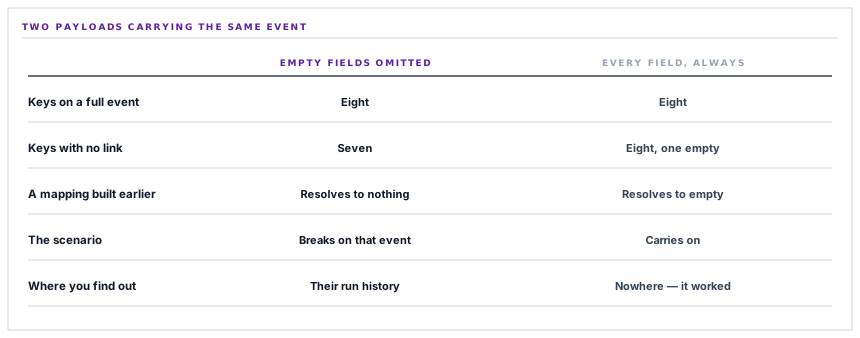
So every event carries all eight keys
The payload is eight fields and it is always eight fields: what sent it, what kind of event it is, a title, a message, the business module, the category, a link and the workspace.
Four of those are frequently empty. An operations notification with no obvious destination has no link. A generic event has no module. Those keys are still sent, holding nothing, which is one line of code and the difference between a scenario that keeps working and one that breaks on a Tuesday for reasons nobody can reconstruct.
The alternative — dropping keys with no value, which is what most JSON-building code naturally does, and what a filter for empty values does deliberately — is tidier on the wire and worse in every way that matters. A scenario built on an event that happened to have a link keeps that mapping, and the first event without one takes a step that has been working for months and hands it nothing.
A field that is always empty is a fact about your data. A field that is sometimes missing is a fact about your JSON, and only one of those belongs in a contract.
And no nesting at all
The second decision is that the payload is flat. Eight keys at the top level, no objects inside objects, no arrays.
This is not because nesting is hard to build — it is easier, if anything, since the data arrives grouped. It is because of who reads it. Somebody mapping fields in a visual builder is choosing from a list, and a flat payload produces a list of eight items. A nested one produces a tree to be expanded, and paths that are longer to type and easier to get wrong.
The rule worth taking from this: a payload for a person to map should be shaped for the mapping screen, not for the data model. The same information nested three deep is correct, complete and more annoying to use, and there is no prize for the version that is more faithful to how we store things.
The event name is a namespace, so one hook can carry everything
One of the eight fields deserves its own section because it decides how many connections a workspace needs.
Every forwarded notification carries an event name built as a prefix and the module it came from — procurement events, sales events, inventory events, each distinguishable by a single field.
Which means one webhook can receive everything and the scenario filters on that field, rather than the workspace maintaining a separate connection per kind of event. One connection, one shape, one filter step, and adding a module to the selection changes what arrives without touching the scenario's wiring.
The connection test uses the same field to say what it is, so a test event is distinguishable from a real one by looking at it — which matters when somebody is building a scenario and does not want their test firing the step that raises a purchase order.
The message is flattened before it leaves
A small detail with a specific reason behind it.
Notifications are stored with markup in them — a link to the record, mostly, added by whatever raised the notification. That is right for the bell menu in the browser, which renders it.
It is wrong for an automation platform, which is not a browser. A message forwarded with markup in it ends up in a spreadsheet cell, an SMS or a chat message with tags printed as text.
So the forwarded message is reduced to plain text, and the link that was inside it travels in the field that exists for links. Each piece of information goes in the field for that kind of information, which is the same principle as the flat payload seen from a different angle.
What a success means
Worth being precise about, because this is where fire-and-forget integrations tend to overclaim.
The send is one request with a twelve-second ceiling. A response in the two-hundreds is a success. Anything else — including a redirect, which a catch-hook has no business returning — is a failure carrying the status number, because a catch-hook's response body is not a documented error format and quoting it would be quoting noise.
And a success means the platform accepted the event. Not that the scenario ran, not that the step after it worked, not that the row reached the spreadsheet. The platform's own run history is where that lives, and no amount of care on this side can report on it.
What is in place
What arrives at the hook
Eight fields on every event
The same keys arrive whatever the event is, so a mapping built once resolves on every event afterwards.
Empty fields sent as empty
A key with no value is present and null rather than omitted, which is what stops a scenario breaking on the first event that lacks a link.
A flat structure
No nesting anywhere, so the field list in a visual builder is eight items rather than a tree to expand.
A namespaced event name
Every event says which module it came from in a single field, so one connection can carry all of them and the scenario filters.
A distinguishable test event
The connection test names itself in the same field, so it can be filtered out of a scenario that is still being built.
The test travelling the real path
A test is an ordinary send with different content, so a passing test exercises the same code an event will.
The message reduced to plain text
Markup stored for the browser is flattened before forwarding, so nothing downstream prints tags as characters.
The link in the link field
A record's address travels in its own field rather than inside the message, so a step can use it as a link.
The workspace named in the payload
Events carry their workspace, so a scenario shared across environments can tell them apart.
A refusal before the request
An unconfigured connection is refused locally rather than by attempting a call to nothing.
A bounded wait
Twelve seconds per send, so an unresponsive platform costs a known amount of time.
Success reported as acceptance
A two-hundred means the platform took the event, and that is the only claim made — what the scenario did is in the platform's own history.
The first three items are the contract and the rest are consequences of taking it seriously. None of them is difficult; the reason they are worth listing is that the natural way to build a JSON payload violates the second one, silently, on the events that happen to be missing something.
Three positions held on purpose
- The payload shape is a published contract, so it does not vary by event. Every field is present on every event, which costs a few bytes and means a mapping somebody built in a visual editor six months ago still resolves.
- It is shaped for the mapping screen. A flat list of eight fields is easier to wire than a faithful nested representation of how we store notifications, and the person doing the wiring is the one to optimise for.
- Success means accepted, and nothing more. Reporting a send as delivered when the platform has merely taken the event would be a claim about somebody else's scenario, which we are not in a position to make.
Five questions about an outbound event payload
Do all events have the same fields?
A good answer sounds like
Yes.
What ours actually is
Eight fields, always all eight, empty ones included.
Is it nested?
A good answer sounds like
Ideally not.
What ours actually is
Flat, so a visual builder shows eight items rather than a tree.
How do I tell one kind of event from another?
A good answer sounds like
A field for it.
What ours actually is
A namespaced event name, so one hook carries every module and the scenario filters.
Will the message contain HTML?
A good answer sounds like
No.
What ours actually is
Flattened to plain text before it leaves; the link travels in its own field.
Does a success mean my scenario ran?
A good answer sounds like
No.
What ours actually is
It means the platform accepted the event. What the scenario did is in its own run history.
Our take
The one line of code worth talking about in this connector is the one that sends a field with nothing in it. Omitting empty values is what every JSON encoder does by default, what every code review nudges you towards, and what makes the payload look cleaner in a log. It is also the thing that breaks a customer's scenario weeks after anybody touched either system, on whichever event happens to be the first one without a link in it — and the failure lands in a platform we do not operate, in a run somebody else has to go and look at. Sending eight keys every time costs nothing and turns the payload from something we happen to produce into something that can be relied on. That is a very cheap way to be dependable.
Ask whether every event has the same fields
It is the difference between an automation you build once and one you repair whenever an unusual event goes through it.
Talk through automation eventsFrequently asked questions
What arrives at my Make scenario when something happens?
A flat JSON object with eight fields: what sent it, the event name, a title, a plain-text message, the business module, the category, a link to the record and the workspace. Every event carries all eight, whether or not each one has a value.
Why are some fields empty rather than left out?
Because Make and Zapier build their field mappings from a sample event. A field that disappears on some events breaks any step that was mapped to it, so a key with no value is sent as empty instead of omitted.
Do I need a separate connection for each kind of event?
No. Every event names its module in the event field, so one webhook can receive all of them and the scenario filters on that field. Adding a module to the selection changes what arrives without rewiring anything.
Can I tell a test event apart from a real one?
Yes — the connection test names itself in the same event field, so a scenario under construction can filter it out and avoid firing real steps while you are wiring it up.
If the send succeeds, did my scenario run?
It means Make accepted the event. What happened after that is in Make's own run history, and no integration on our side can report on a scenario we do not operate.
