
Which Module a Message Belongs To
You choose which parts of the business forward events to your scenario, which means something has to decide which part of the business each event came from. Where that notification carries a tag, it is a fact. Where it does not, it is a keyword search over the sentence.
Choosing which events reach an automation sounds like a filter and it is really a classification problem. A workspace ticks procurement and sales and leaves the rest off, and now every notification the system produces has to be assigned to one of seven buckets before anybody can tell whether it should be forwarded. Most of them are assigned by a tag put there deliberately. The rest are assigned by looking for words in the message, and the interesting part of this connector is the boundary between those two.
Nothing forwards until you say so
Start with the default, because it is the opposite of what most integrations do.
A connection with a valid webhook, switched on, tested and working, forwards nothing at all until at least one module is selected. An empty selection is read as no events, not as all events.
That is worth pausing on, because the sibling credential in this series takes the opposite view: an inbound key with no scopes attached is treated as unrestricted. Both are correct, and the difference is what the empty list is a list of. A list of permissions that is empty describes a key with no restrictions. A list of subscriptions that is empty describes somebody who has not subscribed to anything.
The practical effect is that a new connection is quiet until somebody makes a decision, which is the right way round for a feature that sends your operational activity to a third party.
Where the module comes from
Every notification is asked which module it belongs to, and there are two ways it can answer.
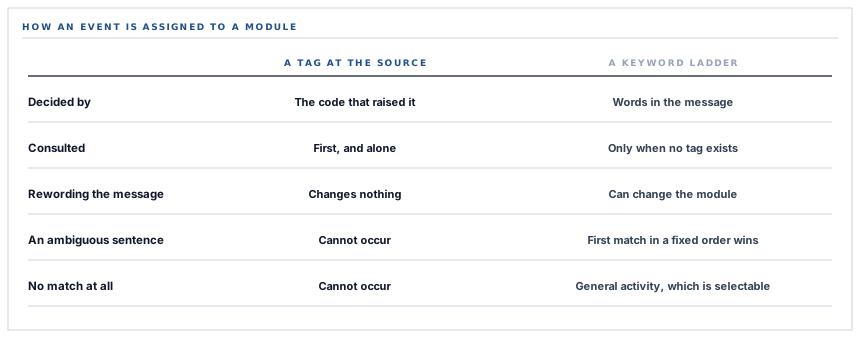
The good way is a tag. A notification raised by the purchasing screens says it is procurement, in a column, put there by the code that raised it. That answer is authoritative, it is checked first, and nothing else is consulted.
The other way is inference. An untagged notification is classified by searching its own text — its message, the screen it points at, its type — for words associated with each module, taking the first module that matches.
What a keyword ladder actually does
The inference is a list of tests in a fixed order, and first match wins. That ordering is the classification rule, and it is worth understanding rather than trusting.
Asset words are checked first. Then invoice and payment words, which route to sales. Then the purchasing vocabulary. Then stock words. Then supplier words. Then the administrative ones — roles, users, devices, logins, billing. Anything that matches none of them is operations.
Read that order with a real sentence in mind and the overlaps appear immediately. A message about a payment to a supplier contains a payment word, and the payment test is reached before the purchasing one, so it classifies as sales. A message mentioning an item routes to inventory whatever else it is about. A message mentioning a user reaches the administrative bucket if nothing above it matched.
A keyword ladder is not a wrong design. It is a design whose accuracy is a property of the wording, which means it changes when somebody improves a sentence.
None of those are bugs in the ladder — they are what a ladder is. The point is that the routing of an untagged event depends on how its message happens to be phrased, so rewording a notification for clarity can change which scenario it reaches, in a system nobody deployed a change to.
Which is why the tag exists, and why it wins
The canonical tag is the fix, and it is already the first thing checked on every notification, on every channel — the automation connectors, chat, messaging, all of them read the same answer.
That single ordering decision is what makes the tagging work worth doing incrementally. Each notification that gains a tag stops being classified by its prose, immediately, everywhere, without any change to the connectors. The ladder stays underneath as the answer for everything not yet tagged, rather than as a competing opinion.
It is the same shape as a good migration anywhere: the new mechanism is consulted first, the old one is the fallback, and progress is measured by how rarely the fallback is reached. Tagging the remaining notification sources is ordinary work rather than a redesign, and it is the single change that makes routing exact.
The fallback that is a real destination
One detail of the ladder deserves calling out because it prevents a much worse outcome.
An event that matches nothing does not end up unclassified, and it is not discarded. It is assigned to operations, which is a module a workspace can select, described on the settings screen as general activity.
So an unrecognised event is reachable. A workspace that wants everything ticks operations along with the rest and receives the ones the ladder could not place. A workspace that ticks only procurement does not receive them, which is also correct — they asked for purchasing events and this is not identifiably one.
The version to avoid is a fallback that is not selectable, where unclassified events are silently unreachable no matter what anybody ticks. That failure is invisible from the settings screen, because the screen shows seven modules all behaving correctly.
The gate is checked twice, on purpose
Forwarding happens on a queue, which introduces a gap between deciding to send and sending.
The check runs at both ends. Once when the notification is created, to decide whether to queue anything at all — which is what keeps a workspace with no connections from filling a queue with work that will do nothing. And again inside the job, where the connection is re-read from the database and re-tested.
That second check is the one that matters for anybody who has just disconnected something. A connection removed between the notification and the send does not fire, because the job asks again rather than trusting what it was told when it was created.
The cost is one query per forwarded event, and the alternative is a queue that keeps delivering to a webhook somebody switched off ten minutes ago — which is exactly the moment when somebody is watching, and exactly the behaviour that reads as the off switch not working.
And a forward cannot break what caused it
Every channel that forwards a notification is invoked inside its own guard, and a failure is logged and stepped over.
So an automation platform being down cannot fail the purchase order that raised the notification, and cannot stop the same notification reaching the other channels a workspace has connected. The in-app notification is the record; forwarding is a courtesy on top of it, and it is arranged so that it behaves like one.
There is a per-request cache in front of the configuration lookup for the same reason: an operation that creates twenty notifications should not run twenty identical queries to discover the same two connections.
What is in place
How an event finds its scenario
Seven selectable modules
Procurement, sales, inventory, assets, suppliers, operations and system, each a tick box on the connection.
An empty selection forwards nothing
A working, tested, active connection stays quiet until somebody selects a module, so the default is silence rather than everything.
A canonical tag consulted first
Where a notification names its own module, that answer is used and nothing else is examined — on this connector and on every other channel.
A keyword ladder as the fallback
An untagged notification is classified from its message, screen and type by a fixed ordered set of tests, first match winning.
A fallback that is selectable
An event matching no test is assigned to operations, which is a real module a workspace can tick, so nothing becomes unreachable.
One answer shared by every channel
Chat, messaging and automation all read the same module decision, so an event cannot route one way here and another way there.
The gate checked before queueing
A workspace with no matching connection queues no work, rather than filling a queue with jobs that will decline.
And re-checked inside the job
The connection is re-read and re-tested at send time, so one disconnected in the meantime does not fire.
An explicit workspace filter in the job
A queue worker has no signed-in user, so the lookup names its workspace rather than relying on ambient context.
Each forward isolated
A failing channel is logged and stepped over, so it cannot fail the operation that raised the notification or block the other channels.
A per-request configuration cache
One lookup per workspace per request serves every notification it creates, instead of one query each.
One connection per platform per workspace
The webhook is keyed on the workspace and the platform together, so the two automation connectors are independent and neither can overwrite the other.
The third and fourth items are the same question answered two ways, and the ordering between them is the most useful thing in this list: a tag is consulted first, so each notification that gains one stops being classified by its wording without any connector changing.
Three positions held on purpose
- An empty selection means nothing, not everything. Forwarding operational activity to a third party is a decision somebody should have made deliberately, so a connection that has been set up but not configured stays silent.
- The tag beats the guess, everywhere, by construction. Rather than improving the keyword ladder, the authoritative answer is checked first — which makes tagging a source a change that improves routing on every channel at once and needs no connector edit.
- An unclassifiable event goes somewhere you can tick. Assigning it to a selectable module keeps it reachable for a workspace that wants everything, where a hidden fallback bucket would make it silently undeliverable with a settings screen that looks correct.
Five questions about event routing
What happens if I select no modules?
A good answer sounds like
Nothing is sent.
What ours actually is
Exactly that — an empty selection is no subscription rather than a full one.
How do you know which module an event belongs to?
A good answer sounds like
It should be recorded, not guessed.
What ours actually is
A tag where the notification carries one; a keyword ladder over its own text where it does not.
Can rewording a notification change where it goes?
A good answer sounds like
Not for tagged ones.
What ours actually is
Correct — a tag is immune, and an untagged event is classified from its wording.
What happens to an event you cannot classify?
A good answer sounds like
It stays reachable.
What ours actually is
It becomes a general-activity event, which is a module you can tick.
If I disconnect, can a queued event still fire?
A good answer sounds like
No.
What ours actually is
The connection is re-read and re-checked inside the job, not trusted from when it was queued.
Our take
Every system that lets you subscribe to some of its events has to classify them, and the classification is almost always less certain than the settings screen implies. Seven tick boxes look like seven categories with clean edges. Underneath, a tagged event knows what it is and an untagged one is being matched against a word list in a fixed order, where a message about paying a supplier can reasonably land in sales rather than purchasing. The right response to that is not to keep tuning the word list — it is to make the authoritative answer win wherever it exists, so that every source that gains a tag stops being guessed at, on every channel, with no connector changes. That is the arrangement here, and the honest measure of the routing is how often the fallback is still being reached.
Ask how an event is classified, not just which events you can pick
Seven tick boxes are easy. Knowing which of them a given message will land in is the question worth asking.
Talk through automation eventsFrequently asked questions
I connected Make and nothing arrives. What is wrong?
Most likely no modules are selected. An empty selection means no events rather than all events, so a connection can be valid, active and tested and still forward nothing until you tick at least one module.
How is an event assigned to a module?
Where the notification carries a module tag, that tag is used and nothing else is consulted. Where it does not, the module is inferred from words in its message, the screen it points at and its type, taking the first match from a fixed ordered set of tests.
Could an event reach the wrong scenario?
For an untagged notification, yes — the inference depends on wording, so a message about paying a supplier can classify as sales rather than procurement. A tagged notification is immune, and tagging a source improves routing on every channel at once.
What happens to an event that matches none of the modules?
It becomes a general-activity event, which is one of the seven modules you can select. That keeps it reachable for a workspace that wants everything, rather than putting it in a bucket nobody can subscribe to.
If I disconnect the webhook, can an already-queued event still fire?
No. The connection is read again from the database inside the sending job and re-tested before anything leaves, so one removed between the event and the send does not deliver.
