
The Same Button for Two Kinds of Account
One Microsoft sign-in button serves a corporate directory account and a personal outlook.com account, and the profile it hands back is the same shape for both. That decision is deliberate, and knowing which way it went tells you what the button can and cannot enforce.
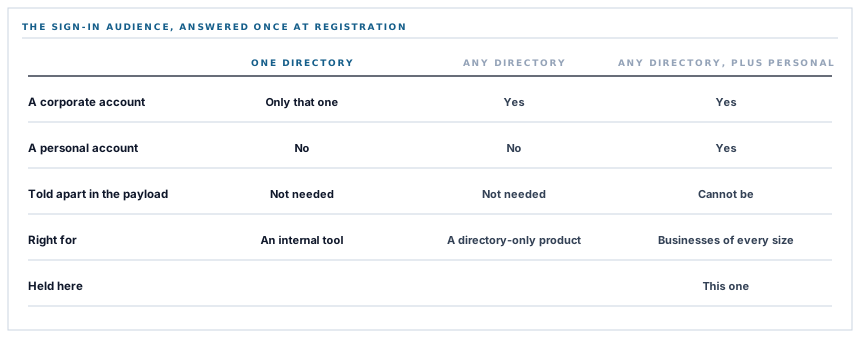
Registering an application with Microsoft asks a question early that most people answer without noticing: who is allowed to sign in with this? A single organisation, any organisation, or any organisation plus personal Microsoft accounts. It is a dropdown, it has a sensible-looking default, and it quietly determines what your sign-in button means for the rest of the product's life. This one accepts the widest of the three, on purpose, and the consequences run further than the sign-in screen.
Why the widest audience
The narrow answer — one organisation only — is right for an internal tool. Everybody who signs in works at the company that built it, and the button can be restricted to that company's directory.
This is not that. The people signing up are businesses of every size, and a large share of them are one or two people with an ordinary Microsoft address rather than a corporate directory. A button restricted to work accounts would refuse them at the door with an error explaining that their account is the wrong kind of account.
So the registration permits both, and the sign-in button says Microsoft rather than the name of any particular directory product. The cost is that it cannot distinguish them afterwards — which is the previous post's subject, and the reason the verification rule there had to be justified at the strength of the weaker account type.
Which directory the button trusts is a deployment decision
Worth being direct about, because it is the question a security team asks second.
The Microsoft credentials — the application, its secret, and optionally a specific directory to authenticate against — are configuration for the whole deployment. One set, held by whoever runs the platform.
There is therefore no setting on a workspace that says only accept Microsoft sign-ins from our own directory. The position we hold is that the boundary belongs where it can actually be enforced: the account has to exist here first, and it is matched by address. A sign-in from any Microsoft account whose address is not already a user in your workspace does not get in, whichever directory it came from.
That is a different guarantee from a directory restriction and it is a real one. A directory restriction answers which identity providers may vouch for a person. Matching an existing account answers which people may enter, which is the question a workspace administrator is usually actually asking. An organisation that needs the first as well is asking for a per-workspace directory pin, and that is a self-contained piece of configuration rather than a rework — a sentence worth having in a procurement conversation rather than discovering afterwards.
Signing in never creates an account
The most important property of the whole flow, and the one that makes the audience decision safe.
A completed Microsoft handshake hands back a verified address. That address is looked up. If there is no user with it, nobody is signed in and nobody is created — the attempt is recorded as a failed authentication and refused.
There is exactly one exception, and it is not an exception to the rule so much as a different journey: somebody who started on the registration screen. The verified identity is carried into the signup form, which still asks for the details a provider cannot supply. Even then nothing is created until that form is submitted.
A wide sign-in audience is only dangerous in a product where signing in can provision. Here it cannot.
The distinction between those two journeys is a session marker rather than a second callback address, and the reason is worth noting: callback URLs are registered by hand in each provider's console, so a separate signup callback would mean another console entry per provider to keep in step. One address, two intentions, and the marker is deliberately cleared at the start of a sign-in so an abandoned signup attempt cannot divert it.
A handshake that comes back with no address at all is refused with a message naming the provider, rather than falling through to any other matching rule. Address is the only thing matched on.
Two callbacks, and the path is not configurable
There are two genuinely different flows and they do have separate addresses: signing in, and linking Microsoft to an account you are already signed into.
Linking is guarded differently — you must already be signed in, and a provider already linked to your account is refused with an instruction to unlink first. Several different providers per account are supported; two of the same one are not.
And there is a small piece of defensive plumbing around those two addresses that is worth copying. The configured value in the environment is used for its scheme, host and port only. The path always comes from the code, chosen by which flow is running.
That means a stale environment value left over from a rename, or one pointing at the sign-in callback when the link flow is running, cannot send the handshake to the wrong place — it can only send it to the wrong host, which fails loudly. And a configured value that does not parse as a URL at all is discarded in favour of the application's own route.
The failure that prevents is a good one to have never had: a linking handshake arriving at the sign-in callback, which would find a verified address, match it to a user, and sign somebody in when they had asked to attach an account.
A button that cannot dead-end, and an error that carries the fix
Two last details, both about the state where the platform has not been given Microsoft credentials.
The sign-in screen builds its buttons from the providers whose credentials are actually present. A provider with no credentials is simply absent — never rendered and then failing when somebody clicks it, which is the ordinary version of this and produces a support ticket that begins the Microsoft button does nothing.
And if the redirect is reached anyway, the refusal names the provider and appends its setup instructions with the exact callback address interpolated into them. Not configure your redirect URI but the actual string to paste into the Azure app registration, computed from the running application's own routes.
That last point is a small thing that keeps being the difference between a ten-minute setup and an afternoon. An error that names the fix is worth more than an error that names the cause, and a redirect URI mismatch is the single most common way a Microsoft app registration is wrong.
What is in place
Who the Microsoft button lets in
Both account types accepted
The app registration permits corporate directory accounts and personal Microsoft accounts, because a large share of workspaces sign up with an ordinary address.
One button, honestly labelled
The button says Microsoft and its description names both account types, rather than implying a directory-only sign-in.
The account must already exist
A verified address is matched against existing users, and a sign-in that matches nobody is refused and recorded as a failed authentication.
Address as the only matching key
A handshake returning no address is refused outright rather than falling through to any other rule.
Signup as a separate journey
A visitor who started on the registration screen carries their verified identity into the form, and nothing is created until that form is submitted.
A signup marker cleared before a sign-in
An abandoned registration attempt cannot divert a later sign-in, because the marker is cleared at the start of one.
One console entry per provider
Signup reuses the sign-in callback and is distinguished by a session marker, so each provider needs one registered address rather than two.
Linking guarded separately
Attaching Microsoft to an existing account requires being signed in, and the same provider twice is refused with an instruction to unlink.
Several providers per account
A user can hold more than one linked provider, so choosing Microsoft does not exclude the others.
The callback path owned by the code
Configuration supplies the host and the application supplies the path, so a stale value cannot route a linking handshake into the sign-in callback.
An unparseable redirect discarded
A configured value that is not a URL falls back to the application's own route rather than being used as given.
No button without credentials
The sign-in screen renders only configured providers, so a button that would fail on click is never shown.
A refusal that names the exact fix
An unconfigured provider answers with its setup steps and the precise callback address to register, computed from the running application.
Button wording fixed rather than composed
The sign-in and sign-up labels are written out, because the permitted strings are a branding requirement and a generated one drifts out of the set.
The third item is what makes the first one safe, and it is the answer to the question a wide sign-in audience raises. The tenth is the quiet one: two flows sharing a configured host but never a configured path is what stops a linking handshake being resolved as a sign-in.
Three positions held on purpose
- The sign-in audience is wide and the account boundary is narrow. Refusing personal Microsoft accounts would turn away a large share of the businesses this product is for; requiring the address to be an existing user is the boundary that actually decides who may enter, and it holds whichever directory the person came from.
- Single sign-on authenticates and never provisions. A provider handshake that matches no account is a refused sign-in recorded as a failed authentication, which is what makes accepting a wide range of identity sources a reasonable thing to do.
- Configuration supplies the host, the code supplies the path. An environment value is allowed to say where the application lives and never which callback is running, because a linking handshake arriving at the sign-in callback would sign somebody in when they had asked to attach an account.
Five questions about a Microsoft sign-in button
Which Microsoft accounts can use it?
A good answer sounds like
They should know.
What ours actually is
Corporate directory accounts and personal ones, deliberately, because both kinds of business sign up.
Can we restrict it to our own directory?
A good answer sounds like
A straight answer.
What ours actually is
Not from a workspace setting today; the credentials are platform-wide. A per-workspace directory pin is contained configuration rather than a rework.
Does signing in create an account?
A good answer sounds like
No.
What ours actually is
The address must already be a user here, and a sign-in matching nobody is refused and logged as a failed authentication.
What if the provider returns no email?
A good answer sounds like
Refused.
What ours actually is
Refused with a message naming the provider; the address is the only thing matched on.
What happens if the redirect URI is wrong?
A good answer sounds like
A clear error.
What ours actually is
The refusal prints the exact address to register, computed from the running application.
Our take
The sign-in audience is a dropdown answered once, in a console, months before anybody asks a security question about it, and it is one of the few decisions in an integration that cannot be revisited quietly. Choosing the widest option looks like the careless answer and here it is the correct one, because the alternative refuses a large share of the businesses this product exists for on the grounds that their email address is the wrong sort. What makes it safe is not anything about the button: it is that a verified identity buys entry to an account that already exists and nothing else. That is the property to check in any product offering you social sign-in. Not which providers it accepts — what a successful handshake is allowed to create.
Ask what a successful sign-in is allowed to create
Which providers a product accepts matters much less than whether a verified address can bring a new account into existence.
Talk through single sign-onFrequently asked questions
Can people sign in with a personal Microsoft account rather than our work account?
Yes — the app registration accepts both, deliberately, because many workspaces sign up with an ordinary Microsoft address rather than a corporate directory. What decides who actually gets in is that the address must already be a user in your workspace.
Can we restrict Microsoft sign-in to our own Entra directory?
Not from a workspace setting today — the Microsoft credentials are configured once for the whole platform. The boundary that does apply is that a sign-in only succeeds for an address that is already a user here. A per-workspace directory pin is contained configuration rather than a rework, and it is worth raising before a rollout if your policy requires it.
Does signing in with Microsoft create a user automatically?
No. The verified address is matched against existing users and a sign-in that matches nobody is refused and recorded as a failed authentication. The only path that leads to an account is starting from the registration screen, and even then the form has to be submitted.
Can one person link both Google and Microsoft?
Yes. Several different providers can be linked to one account; linking the same provider twice is refused with an instruction to unlink the existing one first.
The Microsoft button is missing from our sign-in screen. Why?
The screen renders only providers whose credentials are configured in that environment, so a button that would fail when clicked is never shown. If the redirect is reached directly, the error names the setup steps and the exact callback address to register.
