
The Folder It Can See
Connecting Google Drive to a business system usually means handing over the whole Drive. This one asks for a scope that can only see files it created itself — which changes what the connection is worth if it is ever abused, and changes what you can promise an auditor.
There is a question people ask about storage connectors that nobody answers straight, because the straight answer is usually embarrassing. If I connect my Google Drive to your product, what can your product read? Not what will it read. What can it. The honest answer for most integrations is everything, and the reason is that asking for everything is one line shorter to write.
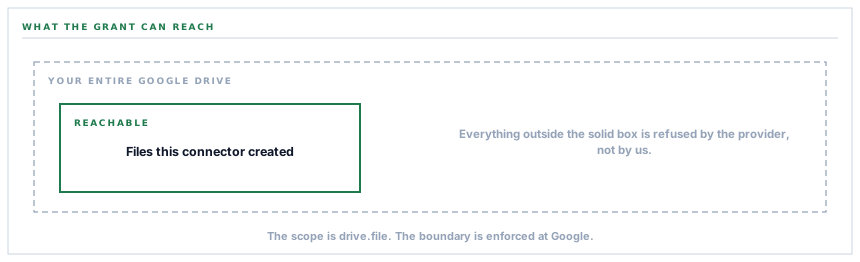
The scope is drive.file, and that word file is doing the work
Google publishes several Drive scopes. The broad one grants an application the run of your Drive: every document, every folder, every file anybody ever shared with you. The narrow one is called drive.file, and it grants access to exactly one category of thing — files the application itself created.
This connector asks for drive.file, plus the two identity scopes that let it display which account is connected. That is the whole grant. There is no read scope on the request, and none is quietly added later, because a scope is fixed at the moment of consent.
What that buys you is a hard boundary rather than a promise. Your board pack, your payroll spreadsheet, the folder your co-founder shared with you in 2019 — the connector does not decline to read them out of good manners. It asks Google for them and Google says no.
A restraint enforced by the other party is worth more than a restraint enforced by us, because it survives our mistakes.
What the connector does inside the space it can see
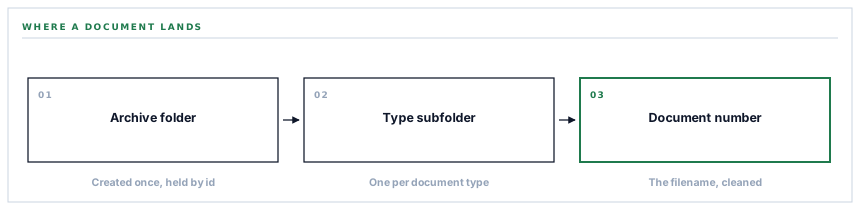
On connection it creates a single folder in your Drive — by default named after the product — and stores its id. Everything the connector ever writes goes inside that folder, in a subfolder named after the kind of document.
| Document type | Subfolder it lands in | What the file actually is |
|---|---|---|
| Sales invoices | Invoices | The issued invoice PDF, rendered fresh at archive time |
| Purchase orders | Purchase Orders | The approved order PDF, rendered fresh at archive time |
| Payment receipts | Receipts | The point-of-sale receipt, on a narrow roll-width page |
| Exported reports | Reports | The stored export — PDF, spreadsheet or CSV as generated |
| Vendor documents | Vendor Docs | The file a supplier uploaded during prequalification |
The subfolder names are derived from the type key rather than configured, which is why they read the way they do. The connector looks for a folder of that name inside your archive folder, and creates one if there is not one, and remembers the answer for the rest of the run so a batch of four hundred invoices does not ask Google the same question four hundred times.
The folder you can move, rename, or throw away
Because the archive folder lives in your Drive, it obeys your Drive. You can rename it. You can drag it inside another folder. You can share it with your accountant, and the connector neither knows nor minds — the id it holds still points at the same folder.
One case is handled deliberately. When the connector re-checks its stored folder before a run, it does not merely ask whether the folder still exists; it asks whether the folder has been put in the bin. A binned folder is not accepted, and a fresh one is created instead. The alternative — writing a quarter of invoices into a folder somebody deleted in March — is the kind of failure that stays invisible until you go looking for a document.
The credential, and how long any part of it is good for
Google hands back two things at consent. An access token, which is good for about an hour, and a refresh token, which is what makes the connection outlive that hour. The consent request explicitly asks for offline access so that the refresh token actually arrives — without it the connection works beautifully for one afternoon and then quietly stops.
Both are stored encrypted at rest. Before any call the connector looks at the stored expiry and reuses the token only if it has more than a minute left; otherwise it refreshes first and saves the new expiry. The effect is that a token never expires during a call, only between calls, where the cost of it is one extra request rather than a failed upload.
A connection with no refresh token stored is treated as not connected at all, rather than as connected-but-broken. That distinction matters on the settings screen, where the two states look identical to a person and have completely different fixes.
What is in place, layer by layer
The Google Drive connector as it stands
A scope that cannot read your Drive
drive.file plus the two identity scopes. Files created by the connector are the only files the grant reaches, enforced at Google rather than by us.
Offline consent, so the connection survives the hour
The authorisation request asks for offline access and a fresh consent screen, which is what makes Google return the refresh token the connection runs on.
Tokens encrypted at rest
Both the access token and the refresh token are stored through an encrypted cast, so a database export is not a Drive grant.
Refresh before the call, not after the failure
A token with under a minute left is renewed before the request goes out, and the new expiry is written back.
One archive folder, checked for the bin
The stored folder is re-verified before use and rejected if it has been binned, so nothing is written into a folder you have already deleted.
A subfolder per document type
Five types, five folders, created on demand and cached for the length of a run so a large batch makes one lookup rather than hundreds.
A connection test that writes a real file
The test uploads a small text file into the folder. If you can see it, every step from credential to folder to write has been proved end to end.
The connected account shown by name
The account email is read once at connection and displayed, so the person auditing the setting can see whose Drive it is without opening Google.
The archive folder is an ordinary folder in your Drive. Renaming it, moving it or sharing it are your decisions, and none of them break the link.
Three positions held on purpose
- The narrow scope is not negotiable per workspace. A settings toggle that widens the grant would mean the sentence "it cannot read your Drive" is true only for people who have not changed a setting, and a security property that depends on a checkbox is a marketing claim rather than a property.
- The archive is a copy, and it is described as one. Documents live in your workspace and are pushed outward; Drive is where a second copy lands, in a folder your own people control. What is in Drive is never read back as an instruction.
- A connection test writes an actual file rather than pinging an endpoint. A green tick that proves only that Google is reachable is the kind of reassurance that fails at the first real upload.
Five questions worth asking any storage connector
What can it read if it wanted to?
A good answer sounds like
A named scope, not a policy.
What ours actually is
drive.file — files the connector created. Everything else is refused by Google, not by us.
Where do the credentials sit?
A good answer sounds like
Encrypted, per workspace.
What ours actually is
Access and refresh token both encrypted at rest, on a row that belongs to one workspace.
What happens when the token expires?
A good answer sounds like
Renewed before use.
What ours actually is
Checked before every call and refreshed with under a minute left, so an upload does not discover it.
What if I delete the folder?
A good answer sounds like
It notices.
What ours actually is
The stored folder is checked for the bin before use, and a binned one is replaced rather than written into.
How do I know it really works?
A good answer sounds like
Something you can see.
What ours actually is
A test that puts a real file in the real folder. The proof is the file.
Our take
Least privilege is one of those phrases that has been said so often it has stopped meaning anything, which is a shame, because in this particular case it means something you can check in about ninety seconds. Open your Google account security page, find the connection, and read the line that says what it has access to. If it says "see, edit, create and delete all of your Google Drive files", the boundary you were promised is a policy someone wrote down. If it says the app can only see files it opened or created, the boundary is enforced by Google and it holds whatever anyone at either company does next. That is the whole difference, and it is visible from your side without asking us anything.
Check what your connectors can actually reach
The scope on a live connection is readable from your own account settings, in every product you have connected. It is a short afternoon and it is usually a surprising one.
Talk through document archivingFrequently asked questions
Can the connector see documents I put in the archive folder myself?
No. The scope is tied to files the connector created, not to a folder. A file you drop into that folder by hand was created by you, so the grant does not reach it — the connector cannot read it, list it or delete it.
What happens if I rename or move the archive folder?
Nothing breaks. The connector holds the folder id, not its name or its path, so a rename or a move is invisible to it. Putting the folder in the bin is the one case that matters, and it is handled by creating a fresh folder rather than writing into the binned one.
Does connecting Drive move my documents out of the workspace?
No. It copies them outward. The record and its file stay where they were, and a second copy lands in your Drive. Disconnecting stops new copies and leaves everything already archived exactly where it is.
Who in my workspace can connect it?
Connecting a storage provider is gated by the integrations permission rather than being open to anybody with an account. It is worth granting to the person who would be asked where a document went, which is usually not the person who generated it.
What is stored on your side after I disconnect?
The stored credential is what makes the connection live, and removing the connection removes it. Files already written to your Drive are yours and are not touched — the connector could not delete them in bulk even if it were asked to, because that is not what the grant is for.
