
Four Categories and Nothing Else
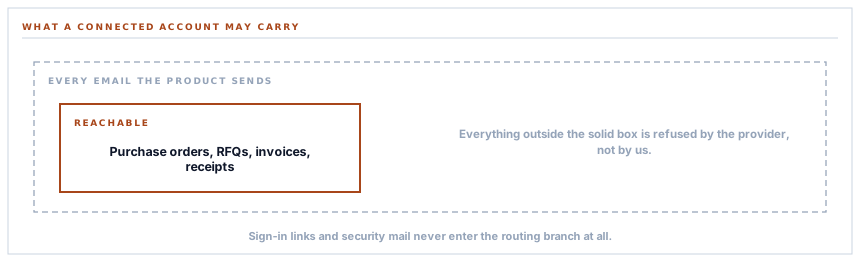
Connecting your own email account moves four kinds of message and no others. Password resets, sign-in links and security alerts keep going through the platform — and that boundary is enforced by the shape of the code rather than by a setting anybody could widen.
The pitch for connecting your own email provider writes itself: mail from your domain, your reputation, your sending history. The question nobody asks until later is which mail — and the answer most products give is all of it, which sounds generous and is how somebody ends up unable to sign in because a sending account they set up in March has expired.
The four
Four categories can be routed through a connected account, and each can be switched on independently.
| Category | Who receives it | Why it belongs here |
|---|---|---|
| Purchase orders | Your suppliers | A commercial document from your organisation |
| RFQ invitations | Your suppliers | An invitation to do business with you |
| Invoices | Your customers | A demand for payment in your name |
| Payment receipts | Your customers | A confirmation you are issuing |
They share one property, and it is the property that defines the boundary: every one of them is a document your organisation is sending to somebody outside it. A supplier receiving a purchase order should see it from you. A customer receiving an invoice should be able to reply to it and reach your finance team.
These are your letters. It is reasonable that they should arrive on your letterhead.
And what is deliberately not on the list
Everything else. Password resets, sign-in links, security notifications, workspace invitations, alert digests, billing mail, onboarding sequences — none of them can be routed through a connected account, whatever is configured.
The reasoning divides into two.
-
Some of it must not depend on your configuration
A sign-in link that cannot be sent because a connected mailbox's credential expired is a lockout caused by an email setting. The mail that lets somebody back in must not travel on the thing that might be broken.
-
Some of it is not from you
A security notification about a sign-in from an unrecognised device, or a billing message about a subscription, is the platform speaking to your people. Dressing that as mail from your own domain would be misrepresenting who is talking.
-
Some of it is internal
An alert digest to your own staff has nothing to gain from your domain's reputation — they already know who you are — and everything to lose from an extra dependency.
-
And the rest is deliverability risk
A newly connected sending domain has no reputation. Moving operational mail onto it on day one means the first thing your own team notices is messages landing in spam.
The boundary is structural, not a filter
This is the part worth understanding, because it is the difference between a rule and a promise.
Routing to a connected account is only considered when the caller supplies a category alongside the workspace. A piece of code that sends mail without naming a category cannot reach a connected account — not because a check refuses it, but because the branch that would route it is never entered.
So the four categories are not a list somebody could add a fifth entry to and change the behaviour. They are the four places in the product that pass a category at all. Widening the boundary would mean changing the call sites, which is a visible, deliberate act rather than an edit to a constant.
That is worth more than a checkbox that says the same thing, for the reason CLAUDE.md in this codebase keeps returning to: a guard that can be satisfied by a configuration change is a guard that will be, by somebody who did not know why it was there.
The sender is overridden, and that is the point
When a message does route through your account, the sender on it is replaced with the one you verified.
That is not a detail, it is the entire feature. A message sent through your provider but still claiming to be from a platform address is worse than either alternative: it fails the alignment checks that receiving servers apply, and it lands in spam more reliably than it would have from the platform in the first place.
The verified sender on your connected account and the address in the message have to agree, and the connector makes them agree rather than trusting whoever built the message to have known.
Four switches, not one
The categories are individually selectable, which sounds like a small nicety and is how most people actually roll this out.
The pattern that works is one category first — usually purchase orders, because suppliers are a forgiving audience who will tell you if something looks wrong. Watch it for a week. Then the rest.
The pattern that does not work is switching all four on the afternoon the domain is verified, and discovering on Friday that a quarter of your invoices went to spam because the domain had no sending history. A new sending domain earns its reputation by sending, and the volume you start with decides how that goes.
What is in place, layer by layer
What a connected email account carries
Four categories, each switchable
Purchase orders, RFQ invitations, invoices and receipts — chosen independently, so a rollout can start with one and grow.
A boundary enforced by structure
Only call sites that name a category can route to a connected account. Mail sent without one never enters that branch at all.
Authentication mail kept on the platform
Sign-in links, password resets and security notifications never travel on a workspace connector, so an expired credential cannot become a lockout.
Platform-voice mail kept on the platform
Billing, security and product messages come from the platform because that is who is speaking, and dressing them otherwise would misrepresent it.
The sender replaced with your verified one
A message routed through your account carries your address, because a mismatch between sender and sending domain is worse for delivery than not connecting at all.
Per-workspace configuration
The credentials, the verified sender and the chosen categories all belong to one workspace and are stored encrypted.
A test that sends a real message
The connection test sends from your verified sender to an address you choose, proving credentials, sender and delivery in one visible step.
Several providers, the same four categories
Whichever email connector a workspace uses, the set of routable mail is the same — so the choice is about your provider rather than about what it can carry.
The four categories are the four places in the product that supply a category. Adding a fifth is a change to a call site, which is visible in review — not an edit to a list.
Three positions held on purpose
- Mail that restores access never travels on a workspace connector. A sign-in link that cannot be delivered because an email setting broke is a lockout caused by a setting, and the person who can fix it is the person who cannot get in.
- The platform speaks in its own voice for its own messages. A security notification or a billing message dressed as mail from your domain would misrepresent who is talking, and the convenience is not worth that.
- The boundary is a property of the code rather than a value in a table. A limit that can be widened by editing a list will be widened by somebody who does not know what it was protecting.
Five questions about sending from your own domain
Which mail moves to our account?
A good answer sounds like
A specific, short list.
What ours actually is
Purchase orders, RFQ invitations, invoices and receipts. Each switchable on its own.
What about password resets?
A good answer sounds like
They stay on the platform.
What ours actually is
Structurally — the code path that would route them never names a category.
What if our sending account breaks?
A good answer sounds like
Nobody is locked out.
What ours actually is
Authentication mail never depended on it, and everything else falls through to the platform.
Whose address is on the message?
A good answer sounds like
Your verified sender.
What ours actually is
Replaced explicitly, because a mismatch between sender and sending domain hurts delivery.
Can we start with just one category?
A good answer sounds like
Yes.
What ours actually is
Four independent switches, and starting with one is the rollout that works.
Our take
Every product that offers to send from your own domain has to decide which mail that covers, and the generous answer is the wrong one. The mail that lets somebody sign in has to be the mail with the fewest dependencies in the building, because it is what you reach for when everything else is broken — including, quite often, the email configuration itself. Keeping that on a path nobody can misconfigure costs you nothing you would miss and removes the one failure mode with no way out of it. The commercial documents are a different question entirely, and there the answer is yes: those are your letters, and they should arrive on your letterhead.
Start with one category and watch it
A new sending domain earns its reputation by sending. Purchase orders first, a week of watching, then the rest — it is the rollout that does not end in a spam folder.
Talk through email deliveryFrequently asked questions
Can we route all our email through our own account?
Four categories can move: purchase orders, RFQ invitations, invoices and receipts. Authentication and platform messages stay where they are, and that is enforced by the structure of the code rather than by a setting — mail sent without a category never enters the routing branch at all.
Why can password resets not come from our domain?
Because a sign-in link is what you use when something is broken, and it must not depend on a configuration that might be the broken thing. A credential expiring on a connected mailbox would otherwise lock out the person who needs to fix it.
Will our invoices land in spam if we connect a new domain?
A new sending domain has no reputation, so the honest answer is that it depends on how you start. Switching one category on first, watching it for a week, and then adding the rest is the rollout that works. Switching all four on the day the domain is verified is the one that surprises people.
What address do recipients see?
The verified sender on your connected account. It is set explicitly rather than inherited from the message, because a sender address that does not match the sending domain fails the alignment checks receiving servers apply — which is worse for delivery than not connecting at all.
Do all the email connectors carry the same four categories?
Yes. Whichever provider or mailbox you connect, the routable set is the same, so the decision is about which provider you want to use rather than about what each one is allowed to carry.
