
The Token in the URL
Telegram puts the bot token in the request path rather than in a header. Every proxy, gateway and access log along the route sees credentials that other providers keep out of the URL — which does not make it unusable, and does make it worth knowing before you route alerts through it.
There is an unglamorous rule in web security that says secrets go in headers, not in addresses. The reason is not cryptographic — a URL over a secure connection is as encrypted as a header is. The reason is that URLs get written down. Access logs, proxy logs, error reports, browser history, referrer headers, the monitoring dashboard that shows your slowest endpoints. Headers mostly do not. Telegram's Bot API puts the token in the path.
Where the six connectors keep their secret
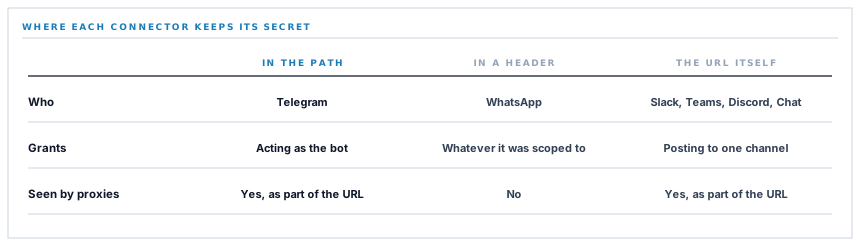
Across the six chat destinations there are three distinct arrangements, and they are worth laying side by side because the differences are real rather than stylistic.
| Arrangement | Who | Where the secret sits | What it grants |
|---|---|---|---|
| A bearer header | The authorisation header, conventionally | Whatever the token was scoped to | |
| A secret address | Slack, Teams, Discord, Google Chat | The URL is the secret — there is no other | Posting to exactly one channel |
| A token in the path | Telegram | Inside the request address | Acting as the bot, anywhere it is a member |
The middle row looks like the same problem as the third and is not. A webhook URL is a secret in an address, but it grants one narrow thing and is bound to one channel by the provider. A bot token is a general credential that happens to be carried in an address.
A secret in a URL is a matter of hygiene. A general credential in a URL is a matter of scope, and Telegram is the second one.
What a bot token actually is
This is the part worth being precise about, because it is the whole risk assessment.
A Telegram bot token is the bot. Anyone holding it can send as that bot to any chat the bot has been added to, read what is sent to it, change its name and description, and leave conversations. It is not scoped to a chat, and there is no per-chat credential to hold instead.
So the honest comparison is: a leaked Slack webhook lets somebody post in one channel. A leaked bot token lets somebody act as your bot in every group it has ever been added to. Same category of accident, different size of consequence, and the size is a function of how many groups the bot is in.
Which leads to the one piece of practical advice that actually reduces the exposure: a bot per purpose, in as few groups as the job needs. It costs a minute to create another bot and it bounds what any single token is worth.
How the token is handled here
The position in the address is Telegram's design and cannot be changed from this side. What can be controlled is everything before the request leaves and after it comes back.
-
Encrypted at rest
The token is stored through an encrypted cast on the row for one workspace. A database export is not a working bot.
-
Never logged
A failed send logs the reason Telegram gave. The request address is not part of the logged context, which is the one line of code that keeps a credential out of a log file with a wider audience than the database.
-
Never shown back
It does not appear in an error message or get echoed into the settings page in full once saved, so a screenshot of a problem is not a disclosure.
-
Permissioned to set
Configuring the connector is its own right rather than something any signed-in member can do, which keeps the number of people who have seen the value small.
What none of that covers is the part outside the application — a reverse proxy, a corporate egress gateway, an APM tool that records outbound request URLs. Those are yours, and if any of them record full URLs, they are recording this token. It is worth five minutes to check rather than assume.
Two escaping contexts in one message
A completely different hazard lives in the same connector, and it is the clearest example in the whole series of why escaping is not one operation.
Telegram messages here are sent in an HTML mode: the title is wrapped in bold tags, and where there is a link it becomes an anchor. So the message text is markup, and text going into it must be escaped.
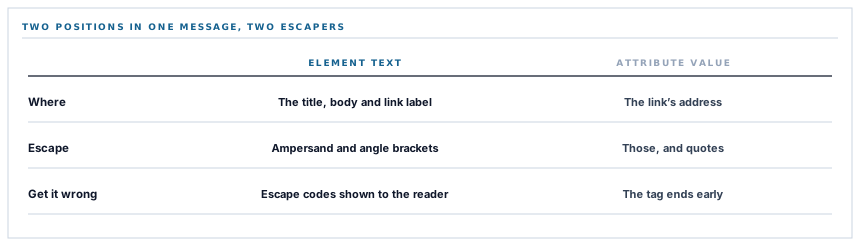
But the message contains two different kinds of position. There is text between tags, and there is a value inside a quoted attribute. They need different escaping, and getting them the same way round is a real defect rather than a tidiness issue.
| Position | What must be escaped | What happens if you use the other one |
|---|---|---|
| Between tags — the title, the body, the link label | The ampersand and both angle brackets | Escaping quotes too puts visible escape codes in front of the reader |
| Inside the link's address attribute | Those three, and quotes as well | An unescaped quote ends the attribute early and the rest of the tag falls out |
So there are two functions, used deliberately in the two places. The label of a link and the address of that link sit inches apart in the code and are treated differently, because one is text and the other is an attribute.
This is the same lesson as the Slack connector's button — where the opposite call was made, and for the same reason. The question is never "does this need escaping" but "what is this a value in".
One more setting, quietly useful
Every message asks Telegram not to expand the link into a preview card.
Left on, a notification about a purchase order would arrive followed by a preview of the sign-in page it links to — because that is what a logged-out fetcher sees. Every alert would carry the same picture of a login screen, three lines tall, and a channel of them would be unreadable.
It also stops Telegram's infrastructure from fetching the link at all, which is a small privacy improvement nobody asked for and everybody would want.
What is in place, layer by layer
The Telegram connector as it stands
Token encrypted at rest
Stored through an encrypted cast on a row belonging to one workspace, never in configuration or environment.
Kept out of logs and errors
A failed send records Telegram's reason. The request address, which carries the credential, is not part of the logged context.
A permissioned setting
Configuring the connector is its own right, which limits both who can redirect alerts and who has ever seen the token.
Two escaping functions, used deliberately
Text between tags is escaped for three characters; the link address is escaped for quotes as well, because an attribute is a different position.
Bold title, plain detail, a real link
The title leads in bold, the body follows, and the link is an anchor with a caller-supplied label rather than a raw address in the text.
Link previews suppressed
Every send asks Telegram not to expand the link, so a channel of alerts is not a column of identical sign-in screenshots.
The body read, not just the status
Telegram can refuse inside a healthy response, so success requires both the status and the flag in the reply.
Telegram's own reason surfaced
A refusal reports the description Telegram supplies — a missing chat, a removed bot — which is usually the entire diagnosis.
A refusal before the call
An incomplete configuration returns a reason without making a request, so a half-set-up connector reads as unconfigured.
The token's position in the address is Telegram's API design. What is controlled here is storage, logging, display and who may set it — and the part outside the application is worth checking on your own infrastructure.
Three positions held on purpose
- The credential's position is described rather than glossed. It is a real property of the provider, it is knowable in advance, and a reader deciding between six chat destinations deserves it stated plainly rather than discovered in a log.
- Escaping is chosen per position, not per message. Two functions inches apart in the same construction is what correctness looks like here, and one shared helper would be wrong in one of the two places every time.
- Link previews are off. A notification is a line of text with somewhere to go, and a provider deciding to render three lines of a sign-in page underneath it is a change to the message nobody chose.
Five questions about a bot-based integration
Where does the credential travel?
A good answer sounds like
They know, and say.
What ours actually is
In the request path — Telegram's design. Everything controllable around it is handled accordingly.
What does the token grant?
A good answer sounds like
A precise answer.
What ours actually is
Acting as the bot in every chat it belongs to. Not scoped per chat, which is why a bot per purpose is worth it.
Is it in your logs?
A good answer sounds like
No.
What ours actually is
Failures log the provider's reason. The address is not in the context.
How is text escaped?
A good answer sounds like
By position.
What ours actually is
Element text and attribute values use different functions, deliberately.
Why do links not preview?
A good answer sounds like
A deliberate setting.
What ours actually is
Suppressed on every send, so alerts stay one line and the link is not fetched by the provider.
Our take
Telegram is genuinely excellent for operational alerts — instant, free, reliable, and trivially easy to set up compared with everything else on this list. The token position is a real consideration and not a reason to avoid it; it is a reason to create a bot for this and nothing else, add it to the two groups that need it, and spend five minutes checking whether anything in your own infrastructure logs full outbound URLs. That is the whole mitigation, it costs less than the setup does, and it converts a vague unease into a bounded, understood arrangement — which is all any of this is ever trying to achieve.
The fastest chat connector to stand up
A bot, a group, two values pasted in. If you want operational alerts working this afternoon rather than after a vendor review, this is the one.
Talk through operational alertsFrequently asked questions
Should we use a dedicated bot rather than an existing one?
Yes, and it is the single most useful thing you can do here. A token grants action as the bot in every chat it belongs to, so a bot that exists only for these alerts and sits in only the groups that need them is a token worth much less if it ever leaks. Creating one takes about a minute.
Can the bot read messages in our group?
A bot's ability to read group messages depends on its privacy setting in Telegram, which is yours to control and is on by default for new bots. This connector never reads anything — it only sends. But the token would permit reading where the bot's own settings allow it, which is worth knowing when you decide which groups to add it to.
How do we find the chat id for a group?
Add the bot to the group and then read the updates the Bot API exposes; the identifier appears there. Group identifiers are negative numbers, which surprises people the first time. Once configured they do not change unless the group is converted to a supergroup, which is one of the cases that produces a clear refusal rather than silence.
What happens if somebody removes the bot from a group?
Sends to that chat fail with Telegram's own description saying so, and the other configured chats are unaffected. Because the connector reads the body rather than only the status, this is reported as a failure rather than counted as a successful send.
Is Telegram appropriate for approval alerts?
For being told, yes — it is fast and people read it. The approval itself happens in your workspace under the approver's own account, which is where a decision with an audit trail belongs. The message carries a link back for exactly that reason.
