
Your Org Can Move
The address of your Salesforce org is not a constant. It is handed to you when you connect, it can be different the next time a credential is renewed, and a connector that stored it once and stopped listening will stop working on a day nobody did anything.
Three connectors in this series get their address from three different places: one has the customer paste it, one hides it inside the credential, and this one is told it by the provider at connection time. The third looks like the most convenient of the three and carries a condition the other two do not — the answer you were given can change, and the only way to know is to keep listening.
Two hosts, and they are not interchangeable
A Salesforce connection talks to two different addresses, for two different purposes, and confusing them is the most common way this integration fails on day one.
| Purpose | Which host | How it is decided |
|---|---|---|
| Signing in and renewing credentials | A login host | Fixed per environment — production or sandbox |
| Reading and writing records | Your org's own host | Returned by the provider when you connect |
The login host is the front door and it is the same one for everybody using that environment. The org host is where your data actually lives, and it is yours.
Credential renewals go to the login host. Record operations go to the org host. Sending either to the other produces an authentication failure that says nothing about addresses, which is why people re-issue credentials that were never the problem.
Two hosts, one credential, and both wrong combinations report the same thing: not authenticated.
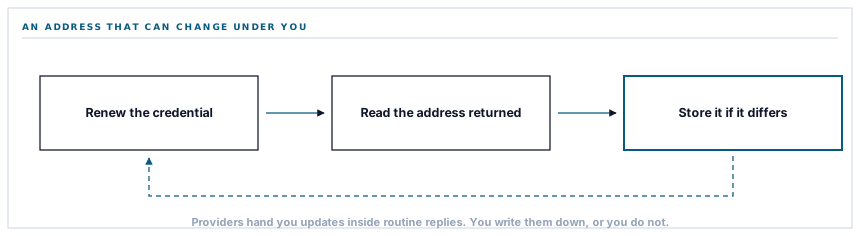
And the org host can change
This is the part worth the post. Salesforce orgs are moved between instances — for capacity, for maintenance, for their own operational reasons. When it happens, your org's address changes.
The way you find out is that the token endpoint tells you: every credential renewal returns the current address alongside the new credential. So the connector compares what came back with what it holds and writes the new one down when they differ.
Three lines. Without them, a connector keeps a stale address until the day it stops resolving, and then fails with a network error on a workspace where nobody changed anything and nothing in the product is wrong.
It is the same family as the rotating credential on the Microsoft storage connector: the provider hands you an update inside a routine response and you either write it down or you do not. Both fail weeks later, both fail for reasons absent from the traceback, and both are a conditional and a save.
The version in every address
A different kind of moving target, handled the opposite way.
Every Salesforce request carries an interface version in its path, and this connector pins one. Not the newest — a specific one, chosen and written down.
The temptation is to track the latest so as to have the newest capabilities. It is the wrong instinct here, because Salesforce releases several times a year and the version in the path is what guarantees that the interface behaves as it did when the code was written.
A pinned version means an upgrade is a decision somebody makes, tests and can undo. An unpinned one means your integration's behaviour changes on somebody else's release schedule, and the change arrives while nobody is looking at it.
The cost is that pinned versions eventually get retired, so there is a maintenance obligation. That obligation is the feature — it forces a deliberate review rather than a silent drift, and a scheduled upgrade is a much better event than an unscheduled behaviour change.
Sandbox is a different front door
A small thing that trips people constantly: a Salesforce sandbox does not sign in at the same address as a production org. It is a different login host entirely.
So the environment is part of the workspace's configuration and the login host follows from it. A workspace testing against a sandbox and one connected to production are simply pointed at different front doors, and switching is a setting rather than a redeployment.
The failure when this is wrong is characteristic: the sign-in appears to work, the credentials look fine, and everything fails afterwards — because the credential is valid for an org that is not the one you meant.
Who connected it, on the screen
One last detail, and it is about people rather than protocol.
The connection response includes an address where the connected user's identity can be read, and the connector fetches it once to display the username.
It is best-effort — a failure there does not stop the connection — and it earns its place because a Salesforce connection is made under a real person's account, and that person's permissions are the connection's permissions.
A connection made by somebody with narrow access will fail to write records for reasons that look like connector problems. A connection made under an administrator's personal account stops working when they leave. Both are visible on the settings screen the moment the username is there, and invisible the moment it is not.
What is in place, layer by layer
The Salesforce connection, end to end
Two hosts, used correctly
Credential operations go to the login host and record operations to your org's own address, because sending either to the other reports only that authentication failed.
The org address updated when it changes
Every renewal is checked against the stored address and the new one written down, so an org moved between instances keeps working.
A pinned interface version
A specific version in every path, so behaviour does not change on somebody else's release schedule and an upgrade is a decision that can be tested and undone.
Sandbox as a per-workspace setting
The login host follows the chosen environment, so testing and production are a setting rather than a deployment difference.
The connected user shown by name
Read once at connection and displayed, because the connection carries that person's permissions and stops when their account does.
A missing renewal credential reads as unconnected
Treated as not connected rather than as connected-and-failing, because the two look identical to a person and have different fixes.
Credentials encrypted at rest
Both tokens stored through encrypted casts on the row for one workspace, and never written into a log line.
Failures logged with the provider's reason
A rejected renewal records the error the provider gave rather than a generic failure, so a revoked grant reads differently from an outage.
Three connectors in this series get their address three ways — pasted by the customer, encoded in the credential, or returned by the provider. Only the third can change after you have stored it.
Three positions held on purpose
- Anything the provider tells us during a routine call is written down when it differs from what we hold. An address returned on every renewal is not decoration — it is the provider telling you where your data is now, and ignoring it fails weeks later with nothing in the traceback.
- The interface version is pinned rather than tracked. An unpinned integration changes behaviour on somebody else's release schedule, and the maintenance obligation of pinning is the point rather than the cost.
- The connected account is displayed. A connection made under an individual's login carries their permissions and ends with their employment, and both facts are only visible if the name is on the screen.
Five questions about a connection to a large platform
Where do API calls go?
A good answer sounds like
Your org's own host.
What ours actually is
Returned at connection. Credential renewals go to a separate login host.
What if our org is migrated?
A good answer sounds like
It follows.
What ours actually is
Every renewal carries the current address, and a change is written down rather than ignored.
Which interface version do you use?
A good answer sounds like
A pinned one.
What ours actually is
A specific version in every path, so behaviour does not shift on a vendor release.
Can we connect a sandbox?
A good answer sounds like
Yes, per workspace.
What ours actually is
The environment is a setting and the login host follows it.
Whose permissions does the connection have?
A good answer sounds like
The connecting user's.
What ours actually is
Read at connection and shown on the settings screen, because that account's access is the connection's access.
Our take
There is a small category of integration bug that only appears in code that has been running successfully for months, and it always has the same shape: the provider told you something during a routine call and nobody wrote it down. A rotated credential. A changed address. A deprecation notice in a response header. All of them arrive quietly, in a response nobody is reading closely, on a day when everything works. The habit worth having is to read a provider's successful responses as carefully as their errors, because the errors are about now and the successes are where they tell you about later.
Read the successful responses too
Rotated credentials, moved addresses and deprecation notices all arrive inside replies that worked. The ones nobody reads are the ones that break things in month four.
Talk through connecting SalesforceFrequently asked questions
What happens if Salesforce moves our org to a different instance?
The connection follows it. Every credential renewal returns the current address alongside the new credential, and a change is written down. Without that, a connector holds a stale address until the day it stops resolving and then fails with a network error on a workspace where nobody changed anything.
Can we connect a sandbox rather than production?
Yes — the environment is part of the workspace configuration and the sign-in host follows it. Sandboxes use a different front door entirely, which is why a sandbox credential used against the production host fails in a way that reads as a bad credential.
Do you use the latest Salesforce API version?
A specific pinned one, deliberately. Salesforce releases several times a year, and an unpinned integration changes behaviour on their schedule rather than on yours. Pinning means an upgrade is something somebody chooses, tests and can undo.
Whose permissions does the connection use?
Those of the person who authorised it, which is why their username is displayed on the settings screen. A connection made under a narrow account fails to write records for reasons that look like connector faults, and one made under an individual's account stops working when that account does.
What happens if the connection is revoked in Salesforce?
Renewals are refused and the provider's reason is logged, and the connector reports itself as needing reconnection rather than as failing intermittently. Reconnecting starts from consent again, which is where the org address and the connected identity are established afresh.
