
The Field You Have to Create First
Before this connector can write a single record, somebody has to add a custom field to your Salesforce org. That is not a setup step we could have avoided — it is the thing that makes every sync afterwards idempotent, and it is worth understanding why.
Most connectors ask for a credential and start working. This one asks for a credential and a field — a custom field, created by an administrator in your own Salesforce org, that does not exist until somebody makes it. It looks like friction and it is the load-bearing decision in the whole integration, because it is what lets the connector know whether a record is already there without ever asking.
The problem it solves
A supplier exists in your workspace. Does that supplier already exist in Salesforce? Every integration has to answer this, and the answers this series has already met are instructive.
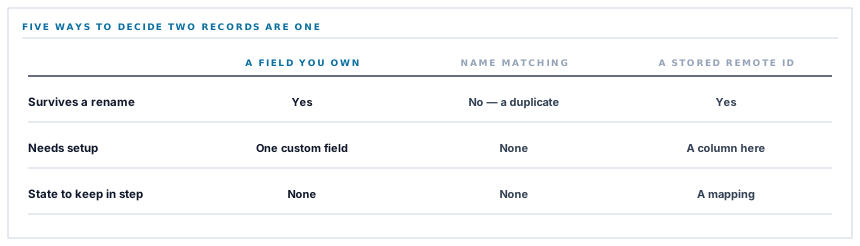
| Approach | Where it appeared | What goes wrong |
|---|---|---|
| Match on a name | The accounting connector | A rename creates a duplicate |
| Compute an id from a stable field | The audience connector | Changing that field creates a duplicate |
| Store the remote id after creating | Common everywhere | Two systems to keep in step |
| Put your own id on their record | Here | Requires a field to put it in |
The last one is the strongest and the only one that needs cooperation. Instead of matching on something that happens to identify the record, you write your identifier onto their record, in a field made for it, and address it by that from then on.
The key is not a property of the data. It is a fact you put there, and nothing anybody edits can change it.
How the write works
Salesforce supports addressing a record by the value of such a field directly. The request names the field and the value in its address and carries the fields to set.
If a record with that value exists, it is updated. If not, it is created with that value in place. One request either way, no search, no branching, and nothing stored on our side beyond the identifier we already had.
The properties that follow are worth listing because they are unusually good.
-
Running twice changes nothing
The second run addresses the same record and writes the same values. There is no duplicate to create.
-
Renaming is safe
A supplier renamed on either side is still the same record, because identity never depended on the name. This is the exact failure the name-matching connector has.
-
Two runs at once do not collide
Both address the same record. There is no window in which both decide to create.
-
Nothing has to be kept in step
No stored remote identifier means nothing to lose, migrate or reconcile if a record is restored from a backup.
Why the field cannot be created for you
The obvious question: if the field is required, why does the connector not make it?
Technically it could — Salesforce has an interface for changing an org's schema. It is not done, for reasons that are about your organisation rather than about difficulty.
A field is a permanent change to your data model. It appears in page layouts, reports and permission sets; it has to be given visibility to the right profiles; it is subject to whatever change control your Salesforce team operates. A connector that added one on first connection would be making a schema change in a production business system on the authority of whoever clicked Connect.
And the permission required to do it is enormous compared with the permission required to write records. Asking for schema-modification rights to avoid a five-minute setup step is a bad trade, and it is one a security review should refuse.
The field name is configurable rather than fixed, because many orgs have naming conventions and some already have a field serving this purpose. A default is supplied; an administrator who wants a different one says so.
What actually gets written
Customers and suppliers, pushed as accounts. That is the scope, and it is worth stating plainly because Salesforce is a large product and people reasonably assume more.
Not contacts, not leads, not opportunities. An account is the organisation you deal with, which is exactly what a customer or supplier record is, and the mapping is honest — one record on each side representing the same company.
The direction is one-way. Records are pushed outward; nothing in Salesforce is read back as an instruction to change your workspace. Your operational records stay the system of record for operations, and Salesforce holds a reflection of who you deal with.
A test that writes nothing
The connection test asks Salesforce for the org's limits — a read-only call that returns a summary of quotas.
It is a good choice for a test because it proves everything that can be wrong without touching data: the credential is valid, the host is right, and the connection has permission to read from the interface. A failure at any of those produces a specific refusal.
It is a deliberate contrast with the storage connectors, where the test writes a real file. There the write is the whole feature and a read would prove less. Here the write goes into a business system full of records people rely on, and a test that creates an account somebody has to find and delete is a worse test.
What a connection test should do depends on what the connector does to the far side, and copying the pattern from another connector without asking that question is how test data ends up in a CRM.
What is in place, layer by layer
The Salesforce connector as it stands
Identity by a field you control
Your identifier is written onto the Salesforce record in a custom field, so identity never depends on a name or an address that somebody might edit.
Upsert in a single request
A record is addressed by that field's value directly, so there is no search, no create-or-update branch and no stored remote identifier.
Idempotent by construction
Running a sync twice addresses the same records and writes the same values, so a repeat is a repeat rather than a duplicate.
A configurable field name
A sensible default with the option to name your own, because many orgs have conventions and some already have a field for this.
No schema changes made for you
The field is created by your administrator, so the connector never needs permission to alter your data model — a far larger right than writing records.
Both path values encoded
The field name and the identifier are encoded for their position in the address, which matters because custom field names carry a suffix and identifiers vary.
A read-only connection test
Proves the credential, the host and access without creating a record somebody would have to find and delete.
One direction only
Customers and suppliers are pushed as accounts. Nothing in Salesforce is read back as an instruction to change a record in your workspace.
The scope is customers and suppliers as accounts. Not contacts, leads or opportunities — worth saying plainly, because Salesforce is large enough that people reasonably assume more.
Three positions held on purpose
- The connector never modifies your Salesforce schema. Creating a field is a permanent change to a production business system, and asking for the permission to do it in order to save a five-minute setup step is a trade a security review should refuse.
- Identity is a fact we write rather than a property we match on. Every other approach in this series derives identity from data somebody can edit, and every one of them produces a duplicate the day they do.
- The connection test reads rather than writes, because the far side is full of records people rely on. What a test should do depends on what the connector does, and copying the pattern from a storage connector is how test accounts end up in a CRM.
Five questions about a CRM sync
How do you know a record already exists?
A good answer sounds like
A key you control.
What ours actually is
Our identifier, written into a custom field on the Salesforce record and addressed directly.
What happens if somebody renames a company?
A good answer sounds like
Nothing.
What ours actually is
Identity never depended on the name, so the same record is updated.
Will you change our Salesforce configuration?
A good answer sounds like
No.
What ours actually is
The field is created by your administrator. The connector never needs schema permissions.
What does the connection test do?
A good answer sounds like
Reads.
What ours actually is
Asks for org limits — proving credential, host and access without creating anything.
What exactly is synced?
A good answer sounds like
A specific list.
What ours actually is
Customers and suppliers as accounts, one way. Not contacts, leads or opportunities.
Our take
An external identifier field is the best available answer to the identity problem, and its cost is that somebody has to agree to it. That cost is worth paying and it is worth being honest that it exists — a connector advertising zero setup either matches on something fragile, stores a mapping that can drift, or is asking for permissions nobody read carefully. Five minutes with a Salesforce administrator buys a sync that is idempotent, safe under concurrency, immune to renames, and holds no state that can go out of step. That is a very good return on a five-minute conversation.
Five minutes with your administrator
One custom field on the account object, and the sync that follows cannot create duplicates, cannot break on a rename, and holds no mapping to keep in step.
Talk through connecting SalesforceFrequently asked questions
Why do we have to create a field before connecting?
Because it is where your identifier is stored on the Salesforce record, and it is what makes every later sync address the right record without searching. Creating it is a permanent change to your data model, subject to your own change control, and a connector that made it for you would need permission to alter your schema — a far larger right than writing records.
Can we use a field we already have?
Yes. The field name is configurable with a sensible default, so an org with a naming convention or an existing external-identifier field can point the connector at it rather than adding another.
What happens if we run the sync twice?
Nothing changes. Each record is addressed by the value in that field, so the second run updates the same records with the same values. There is no duplicate to create and no window in which two runs could both decide to create one.
Does anything come back from Salesforce into our workspace?
No. Records are pushed outward and nothing in Salesforce is treated as an instruction. Your operational records remain the system of record, and Salesforce holds a reflection of who you deal with.
Will the connection test create a test account?
No — it asks the org for its limits, which is read-only. That proves the credential, the host and access without leaving anything behind for somebody to find and delete, which matters when the far side is a business system full of records people rely on.
