
A Failed Lookup Looks Like Nothing There
Notion has no single call that means "create this or update it if it exists", so the connector asks first and then writes. Everything interesting about it follows from the gap between those two requests.
Some systems will take a record and work out for themselves whether it is new. Others make you find out first. The difference sounds like a detail of the interface and it is not: the moment you have to look before you write, you have taken ownership of a question the other system used to answer, including what happens when the looking goes wrong. This connector looks first, because there is no alternative, and this post is about what that costs.
Two requests where other connectors need one
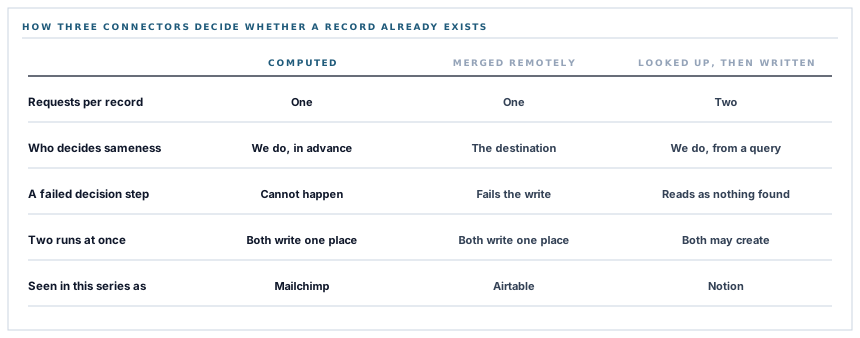
The Airtable connector in this series sends one request per record. It says here is a record, merge it on this field, and the matching happens where the data lives.
Notion has no equivalent. Creating a page and updating a page are different operations, at different addresses, with different verbs and different request bodies — a create names the database it belongs to, an update must not.
So each record becomes a query for a page with that exact title, followed by either an update of what was found or the creation of a new page. Two calls, and the second one's shape depends on the first one's answer.
What null means
The lookup returns either the identifier of a matching page or nothing. Nothing means create.
Read that again with a network in mind, because there are two ways to get nothing. The query can succeed and find no match — the ordinary case for a new customer. Or the query can fail: a rate limit, a timeout, a bad gateway, a moment when Notion was busy.
Both produce nothing, and nothing means create. So a transient failure on the lookup does not surface as an error; it surfaces as a second page with the same title as the first, some weeks later, noticed by somebody wondering why there are two entries for the same supplier.
A lookup that fails and a lookup that finds nothing are the same value. The difference between them is a duplicate.
This is worth stating plainly rather than leaving in the code, because it is the characteristic failure of every read-then-write integration and it is invisible from both ends. Notion logged a request that failed and was retried by nobody. We logged a page created successfully. Both records are accurate.
Distinguishing the two states is a small change — the query already knows whether it succeeded, and treating a failed lookup as skip this record and try next run rather than create turns a silent duplicate into a record that syncs a few minutes later. It is a good example of the kind of improvement that is invisible until it is written down, which is the reason to write it down.
And the gap between the two calls
The second consequence of looking first is a window, and it is a real one rather than a theoretical one.
Two runs of the same sync starting close together — somebody presses the button while a scheduled run is already going — both query for the same title, both find nothing, and both create. There is no lock, and there is nothing in Notion preventing two pages from sharing a title.
A server-side merge cannot do this. The decision and the write are one operation, so there is no interval for a second caller to occupy. That is the real advantage of the one-request design, and it is not about speed.
The practical mitigation today is that the sync is queued rather than run inline, so the ordinary case is one run at a time. The honest description is that the guarantee comes from the arrangement rather than from the write itself.
One match, and only ever one
The lookup asks for a single result, which has a consequence worth knowing if duplicates already exist.
Where two pages share a title, the query returns the first and the sync updates it. The second is never touched — not deleted, not updated, not reported. It sits there indefinitely holding whatever it held when it was created.
That is the right default. Merging duplicates is a decision with data loss in it and it should be made by a person looking at both pages, not by a sync that noticed there were two. What it means in practice is that duplicates are cleaned up in Notion, once, and then stay cleaned up.
A value has to be shaped for its column
The other thing a two-request write inherits is that both branches take the same property shapes, and Notion's property shapes are typed.
An email address is not a string in a Notion payload. It is a structure whose form depends on whether the destination column is an email column, a phone column, a link column or a text column — four different envelopes around the same characters.
So the database's schema is read once per run, each optional value is looked up against it, and the value is wrapped in the envelope its column needs. A column that is absent is skipped, exactly as in the Airtable connector.
A column that is present but of a type this connector does not shape — an email held in a select column, say, or a phone number in a number column — is also skipped, and the page still lands with its title and whatever else was shapeable. A property it cannot express is left out rather than allowed to reject the page, which is the same degrade-rather-than-stop principle applied one level down.
The four shapes covered — email, phone, link and text — are the ones a contact record actually needs. The remaining types are mostly things a name and an email address have no business being put into, and adding a shape for a specific one is a contained piece of work when a workspace turns out to want it.
What a run costs
Two requests per record is worth pricing, because it is the number that decides how this behaves at volume.
-
One schema read per run
The database structure is fetched once and reused, rather than once per record — which is the difference between one request and two hundred.
-
Two requests per record after that
A lookup and a write. Two hundred customers is four hundred calls, and Notion rate-limits per integration, so the ceiling on a run is theirs rather than ours.
-
Two hundred records per type, newest first
The same bound as the sibling connector, and the same statement about it: it is a number, and pushing a complete list is a different feature.
The one-per-record lookup is the obvious thing to improve, and the shape of the improvement is already in the code for a different fact: the schema is read once and reused. A single query returning the titles already present would replace two hundred lookups with one page of results, and it would close the failed-lookup ambiguity at the same time, because a list that arrived is distinguishable from a list that did not.
What is in place
How a record becomes a page
A lookup on the exact title
Each record is matched against pages whose title property equals its title, which is the same identity rule the destination shows in its own first column.
Update and create as separate calls
A found page is patched at its own address and a new one is posted with its parent database named, because the two operations take different shapes.
The schema read once per run
One structural request serves every record, so the per-record cost is the lookup and the write rather than three calls.
Values wrapped for their column type
Email, phone, link and text columns each take a different envelope around the same characters, and the envelope is chosen from the destination's own schema.
An absent column skipped
A value whose property does not exist is left out, so a database with fewer columns still receives the record.
An unexpressible column skipped too
A property of a type this connector does not shape is omitted rather than sent malformed, so the page lands with everything else intact.
Titles truncated to the platform limit
Text is cut to the two thousand characters a Notion fragment holds, so a long value is shortened rather than rejected.
Only the first match updated
Where duplicate titles already exist the first is updated and the others are left untouched, because merging pages is a decision with data loss in it.
A missing title property stops the run
Checked once before any record is attempted, so the reason is reported rather than repeated two hundred times.
Record types isolated
Customers and suppliers run independently, and a failure in one is logged and reported as zero for that type while the other continues.
The sync queued, not inline
Runs happen on a queue, which is what keeps the ordinary case to one run at a time and the request that started it fast.
A bounded wait per call
Fifteen seconds, applied to both the lookup and the write, so a slow workspace costs a known amount of time per record.
Six of these exist because the write is two requests rather than one. That is the honest cost of a destination with no merge operation, and it is worth seeing listed rather than described as a detail of the interface.
Three positions held on purpose
- Duplicates in the destination are left alone. A sync that found two pages with one title updates the first and reports nothing about the second, because deciding which of two records survives is a judgement with data loss in it and it belongs to a person with both pages in front of them.
- A property we cannot express is dropped, not forced. Sending a malformed value would reject the whole page, so an unshapeable column costs that one field and nothing else.
- The two-request cost is stated rather than hidden. Four hundred calls to sync two hundred records is the price of a destination with no merge, and a single-query improvement is worth naming out loud because it closes the duplicate ambiguity as a side effect.
Five questions about a read-then-write sync
Is it one request per record or two?
A good answer sounds like
They should know.
What ours actually is
Two — a lookup then a write — because the destination has no merge operation.
What happens if the lookup fails?
A good answer sounds like
The record is retried.
What ours actually is
Today a failed lookup is indistinguishable from no match and results in a new page; separating the two is a contained change.
Can two runs at once create duplicates?
A good answer sounds like
Not if writes are merged remotely.
What ours actually is
Here the protection comes from running on a queue rather than from the write itself.
What if there are already two pages with one name?
A good answer sounds like
The first is updated.
What ours actually is
Exactly that, and the second is untouched rather than merged or deleted.
What if a column is the wrong type?
A good answer sounds like
That field is skipped.
What ours actually is
The page still lands with its title and everything shapeable; nothing is sent malformed.
Our take
Whether a destination has a merge operation looks like a piece of trivia about its interface, and it decides more about an integration than anything else in it. With one, the question of whether a record already exists is answered by the system holding the records, in the same instant as the write, and there is no window and no ambiguity. Without one, you look first — and now a failed lookup, a slow response and a second run happening at the same time are all your problem, and each of them produces a duplicate rather than an error. None of that is a reason to avoid the destination; people keep their supplier lists in Notion and want them current. It is a reason to know which of the two you are running, because the failure modes are not the same shape and the one that is silent is the one worth naming.
Ask whether the write is one request or two
The answer tells you where duplicates come from, and whether anybody has thought about a lookup that fails.
Talk through record syncingFrequently asked questions
Why do I sometimes see two Notion pages for the same customer?
The sync looks for an existing page by exact title and creates one when it finds none. A lookup that fails for a transient reason currently produces the same result as a lookup that found nothing, which means a new page. Separating those two cases is a contained change and it is the right fix.
Will the sync clean up duplicates it finds?
No. Where two pages share a title the first is updated and the others are left exactly as they are, because choosing which record survives is a decision with data loss in it. Once they are merged in Notion they stay merged.
My database has an Email column but nothing lands in it. Why?
Notion property values are typed, and the connector shapes values for email, phone, link and text columns. A column named Email that is actually a select or a number is skipped, and the page still lands with its title. Adding a shape for a specific type is a small piece of work.
How many requests does a sync make?
One to read the database structure, then two per record — a lookup and a write. Two hundred records is about four hundred calls, which is why the per-record lookup is the first thing worth replacing with a single query.
What if I press Sync while a scheduled run is going?
Runs go through a queue, which is what keeps the ordinary case to one at a time. The protection comes from that arrangement rather than from the write, which is an honest distinction worth making.
