
You Chose the Join Key
Most integrations decide what makes two records the same and tell you afterwards. This one reads the answer out of your own table, which moves a decision you would not have been asked about into a place where you can see it.
Every sync has to answer one question before it can do anything useful: given a record here and a record there, are they the same record? The answer is a comparison on some field, and the choice of field is the single most consequential decision in the whole integration — it determines what updates in place, what arrives twice, and what happens the day somebody edits a name. Usually that choice is made by whoever wrote the connector and appears nowhere. Here it is made by whoever built the table.
The primary field is the join key
An Airtable table has a first column that behaves differently from the others. It is the one shown in every linked-record chip, it cannot be deleted, and it is the table's idea of what a row is called.
That column is the join key. Before a sync sends anything, it reads the table's structure, finds which field is the primary one, and resolves its name. Records are then merged on the value of that field.
So the question what makes two records the same is answered by your table rather than by our code, and it is answered by something you can look at. If the primary field is called Name, records merge by name. If you built the table with a primary field called Account Code, they merge by account code.
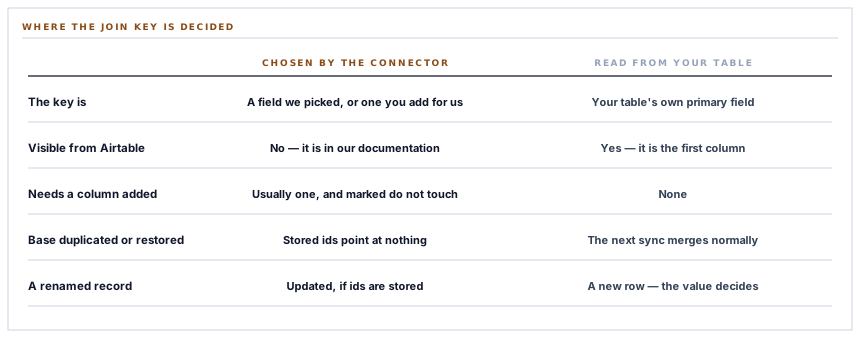
Why that is better than choosing for you
A connector that picks the join key itself has to pick something, and there are only two kinds of thing it can pick.
It can require a column of its own — a hidden identifier field you are asked to add and then told not to touch. That works, it is precise, and it puts a piece of our plumbing in the middle of your table forever. Anybody rearranging the base later has no way to know what it is for.
Or it can assume a name. It looks for a field called Name, or Company, or Email, and does something unhelpful when your table calls it something else — usually creating a second record every run, which looks like the sync working until you count.
Reading the key from the destination is not a shortcut. It is the version where the rule is visible to the person who has to live with it.
Reading the primary field avoids both. It needs no column added, it makes no assumption about naming, and the rule is legible from inside Airtable without reference to any documentation.
And the consequence, stated plainly
Merging on a value has one behaviour that is worth understanding before you turn it on, because it is the same in every system that works this way.
Change the value and you have a new record. A customer synced as Kariuki Hardware who is later renamed Kariuki Hardware Ltd arrives as a second row on the next run, and the first row stays exactly as it was.
That is not a bug in the merge; it is what merging on a value means. The two rows are, as far as the comparison is concerned, two different things — and the alternative, storing a remote record identifier on our side and updating by it, has its own cost: it makes the connection stateful, so a base rebuilt from a copy leaves every stored identifier pointing at nothing.
The version here is stateless. Nothing about the destination is remembered except which base and which table, which means an Airtable base can be duplicated, restored or rebuilt and the next sync simply works.
Three ways a record gets its title
Since the primary field is the identity, the value put into it matters, and a business record does not always have an obvious name.
-
The company name, if there is one
The ordinary case for both customers and suppliers, and the one people expect to see in the table.
-
The person's name, assembled
First and last name joined, for the individual customers who have no company against them.
-
A synthetic title from the record's own id
Where neither exists. It is not pretty, and it is the only one of the three that cannot change — which makes it the one that never produces a duplicate.
The third option is worth pausing on because it inverts the usual instinct. The nameless records are the ones with perfectly stable identities, and the well-named ones are the ones that can drift.
Two refusals before the request
There are two states in which no request is sent at all, and both are the kind of thing an integration usually discovers from the far end.
A table whose primary field could not be resolved stops the whole run, once, with the reason — rather than attempting two hundred writes that each fail for the same cause. And a record that has ended up with no value for the primary field is refused individually, because the merge is on that value and a write without it is a request to create an unnamed row.
Both refusals happen locally. Nothing leaves the building to discover a fact we already had.
A token, not an app
The connection is made with a personal access token that you create in your own Airtable account, rather than by authorising an application.
That has a real advantage and a real cost, and it is the customer's call rather than ours. The advantage is that the scopes and the bases the token can reach are chosen in your account, by you, and visible there — you can issue a token that reaches one base and nothing else. The cost is that a token is a value to be looked after, and it does not renew itself.
It is stored encrypted, and saving a new one marks the connection unproven until it has been tested. The test is a request for the list of bases, which is the cheapest call that proves both that the token works and that it carries the schema-reading permission the sync depends on.
What is in place
How a record finds its row
The primary field read from your schema
The table's own first column is resolved by identifier at run time and used as the join key, so no field has to be added and no name is assumed.
Merging done by Airtable
The write asks Airtable to merge on that field, so the matching happens where the records live rather than in a local copy of them.
No remote identifier stored
The connection remembers a base and a table and nothing else, which is what lets a base be duplicated or restored without breaking the sync.
A three-step title
A company name, then an assembled personal name, then a stable synthetic title from the record's own id, so every record has something to be called.
The schema read once per run
One structural request serves every record in the run rather than one per record.
A missing primary field stops the run
The reason is reported once instead of two hundred identical failures arriving from the far end.
A record with no key value refused locally
Merging is on that value, so a write without one is declined before a request is made.
A token scoped in your own account
A personal access token you issue and can limit to a single base, stored encrypted on our side.
A new token marked unproven
Saving a token clears its verification, so a connection is only described as working after it has answered a request.
The test call chosen for what it proves
Listing bases confirms reachability and the schema permission in one request, which is what the sync actually needs.
Changing the base clears the table
A table identifier only means anything inside its base, so switching base drops the selection rather than carrying a stale one.
Names kept only as labels
The base and table names are stored to display, and the identifiers are what the sync reads, so renaming either in Airtable changes nothing.
The whole design here follows from one choice: the destination decides identity. That is what removes the stored state, the required column and the assumed field name, and it is also what makes the rename behaviour something to know about rather than something to discover.
Three positions held on purpose
- The join key lives in your table. A rule you can read from inside Airtable beats a rule that is correct and documented somewhere else, because the person who rearranges the base in eighteen months is not going to read the documentation.
- No column of ours in your base. A hidden identifier field would make the matching exact and would leave a piece of our plumbing in a table that other people maintain, with nothing to say what it is for.
- Stateless in the destination. Storing remote record identifiers would survive a rename and break on a restored copy of the base; not storing them survives the restore and shows the rename. Between the two, the failure that is visible is the better one to have.
Five questions to ask about any record sync
What decides that two records are the same?
A good answer sounds like
A named field.
What ours actually is
Your table's primary field, resolved from its schema on every run.
Do I have to add a column for you?
A good answer sounds like
No.
What ours actually is
Nothing is required in the destination table beyond a primary field, which every table has.
What happens if I rename a customer?
A good answer sounds like
A new row, if you merge on the name.
What ours actually is
Exactly that, and the original row is left as it was.
What if I duplicate or restore my base?
A good answer sounds like
It should still work.
What ours actually is
No remote identifiers are stored, so the next sync merges normally.
What does connecting give you access to?
A good answer sounds like
Only what the token allows.
What ours actually is
A personal access token you issue, which can be limited to one base in your own account.
Our take
The join key is the part of an integration people ask about last and should ask about first. It is one comparison, it is usually a single line of code, and everything anybody ever complains about downstream is a consequence of it: the duplicates, the updates that did not land, the record that changed name and split in two. What makes this version worth describing is not that the comparison is clever — it is a value match, the same as everybody else's — but that the rule is stored in the customer's own table rather than in our source code. That does not make the rename behaviour go away. It makes it something you can predict by looking at your own base, which is the difference between a characteristic and a surprise.
Ask what decides that two records are the same
Every duplicate, every update that did not land and every split record is downstream of that one answer, and it should take a sentence.
Talk through record syncingFrequently asked questions
Do I need to add a special column to my Airtable table?
No. The sync reads your table's own primary field — the first column, which every table has — and merges records on its value. Nothing about the integration appears in your base as a field.
What happens if I rename a customer or supplier?
Where the primary field holds the name, the renamed record arrives as a new row on the next sync and the original row stays as it was. That is what merging on a value means, and it is predictable from your own table rather than from our behaviour.
Can I sync into a table whose first column is not called Name?
Yes. The primary field is resolved by identifier rather than by name, so it can be called anything and the merge still uses it.
What if I duplicate my base or restore it from a backup?
The connection stores only which base and which table, never individual record identifiers, so the next sync merges against the new copy normally.
How much access does connecting Airtable give you?
Whatever your personal access token allows and nothing more. Tokens are issued in your own Airtable account and can be limited to a single base; ours is stored encrypted and used only to read your table structure and write the record types you select.
