
Only the Fields You Actually Have
A write into somebody else's table can fail for a reason that has nothing to do with the data: a column that is not there. Two filters decide what leaves, and the difference between them is the difference between a sync that degrades and one that stops.
Sending data into a table you do not control is not like writing to your own database. The shape of the destination is somebody else's decision, it can change on a Tuesday without anybody telling you, and the usual response to a field it has never heard of is to reject the entire record rather than the field. Which turns a missing column into a sync that transfers nothing, and does so with a perfectly clear error message that arrives in a log nobody is reading.
One unknown field loses the whole record
Airtable's write is strict about names. Send a record containing a field the table does not have and the request is refused — not partially applied, not applied with the extra field ignored. Refused.
That is defensible behaviour for a data store: silently dropping something you were told to save is worse than declining to save it. It does mean an integration has to be careful about what it sends.
A customer record here can carry a name, an email address and a phone number. A table built for a mailing list has an email column and no phone column. Send all three and you sync nothing at all. The name and the email were both acceptable and both were lost, because of the third one.
So the payload is filtered against the table
Before the records go out, the table's structure is read once and the set of field names it actually has is kept for the run.
Each optional value is then checked against that set. A value whose field exists is included; a value whose field does not exist is simply left out. The record that goes to a mailing-list table carries a name and an email, and the sync works.
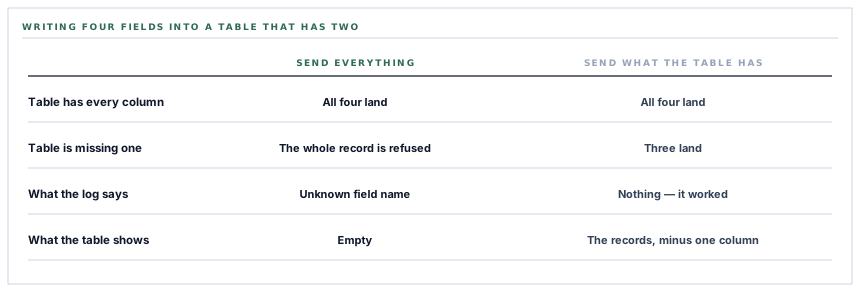
This is the behaviour worth asking any integration for by name: degrade rather than stop. A destination that can take three of our four fields should receive three, not zero.
The second filter, which means something different
There is another condition on the same line, and it looks like the same kind of check. It is not.
An empty value is also left out — a customer with no phone number recorded does not send an empty phone field.
The first filter is about the destination's shape. This one is about meaning, and the meaning is specific: since the write merges into an existing row where one matches, a field that is absent from the payload is left alone in the destination, and a field that is present with an empty value is overwritten with nothing.
Not sending a value and sending an empty one are two different instructions. Only one of them is safe by default.
So omitting empty values is a decision about whose data wins. A phone number typed into Airtable by somebody in the office survives a sync from a record that has no phone number on it. If empty values were sent, that number would be erased on the next run, quietly, and the person who typed it would conclude that Airtable had lost it.
The cost of that choice is the mirror image and worth being straight about: clearing a value on our side does not clear it there. A field is emptied in the destination by emptying it in the destination. That is the right trade for a table people also edit by hand, which is what an Airtable base almost always is.
And a coercion that is doing more than it looks
Every value sent is text. Airtable columns are not: they are dates, numbers, single selects, checkboxes, links.
The write therefore asks Airtable to convert as it goes, which is why a phone number typed as text lands correctly in a phone-formatted column instead of being refused for having the wrong type.
That convenience has one edge that is worth knowing rather than discovering: where the destination is a single-select column, a value that is not one of the existing options is added as a new option. So a coercion setting is also, in one specific case, a schema change.
Which is exactly why the values sent are held to plain identifying text — a name, an email address, a phone number. The setting stays because it is what makes writing into an unknown column shape work at all; the payload stays narrow because that is what keeps it from mattering.
What the run is bounded by
Three bounds, all of them deliberate, and all worth stating as numbers rather than as reassurance.
-
Two hundred records per type, newest first
A run pushes the most recent two hundred customers and the most recent two hundred suppliers. A workspace with four thousand customers is syncing its newest two hundred, and repeated runs do not walk backwards through the rest.
-
One record per request
Each record is its own call. Slower than batching, and it means one rejected record is one rejected record rather than a batch of ten that all fail together.
-
Fifteen seconds to answer
A destination that has stopped responding costs a bounded amount of time per record rather than holding the run open.
The two-hundred ceiling is the one to know about, because it is the one that looks like a bug from the outside: the table fills up, the count stops climbing, and nothing anywhere reports a limit. Paging through an entire customer list on every run is a different feature with different costs, and it is a straightforward thing to add for a workspace that needs the whole book in Airtable rather than the recent end of it.
Each type fails on its own
Customers and suppliers are pushed independently, and each is wrapped so that a failure in one does not end the run.
If the customer half throws — a network fault, an unexpected response, a record with something strange in it — that half reports zero, the reason is logged, and the supplier half still runs.
The alternative, letting the first failure end everything, has a specific unpleasant property: the two halves are ordered, so the same failure would always sacrifice the same half. Isolating them means a partial success is partial rather than arbitrary.
The returned count is deliberately a count of writes the destination accepted, broken down by type. It is not a count of rows in your table, and it cannot be, because a merge into an existing row and the creation of a new one are indistinguishable in the response. The number means "this many records were successfully sent", which is the only thing it can honestly mean.
What is in place
What leaves, and what is left out
The destination's field names read once
One structural request per run produces the set of columns the table actually has, and every record is filtered against it.
Unknown fields left out
A value whose column is absent is dropped rather than sent, so a table with fewer columns receives what it can take instead of rejecting the record.
Empty values left out
A field with nothing in it is omitted, so a value entered by hand in the destination is preserved rather than overwritten with a blank.
The same filter in the layer below
The write itself also drops empty values, so the guarantee holds for any caller rather than only for the scheduled sync.
Type coercion asked for explicitly
Values are sent as text and converted by the destination, which is what lets a record land in a typed column without knowing its type in advance.
A narrow payload to keep it harmless
Only plain identifying text is sent, so the one case where coercion would alter a column's options is not reachable.
A stated per-run ceiling
Two hundred records per type, newest first, which is a number rather than an assurance.
One record per request
Each write stands alone, so a single rejected record does not take nine acceptable ones with it.
A bounded wait
Fifteen seconds per call, so an unresponsive destination costs a known amount of time instead of an open-ended one.
Record types isolated from each other
Customers and suppliers run independently and a failure in one is logged and reported as zero for that type while the other continues.
An explicit workspace filter on every read
The records gathered for a run are selected by workspace explicitly rather than relying on ambient context, because a scheduled run has no signed-in user.
A count of what was accepted
The result reports writes the destination took, per type, rather than implying a row count it has no way to know.
The two filters on one line are the whole post: one asks what the destination can accept and the other asks what we actually have to say. Reading them as the same kind of check is the easiest way to end up sending blanks over data somebody typed.
Three positions held on purpose
- Degrade rather than stop. A destination missing one of four columns should receive the other three, because the alternative is a sync that transfers nothing for a reason nobody looking at the table can see.
- An absent field is not an empty field. Omitting a value we do not have means a value typed by hand in the destination survives, and it means clearing a field on our side is not a way to clear it there. For a table people also edit themselves, that is the direction that respects the work.
- A count says what was sent. Reporting accepted writes rather than a row count keeps the number true, because a merge and a creation look identical in the response and any richer claim would be a guess.
Five questions about writing into a table you do not own
What if my table has fewer columns than you send?
A good answer sounds like
You send fewer fields.
What ours actually is
The payload is filtered against the table's real field names, so the record still lands.
Will a sync overwrite a value I typed there?
A good answer sounds like
Not with a blank.
What ours actually is
Empty values are omitted, so a field we have nothing for is left exactly as it is.
How do I clear a field, then?
A good answer sounds like
In the destination.
What ours actually is
Emptying it here does not empty it there; that is the cost of the previous answer.
How many records move per run?
A good answer sounds like
A number.
What ours actually is
Two hundred per record type, newest first.
If one record type breaks, do I lose the other?
A good answer sounds like
No.
What ours actually is
Each type runs independently; a failure is logged and reported as zero for that type alone.
Our take
Writing into a table somebody else designed is the part of integration work where the interesting decisions are all about what not to send. Send a field that is not there and you lose the record. Send a blank and you overwrite something a person typed. Send everything and both happen, occasionally, to a subset of records, in a way that shows up as a table that is slightly wrong rather than as an error anybody investigates. The two conditions that prevent it fit on one line and read as the same check, which is exactly why it is worth saying out loud that they are not: one is about the shape of the destination and the other is about the difference between having no answer and answering with nothing.
Ask what happens when a column is missing
The two useful answers are "the record still lands, without that field" and "the record is rejected". They are very different to live with.
Talk through record syncingFrequently asked questions
My Airtable table only has a name column. Will the sync work?
Yes. The table's field names are read before the records go out and the payload is filtered against them, so a table with one column receives names and nothing else rather than rejecting the records.
Will syncing wipe out phone numbers my team typed into Airtable?
No. A field we have no value for is left out of the write entirely, and a field left out of the write is untouched in the destination. The value your team typed survives every subsequent sync.
How do I remove a value from the Airtable row then?
By clearing it in Airtable. Clearing it on our side omits the field rather than sending a blank, which is the same rule as the previous answer seen from the other direction.
How many records go across in one sync?
Up to two hundred per record type, newest first, per run. Pushing a complete customer list of any size is a straightforward extension for a workspace that needs the whole book in Airtable rather than the recent end of it.
What does the number in the success message count?
Writes the destination accepted, broken down by record type. A write that merged into an existing row and one that created a new row are indistinguishable in Airtable's response, so the count deliberately does not claim to be a row count.
