
Typecast Is Doing a Lot of Work
One flag on an Airtable write asks the provider to make your value fit whatever the column is — and for a dropdown column, making it fit means adding a new option. It is the most convenient setting in the whole connector series and the one worth understanding before you rely on it.
One connector in this series reads a database's schema before writing so every value can be shaped to its column's type. This one sets a flag that says: make it fit. Both are reasonable. They put the work in different places, they fail differently, and one of them can change the structure of your data as a side effect of a sync.
What the flag actually does
Airtable columns are typed — a number, a date, a dropdown, a link. A value arriving in the wrong form is normally refused.
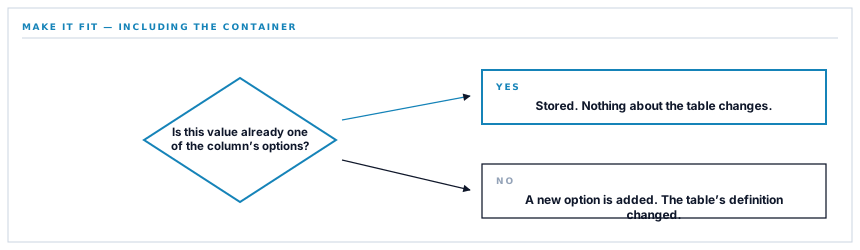
With this flag set, the provider converts instead. A numeral written as text becomes a number. A date written in a recognisable format becomes a date. And a value that is not one of a dropdown's existing options becomes a new option.
That last one is not a conversion. It is a change to the table's definition, made by a write.
Why it is on
Because the alternative is worse for what this connector does.
The contacts being written are names, addresses and phone numbers held as text in an operational system. The columns they land in were created by somebody in Airtable, with whatever types they chose, in a base the connector has never seen.
Without the flag, a phone number arriving at a column somebody made a number field is refused — and the whole record with it.
-
The flag off
Every column type has to be read and every value shaped to it, and any type we do not handle costs that field or the record.
-
The flag on
Values are sent as they are and the provider fits them, so a base with unexpected column types still works.
-
The cost
A value that does not match a dropdown's options adds one, which changes the table rather than the record.
-
The bound
It only reaches columns being written, which are the few this connector fills.
That last point is what makes it acceptable rather than alarming. The connector writes a handful of contact fields. A base full of formulas, attachments and links is untouched, because nothing is sent to those columns.
When it would not be acceptable
It is worth naming the case where this flag is a bad idea, because the reasoning generalises well beyond this connector.
A column that means something — a status, a category, a stage — has a fixed set of options on purpose. Those options are what reports group by and what automations branch on. Adding one is a change to a shared vocabulary.
Write into such a column with this flag on and a variant spelling quietly becomes a new category. Nothing errors, the record looks right, and a report that grouped by that column now has two groups where there was one — with a handful of rows in the new one.
So: it is safe where you are writing values with no vocabulary, and unsafe where you are writing into one. Contact details are the first kind. Anything with a fixed set of options is the second, and there the schema-reading approach is right even though it is more work.
The upsert underneath it
The write itself uses the provider's own upsert: name a field to match on, and the record is updated if a match exists or created if not — in one request, with no lookup first.
That puts it in the good half of the identity approaches this series has covered.
| Approach | Requests | Two runs at once |
|---|---|---|
| Search, then create or update | Two | Both can decide to create |
| Address a computed identifier | One | Both write the same place |
| Upsert on a named field | One | The provider resolves it |
The third row is the best of the three where a provider offers it, because the matching happens inside their system rather than across two calls of yours. There is no window between deciding and doing, because deciding and doing are the same request.
And the connector refuses to send a record with no value for the field being matched on. Without one there is nothing to match, so the provider would create a new row every run — the silent duplication this series keeps meeting, caught here before the request rather than found in the table later.
Empty values, removed as usual
Fields with nothing in them are dropped before sending, for the reason that recurs in every connector here: an absent field means nothing to say, and an empty one means make it empty.
On an upsert that matters more than usual, because a matched record already exists. Sending an empty phone number would clear a number somebody typed in there, silently, and the sync would report success.
It is the fifth appearance of this rule in the series and the one where the consequence is most direct: your blank should never beat their value.
What is in place, layer by layer
How a record is written
A native upsert in one request
The record is matched on a named field by the provider, so there is no lookup, no branch and no window in which two runs both create.
Values coerced to the column type
The provider fits each value to whatever type the column was given, so a base built with unexpected types still accepts a record.
Bounded to the columns written
Only the contact fields are sent, so nothing reaches the formulas, attachments and links that make up the rest of a base.
A missing merge value refused
A record with no value in the field being matched on is not sent, because it would create a new row on every run.
Empty values removed
A blank in your records is omitted rather than written, so it cannot clear a value somebody entered in Airtable.
The provider's reason surfaced
A refused write reports Airtable's own message, which names the field or the constraint rather than reporting a generic failure.
The credential encrypted at rest
Stored on the row for one workspace, never in configuration, and never written into a log line.
Coercion can add an option to a dropdown column. That is safe for contact details, which have no fixed vocabulary, and would not be for a status or category column where the options are what reports group by.
Three positions held on purpose
- Coercion is used because the destination is somebody else's base with types we cannot predict. Its one real cost — a new option on a dropdown — is bounded by writing only contact fields, and it is stated here rather than left to be discovered.
- A record with no value for the matching field is refused before sending. It is the one input that turns an upsert into an unbounded row generator, and it costs a single check to rule out.
- A blank never overwrites a populated value. On an upsert the matched record already exists, so an empty field sent as empty erases something a person typed and reports success.
Five questions about writing into a flexible database
What if our column types are unusual?
A good answer sounds like
It still writes.
What ours actually is
Values are coerced by the provider to whatever the column was declared as.
Can a sync change our table structure?
A good answer sounds like
An honest answer.
What ours actually is
A value not matching a dropdown's options adds one — which is why only contact fields are written.
How is a record matched?
A good answer sounds like
By the provider.
What ours actually is
A native upsert on a named field, in one request, with no lookup and no race.
What if the matching field is empty?
A good answer sounds like
Refused.
What ours actually is
Caught before sending, because it would create a new row on every run.
Will a blank in our records clear a value?
A good answer sounds like
No.
What ours actually is
Empty fields are omitted rather than written, so nothing is erased by an absence.
Our take
Convenience flags in APIs are usually doing one small helpful thing and one larger thing nobody mentioned. This one converts types, which is the small helpful thing, and creates dropdown options, which is a change to the shape of your data made as a side effect of writing a row. It is entirely reasonable in the context it is used and it would be a genuine problem written into a column whose options mean something. The general habit is worth more than the specific case: when a provider offers to make your data fit, find out exactly what fitting involves, because the answer is occasionally that they will change the container.
Mirror your customers into a base people actually use
A lightweight tracker your team already lives in, kept in step with the records that matter — writing only the fields it was asked to.
Talk through contact syncingFrequently asked questions
Can syncing change our Airtable table structure?
In one specific way: if a value written into a dropdown column is not already one of its options, Airtable adds it. That is bounded to the columns the connector writes, which are contact fields. Nothing reaches formulas, attachments, links or the columns you use for status and categorisation.
What if we made the phone column a number field?
It still works. Values are coerced to the column's type by the provider, which is why a base built with unexpected types accepts a record rather than refusing the whole write.
Does syncing twice create duplicates?
No. The write uses Airtable's own upsert, matching inside their system rather than across two of our calls, so there is no window in which two runs could both decide to create.
Will a blank field in our records clear what is in Airtable?
No. Empty values are removed before the request, so a field you have not filled in here leaves whatever is there untouched. Your blank never beats their value.
Should we point this at a table with status or category columns?
Not into those columns. Coercion is safe where values have no fixed vocabulary and unsafe where the options mean something — a variant spelling would quietly become a new category, and any report grouping by that column would gain a group.
