
The Shape of a Value
The same email address has to be sent four different ways depending on what the destination column was declared as. Guess wrong and the whole record is refused — so the connector reads the schema first and shapes every value to what it finds.
A spreadsheet lets you put anything in any cell. A database does not, and the interesting integrations are against the second kind — where a column has a declared type, a value has to arrive in the shape that type expects, and one piece of text is four different payloads depending on where it is going.
One value, four shapes
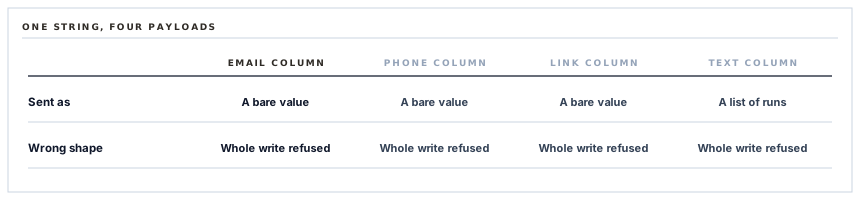
Take an email address. Written into a column declared as an email address, it is sent one way. Into a phone column, another. Into a link column, another. Into a text column it becomes a nested structure, because text in this system is formatted text and formatted text is a list of runs.
Same string, four payloads. And a payload in the wrong shape is refused — the whole write, not the one field.
The value does not decide its own shape. The column does, and the column is not ours.
So the schema is read first
Before anything is written, the connector asks the database what its columns are and what type each one is. That answer drives everything after it.
-
Which column is the title?
Every database has exactly one, and it can be called anything. Found by its type rather than assumed to have a particular name.
-
Which other columns exist?
Values for columns that are not there are dropped rather than sent, because a property the database has never heard of is refused.
-
What type is each one?
This is what decides the shape of every value written into it.
-
And a type we do not handle?
The value is dropped rather than guessed at. A wrongly shaped value fails the whole write; an omitted one leaves a column empty.
The first point is worth dwelling on. The title column of a Notion database can be renamed to anything by anybody. A connector assuming a conventional name works on databases that happen to use it and fails on the rest, and the failure reads as a permission or configuration problem rather than as a naming one.
Finding it by type is the only correct approach: there is exactly one column of that type, and it is the one regardless of what somebody called it.
Dropping rather than guessing
Two of the four checks drop a value rather than attempting it, and the reasoning is the same both times.
| Situation | Drop the value | Guess a shape |
|---|---|---|
| A column that does not exist | That field is empty | The whole write is refused |
| A column type we do not handle | That field is empty | The whole write is refused |
| Consequence | A record with a gap | No record at all |
A record present with a missing column is visible, fixable and obviously incomplete. A write refused because one optional field was shaped wrongly loses everything, including the fields that were correct.
When one bad field can cost the whole record, dropping it is not laziness — it is the choice that keeps the other fields. The same reasoning appeared with the recipient list that skips malformed entries and the archive job that steps over a document it cannot render.
And one thing that is refused outright
A database with no title column at all is refused with a reason rather than written to.
It is the one case where dropping would be wrong. The title is how a page is identified — by people looking at it, and by the matching that decides whether a page already exists. A page written without one has no name and cannot be found again, so every sync would add another.
The refusal names the cause, which turns an odd situation into a one-line explanation instead of a growing pile of unnamed pages. What happens when that matching finds nothing is its own subject, covered separately.
Caps, quietly applied
Text values are trimmed to the provider's limit before sending. It is the same reasoning as the chat connector that trims its fields: an over-long value is refused outright rather than shortened, so the trim happens on our side or the write does not happen at all.
For contact records the limit is far above anything real. It is applied because the one time it is not is a supplier whose registered name runs to a paragraph, and that record is exactly as worth syncing as the others.
Empty values, and whose blank wins
A field with nothing in it is left out of the request entirely rather than written as empty.
On a write that may land on an existing page, that distinction is the difference between leaving a value alone and erasing it. A phone number missing from your records and present in Notion — because somebody added it there — survives, because nothing was said about that column.
It is the same absent-versus-empty rule that runs through every connector in this series, and this is the context where the consequence is most direct: your blank should never beat their value.
What is in place, layer by layer
Writing into a typed database
The schema read before writing
Column names and types are fetched first, and everything written afterwards is shaped to what was found.
The title column found by type
Discovered rather than assumed, because it can be renamed to anything and a connector that guesses works only on databases that kept the default.
Values shaped per column type
The same string becomes a different payload for an email, a phone number, a link or formatted text, because each type accepts only its own shape.
Unknown columns dropped
A value for a column that does not exist is left out, because sending it would refuse the entire write rather than that one field.
Unhandled types dropped
A column type we cannot shape a value for is skipped rather than guessed at, so a record arrives with a gap rather than not arriving.
A database with no title refused
The one case where dropping would be wrong, because a page with no name cannot be found again and every sync would add another.
Text trimmed to the provider's limit
An over-long value is shortened rather than refused, so an unusually long name still produces a record.
Empty values omitted
A field with nothing in it is left out rather than written as empty, so a blank here does not clear a value somebody entered there.
Only the columns being written are ever mentioned in a request. Everything else in the database is not merely untouched — it is absent from the conversation entirely.
Three positions held on purpose
- A field we cannot write correctly is dropped rather than guessed at. Where one wrongly shaped value refuses the entire write, keeping the other fields is worth more than attempting the last one.
- The title column is discovered rather than assumed. It can be renamed by anybody, and a connector that assumes a conventional name fails in a way that reads as a permission problem.
- An empty value is never written. On a write that may land on an existing page, sending a blank erases what somebody typed and reports success — which is the quietest kind of data loss there is.
Five questions about writing into somebody else's database
How do you know what columns exist?
A good answer sounds like
They read the schema.
What ours actually is
Fetched before writing, and every value is shaped to the type found.
What if we renamed the title column?
A good answer sounds like
It still works.
What ours actually is
It is found by its type rather than by its name.
What if a column type is unsupported?
A good answer sounds like
That field is skipped.
What ours actually is
Dropped rather than guessed, because a wrong shape refuses the whole record.
Will a blank in our records clear a value?
A good answer sounds like
No.
What ours actually is
Empty values are omitted rather than written, so nothing is erased by an absence.
What about columns you do not write?
A good answer sounds like
Untouched.
What ours actually is
They are not mentioned in the request at all.
Our take
Writing into a typed database owned by somebody else is a good test of whether an integration was built by reading or by guessing. The guessed version assumes column names, assumes types, sends the same shape everywhere, and works on the database it was developed against. The read version asks what is there, shapes each value to what it finds, drops what it cannot handle, and works on databases nobody involved has ever seen. The second costs one extra request per sync and a few lines of mapping, and it is the difference between a connector that works for your customers and one that works for you.
A connector that asks before it writes
Reading the schema costs one request and means the integration works against a database built by somebody with their own naming, their own columns and their own conventions.
Talk through contact syncingFrequently asked questions
Do we have to name our Notion columns in a particular way?
No. The title column is found by its type rather than its name, and other columns are matched by the names you actually have — values for columns that do not exist are simply not written. What matters is that the columns you want filled exist with types the connector can shape a value for.
What happens if a column type is not supported?
That field is left empty and the rest of the record is written. A value in the wrong shape would cause the provider to refuse the whole page, so dropping one field is the choice that keeps the others.
Will syncing overwrite notes we added in Notion?
Only in the columns being written, and not with blanks. Values with nothing in them are omitted rather than sent empty, and columns the connector does not write are never mentioned in the request at all.
What if our database has no title column?
The connector refuses with a reason rather than writing. A page without a title cannot be identified — by people or by the matching on the next sync — so every run would create another one. It is the one case where skipping the field would be worse than stopping.
Is there a limit on how long a value can be?
Yes, and text is trimmed to it before sending. The limit is far above anything a contact record contains; it is applied because the exception is a supplier whose registered name runs to a paragraph, and that record is as worth syncing as any other.
