
An Integration You Have to Invite
A valid Notion token that has been shared with nothing can reach nothing, and it reports itself as working. That is the whole access model, and the empty list it produces on the first attempt is the most useful thing about it.
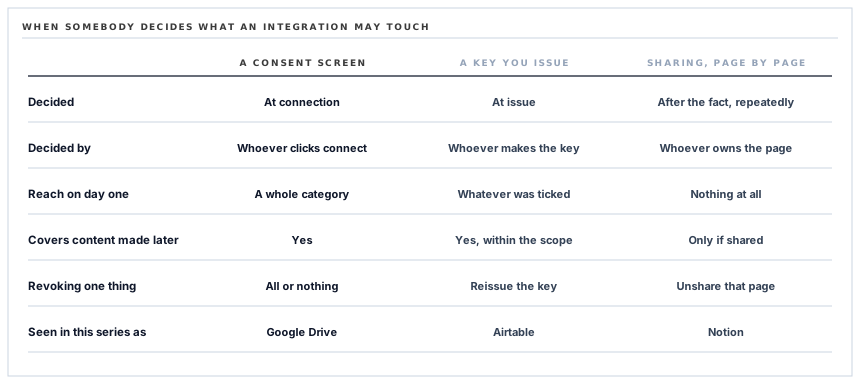
There are three ways an integration can be told what it is allowed to touch, and they differ in when the decision is made. It can be made at connection time, by a consent screen listing permissions. It can be made at issue time, by whoever creates the key. Or it can be made afterwards, page by page, by whoever owns the content — which is the arrangement here, and it produces a first-run experience that looks exactly like a broken connection.
A token that works and reaches nothing
You create an integration in your own Notion settings and it gives you a secret. You paste the secret in, test the connection, and it says the token is valid.
Then you go to pick a database to sync into, and the list is empty.
Nothing is wrong. The token is genuinely valid, the request genuinely succeeded, and the correct answer to which databases can this integration see is genuinely none — because seeing anything in Notion requires somebody to have shared it with the integration, from inside Notion, one page at a time.
Why an empty list is the right first answer
Compare it with the two other shapes, both of which appear elsewhere in this series.
A consent screen asks once, up front, for a category of access — see and edit your files — and then it is done. It is convenient and it is coarse: the grant covers things that do not exist yet, and revoking it is all or nothing.
A key issued in your own account is better, because the person creating it chooses the reach. It is still a decision made in advance by somebody thinking about integrations rather than about content.
Per-page sharing moves the decision to the person who owns the page, at the moment they want it synced. Nothing is reachable by default and every grant is a deliberate act, which is the correct default for a workspace that also contains meeting notes, salary discussions and a document called Redundancy Plan.
The version that looks broken on the first attempt is the version where nothing was quietly included.
It also means revocation is granular and immediate. Removing the integration from one database stops that database syncing and leaves everything else alone, and it is done by the page's owner without touching any settings screen of ours.
What the picker can and cannot show
The database list is built from a search restricted to databases, and search in Notion returns only what the caller has been given.
Which makes the picker a genuinely accurate statement of reach, rather than a list of everything with some of it disabled. If a database is not in that list, we cannot read it, cannot write to it, and cannot tell you it exists.
Two practical details follow. The list is capped at a hundred databases, which is far more than anybody picks a sync target from and is worth knowing if your workspace shares hundreds. And a name in that list is assembled rather than read: a Notion title is not a string but a sequence of formatted fragments, so the display name is the fragments joined together, falling back to Untitled for a database nobody has named.
The title property is the identity, and it can be called anything
Every Notion database has exactly one property of the title type. It is the column whose value names the page, and it is the one that cannot be removed.
The sync finds it by type rather than by name, for the same reason the Airtable connector resolves a primary field by identifier: a database whose title column is called Client, or Supplier, or Organisation works exactly as well as one called Name.
A database with no title property stops the run once, with the reason, rather than attempting two hundred writes that will each fail identically. That case is rare in practice — Notion databases have one by construction — and the check costs nothing, which is the right price for a guard against a state you have not personally seen.
A version header with a date in it
One more detail, and it is a small thing that prevents a large category of problem.
Every request carries a header naming the version of Notion's API to answer it with, and that version is a date fixed in our code. Notion resolves the call against the contract as it stood on that day.
So a change they ship next year — a renamed field, a differently nested response — does not alter what arrives here. The integration is pinned to a contract rather than tracking a moving one, and moving to a newer contract is a deliberate edit with a diff, made when somebody has read the changes.
The failure this avoids is the worst kind of integration failure: one that arrives on a day nobody deployed anything, in a system that has been working for a year, because a third party improved something.
What is in place
How access to a Notion workspace is bounded
Nothing reachable until it is shared
A valid token with no pages shared with it reaches nothing, so the default state of a new connection is access to no content at all.
Grants made per page, from inside Notion
The decision belongs to whoever owns the content and is made where the content is, rather than on a settings screen.
Revocation one database at a time
Removing the integration from a page stops that page and leaves every other grant intact, with no reconnection needed.
A picker that states real reach
The database list is what the integration has been given, so absence from the list means genuinely unreachable rather than not selected.
A test that separates two questions
The connection test reports that the token is valid, which is a different claim from having something to sync, and the empty picker answers the second.
The title property found by type
Identity comes from the database's own title column whatever it is called, so no naming convention is imposed on the destination.
A missing title property stops the run
The reason is reported once rather than as two hundred identical rejections from the far end.
Titles assembled from their fragments
A Notion title is a sequence of formatted pieces, joined for display, with a fallback for a database nobody has named.
The API version pinned to a date
Every request names the contract it wants to be answered against, so a change shipped by Notion cannot alter a response we already parse.
The token stored encrypted
The secret is encrypted at rest, hidden from serialisation, and a newly saved one is treated as unverified until it has answered a request.
The database id as the truth
The name is kept only to display, so renaming a database in Notion changes the label and not the target.
A bounded wait on every call
Fifteen seconds per request, so an unresponsive workspace costs a known amount of time.
The first three items are one property seen from three angles: the grant is not ours to make, not ours to widen, and not ours to keep. Everything after them is a consequence of building against a list that can legitimately be empty.
Three positions held on purpose
- An empty picker is shown rather than explained away. The list is what the integration can actually reach, and padding it with unreachable databases to make the screen look populated would turn an accurate statement into a misleading one.
- The connection test says what it tested. It reports a valid token, not a working sync, because those are two different facts and one of them depends on something only the customer can do.
- The API contract is pinned to a date. Tracking the newest version automatically means a third party can change our behaviour on a day we did not deploy, which is the kind of failure nobody has a runbook for.
Five questions about connecting a knowledge workspace
What can you see after I connect?
A good answer sounds like
Nothing yet.
What ours actually is
Exactly nothing, until somebody shares a database with the integration from inside Notion.
How do I limit you to one database?
A good answer sounds like
Share only that one.
What ours actually is
The grant is per page, so sharing one database is the whole limit.
How do I revoke it?
A good answer sounds like
In Notion, per page.
What ours actually is
Remove the integration from a database and that database stops, with no reconnection anywhere.
Why is my database list empty?
A good answer sounds like
Because nothing is shared.
What ours actually is
The picker shows real reach rather than a padded list, so empty means empty.
What happens when Notion changes their API?
A good answer sounds like
Nothing, if you pin a version.
What ours actually is
Every request names a dated contract, so a change lands only when we choose to move.
Our take
The access model here is the best of the three in this series and it is the one that generates support questions, which is a fair summary of security done properly. A consent screen is one click and grants a category. A key issued in your own account is a good middle. Per-page sharing grants literally nothing until a person decides otherwise, and the price is that the first attempt at setting it up ends with an empty list and no error — the exact signature of something broken. We could pad that list, or hide the picker until something is shared, or word the test result more warmly. All three would make the screen feel better and the statement less true. The empty list is the connector telling you precisely what it can reach, on the one occasion when the answer is nothing.
Ask what a new connection can already see
The answers range from your entire workspace to nothing at all, and the difference is decided before anybody clicks connect.
Talk through workspace connectionsFrequently asked questions
I connected Notion and the database list is empty. What is wrong?
Nothing. A Notion integration reaches only what has been shared with it, so a new connection sees no content at all. Open the database in Notion, share it with the integration, and it appears in the picker.
What can you read once I share one database?
That database, and anything else somebody has shared with the same integration. A page that has not been shared cannot be read, written or listed — the search that builds the picker returns only granted content.
How do I stop the sync for one database without disconnecting everything?
Remove the integration from that database in Notion. The grant is per page, so the rest continues and nothing needs reconnecting on our side.
Does my database need a column called Name?
No. Every Notion database has exactly one title property and it is found by its type rather than its name, so it can be called Client, Supplier or anything else.
What happens if Notion changes their API?
Every request names the version of their contract it wants to be answered against, and that version is fixed in our code. A change they ship does not alter the responses we parse until we deliberately move to a newer one.
