
A Key You Hide on Their Record
The Salesforce connector needs an administrator to create a field before it can identify its own records. This one needs nothing, because a calendar event has a private compartment for exactly that — invisible to the people reading the calendar and searchable by us.
Every connector that pushes records into another system has to answer the same question, and this series has now collected six answers to it. Match on a name. Compute an identifier from a stable field. Store the remote identifier. Ask an administrator for a custom field. Use the provider's own upsert. And this one, which is the neatest of the six and available more often than people realise: put your key somewhere on their record that nobody has to see.
A compartment nobody looks in
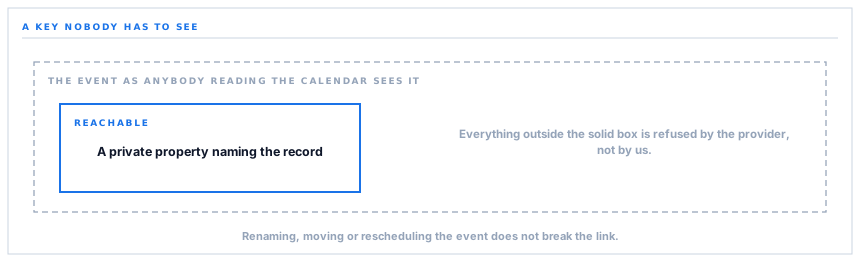
A calendar event has a place for private application data — properties attached to the event, not shown in any calendar interface, readable only by the application that wrote them.
So when a delivery deadline is pushed to a calendar, the event carries a key identifying which record it came from. Nobody looking at their calendar sees it. The event is a normal event with a title and a date.
And the calendar can be searched by that key. So the next time the same deadline is pushed, the connector asks for the event carrying that key, finds it, and updates it — rather than creating a second one.
The identifier is on their record, invisible in their interface, and searchable by us. It is the arrangement every other approach in this series is a compromise for.
Compared with the alternatives
| Approach | Costs | Fails when |
|---|---|---|
| Match on a title | Nothing | Anybody edits the title |
| Store the remote identifier here | A column, and a mapping to keep | A record is restored from a backup |
| Ask for a custom field | A schema change and a conversation | Never, but it has to be agreed |
| Hide a key in private metadata | Nothing | Never — and nobody has to agree to it |
The last row is strictly better than the third and needs nobody's permission, because the compartment already exists and is meant for this. It is worth going looking for on any provider you integrate with: many systems have a private metadata bucket, and it solves the identity problem outright.
It also means a person can rename the event, move it, or drag it to another day, and the next push finds it and corrects it — because identity never depended on anything they can see.
A field that looks like a no-op and is not
One trap here is worth the whole post on its own, because it is the most counter-intuitive thing in the connector series.
A calendar event can carry reminder settings. There is a value meaning use the calendar's defaults, which reads exactly like saying nothing at all.
It is not. On an update, that value is merged with whatever reminder overrides the event already has — and an event that says both use the defaults and here are specific overrides is contradictory, so the provider refuses the entire write.
Not the reminders. The whole update. A deadline change fails because of a field that was included to mean nothing.
The connector omits the field entirely, and the calendar's defaults apply anyway — which is what saying nothing was supposed to achieve. The explicit version of a default is not always equivalent to its absence, and this is the sharpest example of that rule anywhere in this series.
It is also the reason the reasoning sits in a comment beside the omission. A missing field looks like an oversight, and the next person to read it would add it back.
The day that ends tomorrow
A second trap, older and better known, and still caught constantly.
An all-day event's end date is exclusive. An event on the fourteenth ends on the fifteenth. Set the end to the fourteenth and it has no duration — depending on the client, it renders on the wrong day or not at all.
So a single-day deadline is written with an end one day later than the day it is about, which reads as a bug in the code and is the correct value.
Both traps share a shape worth naming: the obvious value is wrong and the correct value looks like a mistake. Neither is discoverable from a working example, because a working example already has the right values in it and nothing marks them as surprising.
And a scope that only sees its own work
The permission requested for the calendar reaches events this application created. Not your calendar, not your colleagues' meetings — the deadlines it put there.
That is the same least-privilege arrangement as the document archive connector, and it has the same property: it is a boundary Google enforces rather than a policy we describe. Somebody reviewing the connection in their own account settings can read exactly what it covers.
It also makes the private key more than a convenience. Since the connector can only see its own events, searching by the key is not narrowing a larger result — it is the only kind of search available, and it happens to be the right one.
Reading back rather than trusting
One last capability, and it exists for the same reason as the accounting connector's read-back.
The event for a given key can be fetched, so a sync can be checked against what is actually on the calendar rather than against what the code believes it wrote.
Those two things diverge more often than anybody expects — a write that reported success and was superseded, an event somebody deleted, a value the provider adjusted. A push tells you what you sent; only a read tells you what is there, and the difference is the whole subject of one of the earlier posts in this series.
What is in place, layer by layer
Deadlines on a calendar
A private key on every event
The record it came from is stamped into the event's private application data, invisible in any calendar interface and searchable by the connector.
Upsert by that key
An existing event carrying the key is updated and a new one created otherwise, so repeated pushes correct rather than duplicate.
Immune to anything a person changes
Renaming, moving or rescheduling an event does not break the link, because identity never depended on anything visible.
Deleted events excluded from the search
A binned event is not matched, so a deadline somebody removed is recreated rather than resurrected in place.
The reminders field deliberately omitted
Including the value that means "use defaults" merges with existing overrides and makes the provider refuse the whole update; omitting it applies the defaults anyway.
All-day dates written exclusively
A single-day deadline ends the following day, which is what the format requires and what makes it render on the right day.
A scope limited to its own events
The permission reaches events this application created, enforced by the provider rather than described by us.
A read-back for verification
The event for a key can be fetched, so a sync is checked against the calendar rather than against what the code believes it wrote.
The calendar chosen per workspace
A specific calendar or the account's main one, encoded for the address so a calendar identifier with unusual characters still resolves.
The private metadata bucket is the provider's own feature and exists for exactly this. Where a system offers one, it solves the identity problem without a schema change and without anybody agreeing to anything.
Three positions held on purpose
- Identity is written into private metadata rather than matched on anything visible. It costs nothing, needs no agreement, and survives every edit a person can make to the event.
- A field is omitted rather than set to its documented default. The explicit default is not equivalent to absence here — it merges with existing values and makes the provider refuse the entire write.
- The reasoning behind a missing field is written beside it. An omission looks like an oversight, and without the note the next person to read the code adds it back and reintroduces the failure.
Five questions about pushing to a calendar
How do you avoid duplicate events?
A good answer sounds like
A key on the event.
What ours actually is
A private property identifying the record, searched before writing.
What if somebody renames an event?
A good answer sounds like
Nothing breaks.
What ours actually is
Identity is in private data, so a rename, a move or a reschedule is corrected on the next push.
What can the connector see?
A good answer sounds like
Its own events.
What ours actually is
A scope covering events this application created, enforced by the provider.
What if somebody deletes a deadline?
A good answer sounds like
It comes back.
What ours actually is
Deleted events are excluded from the search, so the next push creates a fresh one.
Can you check the calendar matches?
A good answer sounds like
Yes.
What ours actually is
The event for a key can be read back, so a sync is verified rather than trusted.
Our take
When you are integrating with something new, the first question worth asking its documentation is whether it will let you attach your own metadata to its records. A private key you can write and search on solves the identity problem completely — no name matching, no stored mapping, no schema change, nothing for a person to agree to, and immunity to every edit somebody makes in the interface. It is available on far more systems than people check, usually under a name like custom properties or extended attributes, and it is almost never the first thing in the documentation. Fifteen minutes of looking saves an entire category of duplicate-record problem for the life of the integration.
Deadlines where people already look
Delivery dates, approval windows and RFQ closes on the calendar your team already has open — corrected rather than duplicated on every change.
Talk through calendar deadlinesFrequently asked questions
Will pushing deadlines twice create duplicate calendar entries?
No. Each event carries a private property identifying the record it came from, and the connector searches for that before writing — updating the existing event rather than adding another. The property is invisible in every calendar interface.
What happens if somebody edits or moves an event?
The next push finds it and corrects it, because identity is stored in private data rather than in the title or the date. A renamed or rescheduled event is the same event as far as the connector is concerned.
What if we delete a deadline from the calendar?
Deleted events are excluded from the search, so the next push creates a fresh one rather than trying to resurrect the deleted entry. If a deadline should not be on the calendar, removing it at the source is the way.
What can the connector see in our calendar?
Events it created. The permission requested is scoped to those rather than to your calendar as a whole, which is enforced by Google rather than promised by us — you can read the exact wording in your own account's security settings.
Why do single-day events show an end date of the following day?
Because an all-day event's end date is exclusive in the calendar format. An event on the fourteenth ends on the fifteenth. Setting the end to the same day gives it no duration, and it renders on the wrong day or not at all depending on the client.
