
Add, Never Overwrite
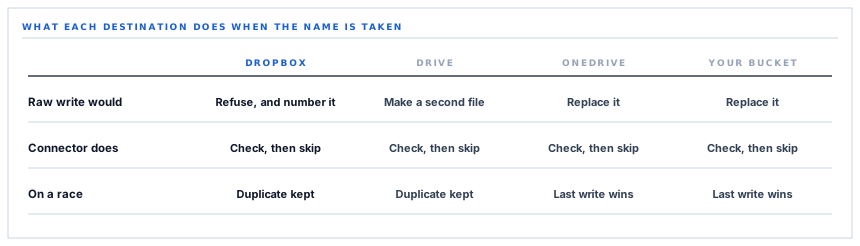
Four storage connectors archive the same documents under the same filenames. Ask each one what happens when the name is already taken and you get four different answers — one skips, one refuses to overwrite on principle, one replaces, and one would replace if it were not stopped first.
An archive is a set of files named after the things they are. That is the only design decision that matters in a document archive, and everything interesting follows from it — including a question that sounds trivial and is not. What should happen when a file with that name is already sitting there? There are three defensible answers and they lead to three different filing cabinets.
The three answers, and who gives which
Skip it, replace it, or keep both. Each is right for some purpose. The problem is that a storage API picks one for you by default, the default differs per provider, and nobody reads that line of the documentation until a document has gone missing.
| Provider | What the write mode does on a collision | What the connector does about it |
|---|---|---|
| Dropbox | Refuses to overwrite. Adds a numbered copy instead. | Checks first and skips, so the numbered copy is a backstop rather than the plan. |
| Google Drive | Would create a second file with the same name — Drive allows that. | Searches the subfolder by name first and skips a match. |
| OneDrive | Replaces the file at that path. | Checks the path first and skips a match. |
| Your own storage bucket | Replaces the object at that key, silently. | Writes. A re-archive of the same document replaces the object. |
Read that table twice, because the fourth row is the one that will surprise you and it is the honest answer rather than the flattering one.
Dropbox is the one that will not overwrite even if asked
The upload sent to Dropbox declares its write mode as add and turns on automatic renaming. Add means: put this file here, and if something is already here, do not touch it. Automatic renaming means: and rather than failing, give mine a number and put it beside the existing one.
That combination is a deliberate belt and braces. Before uploading anything, the connector asks Dropbox whether the path already holds a file, and skips the upload if it does. So in ordinary operation the write mode never comes into play at all.
It comes into play in the case the check cannot cover. Two archive jobs for the same document, running at the same moment on two workers — both ask, both are told no, both upload. With overwrite semantics one of them wins and the loser is gone without trace. With add semantics you end up with an invoice and an invoice numbered two, which is untidy and completely recoverable.
A duplicate you can see is a filing problem. A file that was silently replaced is an archaeology problem.
The third flag on that upload is about somebody's evening
There is a third setting on every upload, and it does nothing for correctness at all. It mutes the notification.
Dropbox is a consumer product before it is an archive target, and it tells people when files arrive. The person who connected the account has the desktop client running. Without that flag, a backfill of eight hundred invoices is eight hundred notifications on somebody's laptop on a Tuesday afternoon, and the connector gets disconnected by the end of the week for reasons that have nothing to do with whether it works.
It is the sort of detail that never appears in a feature list and decides whether a feature survives contact with its user.
What the connection is made of
Dropbox issues a short-lived access token and, when asked for offline access at consent time, a refresh token that outlives it. Both are stored encrypted against your workspace.
The access token lasts about four hours rather than the hour Google gives you, which changes nothing about how the connector behaves — it checks the stored expiry before every call and renews when there is under a minute left either way — but it does mean a long backfill against Dropbox will typically run start to finish on one credential.
One structural difference from Drive is worth knowing because it shows up as an absence. Dropbox creates folders on the way past: upload to a path whose folders do not exist and Dropbox makes them. So there is no folder-creation step in this connector, no stored folder id, and no lookup cache — the path is the instruction, and it is enough.
What is in place, layer by layer
The Dropbox connector as it stands
Offline consent for a durable connection
The authorisation asks for offline access, which is what makes Dropbox return the refresh token the connection lives on after the first four hours.
Tokens encrypted at rest
Access token and refresh token both stored through an encrypted cast on a row that belongs to one workspace.
Renewal before the call
The stored expiry is checked ahead of every request and the token renewed with under a minute left, so an upload never discovers the expiry itself.
A deterministic path per document
Your chosen root, then a folder named for the document type, then the document number as the filename. The same record always produces the same path.
Existence checked before upload
A metadata lookup on the exact path decides whether there is anything to do, so a repeat run costs one small request rather than a re-render and a transfer.
Add mode, never replace
The upload itself refuses to overwrite. Where the pre-check cannot help — two workers, one instant — the result is a numbered copy rather than a lost file.
Notifications muted
Archive uploads do not raise desktop alerts, so a backfill is invisible to whoever has the Dropbox client running.
A test that writes a real file
The connection test uploads a small text file to your root folder. Seeing it proves credential, path and write permission in one go.
Per-type opt-in
Five document types, each separately switchable, and a connected account that archives nothing until you choose one.
Dropbox creates missing folders during an upload, so the connector stores a path rather than a folder id and needs no folder-creation step at all.
Three positions held on purpose
- A collision is resolved in favour of keeping both files. Where a provider offers the choice, the connector takes the option that cannot lose a document, and accepts that this occasionally produces a duplicate somebody has to delete.
- A failed existence check is read as "not there" rather than as "do not proceed". The consequence of guessing wrong in that direction is one extra file; the consequence of guessing wrong in the other is a document that was never archived and nothing to say so.
- The write mode is fixed rather than configurable. A setting that turns overwriting on would be a setting that quietly changes what your archive is, and it would be found by whoever wanted to tidy up rather than by whoever understood the trade.
Five questions to put to any archive destination
What happens when the filename already exists?
A good answer sounds like
A specific answer per provider.
What ours actually is
Skipped after a check. On Dropbox the upload itself also refuses to overwrite, so a race produces a numbered copy.
Can two simultaneous runs lose a file?
A good answer sounds like
No, and here is the mechanism.
What ours actually is
On Dropbox, no — add mode makes overwriting impossible regardless of timing.
How long is the credential good for?
A good answer sounds like
A number, and a renewal story.
What ours actually is
About four hours, renewed before any call that finds under a minute left.
Does a big backfill disturb anybody?
A good answer sounds like
It should not.
What ours actually is
Uploads are muted, so the desktop client stays quiet through a run of any size.
Where exactly do files land?
A good answer sounds like
A path you can predict.
What ours actually is
Your root, a folder named for the document type, the document number as the name.
Our take
Overwrite behaviour is the least glamorous thing in an integration and one of the few that can quietly destroy something. What makes it dangerous is that every provider has a sensible default, every default is different, and the code that talks to them looks identical either way — one line, one flag, no visible consequence until the day two things run at once. The useful discipline is not to pick the clever answer. It is to know which answer you picked, per destination, and to be able to say it out loud. We picked skip-if-present everywhere, and where the provider lets us go further, we picked the mode that physically cannot replace a file.
Know what your archive does on a collision
It is one question, it takes a minute, and the answer tells you whether your document archive is a record or a rolling snapshot.
Talk through document archivingFrequently asked questions
If a document is corrected and re-issued, does the archive update?
No. The filename comes from the document number, so the corrected version produces the same path, the existing file is recognised, and nothing is uploaded. To get the revision into the folder, remove the old file and re-run the sync — which is deliberate, because silently replacing an archived document is exactly what an archive should not do.
I have a file ending in (1) — what happened?
Two archive attempts for the same document overlapped closely enough that both checked before either wrote. Dropbox refused to overwrite and numbered the second. The two files are the same document; delete either one.
Does the connector ever delete anything from my Dropbox?
No. It writes and it reads metadata to decide whether to write. There is no delete path in it at all, which also means clearing out duplicates or old archives is something you do in Dropbox rather than something you can ask the connector to do.
Can I change the root folder after connecting?
Yes, and it takes effect for everything archived afterwards. Files already written stay where they are — the connector has no concept of moving an archive, and a path change is read as a new destination rather than as an instruction to relocate the old one.
Why does the connection test file stay in my folder?
Because deleting it would need a permission the connector does not use, and because leaving it is honest — it is dated, so it doubles as a record of when the connection was last proved end to end. Deleting it yourself does nothing to the connection.
