
Nothing Is Archived Until You Tick It
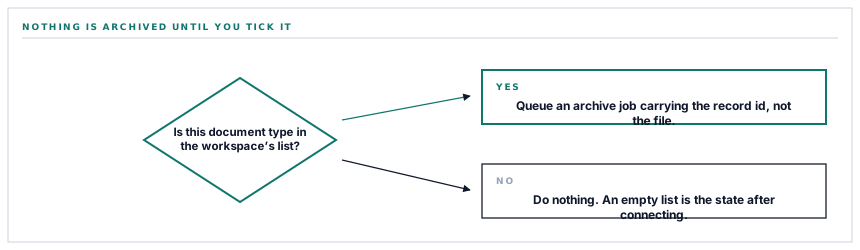
Connecting a Drive account archives nothing. There is a second decision after the connection — five checkboxes, one per document type — and until one of them is ticked the connector is live, authorised, and deliberately idle.
Most integrations treat connection as consent to everything. You authorise the account and the product starts copying, and the first sense you get of what it decided to copy is when you look in the folder. This one splits the decision in two on purpose, because the question "may we reach your Drive" and the question "which of your documents should leave the building" are not the same question and should not be answered by the same click.
The list starts empty
A connected Drive holds a list of document types it archives. That list starts as nothing. The test that decides whether a given document is copied asks whether its type appears in that list, and an absent list fails that test for every type there is.
So the state immediately after connecting is: authorised, folder created, connection tested, nothing copied. That reads as a bug for about four seconds and then reads as the right default for as long as you run the workspace. The five types are separately switchable because they carry genuinely different sensitivity.
-
Sales invoices
What you issued and to whom. Usually the first one ticked, because an invoice archive is what somebody asks for when a customer disputes a figure.
-
Purchase orders
What you committed to buy. The one a procurement audit tends to want in a folder somebody outside the system can open.
-
Payment receipts
Point-of-sale receipts, one per sale. High volume, and the one to think about before ticking if you run a busy counter.
-
Exported reports
Registers and reports as generated — PDF, spreadsheet or CSV. These are already files rather than renders, so they land as they were made.
-
Vendor documents
What a supplier uploaded during prequalification. Someone else's certificates and registrations, which is precisely why it is a separate decision.
The five types are five switches because a purchase order and a supplier's tax certificate are not the same kind of secret.
What happens the moment a document is produced
Archiving is not a nightly sweep. It hangs off the point where the document comes into existence, and the path from there is short and entirely made of refusals.
The document is produced. The archiver works out which workspace owns it — which is less trivial than it sounds, because different records in this system carry their workspace on differently named columns, and the archiver asks each record for its own rather than assuming. Then, for each connected storage provider in turn, it asks two questions: is this connection usable, and does this workspace want this type archived here. Both yes queues a job. Anything else is silence.
Note the shape of that: each provider is asked separately. A workspace archiving invoices to Drive and everything to its own storage bucket is a normal configuration, not a special case, and neither connection knows the other exists.
The job carries an id, not a document
What goes onto the queue is four small values: the workspace, the type, which kind of record it is, and its id. Not the PDF. Not the record. The job re-finds the record when it runs.
That is a deliberate trade and worth understanding, because it has three consequences you can feel.
| Because the payload is an id | The consequence |
|---|---|
| The queue stays small | Ten thousand archives is ten thousand tiny rows, not ten thousand embedded PDFs in a queue table. |
| The document is rendered late | What lands in Drive reflects the record at archive time, not at the instant the button was pressed. |
| A retry re-renders | Three attempts are allowed. Each one re-resolves and re-renders rather than replaying a stale copy. |
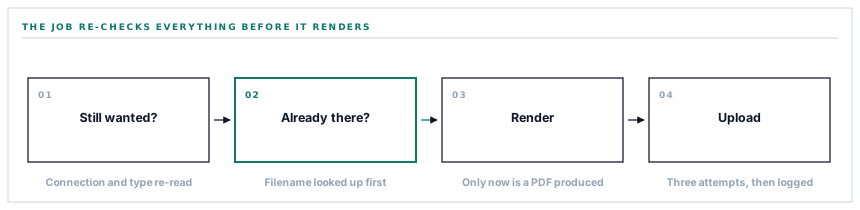
And it re-checks everything. The job does not trust the decision that queued it — it asks again whether the connection is usable, whether this type is still wanted, and whether the record it just loaded really does belong to the workspace named in the job. A type unticked in the ninety seconds between queueing and running is not archived. That is the correct answer, and getting it requires asking twice.
The filename is the whole idempotency story
Before rendering anything, the job works out what the file would be called and asks Drive whether that name is already in the subfolder. If it is, the job stops there — no render, no upload, no duplicate.
This is why the filenames are what they are. An invoice is archived as its invoice number. A purchase order as its order number. A receipt as its sale number. These are derived from the record rather than from the clock, so the same record always produces the same name, and the same name is how "already archived" is recognised at all.
The names are also cleaned to a filesystem-safe alphabet, which is the unglamorous detail that stops a supplier reference containing a slash from becoming a folder somebody has to go and find.
The practical payoff is that Sync now is safe to press repeatedly. Pressing it twice archives nothing twice. Pressing it after a failed run picks up only what did not land. That is not a promise made by policy; it is a consequence of naming files after the thing they are.
What is in place, layer by layer
The archive path, end to end
Per-type opt-in, empty by default
Five document types, five independent switches, and a connected account that archives nothing until one of them is on.
Archiving at the point of production
The hook sits where the document is generated, so the copy is made as part of the work rather than by a sweep that runs later and hopes.
Each provider guarded independently
Drive, Dropbox, OneDrive and your own storage bucket are asked separately whether they are usable and whether they want this type.
Ownership read from each record
The archiver asks every record which column carries its workspace instead of assuming one, because in this system they genuinely differ.
Tiny queue payloads
A job carries the workspace, the type, the record class and its id. The bytes are produced when the job runs.
Re-checked inside the job
Connection, type selection and record ownership are all verified again at execution time, so a setting changed after queueing is honoured.
Deterministic filenames
The document number is the filename, cleaned to a safe alphabet, which is what makes "is this already archived" answerable without a second database.
Existence checked before rendering
The job asks whether the name is already there before it renders a page, so a repeat run costs one lookup rather than one PDF.
Three attempts, then it stops
A transient failure is retried; a permanent one is not retried forever. A document that cannot be produced is logged rather than crashing the run.
Reports and vendor documents are read from storage as they are rather than re-rendered, because they were already files. Invoices, orders and receipts are rendered fresh at archive time.
Three positions held on purpose
- Nothing is archived by default. A connector that starts copying the moment it is authorised has made a decision about your data on your behalf, and the fact that the decision is usually the one you wanted does not make it yours.
- A document that will not render is logged and skipped rather than retried until the queue gives up. A malformed record is a thing for a person to look at, and burning three attempts on it delays the four hundred documents behind it in the line.
- The archive is written, never read. Nothing in the destination folder is treated as an instruction, which means a file somebody edits, renames or deletes in Drive cannot change a record in your workspace.
Five questions about any archive-as-you-go feature
What does it copy after I connect?
A good answer sounds like
Nothing until you choose.
What ours actually is
The type list starts empty and the test that gates every copy fails on an empty list.
Is running it twice safe?
A good answer sounds like
Yes, and here is why.
What ours actually is
Filenames come from document numbers, and an existing name is skipped before anything is rendered.
What is sitting in your queue?
A good answer sounds like
References, not documents.
What ours actually is
A workspace, a type, a class and an id. The PDF is produced when the job runs.
What if I turn a type off mid-run?
A good answer sounds like
It stops.
What ours actually is
Each job re-checks the selection when it executes, not only when it was queued.
Can the archive change my records?
A good answer sounds like
No — it is one-way.
What ours actually is
Nothing in the destination is ever read back. Archiving is a write.
Our take
The interesting engineering in an archive feature is not the upload. Uploading is four lines. The interesting part is the set of things it refuses to do — copy before being asked, copy the same document twice, copy a document belonging to a workspace that did not ask for it, hold a PDF in a queue for an hour, keep going after somebody has changed their mind. Every one of those refusals is a few extra lines that make the feature look identical when it is working, which is exactly why they get skipped. You find out which ones a product wrote the first time a run half-fails, and by then the folder is either right or it is a puzzle.
Decide which documents should leave the building
Five types, five separate answers, and no obligation to give the same answer to all of them. That is the conversation worth having before the connection, not after.
Talk through your archive policyFrequently asked questions
If I tick a type today, does it archive the documents already in my workspace?
Not on its own — the automatic hook runs at the point a document is produced, so it applies from now on. A manual backfill exists for exactly this, and it walks the most recent records of a type. Because filenames are deterministic, running it does not duplicate anything already archived.
Why does the receipt PDF look different from the one on screen?
It is not different, it is the till-roll rendering. Receipts are laid out on a narrow page whose height grows with the number of lines, in a monospaced face, because that is the shape a receipt actually is. Invoices and purchase orders use their full-page templates.
Does an archived document update when I edit the record?
No. The archive is a copy taken at a moment. An edited record produces the same filename, so the existing copy is recognised and left alone rather than replaced. If you need the revised version in the folder, the honest way is to remove the old file and re-run the sync.
What if the same document is due to go to two providers?
It goes to both, as two independent jobs. Each provider has its own connection, its own type selection and its own idea of what is already there, so one failing has no effect on the other.
How large a batch can the backfill handle?
It is capped per run rather than unbounded, and each document becomes its own queued job. That keeps a large backfill from monopolising the queue, and it means a run that is interrupted resumes cleanly, because the documents that already landed are recognised and skipped.
