
Cloud vs On-Premise ERP: The Real Trade-offs
Cloud or on-premise is one of the first big questions in any ERP decision, and it is usually answered by habit or by whoever is loudest in the room. Here is the honest trade-off — who owns the servers, what the cost really looks like, and who carries the burden of keeping it running.
Every ERP decision eventually hits the same fork: do you run the system in the cloud, hosted and managed by the vendor, or on-premise, on servers you own and maintain? The choice sounds technical, but it is really about money, risk, and who does the work of keeping the system alive. Both models can run the same software and deliver the same features; where they differ is in cost shape, control, and the ongoing burden that lands on you long after go-live. Deciding well means being honest about which of those you can actually carry.
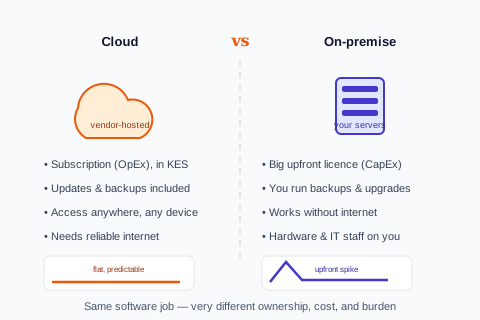
The core trade-off
Strip away the jargon and the difference comes down to a handful of practical dimensions. Here is how the two stack up side by side.
Cloud (vendor-hosted)
- Subscription cost (OpEx) — predictable monthly spend in KES, no big upfront outlay.
- Updates, backups, and security handled by the vendor.
- Accessible from any location or device — head office, branch, or phone.
- Scales up or down without buying hardware.
- Depends on a reliable internet connection.
On-premise (self-hosted)
- Large upfront licence and hardware cost (CapEx), then ongoing maintenance.
- You run backups, upgrades, security, and disaster recovery.
- Works fully offline, on your local network.
- Scaling means buying and configuring more hardware.
- Requires in-house IT capacity to keep it running.
The cost illusion
On-premise often looks cheaper because the licence can feel like a one-time purchase, while a subscription "never stops." That comparison is a trap. The true cost of on-premise is the licence plus servers, plus the IT staff or contractor to run it, plus backups and security, plus the upgrade projects every few years — and the risk that when it breaks, it is your problem at 2am. A cloud subscription folds most of that into one predictable figure. For most Kenyan SMEs without a standing IT team, the total cost of ownership favours cloud, and — just as importantly — the cost is knowable in advance rather than lurking in emergencies.
On-premise is rarely "buy once." It is buy the licence, then keep paying in servers, IT staff, upgrades, and the 2am phone call.
The hidden cost of self-hosting
When on-premise still makes sense
This is not a one-sided argument. On-premise remains the right call in specific situations: where internet connectivity is genuinely unreliable and offline operation is non-negotiable, where data-residency or contractual rules require systems to stay on your own infrastructure, or where you already have a capable IT team and want full control of the stack. A well-designed operations system should also handle the connectivity reality either way — offline-resilient capture that syncs when the connection returns often removes the single biggest reason SMEs cling to on-premise.
Our take
For most Kenyan SMEs, cloud wins on total cost, predictability, and freedom from maintenance — provided the system is genuinely offline-resilient for when connectivity drops. Choose on-premise only for a concrete reason: hard data-residency rules, truly unreliable internet, or an existing IT team that wants to own the stack. Do not choose it because a one-time licence looks cheaper than a subscription; that comparison almost always misleads.
Cloud-versus-on-premise is one of several questions worth settling before you shortlist systems — alongside how much system you actually need. If you are still deciding whether you have outgrown your current tools at all, start with the signs you have outgrown your accounting software, and when you are ready to evaluate options, the ERP buyer's guide walks the whole decision. The deployment model is important, but it is the delivery mechanism — not the thing that determines whether the software fits your operation.
See a cloud system built for Kenyan connectivity
Predictable KES pricing, updates and backups handled, and offline-resilient capture for when the connection drops — the cloud model without the connectivity fear.
See AWRA for Kenyan operationsFrequently asked questions
Is cloud or on-premise ERP cheaper?
For most SMEs, cloud is cheaper on total cost of ownership, even though a subscription never stops. On-premise adds servers, IT staff, backups, security, and periodic upgrade projects to the licence, plus the risk of downtime being your problem. The one-time-licence-looks-cheaper comparison ignores all of that and usually misleads.
When does on-premise ERP make more sense?
When you have genuinely unreliable internet and need full offline operation, when data-residency or contractual rules require systems on your own infrastructure, or when you already have a capable IT team that wants to control the stack. Outside those specific cases, the maintenance burden rarely justifies it for a growing SME.
What about internet reliability in Kenya — does that force on-premise?
Not necessarily. A well-designed cloud operations system offers offline-resilient capture that continues working during an outage and syncs automatically when the connection returns. That removes the single biggest reason SMEs choose on-premise, letting them keep cloud's cost and maintenance advantages without fearing a dropped connection.
Does the cloud-vs-on-premise choice affect the software's features?
Generally no — the same software can run either way and deliver the same capabilities. The deployment model affects cost shape, control, accessibility, and who carries the maintenance burden, not what the system can do. Decide whether the software fits your operation first; deployment is the delivery mechanism, not the fit.
