
One Reason the Push Did Not Arrive
Five things have to be true before a notification can reach a phone, and when one fails the other four look broken too. Both ends of the chain now name the first one rather than listing all five.
- Written by
- AWRA OpsHub TeamOperations Insights
- Issued
- Build
- Initial
"I am not getting notifications" is one sentence covering at least nine unrelated faults. The app was built without the messaging component. The operating system was told no and remembers. No token was ever minted. The token was minted and never sent. It was sent and refused. It was accepted and has since changed. Every one of those produces exactly the same experience: silence.
Which is why the support conversation is always the same, and always long. The user knows only that nothing arrives. The administrator can see that the message was sent. Both are right, and neither has the piece the other needs.
The chain, and why order is the whole answer
Push has five preconditions and they are strictly sequential. A build capable of minting a token. An operating system that permits notifications. A token actually issued. A server that accepted it. And that token still being the current one.
Because they are sequential, a diagnosis is not a list of everything that is wrong — it is the first thing that is wrong. Telling somebody their server registration is stale while the OS permission is denied is worse than useless: there is no token to register, so the second finding is a consequence of the first, and acting on it changes nothing.
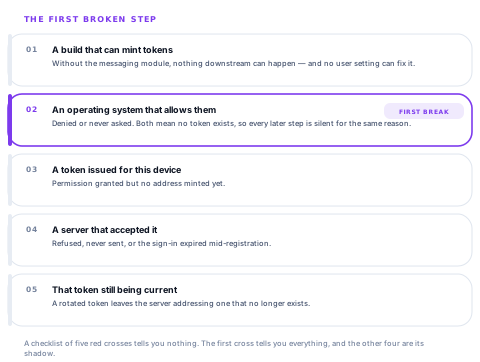
A checklist of five red crosses tells you nothing. The first cross tells you everything, and the other four are its shadow.
What the phone can say about itself
| First broken step | What the screen says | Who can fix it |
|---|---|---|
| No messaging in this build | Push is not available in this install | Nobody on the phone. This is a build, not a setting — so no action is offered. |
| Permission refused | Notifications are blocked | The person, in system settings. |
| Permission never asked | Permission has not been granted yet | The person, by accepting the prompt. |
| No token issued | No device token | Usually a restart; sometimes the device has no messaging services at all. |
| Sign-in expired mid-registration | The session was no longer valid when the token registered | The person, by signing in again. |
| The server refused the token | The server would not accept this device | An administrator. The device is reachable and unregistered. |
| Never reached the server | The token has not been sent yet | Connect and reopen — registration runs on launch. |
| Registered, then the token changed | The server holds an old token | Reopen while connected; a refreshed token re-registers. |
| Everything is in place | Registered, and here is when something last arrived | Nobody — this is the healthy state. |
Registered and silent is not a fault
A device that is correctly registered and has received nothing yet is told exactly that: it may simply be that there has been nothing to send. Implying a problem where there is none sends somebody to reinstall an app that was working — and the honest version of this screen has to be as careful about false alarms as about missed ones.
One detail in the ordering is worth stealing. A registration that failed with an explanation is reported before the generic "this device has never registered". Both are true at once, and only one of them says anything: "never registered" is the symptom, "your sign-in had expired" is the cause.
What the server can say about a send
The other half of the chain has its own failures, and they sort into five categories. A workspace administrator sees the last thirty days of failed sends bucketed by cause, with the reason and the next step written out rather than an error code to search for.
| Category | What went wrong | Severity |
|---|---|---|
| Missing token | No device token registered for that audience, so the send had nothing to deliver to | High |
| Configuration | Messaging credentials missing or unusable on the server, so no message could be authorised | High |
| Permission denied | The messaging provider refused the credentials — wrong role, or a token from a different sender | High |
| Stale token | The token is no longer valid: app uninstalled, storage cleared, or the token rotated | Medium |
| Provider error | The provider accepted the request and could not deliver it — outage, quota, transient fault | Medium |
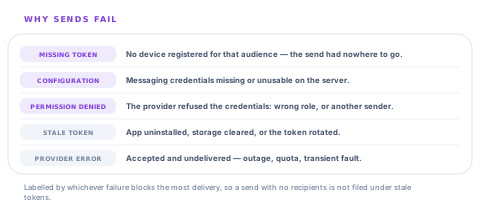
When a single send trips several of these at once, the row is labelled with the one that blocks the most delivery. A send with no tokens at all and a stale token among them is a missing-token problem; calling it a stale-token problem would send an administrator to purge a list that was never the reason nothing arrived.
A send with nobody to send to is a failure
It is tempting to record a notification with zero registered devices as a success — nothing errored, after all. It is the single most common reason a message does not arrive, and counting it as a success is how a workspace concludes that push works fine while none of their field staff have ever accepted the prompt.
The two halves answer different questions
On the phone
- Why this device is not receiving anything.
- Readable by the person holding it, in the field, with no administrator involved.
- Names one thing to do, or admits plainly that there is nothing they can do.
- Records when a message last actually arrived — the only proof of delivery that exists anywhere.
On the server
- Why sends across the workspace are failing, over the last thirty days.
- Grouped by cause, with the fix written next to it rather than an error string to search for.
- Labelled by the failure that blocks the most delivery when several coincide.
- Lists the stale tokens so they can be purged; the devices re-register on their next sign-in.
Neither view can answer the other's question. The server cannot tell you that a particular phone has notifications switched off at the operating system, because from where it sits that device simply has a token and is silent. The phone cannot tell you that credentials on the server are misconfigured, because it never hears about the send at all.
Why any of this had to be built
The original code did the reasonable thing: it wrapped the whole messaging setup in a catch and carried on, on the grounds that the platform retries on the next launch. Nothing crashed. Nothing was logged in a place anybody would look. Token registration was one step among several inside that block.
The result is the most expensive kind of silent failure — one where the product appears to work, the send is recorded, the administrator sees it, and only the person waiting for the notification knows anything is wrong. Making the chain observable did not change how push works. It changed how long it takes to find out why it did not.
Questions worth asking about notifications
How does a user find out why they get no notifications?
What you will hear
"They should check their settings."
How to read it
Which settings? There are at least five places it can break and only one of them is a phone setting. A product with no diagnostic screen is one where every case becomes a support ticket that starts with "have you tried reinstalling".
Does a send to a user with no registered device count as a failure?
What you will hear
"There was nothing to send to."
How to read it
It is the most common reason messages do not arrive, and counting it as a success is how a workspace believes push works while half the field team never accepted the prompt.
Can you tell me a notification was delivered?
What you will hear
"Yes, it shows as sent."
How to read it
Sent to the provider is not delivered to a phone. The only honest evidence of delivery is the device saying something arrived, and a vendor that treats the two as the same thing has not looked past their own logs.
What happens when a device token changes?
What you will hear
"It updates automatically."
How to read it
It does, on the next launch — which can be days. Ask what the workspace sees in the meantime, and whether stale tokens are surfaced and purgeable rather than accumulating quietly against every send.
Our take
Push notifications are the feature most likely to be silently broken for a subset of your staff, because the failure is invisible from both ends: the sender sees a send, the recipient sees nothing, and nobody has the missing piece. The fix is not more reliable delivery — nobody controls that — it is making the chain legible. One screen on the phone naming the first broken link and the one thing to do about it, one screen in the workspace grouping failed sends by cause with the fix beside it, and an honest refusal to call a send with no recipients a success. That does not make notifications arrive more often. It makes the ones that do not arrive take minutes to explain rather than a fortnight.
Delivery reporting is the natural extension here
The diagnosis on the device and the categories on the server are both single, well-bounded pieces. These are what people ask for next.
Per-recipient delivery status
Which of the intended recipients had a registered device at the moment of the send, on the notification's own record, so a gap is visible immediately.
Device push health across the fleet
Each handset's diagnosis gathered centrally, so an administrator can see the six people whose permission is denied without asking them.
A fallback channel on a failed push
Email or SMS on a message that could not be delivered to any device, for the notifications where arrival genuinely matters.
Scheduled stale-token purging
Automatic clean-up on your own schedule, so a workspace with high device turnover does not carry a growing list of addresses that no longer exist.
The failure categories, their precedence and the device diagnosis each live in one place with the reasoning beside them, which is what makes each of these a defined change.
Tell us which alerts you cannot afford to missCheck the quietest phone you have
Find the person who says they never get notifications and open the diagnosis on their handset. In our experience it names the answer in one line, and it is almost never the thing anybody guessed.
Talk to us about notificationsFrequently asked questions
Why am I not getting notifications on my phone?
There are five things that all have to be true, and the app will tell you which one is not: the build has to include messaging, the operating system has to allow notifications, a token has to be issued, the server has to have accepted it, and that token has to still be the current one. The screen names the first broken step and the one action that fixes it — or says plainly when there is nothing you can do from the phone.
Why does the app show only one problem instead of a list?
Because the steps are sequential, so everything after the first failure is a consequence of it rather than a separate fault. If notification permission is denied there is no token, and telling you the server registration is stale would send you to fix something that cannot be fixed and would change nothing if it were.
The workspace says the notification was sent. Why did nobody receive it?
Sent to the messaging provider is not the same as delivered to a phone. The most common cause is that nobody in the audience had a registered device — which is recorded as a failure rather than a success, precisely because counting it as a success is how a team concludes push works while half of them never accepted the prompt. The failed-sends view groups the last thirty days by cause with the fix beside each one.
What is a stale token, and does it matter?
It is a device address that is no longer valid — the app was uninstalled, storage was cleared, or the platform rotated it. Messages addressed to it go nowhere. They can be purged, and the device re-registers on its next sign-in; on the phone itself the same situation is reported as the server holding an old token, fixed by reopening the app while connected.
Can you prove a notification was delivered?
Only the device can, by recording that a message arrived, and that is what the diagnosis on the phone shows. Anything the server reports is about the send, not the arrival. We would rather state that plainly than present a send log as delivery evidence.
One send failed for several reasons at once. Which one is reported?
The one that blocks the most delivery. A send with no registered devices that also carried a stale token is reported as a missing-token problem — labelling it as stale tokens would send an administrator to purge a list that was never the reason nothing arrived.
