
It Has to Make the Spreadsheet Itself
There is no screen for choosing which spreadsheet to export into, and its absence is not an omission. The permission this connector asks for cannot open a file it did not create, so creating one is the only move available.
When you connect a spreadsheet export to a business system, the screen you expect next is a file picker. Choose a spreadsheet, choose a tab, done. This one does not have that screen, and the reason is more interesting than a missing feature: the permission it holds is scoped to files it created, so a spreadsheet you already own is not something it declines to touch — it is something it cannot see.
The narrowest scope that can still write
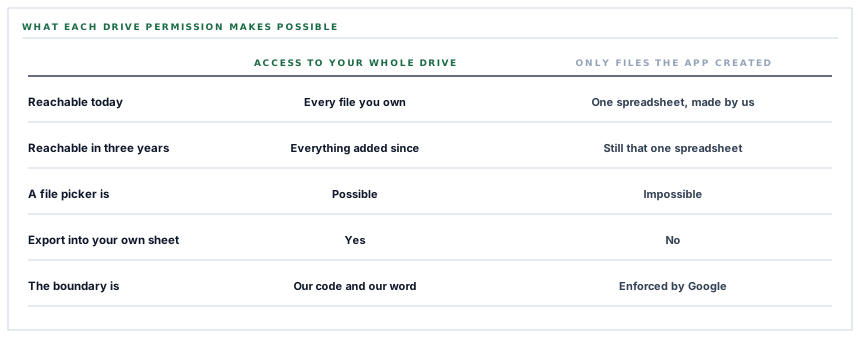
Google offers a permission that grants an application access to a user's entire Drive, and a much narrower one that grants access only to files the application itself created.
This connector asks for the narrow one. The boundary is enforced by Google rather than promised by us: a request for any other file in your Drive is refused at their end, whatever our code asks for.
The sibling connector in this series that archives documents into Drive uses the same permission for the same reason, and that post is about what the boundary protects. This one is about what it costs, because the cost lands on the shape of the product rather than on the security model.
So the first thing it does is create a spreadsheet
On the first export, the connector makes a spreadsheet in your Drive with a name identifying what it is, and remembers its identifier and its address.
It lives in your Drive, owned by your account, and you can move it, rename it, share it with your accountant and give it whatever access rules you like. All of that is Drive's business rather than ours; we hold no view on who else may read it.
What you cannot do is point the connector at a spreadsheet you built yourself, and that is the honest trade. You give up choosing the file, and in exchange nothing else in your Drive is reachable — including the thousands of files that will exist in it in three years, which a full-Drive permission would have covered in advance.
For an export destination that is a good trade, because the destination is disposable: it holds a copy of data that lives here. For a connector that had to read your existing files it would be the wrong trade, which is the difference worth noticing when a permission request looks over-broad.
A missing spreadsheet becomes a new one
One behaviour that follows from all this is worth knowing before it happens to you rather than after.
Before an export runs, the stored spreadsheet is checked. If that check does not come back cleanly — the file was deleted, moved to the bin, or is unreachable for any other reason — the connector creates a fresh spreadsheet and records its address in place of the old one.
That is deliberate and it is the recoverable direction: a workspace whose export target went missing gets a working export again without anybody filing a ticket. It also means a deleted spreadsheet does not raise an error, it produces a second spreadsheet — and the link on the settings screen quietly starts pointing at the new one.
Recovering silently and failing silently are the same behaviour seen from two different moods.
The version worth having eventually says both things: recreate the sheet, and say that it happened, because the old spreadsheet may still be in somebody's bookmarks. That is a notification rather than a new mechanism, and it is a good example of the kind of gap that is only visible once the recovery path is written down.
The refresh token, and the refusal that saves you a week
An access token from Google lasts about an hour. A refresh token is what lets a connection outlive that, and Google only issues one on a genuinely fresh consent.
Which produces a specific trap. An account that has authorised the application before can be sent back through the flow, approve instantly without seeing a consent screen, and arrive back with an access token and no refresh token. Everything looks connected. Every export works for an hour. Then it stops, permanently, and the settings screen still says connected.
Two things prevent that here. The authorisation request forces the consent screen every time rather than accepting a silent approval. And if a refresh token still does not come back, the connection is refused rather than saved — with the actual fix in the message, which is to remove the application from your Google account permissions and connect again.
That refusal is the single most useful line in the whole flow. Saving a connection that cannot renew itself is the version where somebody discovers the problem a week later, from a spreadsheet that stopped updating, with nothing anywhere that says why.
And a minute of margin on every token
A stored access token is reused only if it has more than a minute left on it. Otherwise it is refreshed before the request goes out.
The obvious version of that check asks whether the token has expired, which is correct and leaves a window: a token with four seconds left passes the check, the request takes six seconds, and the call fails with an authorisation error on a token that was valid when it was chosen.
A minute of margin costs an occasional unnecessary refresh, which is one cheap request. The failure it prevents is intermittent, looks like an authentication problem, and cannot be reproduced on demand — which makes it the kind of bug that takes a day to find and a second to fix.
What is in place
How a spreadsheet export gets connected
A created-files-only permission
The connector holds Google's narrow scope, so the boundary around what it can reach is enforced by Google rather than by our code.
The spreadsheet created rather than chosen
The export target is made in your Drive on first use, which is the only file the permission can ever open.
Owned by your account
The file is yours to move, rename and share, and its access rules are Drive's rather than ours.
A missing target recreated
A stored spreadsheet is checked before each export and a fresh one is made where it cannot be reached, so a deleted file does not end the export.
Consent forced on every connect
The authorisation request asks Google for a consent screen rather than accepting a silent approval, because a refresh token is only issued with one.
A connection with no refresh token refused
Rather than saving a connection that will stop working within the hour, the flow declines it and names the fix.
A minute of margin before reuse
A stored token is only used when it has more than a minute left, so a token cannot expire in the middle of the request that chose it.
Both tokens encrypted at rest
The access token and the refresh token are encrypted in the database and hidden from serialisation.
A failed refresh reported, not thrown
Transport failure and rejection are logged separately and both end as a connection that reports itself broken rather than an exception mid-export.
The connected account recorded
The email address of the authorising account is stored and shown, so the screen can say whose Drive the spreadsheet is in.
Four refusals before any token is stored
Platform credentials absent, authorisation cancelled, the security check failed, or no code returned — each ends the flow with its own message.
A test that actually writes
The connection test creates the spreadsheet and writes a cell to it, so a success means the whole path works rather than that a token parsed.
The first four items are all the same decision: hold the narrow permission and accept that the file has to be ours to create. The last eight are about the connection surviving longer than an hour, which is where this class of integration usually fails.
Three positions held on purpose
- No file picker, because there can be no file picker. Asking for a permission wide enough to open your existing spreadsheets would mean asking for access to every file in your Drive, present and future, to gain the ability to write into one of them.
- A connection that cannot renew itself is not saved. Refusing at the point of connection puts the problem in front of the person setting it up, which is the only moment anybody is in a position to fix it.
- The test writes a real cell. A connection test that only checks a token would pass in the two states that actually break this connector — no permission to create, and an API not enabled on the Google project.
Five questions about a spreadsheet export
What can you reach in my Drive?
A good answer sounds like
Only what you created.
What ours actually is
Google's created-files-only scope, enforced by them rather than promised by us.
Can I export into my own spreadsheet?
A good answer sounds like
Not without wider access.
What ours actually is
No — and the reason is the answer above, which is the trade we chose.
Who owns the spreadsheet?
A good answer sounds like
The customer.
What ours actually is
Your account. Move it, rename it or share it as you like.
What happens if I delete it?
A good answer sounds like
It should recover.
What ours actually is
A fresh one is created on the next export, and the stored link is replaced.
How do you keep the connection alive?
A good answer sounds like
A refresh token.
What ours actually is
Consent is forced so one is issued, and a connection without one is refused rather than saved.
Our take
The missing file picker is the part of this connector most likely to be read as unfinished, and it is the part that took the most deciding. A wider permission would have bought a nicer first-run experience — pick your spreadsheet, pick a tab, off you go — at the price of an access grant covering every file in a Drive, including the ones that do not exist yet. Nobody would have complained. Consent screens listing broad access are so ordinary that a customer approving one is not really making a decision. The narrow version has to explain itself, cannot do the obvious thing, and is the one where the honest answer to what can you reach is a sentence rather than a paragraph.
Ask what a connector can reach, not what it promises
A permission enforced by the provider and a policy described in a document are different kinds of assurance, and only one of them survives a change of staff.
Talk through spreadsheet exportsFrequently asked questions
Why can I not choose which spreadsheet the export goes into?
The connector holds Google's narrowest write permission, which reaches only files the application itself created. A spreadsheet you built is not one of those, so the export target is created rather than chosen. The alternative would be asking for access to your entire Drive.
Who owns the spreadsheet that gets created?
Your Google account. It appears in your Drive and you can move it, rename it, share it or restrict it exactly like any other file. Sharing is Drive's decision rather than ours.
What happens if somebody deletes it?
The stored spreadsheet is checked before each export, and where it cannot be reached a fresh one is created and the recorded link is replaced. The export keeps working; anyone holding a bookmark to the old file will need the new link.
Why did the connection ask for consent again when I had already approved it?
Google only issues a refresh token on a fresh consent, and without one a connection stops working after about an hour. Forcing the consent screen is what keeps the connection alive, and a connection that comes back without a refresh token is refused rather than saved.
What does the connection test actually check?
It creates the spreadsheet if it does not exist and writes a cell into it, so a success means the whole path works — the token, the permission and the Sheets API being enabled on the Google project.
