
A Tab Is a View, Not a Document
Every refresh clears the tab and writes it again from the first cell. That makes the sheet a reliable mirror of your registers and it makes anything typed into it temporary — which is the one thing everybody needs to know before the second week.
Give people a spreadsheet and they will use it as a spreadsheet. They will add a column of notes, colour some rows, put a comment against a supplier. That is not misuse — it is the entire reason they wanted the data in a spreadsheet rather than in a report. It is also incompatible with how this refresh works, and the honest thing is to say so at the start rather than after somebody has lost an afternoon of annotations.
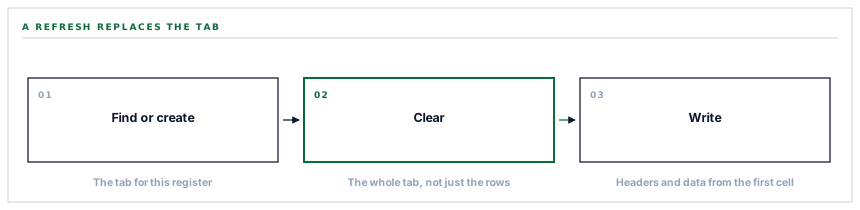
What a refresh actually does
-
Find the tab, or create it
The spreadsheet is inspected for a tab of the right name and one is added if it is missing.
-
Clear it
The whole tab, not the rows about to be written. Everything that was there is gone.
-
Write the headers
The first row, from the first cell.
-
Write the rows
Beneath it, in order, as the register currently stands.
The second step is the one to internalise. It is not a merge, not an update of changed rows, not an append. The tab is emptied and written again.
A column of notes somebody added on Tuesday is not there on Wednesday, and nothing warned them.
Why it is built that way
Because the alternative is a synchronisation problem, and synchronisation problems are much worse than they look.
A connector that updated only what changed would have to answer questions it has no way of answering. Which row corresponds to which record, when somebody has sorted them? What does a deleted record mean — remove the row, or leave it because a person may have annotated it? What happens when somebody inserts a row in the middle?
Every one of those is a judgement call about somebody else's document, and getting one wrong destroys data in a way that looks deliberate.
Clear-and-rewrite has none of those questions. The tab is a rendering of the register at a moment. It is always exactly right, it cannot drift, and a refresh cannot half-succeed into a state that is neither the old data nor the new.
The price is that the tab is not a place to put things. That is a real limitation and it is the correct trade, because the alternative buys the ability to annotate at the cost of a mirror you can trust.
How to annotate anyway
The thing people actually want is entirely achievable, in the spreadsheet, using what spreadsheets are for.
Add your own tab. Reference the written one from it. Put your notes column beside the reference, keyed on something stable like a document number.
| The written tab | Your own tab | |
|---|---|---|
| Owned by | The connector | You |
| On refresh | Cleared and rewritten | Untouched |
| Safe to edit | No — it will be replaced | Yes |
| Formulas, filters, notes | Lost on the next refresh | Kept |
This is the arrangement people arrive at on their own after losing one set of notes. Saying it first saves them that, and it is the reason the connector writes one tab per register rather than one tab total: a tab is a namespace, and leaving the rest of the workbook alone is what makes the pattern possible.
Five registers, five tabs
Each register gets its own tab, written independently. Suppliers, purchase orders, invoices, quotations and requests for quotation.
They are separate writes, so one failing does not affect the others — the same per-unit failure boundary that runs through every connector in this series. And a workspace that only wants some of them gets only those tabs.
The refresh is on demand rather than continuous. That is worth being plain about: the sheet reflects the moment it was refreshed, not the moment you are looking at it. Somebody reading a figure from it is reading a snapshot, and if the number matters the product itself is the live answer.
The spreadsheet is remembered, and re-checked
The connector creates one spreadsheet and stores its identifier. Before writing, it confirms that identifier still resolves — and creates a fresh spreadsheet if it does not.
It is the same shape as the document archive re-checking its folder before a run, and for the same reason: a stored reference to something in somebody else's account is a reference to something they can delete.
The difference from a folder is what recovery means. A new folder is an inconvenience. A new spreadsheet is a new address, so anybody who bookmarked the old one, or built their own tab against it, is now looking at something empty.
Which is a good argument for the same discipline as everywhere else in this series: the sheet is a copy, and the product is the record. A spreadsheet that disappeared is an inconvenience precisely as long as nothing depended on it being the only place something lived.
What is in place, layer by layer
How a register reaches a tab
One tab per register
Suppliers, orders, invoices, quotations and requests each get their own tab, written independently so one failing does not affect the others.
Tabs created on demand
A missing tab is added rather than causing a failure, so a new register appears the first time it is refreshed.
Cleared before writing
The whole tab is emptied and rewritten from the first cell, so it is always exactly the register rather than a merge that can drift.
Headers written every time
The first row is part of the write rather than assumed to be there, so a tab is correct even if somebody removed it.
The rest of the workbook untouched
Only the register tabs are written, which is what makes a tab of your own alongside them a safe place for notes and formulas.
The spreadsheet remembered and re-checked
The stored spreadsheet is confirmed before writing and recreated if it has gone, so a deleted sheet does not silently stop the export.
Refreshed on demand
The sheet reflects the moment it was refreshed rather than the moment you are reading it, which is stated rather than implied.
A refusal before the call
No credential or no spreadsheet returns a reason rather than a request, so an unconfigured connector reads as unconfigured.
The provider's rejection surfaced
A refused write reports the provider's own response, which names a permission or a range problem rather than reporting a generic failure.
A refresh clears the tab. Anything typed into a written tab is removed on the next run — put notes and formulas in a tab of your own that references it.
Three positions held on purpose
- The tab is regenerated rather than merged. A merge would need the connector to make judgements about somebody else's document — which row is which after a sort, what a deleted record means — and getting one wrong destroys data in a way that looks deliberate.
- Only the register tabs are written, deliberately, so the rest of the workbook is yours. That is what makes a notes tab alongside them a supported pattern rather than a workaround.
- The sheet is described as a snapshot rather than a live view. It reflects the last refresh, and a figure read from it is a figure from then — which matters most to exactly the people most likely to read one.
Five questions about a spreadsheet export
Can we add notes to the sheet?
A good answer sounds like
In your own tab.
What ours actually is
A written tab is cleared on refresh. A tab of your own referencing it is untouched.
Does it merge or replace?
A good answer sounds like
Replace, and here is why.
What ours actually is
Cleared and rewritten, so it cannot drift and a refresh cannot half-succeed.
Is it live?
A good answer sounds like
No — on demand.
What ours actually is
It reflects the last refresh. The product is the live answer.
What if somebody deletes the spreadsheet?
A good answer sounds like
It is detected.
What ours actually is
The stored reference is confirmed before writing and a fresh sheet created if it has gone.
Does it touch the rest of our workbook?
A good answer sounds like
No.
What ours actually is
Only the register tabs are written, which is what makes a tab of your own safe.
Our take
Exporting to a spreadsheet is one of those features where the engineering is easy and the expectation-setting is the whole job. People do not want a read-only rendering of a table; they want a spreadsheet, with everything that implies. Building the merge they are imagining means guessing at their intentions about rows they moved and records that vanished, and being wrong looks like data loss. Clear-and-rewrite is honest, always correct, and asks one thing in return — that annotations live in a tab you own. Say that on the day it is connected, and the feature is a success. Say it after the first refresh and it is a support conversation.
Your registers, in the tool your team already opens
Five registers, five tabs, refreshed when you ask — with your own notes and formulas safely in a tab beside them.
Talk through register exportsFrequently asked questions
Can we add our own columns to the exported tabs?
Not to the written tabs — a refresh clears each one and writes it again from the first cell, so anything added there is removed. Add a tab of your own that references the written one and put your columns there; the connector never touches it.
Why not update only the rows that changed?
Because that requires the connector to make judgements about your document — which row corresponds to which record after somebody sorted them, whether a deleted record means removing a row or leaving it. Getting one of those wrong destroys data in a way that looks deliberate, whereas a rewrite is always exactly the register.
Is the sheet live?
No. It reflects the moment it was last refreshed, so a figure read from it is a figure from then. If a number matters, the product itself is the live answer — the sheet is a copy for people who want the data where they already work.
What happens if somebody deletes the spreadsheet?
The stored reference is confirmed before each write and a fresh spreadsheet is created if it no longer resolves. That does mean a new address, so anybody who bookmarked the old one or built a tab against it will need the new link.
Can we export only some of the registers?
Yes. Each register is a separate tab written independently, so a workspace that wants suppliers and purchase orders gets those two tabs and nothing else. It also means one register failing does not affect the others.
