
Raw Means It Is Not a Formula
Every value this connector writes to a spreadsheet is stored exactly as given, never interpreted. That is one query parameter, and it is the difference between exporting your supplier list and executing it.
A spreadsheet is the only export format that runs code. Every other one — a comma-separated file, a document, a database row — holds text. A spreadsheet cell holds text unless the text starts with an equals sign, in which case it holds an instruction. Writing untrusted data into one is therefore a slightly different activity from writing it anywhere else, and there is a single parameter that decides which activity you are doing.
Two ways to write a cell
The interface offers a choice. Write values as though a person had typed them, or write them exactly as given.
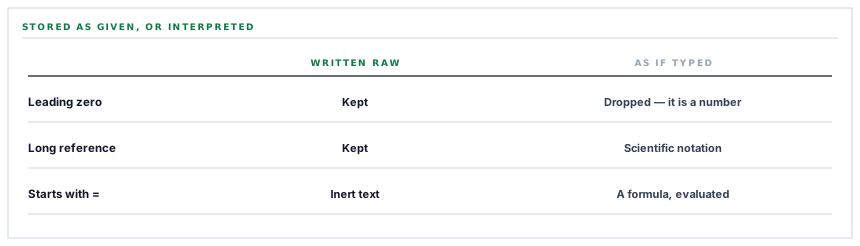
| A value of | Typed by a person | Stored as given |
|---|---|---|
| A supplier name | The name | The name |
| A phone number with a leading zero | A number, the zero gone | The text you sent |
| A long reference of digits | Scientific notation | The reference |
| Something that looks like a date | A date, reformatted | The text you sent |
| Text beginning with an equals sign | A formula, evaluated | The text you sent |
Only the first row is the same in both columns. Every other one is a value that arrives correct one way and altered the other.
Four of those five are data-quality problems. The fifth is a security one, and it is the same setting.
The security half
A value beginning with an equals sign — or one of a few other characters spreadsheets treat as introducing a formula — is not text when interpreted. It is an expression, and it runs when the sheet opens.
The path is not exotic. A supplier fills in their company name during prequalification. It reaches your workspace. It is exported to a spreadsheet. Somebody in finance opens it.
At no point does anybody with malicious intent need access to anything of yours. They typed into a form you offered, and the formula evaluated in a spreadsheet on somebody else's machine — which is why this class of problem is usually named after the export format rather than after the application.
Writing raw removes it entirely. Not by escaping, not by stripping characters, not by detecting anything — by never entering the interpreting mode at all. A value beginning with an equals sign is stored as a piece of text beginning with an equals sign, visible and inert.
The data-quality half
The other four rows in that table are the ones people meet daily, and they are the reason spreadsheet exports have a bad reputation.
A phone number with a leading zero is a number as far as a spreadsheet is concerned, and numbers do not have leading zeros. A long numeric reference becomes an approximation in scientific notation. Anything that resembles a date is reformatted into whichever date format the sheet is set to.
All three are silent. The value arrives, it looks plausible, and it is not what you sent. Somebody notices the day they try to match the export against something else and a third of the rows do not join.
Raw writing means what you sent is what is there. The sheet becomes a faithful export rather than an interpretation of one, and the cost is that a column of numbers arrives as text — which is a visible, fixable, one-click problem rather than an invisible one.
The scope, and why it is narrow
A separate property worth pointing at, because it is the same one used by the document archive connector.
The permission requested reaches only files this application created. Not your Drive, not your other spreadsheets — the ones it made.
That works here because the connector creates the spreadsheet itself. It is not pointed at one of yours; it makes one, remembers it, and writes into it. Which is what makes the narrow permission sufficient rather than a limitation dressed up.
The consequence is worth stating: this connector cannot write into an existing spreadsheet of yours, and it cannot read one. If the model you wanted was a sheet you already have with formulas around it, the honest answer is that the sheet it makes is the destination, and your formulas go in another tab that references it.
One error message that names the cause
A small thing that saves an afternoon.
When the spreadsheet cannot be created, the message says to check that the Sheets interface is enabled on the Google project.
That is the overwhelmingly common cause, and it is invisible from every angle a person would look at: the credential is valid, the account is right, the permission was granted, and the request is refused because a specific interface has not been switched on in a console somebody visited weeks ago.
Naming a likely cause in an error message is a small editorial act with a real return. The provider's message tells you what was refused; the connector can tell you what usually causes that, and the second is what shortens the search.
What is in place, layer by layer
How values reach a cell
Written raw, never interpreted
Every value is stored exactly as sent, so nothing is evaluated as a formula and nothing is reformatted into a number or a date.
Formula execution removed structurally
A value beginning with an equals sign is inert text rather than an expression, because the interpreting mode is never entered.
Leading zeros and long references preserved
Phone numbers and document references arrive as they are rather than as approximations, so an export can be matched against its source.
A scope limited to what it created
The permission reaches only files this connector made, which is sufficient because it creates the spreadsheet itself.
The spreadsheet created, not adopted
A sheet is made and remembered rather than pointed at one of yours, which is what makes the narrow permission enough.
Ranges encoded for the address
Tab names travel inside the request address and are encoded, so a tab with a space or a punctuation mark in its name still resolves.
A likely cause named on failure
Where a refusal usually means one specific thing, the message says so, because the provider can only report what was refused.
Tokens encrypted at rest
Both credentials stored through encrypted casts on the row for one workspace, and never written into a log line.
Because the connector creates the spreadsheet, it cannot write into one you already have and cannot read any of yours. Formulas of your own belong in another tab referencing the written one.
Three positions held on purpose
- Values are written raw rather than sanitised. Removing the interpreting mode is stronger than detecting dangerous input, because it does not depend on a list of characters being complete.
- A faithful export beats a convenient one. Numbers arriving as text is a visible one-click problem; a reference silently rendered in scientific notation is found weeks later by somebody trying to match two files.
- The connector creates its own spreadsheet rather than asking for access to yours. It keeps the permission narrow, and the limitation that follows is stated rather than worked around with a wider scope.
Five questions about exporting to a spreadsheet
Can data in our records execute in a spreadsheet?
A good answer sounds like
No, structurally.
What ours actually is
Values are written raw, so a formula-looking value is inert text rather than an expression.
Do phone numbers keep their leading zeros?
A good answer sounds like
Yes.
What ours actually is
Nothing is reinterpreted as a number, a date or anything else.
What can the connector see in our Drive?
A good answer sounds like
Only what it made.
What ours actually is
The permission reaches files this application created, which is why it creates the spreadsheet itself.
Can it write into a sheet we already have?
A good answer sounds like
No — say so.
What ours actually is
It creates its own. Your formulas go in another tab referencing it.
What if the export fails to set up?
A good answer sounds like
A named likely cause.
What ours actually is
The message points at the interface not being enabled, which is the usual reason and is invisible otherwise.
Our take
Formula injection is the security problem that keeps working because nobody owns it. It is not a flaw in your application — your application stored a string faithfully. It is not a flaw in the spreadsheet — it evaluated a formula, which is what it is for. It lives entirely in the gap between them, and the gap belongs to whoever wrote the export. One parameter closes it, it costs nothing, and it also removes the four data-quality failures that make spreadsheet exports untrustworthy. If you write a spreadsheet anywhere, this is a ninety-second check worth doing today.
An export you can match against its source
Values stored exactly as sent — no evaluated formulas, no lost leading zeros, no references quietly rendered in scientific notation.
Talk through register exportsFrequently asked questions
Can a supplier name entered in our system run code in a spreadsheet?
No. Values are written raw, which means the spreadsheet stores them as given rather than parsing them the way it would parse typing. A value beginning with an equals sign arrives as visible, inert text rather than as a formula.
Why do numbers appear as text in the sheet?
Because nothing is reinterpreted. That is deliberate — it is what keeps leading zeros on phone numbers, stops long references becoming scientific notation, and prevents anything date-like from being reformatted. Converting a column afterwards is one click; recovering a mangled reference is not.
Can we point this at a spreadsheet we already use?
No. The connector creates its own, which is what allows it to run on a permission limited to files it made rather than access to your Drive. If you want your own formulas around the data, put them in another tab that references the written one.
What can the connector see in our Google Drive?
Only the spreadsheet it created. The permission requested covers files this application made and nothing else, so your other documents are not merely untouched — they are unreachable.
The connection test fails to create the spreadsheet. What should we check?
Whether the Sheets interface is enabled on the Google project, which is what the message points at. It is the usual cause and it is invisible from every other angle: the credential is valid, the account is right and the permission was granted.
