
Clear, Then Write
Each register is emptied and rewritten from the first cell on every run, which makes the tab a mirror rather than a record. That has one obvious cost, one hidden one, and one security property nobody asks about.
There are two ways to keep a spreadsheet current. You can work out what changed and apply the differences, or you can empty the sheet and write it again. The first sounds obviously better and requires knowing which row is which, which means an identity for every record and somewhere to remember it. The second requires none of that and has a property the first cannot offer: what you are looking at is what the system currently holds, with nothing left over from before.
The tab is a mirror, not a ledger
Each register gets its own tab, and each run clears that tab completely and writes the whole thing again from the first cell — a header row assembled from the column definitions, then the rows.
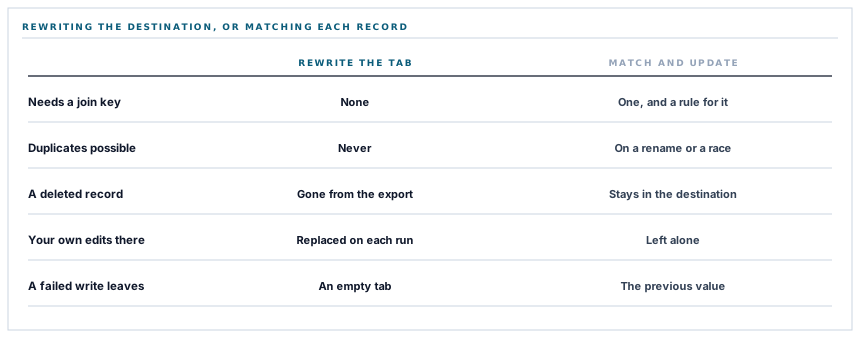
So there is no join key anywhere in this connector. No stored remote identifier, no matching on a name, no upsert, and no question about what happens when a record is renamed. A duplicate row is not possible, because no row survives a run.
It also means deletions propagate for free. A supplier removed here is absent from the next export, which the two record-syncing connectors in this series cannot do: they update and create, so a record they no longer see is a row that stays in the destination indefinitely.
Which is exactly why you must not type in that tab
The cost is the mirror image of the benefit and it needs saying in plain language, because a spreadsheet is the most editable object in any office.
A column somebody adds to the right of the export, a note typed in a spare cell, a status they have been maintaining by hand, a formula computing a subtotal — all of it is gone on the next refresh. The tab is cleared, not merged into.
The right way to work with it is the way you would work with any generated file: read from it, do not write into it. A second tab in the same spreadsheet, referencing the export with formulas, survives every refresh and can carry as much analysis as you like. That tab is yours; the export tabs are not.
A generated tab is a window. Anything you want to keep goes on the other side of the glass.
It is worth being blunt about this rather than soft, because the failure is silent, personal and annoying: somebody spends an afternoon on a column and loses it to a scheduled refresh at two in the morning, and nothing anywhere says what happened.
The gap between the clear and the write
Now the part that is genuinely a characteristic rather than a policy, and it is the reason this post exists.
Clearing the tab and writing it are two separate requests to Google, and there is nothing wrapping them. The clear happens first.
So if the write fails — a rate limit, a timeout on a large register, a network fault in the wrong half-second — the tab has already been emptied. The failure is logged, the other tabs continue, and that one register reads as zero rows until the next successful run.
Which is a bad half-hour for anybody who opens the spreadsheet in between and concludes there are no outstanding purchase orders. An empty tab and a tab that is genuinely empty look identical.
The shape of the fix is well understood and worth naming: write into a fresh tab and then swap, or write first and clear only the rows below what was written. Both make the visible state jump straight from the old data to the new with no interval, and both are contained pieces of work. Until then the honest description of a failed export is not the refresh did not happen but the refresh got half way, and those need different words.
Every value is text, deliberately
The write asks Google to store values exactly as given rather than interpreting them the way it would interpret typing.
That has an unglamorous cost: a date arrives as characters rather than as a date, so sorting a date column works alphabetically until somebody formats it. The dates are written in a year-month-day form specifically so that alphabetical and chronological order are the same thing.
And it has a benefit that never comes up in a feature discussion. When a spreadsheet interprets what it is given, a cell whose text begins with an equals sign becomes a live formula. That is how a value typed into a business system by somebody outside it ends up executing inside a spreadsheet on a finance manager's laptop — a class of problem that has its own name and a long history in exported reports.
Storing values as text closes that door by construction, not by filtering. There is no list of dangerous prefixes to maintain and no escaping to get wrong: a supplier whose name begins with an equals sign is a supplier whose name begins with an equals sign, in the cell, as characters.
The header row cannot drift
A small structural point that is worth copying into anything that exports tabular data.
Each register is defined once as an ordered map of column heading to the expression that produces that column's value. The header row is that map's keys; the data rows are its values applied to each record.
So the heading and the thing underneath it come from the same declaration and there is no second list to keep in step. Adding a column is one line. The failure this design removes — a heading list and a value list that agree until somebody inserts one of them in the wrong place, after which every column is labelled with its neighbour — is both easy to cause and unusually hard to spot, because the spreadsheet looks entirely normal.
And what the row count is bounded by
Five thousand rows per register, newest first. That is twenty-five times the ceiling on the record-syncing connectors in this series, and the difference is the write model rather than a difference of ambition.
-
One request carries every row
A register is a single write, so five thousand rows cost about the same number of calls as fifty. The connectors that write one record per request pay per record and are bounded much lower.
-
Related records loaded in advance
A register that shows a supplier name against each purchase order loads the suppliers alongside the orders, so five thousand rows do not become five thousand extra database queries.
-
Thirty seconds for the write
The longest of the four timeouts in the run, because it is the call carrying the payload — the others are metadata and cost a fraction of it.
The five-thousand bound is a real one, and a register past it exports its most recent five thousand rows. Paging a larger register across several writes is a contained extension, and the shape of the fix overlaps with the clear-and-write window above — both are solved by writing the new state before disturbing the old.
What is in place
How a register reaches a tab
One tab per register
Five registers, each with its own named tab, created on the first export that needs it and left alone afterwards.
The tab rewritten in full
Every run replaces the whole tab, so what is on screen is what the system holds now and no row can be left over from a previous state.
Deletions carried across
A record removed here is absent from the next export, which a match-and-update write model cannot do.
No identity to keep
There is no join key, no stored remote row id and no rename behaviour, because nothing is matched.
Values stored exactly as given
Nothing in an exported cell is interpreted as a formula, which removes a whole class of exported-report problem by construction rather than by filtering.
Dates written to sort correctly as text
A year-month-day form means alphabetical and chronological order agree before anybody formats the column.
Every cell reduced to a string first
Nulls become blanks, dates become dates in one form, and true and false become Yes and No, so a cell never carries a type the destination has to guess at.
Headings and values from one definition
The header row is the keys of the same ordered map that produces the values, so a column cannot end up labelled with its neighbour.
Related records loaded alongside
A register showing a supplier against each order fetches them together rather than one query per row.
A tab created only when absent
The existing tab names are read first, so re-exporting does not add a second tab with the same name.
A failed tab does not stop the run
Each register reports its own outcome, so one rejected write leaves the other four to complete.
A stated row ceiling and four bounded waits
Five thousand rows per register, newest first, and a separate timeout on each of the four calls a tab needs.
Items two, three and four are one decision stated three ways, and item five is the one nobody asks for. The clear-then-write ordering described above is the part of this list still worth improving, and it is the same fix as paging a larger register.
Three positions held on purpose
- The export tabs are generated, and generated means read-only in practice. We say so plainly rather than attempting to preserve hand-typed columns, because a merge that works most of the time is worse than a rule people can rely on — put your own work on your own tab and reference the export from it.
- Values are stored, not interpreted. A cell that starts with an equals sign stays text. Letting a spreadsheet parse exported values is how a name typed into a business system becomes a formula on a finance laptop, and no amount of prefix filtering is as reliable as not asking for parsing.
- A half-finished refresh is described as half-finished. The clear and the write are separate requests, so a failed write leaves an empty tab, and calling that "the refresh did not happen" would be the wrong sentence for somebody deciding whether to trust what they are looking at.
Five questions about an export into a spreadsheet
Does it update rows or rewrite the sheet?
A good answer sounds like
They should know which.
What ours actually is
Rewrites the tab in full on every run, so deletions carry across and duplicates cannot occur.
Can I add my own column to the tab?
A good answer sounds like
No.
What ours actually is
It is cleared on each refresh. Put your work on another tab and reference the export.
What if the write fails halfway?
A good answer sounds like
They should say.
What ours actually is
The tab is cleared first, so a failed write leaves it empty until the next successful run.
Are exported values interpreted as formulas?
A good answer sounds like
No.
What ours actually is
Everything is stored as text, so a cell beginning with an equals sign stays characters.
How many rows per register?
A good answer sounds like
A number.
What ours actually is
Five thousand, newest first, in a single write per register.
Our take
Rewriting the whole tab is the less sophisticated of the two ways to keep a spreadsheet current and, for this job, the better one. It needs no identity for any record, cannot produce a duplicate, and carries deletions across without anybody having to think about it — three problems that the clever version spends most of its code on. What it costs is that the tab belongs to the export rather than to the reader, which has to be said out loud rather than discovered, and that the clear and the write are two requests with a gap between them where an empty tab can be seen. That second one is the honest defect in this connector today. It is small, it is fixable by writing before clearing, and it is worth naming in the same breath as the design that produced it.
Ask whether the export rewrites or merges
It decides whether deletions reach your spreadsheet, whether duplicates are possible, and whether anything you type in that tab survives the night.
Talk through spreadsheet exportsFrequently asked questions
Can I add my own columns or notes to the exported tabs?
Each tab is cleared and rewritten in full on every refresh, so anything typed into it is replaced. Add a separate tab in the same spreadsheet and reference the export with formulas — that tab is untouched by every refresh.
Do records I delete disappear from the spreadsheet?
Yes. Because the tab is rewritten rather than merged, a record that no longer exists here is simply absent from the next export. That is the main advantage of this write model over one that matches and updates individual rows.
One of my tabs is empty after a sync. What happened?
The tab is cleared before the new rows are written, so a write that failed — a rate limit or a timeout on a large register — leaves it empty until the next successful run. The other tabs are unaffected. Writing before clearing is the fix and it is a contained change.
Why do dates arrive as text?
Values are stored exactly as given rather than interpreted, which is what stops any exported cell becoming a live formula. Dates are written in a year-month-day form so that sorting them as text still puts them in chronological order, and formatting the column gives you real dates.
How many rows can a register export?
Up to five thousand per register, newest first. That is much higher than the record-by-record connectors because the whole register goes across in one write; paging a larger register across several writes is a straightforward extension.
