
No OAuth, No App, Just Your Keys
Three of the four storage connectors need us to be registered as an application with the provider before you can use them. The fourth needs nothing from us at all — you create a key in your own account, paste it in, and the relationship is between your workspace and your bucket.
Every OAuth connector has a party in it you did not invite. Before you can connect Google Drive to any product, that product must be registered with Google, reviewed by Google, and granted the right to ask you for permission. The arrangement works. It also means the vendor sits permanently between you and your own storage, and the day their registration is suspended is the day your archive stops, for reasons entirely outside your account.
The connector with no application behind it
Archiving to your own object storage works differently, and the difference is structural rather than cosmetic. There is no application registration, no consent screen, no refresh token and no platform identity. You create an access key inside your own cloud account, decide what that key is allowed to touch, and paste it into your workspace settings.
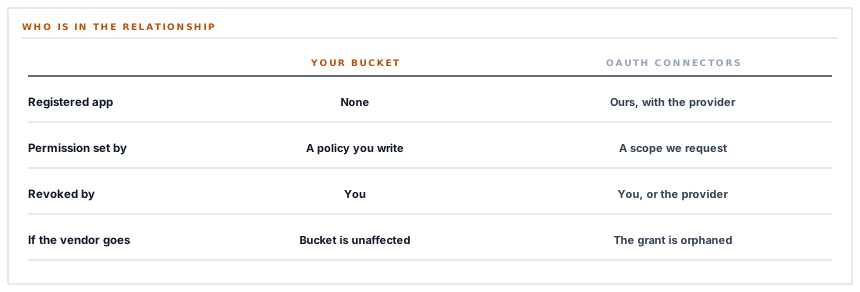
What that changes is who can end the relationship. With an OAuth connector the answer is three parties: you, us, and the provider. With your own key it is two, and one of them is you.
| Question | OAuth connectors | Your own storage bucket |
|---|---|---|
| Who registers with the provider? | We do, as an application. | Nobody. There is no application. |
| Who decides what is permitted? | The scope we request, which you approve. | The policy you attach to the key you made. |
| Who can revoke it? | You, or the provider. | You. |
| What proves it is connected? | A grant held on our side. | A key you can rotate whenever you like. |
| If the vendor disappears? | The grant is orphaned. | The bucket is yours and unaffected. |
The archive that needs least from us is the one most people with a compliance obligation end up choosing, and that is the right reason to choose it.
The permission is one you write, not one we ask for
This is the part worth taking seriously, because it inverts the usual security conversation.
On an OAuth connector the permission is a scope we chose when we built the integration. You can accept it or decline it. You cannot narrow it, and you certainly cannot narrow it to a particular folder.
With your own key, the permission is a policy document you write in your own account. You can restrict it to a single bucket. You can restrict it to a single prefix inside that bucket. You can grant the ability to write objects and withhold the ability to read them back, or to list them, or to delete them — an archive key that can add and never remove is a perfectly reasonable thing to want, and it is entirely within your gift.
None of that is something we implement. It is something the storage provider enforces against a credential you control, which makes it the strongest kind of restriction there is: one that does not depend on our code being correct.
Nothing is registered globally, and that matters more than it sounds
A detail of how this is built has a direct consequence for isolation between workspaces.
The usual way to teach an application about a storage bucket is to declare it in configuration at boot — a named connection the whole application can reach by name. That is fine when there is one bucket. It is quietly wrong when every workspace has its own, because a named connection is a shared global and the only thing stopping one workspace's job from using another's is that nobody wrote the line that would.
So no bucket is ever registered. The connection is constructed at the moment of use, from the row belonging to the workspace being served, and it goes out of scope when the operation ends. There is no name for another part of the system to reach for, because there is no name.
S3 is a shape, not a company
The interface this connector speaks is Amazon's, and it has been implemented by enough other people to have become a de facto standard. That is deliberately taken advantage of: supply an endpoint alongside your keys and the same connector talks to whichever store you actually run.
-
Amazon S3
Leave the endpoint blank. Region and bucket are enough, and addressing follows Amazon's own convention.
-
Cloudflare R2
A common choice for archives specifically, because retrieving what you stored does not carry a separate bandwidth charge.
-
DigitalOcean Spaces
Straightforward if your infrastructure is already there and you would rather not add a second cloud account.
-
Backblaze B2
Priced for keeping things rather than moving them, which is what a document archive mostly does.
-
MinIO, on your own hardware
The answer when the requirement is that documents never leave a building you control. It is the same interface, pointed at a machine you own.
One technical detail is handled for you rather than asked about. Amazon addresses buckets as part of the hostname; most compatible providers want the bucket in the path instead. The connector switches to path addressing automatically whenever you have supplied an endpoint, which is the correct rule for essentially all of them, and it means the setting does not appear on your screen at all.
What is in place, layer by layer
The object storage connector as it stands
Your credentials, your account
A key you create and can rotate or delete at any moment, with no application registration and no third party in the grant.
A permission you author
What the key may do is a policy in your own cloud account — one bucket, one prefix, write without delete, whatever you decide — enforced by the provider rather than by us.
Keys encrypted at rest
Access key and secret are stored through an encrypted cast on a row belonging to one workspace, never in configuration files or environment variables.
Built per use, never registered
The storage connection is constructed from the workspace's own row at the moment of the write and discarded afterwards, so there is no shared name another part of the system could reach for.
Any S3-compatible store
Supply an endpoint and the same connector serves R2, Spaces, MinIO, B2 or anything else speaking the interface — including a machine in your own building.
Addressing chosen automatically
Path-style addressing is switched on whenever a custom endpoint is present, which is what compatible providers need, so it is not a setting you have to understand.
Objects written privately
Every archived document is written with private visibility, so nothing becomes publicly readable because of a bucket default.
A prefix you choose
The archive lives under a prefix you set, so a shared bucket can hold this alongside whatever else it already holds.
A test that writes a real object
The connection test puts a small marker object under your prefix, which proves credentials, region, bucket and write permission in a single visible step.
Failures on this connector raise rather than returning quietly, so a credential or permission problem surfaces as a logged reason instead of an archive that appears to be working.
Three positions held on purpose
- We do not ask for a key wider than the job. What the credential may do is your decision, and the honest guidance is to give it the narrowest policy that lets it write — because a vendor asking you to widen a policy for convenience is a vendor asking you to carry their risk.
- No workspace bucket is registered as a named connection anywhere in the system. Isolation that depends on nobody writing a particular line is not isolation, and the fix is to make the name not exist rather than to be careful with it.
- Objects are written private regardless of what the bucket permits. A bucket configured for public reads is somebody's deliberate choice for its other contents, and an archived invoice should not inherit it.
Five questions to ask before you hand over a storage key
What does the key need to be able to do?
A good answer sounds like
Write. Not much else.
What ours actually is
Put objects under your prefix, and read metadata for the connection test. Listing and deleting are not used.
Where is the key stored?
A good answer sounds like
Encrypted, per workspace.
What ours actually is
Both halves through an encrypted cast, on the row for one workspace. Never in configuration or environment.
Can another workspace reach my bucket?
A good answer sounds like
Structurally, no.
What ours actually is
The connection is built from one workspace's row at the moment of use. There is no registered name to reach for.
Does it work with something other than Amazon?
A good answer sounds like
Yes, with an endpoint.
What ours actually is
Any S3-compatible store, with path addressing selected automatically when an endpoint is present.
What visibility do the objects get?
A good answer sounds like
Private, always.
What ours actually is
Written private explicitly, rather than inheriting whatever the bucket happens to default to.
Our take
There is a version of the data sovereignty conversation that is entirely about where a server is, and it usually misses the more useful question, which is who holds the credential. A document archive in a bucket you created, under a key you wrote the policy for, in a region you picked, is a different kind of arrangement from an archive in a folder reached through a grant that a vendor negotiated with a platform. Both can be perfectly safe. Only one of them stays yours if the vendor and the platform have a disagreement. For a lot of organisations that difference is theoretical, and for the ones where it is not, it is the whole decision.
Keep the archive in a bucket you own
Your keys, your policy, your region — and a connector that needs no registration with anybody to write into it.
Talk through storage optionsFrequently asked questions
What is the narrowest policy that will work?
Permission to put objects, scoped to your bucket and the prefix you configured. The connection test also writes an object under that prefix, so it is covered by the same grant. Listing, reading back and deleting are not used by this connector, so a key without them archives perfectly well.
Can I use this to keep documents inside my own country?
Yes — you choose the region when you create the bucket, and the connector writes wherever you point it. If the requirement is stricter than a region, an S3-compatible server running on your own hardware is the same connector with an endpoint filled in.
What happens if I rotate the key?
Paste the new one into the settings and archiving continues. Because filenames are deterministic and derived from document numbers, nothing needs to be reconciled afterwards — a run under the new key picks up exactly where the old one stopped.
Do I need a separate bucket for this?
No. The archive lives under a prefix you choose, so a bucket you already use is fine. A separate bucket makes a narrow key policy easier to write, which is the usual reason people end up with one.
Is anything ever read back out of the bucket?
The connection test reads the object it just wrote, and that is the extent of it. Archived documents are never read back into your workspace, so nothing in the bucket can change a record.
