
The Delivery Note Photographed at the Gate
A file picker hands back a URI into somewhere temporary. Queue that string with a delivery note attached and it works in testing and fails at a gate — which is the only place anybody needed it.
- Written by
- AWRA OpsHub TeamOperations Insights
- Issued
- Build
- Initial
Three screens in this app used to carry the same sentence: attachments require a live connection. It was an honest message and it was in completely the wrong place. The delivery note photographed at a gate with no signal is not an awkward edge case for the offline queue — it is the exact capture the offline queue exists for. Refusing it sends somebody away to remember the paperwork later, which is a polite way of saying to lose it.
The reason for the refusal was narrow, technical and completely fixable, which is the most annoying kind of reason for a feature to be missing.
What a file picker actually gives you
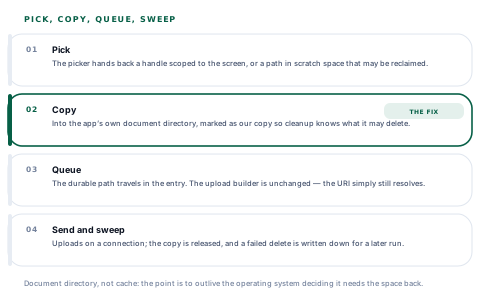
It looks like a path. It is not a path in any sense that survives the afternoon. What comes back is either a handle scoped to the screen that opened the picker, or a location in the operating system's scratch space that may be reclaimed whenever the device wants the room.
Store that string in a queued entry and everything works — for as long as nothing clears up. Which is to say it works on a developer's desk, works in a demonstration, works in a test, and fails in a loading bay six hours later when the queue finally drains and the file it names is gone.
A reference that is valid until the operating system feels like tidying is not storage. It is a bet, and the queue is exactly where you lose it.
Copy it before you promise it
So at the moment a write is queued, the file is moved into the app's own document directory, and the durable path goes into the entry. Not the cache directory — the entire point is to outlive the system deciding it needs the space back, and a queue that loses its attachments under storage pressure is the original bug with better paperwork.
Everything downstream is unchanged. The upload builder still appends the file as a name, a type and a URI, and the server sees exactly what it always saw. The only difference is that the URI still resolves on Monday.
-
Pick
The operator chooses a file or photographs one at the gate. The picker hands back its transient reference.
-
Copy
The file is copied into app-owned storage and marked as a copy this app made, so the cleanup path knows which files it is allowed to delete.
-
Queue
The durable path travels in the queued entry, alongside the rest of the form.
-
Send and sweep
On a connection the entry uploads as it always did, and the copy is released afterwards.
Marking our own copies is not bookkeeping for its own sake
A queued attachment can point at a file the app copied, or at something the operator picked from their own storage that we merely referenced. Deleting the second kind after an upload would be an app quietly removing a document from somebody's phone. The marker is what separates "this is ours to clean up" from "this is none of our business".
Why photos are the exception, and why that proves the rule
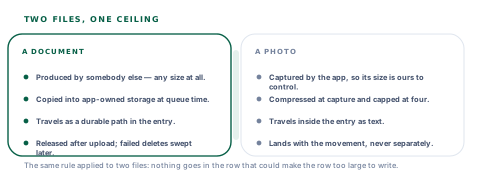
Photo evidence on an asset movement does travel inside the queued entry, encoded as text. That looks like a contradiction and is the same rule applied to a different file.
Two kinds of file, one ceiling
Photos are captured by this app, which means their size is ours to control — compressed hard and capped at four. An attachment is a file somebody else produced, and encoding one into the queue row is precisely the failure the row-size ceiling exists to prevent.
When the copy itself fails
A device can be too full to make the copy. That is a real state and it has to produce something better than a save that silently does nothing.
So it produces a sentence with two ways out: remove the attachment and save the rest of the entry now, or try again once there is a connection. The first matters most. An operator at a gate has a form full of what they observed and one file they cannot store, and the worst possible outcome is that all of it is refused because part of it will not fit.
The delete that fails on the wrong thread
There is a detail here that is invisible in any test and specific to how phones work. Cleaning up a copy after a successful upload has to go through the same component that picked it — and on Android, that component needs a foreground activity to delete a file. The queue drains on reconnect, which is very often exactly when the app is in the background.
So the delete fails, and it fails for a reason nobody should be bothered about. Silently forgetting the path would leak the file for the life of the install: a growing pile of delivery notes in app storage that nothing will ever remove.
Instead the path is written down and swept later. That list has a ceiling of two hundred, oldest first out, for the reason you can already see coming — a cleanup list that itself grew without bound would be the original bug in a new costume.
And it is on the readiness screen
The attachment policy sits beside the queue's own size, because "how much of this phone am I using for work that has not been sent yet" is one question, not two. A queue of forty entries and a pile of un-swept files are the same problem to the person holding the device.
What this does not survive
The copy lives in the app's own storage, which means it is exactly as durable as the app. Uninstall it, or clear its storage from system settings, and the queued entries and their attachments go together.
That is worth stating rather than leaving somebody to discover. The failure being solved is the operating system reclaiming scratch space, and that one is solved completely. A person deliberately deleting the app's data is a different problem and no local design solves it.
Questions about offline attachments
Can somebody attach a document with no signal?
What you will hear
"Yes, it uploads later."
How to read it
Ask what is stored in the meantime. If the answer is the path the picker returned, the file is a temporary handle and the upload will work in every test and fail on the day it matters. The file has to be copied somewhere the app controls.
Where does the file live between capture and upload?
What you will hear
"In the app cache."
How to read it
The cache directory is the one place the operating system is allowed to empty when it wants the space — which it does under exactly the storage pressure a phone full of queued work is under.
What happens if the device cannot store the file?
What you will hear
A pause.
How to read it
The answer should let the rest of the entry be saved without the attachment. Refusing the whole capture because one part of it will not fit loses everything the person observed, which is far more than the file was worth.
Are copied files cleaned up after upload?
What you will hear
"Of course."
How to read it
Ask what happens when the delete fails, because it will — background drains and foreground-only file operations collide on real devices. Written down and swept later is a good answer; silently forgotten means a pile that grows for the life of the install.
Our take
Offline attachments are a good example of a feature that is one small technical fact away from being impossible, and the fact is that a file picker does not hand you a file — it hands you a reference that expires. Copy it into storage you control and the whole thing becomes ordinary: the queue carries a path, the upload builder never changes, and a delivery note photographed at a gate with no signal arrives on Monday with the entry it belongs to. What we would look for in any product claiming this is the unglamorous half — what happens when the copy cannot be made, and what happens to the copies afterwards.
Attachment handling is a bounded surface with real variation between operations
The copy, the cleanup and the policy are three named pieces in one module. These are the extensions field teams ask for.
Attachment types and sizes you set
Your own rules on what may be attached offline and how large, per workspace, so a phone fleet with small storage is governed differently from a tablet fleet.
Required documents on chosen entries
A delivery note or a signed note mandatory on the receipts where it matters, checked at capture rather than at review.
Queued attachments visible before they send
Opening and reviewing a file that is still waiting in the queue, so a photograph of the wrong page can be replaced before it becomes the record.
Resumable uploads for large files
Part-uploaded documents continuing where they stopped, for crews on connections that come and go inside a single upload.
The durable copy is the piece that is awkward to retrofit, and it already exists — which is what makes each of these a defined change rather than a redesign of the queue.
Tell us what paperwork arrives with your goodsPhotograph a note in flight mode
Attach it to a receipt, leave the phone alone for a few hours, then reconnect. Whether the file is still there when the queue drains is the whole test, and it takes no setup at all.
Talk to us about goods receiptFrequently asked questions
Can I attach a document to an entry captured with no signal?
Yes. The file is copied into the app's own storage the moment the entry is queued, and the queued row carries the durable path rather than the temporary reference the picker returned. The upload itself is unchanged — the file simply still resolves days later, when the queue drains.
Why can the app not just remember where the file was?
Because what a file picker returns is a handle scoped to the screen that opened it, or a location in the operating system's scratch space that may be reclaimed at any time. Storing that string works until the device tidies up, which means it works in testing and fails at a gate six hours later.
What happens if the phone is too full to store the file?
You are told, and offered two ways forward: remove the attachment and save the rest of the entry now, or try again with a connection. Refusing the whole capture because one file will not fit would lose everything the person observed, which is worth far more than the attachment.
Are the copies cleaned up after they upload?
Yes, and the failures are handled rather than hoped about. The delete needs the app in the foreground on Android, while the queue often drains in the background — so a failed delete is written down and swept on a later run. That list is capped at two hundred entries, oldest first out, because a cleanup list that grew without bound would be the same bug again.
Will the app delete files I picked from my own phone?
No. Only files the app copied for the queue are marked as its own, and only those are cleaned up. A URI pointing at something in your own storage is referenced and never removed — an app quietly deleting somebody's document after uploading a copy is not a cleanup, it is a surprise.
Why do photos on asset movements work differently?
Because their size is ours to control. Photos are captured by the app, compressed hard at capture and capped at four per movement, so they can travel inside the queued entry as text. An attachment is a file somebody else produced and could be any size, and encoding one into the row is precisely the failure the queue's size ceiling exists to prevent.
Do queued attachments survive an uninstall?
No. The copy lives in the app's own storage, so it is exactly as durable as the app: clearing the app's data or removing it takes the queued entries and their attachments together. What the design solves completely is the operating system reclaiming scratch space on its own, which is the failure that used to lose files.
