
The Name Is the Join Key
A supplier in your workspace and a supplier in QuickBooks are decided to be the same supplier by one thing: the display name, spelled identically. Everything downstream — items, purchase orders, totals — hangs off that one comparison.
Every accounting integration has to answer a question nobody at the keyboard ever asks it. Is this supplier the same supplier? Two systems, two records, no shared identifier between them until somebody decides there is one. The QuickBooks connector answers it with the name, matched exactly, on every run — and once you know that, almost everything the sync does or declines to do stops being mysterious.
The match is on the display name, and it is exact
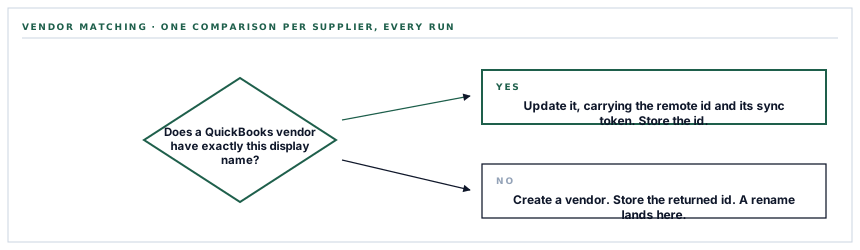
When the vendor sync runs, each supplier in your workspace produces a query against your QuickBooks company that asks for a vendor whose DisplayName equals the supplier's name. Not similar to it. Equal to it, character for character, after escaping.
If that query returns something, the connector updates it — carrying back both the remote record's id and its SyncToken, which is QuickBooks' way of refusing an update written against a stale copy. If it returns nothing, the connector creates a vendor instead. Either way the id that comes back is written onto your supplier record as its QuickBooks id.
Here is the part that surprises people: the stored id does not replace the name lookup on the next run. The query goes out again, by name, every time. The id is what purchase orders point at; the name is the join.
What that means the day somebody renames a supplier
Suppose a supplier is in your workspace as Kentrade Supplies and in QuickBooks under the same name, matched and linked. Somebody in procurement tidies the record to Kentrade Supplies Ltd, which is what the letterhead says.
On the next sync the query asks QuickBooks for a vendor called Kentrade Supplies Ltd, finds nothing, and creates one. You now have two vendors in your books that are one company, and the local record points at the new one. Purchase orders written afterwards go to the new vendor; the history stays on the old.
The sync will not warn you it made a second supplier. It made one, correctly, by the rule it was given.
The practical discipline is short. Treat the supplier name as the shared key it actually is: change it in both systems in the same sitting, or change it in your workspace and merge the duplicate in QuickBooks the same day. A merge in QuickBooks keeps the transaction history on one vendor, which is the thing you would otherwise spend a quarter reassembling.
A purchase order is the third link in a chain
Purchase orders are where the identity rule stops being an abstraction, because a purchase order cannot be pushed until two other things have been resolved first.
-
The supplier must already carry a QuickBooks id
A purchase order whose supplier has never synced is skipped and noted in the log. It is not an error and it does not stop the run — the vendor sync simply has to have happened first.
-
Every line needs an item that exists on both sides
A line whose item already carries a QuickBooks id uses it. A line whose item does not gets one created on the spot, and the new id is written back to the item so the next run is cheaper.
-
A purchase order with no resolvable lines is skipped
If every line failed to produce an item id, there is nothing to push and the order is left alone rather than sent as an empty document.
-
Then it is created or updated
With a stored id the connector fetches the remote order and updates it. Without one it creates it, and writes the returned id back. The document number is truncated to 21 characters, which is what QuickBooks accepts.
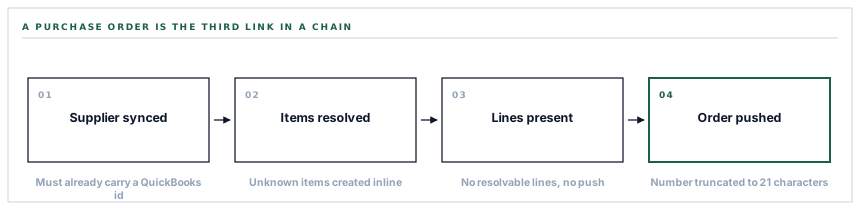
A failure at any point in that chain is logged and the loop moves to the next record. A partial run is the normal shape of a run, not a malfunction: forty-one of forty-three orders pushed, two waiting on a supplier that has not synced yet.
Three accounts, matched by name as well
When the connector creates an item that did not exist in QuickBooks, it has to say which accounts that item posts against. It resolves three of them, and it resolves them the same way it resolves vendors — by looking up a literal name in your chart of accounts.
| Reference | Account name looked up | What it is for |
|---|---|---|
| Income account | Sales - retail | Where revenue lands if the item is ever sold |
| Expense account | Freight and delivery - COS | Where the cost of the item lands |
| Asset account | Inventory | Where the item sits while it is held |
Those are the default account names in a standard QuickBooks Online chart of accounts, and they are the reason the first sync on a heavily customised chart is worth doing deliberately rather than at month end. Lining those three names up — or knowing which of yours plays each role — is a ten-minute job before the first run and an archaeology exercise afterwards.
What the connection itself is made of
The connection is an OAuth grant against exactly one QuickBooks company. That company is identified by a realm id, and it is chosen at the moment somebody authorises the connection — which means the person clicking Connect is choosing the books, and it is worth their being the person who knows which company file is the real one.
What is stored for your workspace is the access token, the refresh token, the realm id and the expiry. Before any batch of calls the connector checks that expiry and refreshes the token when it is inside five minutes of running out, so a long sync cannot die halfway through on an expired credential. When Intuit omits the realm on a refresh — it sometimes does — the stored one is re-attached rather than lost.
Disconnecting deletes that row and clears the session keys. There is no lingering grant on our side afterwards; the next connection starts from consent again.
What is in place, layer by layer
The QuickBooks connector as it stands
One company per workspace
An OAuth grant against a single realm, chosen at consent and stored with its refresh token and expiry.
Refresh before a batch, not after a failure
A token inside five minutes of expiry is refreshed before the calls go out, and the company id is re-attached from storage when a refresh does not return one.
Vendor matching on display name
An exact-name query per supplier, an update carrying the remote SyncToken when one is found, a create when it is not, and the id written back either way.
Items created on demand
A purchase order line whose item is unknown to QuickBooks creates it against the three named accounts, then reuses that id for the rest of the run.
Purchase orders with line detail
Quantity, unit price and amount per line, the supplier reference, the order date, your notes as a private note, and the document number truncated to what QuickBooks accepts.
Row-level tolerance
A record that cannot be pushed is logged and stepped over, so one malformed supplier cannot cost you the other two hundred.
A log row per run
Type, status, start, finish, duration and a payload naming exactly what moved, written when the run starts and closed when it ends.
Mail on both outcomes
A success mail listing the orders that moved, and a failure mail carrying the error, queued separately from the sync itself.
Three separate permissions
Seeing the integration, connecting or disconnecting it, and running a sync are three different rights, so the person who authorises the books need not be the person who pushes to them.
Every sync runs as a queued job rather than inside the request, which is why a run over a few thousand records does not depend on a browser tab staying open.
Three positions held on purpose
- The connector writes to QuickBooks and reads only to find what it is about to write. Your books stay the system of record for accounting, and nothing in QuickBooks is treated as an instruction to change a record in your workspace.
- A record that cannot be pushed is stepped over rather than guessed at. Inventing a supplier because a name nearly matched is how one company becomes three, and a near match is a decision for a person rather than a comparison.
- The company file is chosen by whoever authorises the connection, not by configuration afterwards. Pointing a live sync at a different company file by editing a setting is a mistake nobody should be one dropdown away from.
Five questions to ask about any accounting connector
How do you decide two records are the same record?
A good answer sounds like
A named key, stated plainly.
What ours actually is
The vendor display name, matched exactly, on every run — with the returned id stored for purchase orders to point at.
What happens when somebody renames one side?
A good answer sounds like
A straight answer, not a shrug.
What ours actually is
The next run finds no match and creates a second vendor. Keep the names in step, or merge in QuickBooks the same day.
Does one bad record stop the batch?
A good answer sounds like
No, and it is logged.
What ours actually is
Each failure is logged and the loop continues, so a run reports what it moved rather than dying on the first refusal.
What happens when the credential expires mid-run?
A good answer sounds like
It is refreshed before the calls.
What ours actually is
The expiry is checked first and refreshed inside a five-minute window, rather than being discovered by a failed call.
Who can point it at your books?
A good answer sounds like
A specific permission.
What ours actually is
Connecting is its own right, separate from seeing the integration and from running a sync.
Our take
Accounting connectors are usually sold on what they move, and almost never described by how they decide what is what. That second thing is where the surprises live. Name matching is a perfectly reasonable choice for suppliers — it is what a human doing the same job would do, and it needs no shared identifier to be set up in advance — but it is a choice with a consequence, and the consequence is that a supplier name is now a key rather than a label. If you know that on day one, you write it into the procurement routine and it never costs you anything. If you learn it in month four, you learn it from a duplicate vendor in a set of books somebody has already reconciled.
Ask an integration how it decides two records are one
It is the most useful question you can put to anybody selling you a sync, because the answer tells you which of your own habits are about to become load-bearing.
Talk through connecting your booksFrequently asked questions
Does the connector pull anything back from QuickBooks into AWRA?
It reads in order to write. It queries QuickBooks for a matching vendor before deciding to update or create, and it fetches a purchase order by id before updating it. What it does not do is treat anything in QuickBooks as an instruction to change a record in your workspace.
What happens if I connect the wrong QuickBooks company?
Disconnect and reconnect. Disconnecting deletes the stored credential for your workspace, and the next connection asks for consent again, where you choose the company. Records already pushed to the wrong company stay there and have to be dealt with inside QuickBooks.
Can two people in the same workspace connect different QuickBooks companies?
No. One workspace holds one QuickBooks connection, identified by a single realm id. Connecting again replaces the stored credential rather than adding a second one.
Why was a purchase order skipped?
Almost always one of two reasons: its supplier has not been synced yet and so carries no QuickBooks id, or none of its lines produced an item id. Run the vendor sync, then the item sync, then purchase orders, and the chain resolves in that order.
Do I need to keep a browser tab open while a sync runs?
No. Each sync is dispatched as a background job and writes its own log row, so you can start it and leave. Success and failure both send mail.
