
A Push Is Not a Reconciliation
Sending a record to your accounting system and checking that it arrived intact are two different operations, and almost every integration only does the first. Here is what the second one looks like when you build it.
A push integration is optimistic by construction. It assembles a record, hands it to an interface, gets an id back and writes that id down as proof. What it does not do — what almost none of them do — is go back afterwards and ask whether the thing that arrived is the thing that was sent. For a while, ours had a reason to.
The defect was a column name
The routine that assembles purchase order lines for QuickBooks read a unit price off a property that does not exist on a purchase order line. The real column is called something else. In PHP, reading a property that is not there yields nothing, and nothing multiplied by a quantity is zero.
So every line went out with a unit price of zero and an amount of zero. The purchase order arrived. It carried the right supplier, the right document number, the right date, the right items and the right quantities. Every figure on it was zero.
The order was correct in the workspace, correct on the printed page, and zero in the books.
This is the failure mode worth naming, because it is the one that survives every check a person would think to run. Nothing threw. Nothing was logged as an error. The sync reported success and named the orders it had moved, truthfully — it had moved them. Every screen inside the workspace was right, because the workspace had the correct figures all along. The only place the fault was visible was inside somebody else's system, on a report nobody looks at until quarter end.
Fixing the code does not fix the records
Correcting the line builder was a one-word change, and it made every subsequent push correct. It did nothing whatsoever for the orders already sitting in QuickBooks at zero, because those records are not in our database. They are in yours, in a system we push to, and the only way to know what they say is to ask.
The obvious remedy — re-push everything — is worse than the problem. A blind overwrite assumes that whatever is in QuickBooks now is wrong and whatever is here is right, and that assumption is false the moment somebody has edited an order inside QuickBooks on purpose. A repair that destroys a deliberate correction is not a repair.
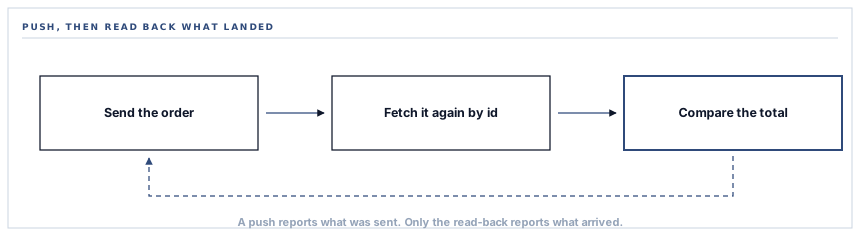
What a read-back actually does
So the correction is a comparison, not a push. It takes every purchase order that carries a QuickBooks id, computes what the order is worth locally, fetches the remote copy by id, and puts the two numbers side by side.
One order, as the comparison sees it
Change the fourth row to a remote total of 180,000.00 and the verdict flips to "differs but is not zero — not touched". That is the whole safety property in one line.
Four decisions are made in that comparison, and each of them exists to stop the repair doing damage of its own.
-
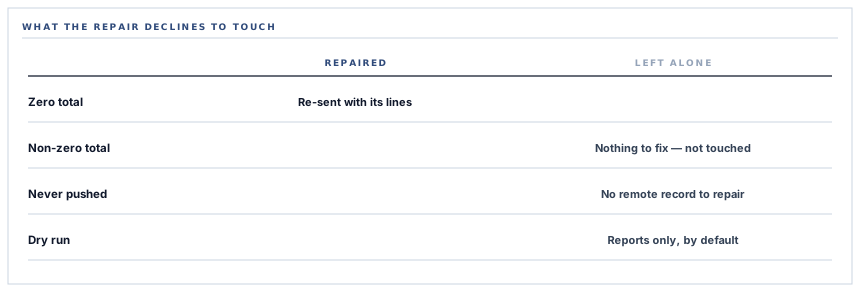
An order genuinely worth nothing locally is left alone
If the local total is zero or less, there is nothing to correct it to, and the order is skipped before any call goes out. It is not even counted as checked.
-
A penny of tolerance
QuickBooks rounds to two decimal places. An exact comparison between two floating point numbers would report perfectly correct orders as broken, so anything inside a cent is treated as agreement.
-
Only zero is treated as the defect
If the remote total differs but is above zero, that is a real divergence with a cause nobody has established, and it is reported and left untouched. The repair fixes one known fault and refuses to guess at any other.
-
Lines are rebuilt only from items that exist on both sides
A corrected order is assembled from lines whose item already carries a QuickBooks id. If that leaves no lines, the order is reported as skipped rather than pushed as an empty document.
It reports before it writes
The whole thing runs as a command, and the default is to change nothing. It prints what it found — the order number, what the workspace says it is worth, what QuickBooks says it is worth — and then tells you to run it again with an explicit flag if you want the corrections pushed.
That default matters more than it looks. A repair tool that writes on the first run is a tool nobody dares point at production, so it gets run once, nervously, on one workspace, and the other findings are never looked for. One that reports first gets run on everything, because running it costs nothing.
It can be pointed at a single workspace or swept across every workspace with a live QuickBooks connection. The sweep is declared as cross-workspace work rather than accidentally unscoped — which is the difference between a deliberate administrative operation and the kind of forgotten filter that reads records it should never have seen.
The interface lies about its own failures
One detail from building this is worth passing on to anybody integrating with a large third-party library. The QuickBooks SDK declares that fetching a record by id returns a record, and that an update returns the updated entity. At runtime, fetching an id that no longer exists returns false, and a rejected update returns nothing at all.
A type checker reading those declarations concludes that the guards around them are unreachable code, and the natural response — deleting the guard the analyser says can never fire — removes the only place a rejected write is ever noticed. Both guards are kept, and both carry a note saying exactly why they look redundant. Take the interface's word for what it returns and you will delete your own error handling on the analyser's advice.
What is in place, layer by layer
The read-back, as it stands
Comparison against the live record
Every purchase order carrying a QuickBooks id is fetched back by that id and compared against what the workspace says it is worth.
Report first, write only when told
The default run changes nothing and prints its findings; writing requires an explicit flag on a second run.
Rounding tolerance
Agreement within a cent is agreement, so two-decimal rounding on the far side never produces a false finding.
A refusal to overwrite an unexplained difference
A remote total that differs but is not zero is reported and left exactly as it is, because a blind correction would erase a deliberate edit.
One workspace or all of them
A single connected workspace by id, or a sweep across every workspace with a live connection, declared as cross-workspace work rather than silently unscoped.
Named outcomes per record
Repaired, zero in QuickBooks, lookup failed, not found, no lines with a synced item, or update rejected with the response body attached.
A log line per correction
Each repair writes the workspace, the order number, the remote id and the corrected total, so the change is auditable after the terminal output is gone.
The counters at the end separate found, repaired, and skipped or failed, so a run that touched nothing and a run that could not reach the interface at all do not look alike.
Three positions held on purpose
- A repair corrects one identified fault and reports everything else. A tool that reconciles by overwriting is a tool that will one day overwrite the correct side, and it will do it quietly across every record at once.
- The default run is read-only. Anything that writes to a system of record on its first invocation gets used timidly or not at all, and a check nobody dares run is worth less than no check.
- The comparison is on the figure, not on a status flag we control. Asking our own database whether it thinks the push succeeded answers a different question from asking your books what they actually contain.
Five questions to ask about any push integration
How would you know if a record arrived wrong?
A good answer sounds like
By reading it back.
What ours actually is
A comparison that fetches each pushed purchase order by id and puts the remote total beside the local one.
Does the check write anything by default?
A good answer sounds like
No.
What ours actually is
It reports and stops. Writing takes a second run with an explicit flag.
What does it do with a difference it cannot explain?
A good answer sounds like
Reports it, and stops.
What ours actually is
A remote figure that differs but is not zero is named in the output and left untouched.
How do you avoid false findings from rounding?
A good answer sounds like
A stated tolerance.
What ours actually is
A one-cent band, because the far side rounds to two decimal places and an exact float comparison would flag correct records.
Can it run across every customer at once?
A good answer sounds like
Yes, and deliberately.
What ours actually is
A sweep over every workspace with a live connection, declared as cross-workspace work rather than an unscoped query that happens to see everything.
Our take
The lesson generalises well beyond accounting. Any time your system hands a record to somebody else's system and stores an id as proof, you have built a claim rather than a fact, and the claim is only as good as the code that made it on the day it ran. Most of the time that is fine. The day it is not, you discover that you have no way to ask the question, and the answer is sitting in a system you can read perfectly well — you simply never wrote the thing that reads it. A read-back is cheap to build, boring to run, and the only mechanism that turns "we pushed it" into "it is there and it is right".
Ask what happens after the push succeeds
It is a short question with a revealing answer, and it separates integrations that report what they attempted from ones that can tell you what is actually in your books.
Talk through your accounting syncFrequently asked questions
Does the read-back run automatically?
No. It is an administrative command, run deliberately, and its default is to report without changing anything. That is on purpose: a repair that runs on a schedule is a repair that writes to your books without anybody having read the findings first.
What happens to a purchase order that no longer exists in QuickBooks?
It is reported as not found and left alone. Somebody deleted it inside QuickBooks, and recreating it silently would be a decision the tool has no business making.
Why does it only correct totals that are zero?
Because zero is the signature of one specific fault with one known cause. Any other difference has a cause nobody has established yet, and overwriting it would destroy whatever produced it, including a deliberate edit made by your accountant.
Will it touch orders that were always meant to be zero?
No. If the order is worth nothing in the workspace as well, there is nothing to correct it to, and it is skipped before any call goes out.
Does this apply to vendors and items too?
The read-back covers purchase order totals, which is where the fault was and where the money is. Vendors and items are matched and written on every sync run rather than pushed once, so a correction there arrives with the next sync.
