
The Role You Have to Name
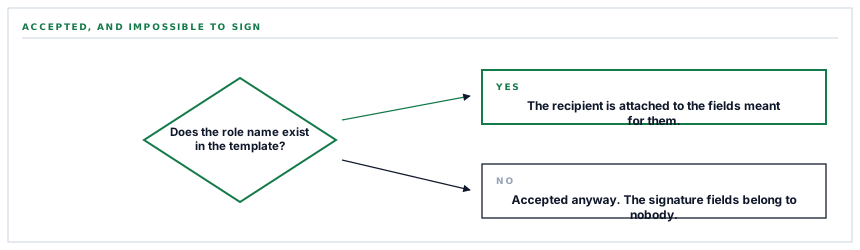
Send a contract naming a recipient role the template does not define and everything succeeds. The document is created, the email goes out, the recipient opens it — and there is nothing for them to sign, because the signature fields belong to a role nobody was assigned.
This series keeps arriving at the same category of failure from different directions: the operation that succeeds and achieves nothing. A message sent to an empty recipient list. A notification card refused for having nothing in its body. Here is the version that costs the most, because it involves a customer, a contract, and several days before anybody works out what happened.
What a role is, and why it is not a label
An e-signature template does not contain signature fields belonging to people. It contains fields belonging to roles — a named part in the document, like the supplier or the approver — and when a document is created, each role is filled by an actual recipient.
That is a good design. One template serves every supplier because it does not know about any of them; it knows there is a part called something, and that part has three initials boxes and a signature block.
The consequence is that the role name in the send has to match the role name in the template. Exactly. It is a join between two systems on a string, which this series has met before with a supplier display name — and it fails the same way.
A role is a join key wearing the clothes of a label, and nothing in either interface says so.
The failure, step by step
-
The document is created
The provider accepts it. The role name does not have to exist — there is no validation against the template.
-
The recipient is attached
They are on the document, with a name and an address, in a role that corresponds to nothing in it.
-
It is sent, and it arrives
The email goes out. Everything on your side reports success, because everything on your side succeeded.
-
And there is nothing to sign
The signature fields belong to the role the template defines, which nobody was assigned to. The document can be read and cannot be completed.
What makes this expensive is who discovers it. Not a monitor, not a log, not a test — the recipient, who is a supplier or a customer, and whose experience is that you sent them a contract that does not work.
And their report is ambiguous. I can't sign it sounds like a browser problem, and the first hour goes on browsers.
The fix is to ask the template
The provider will tell you what roles a template defines. The connector asks, and the answer is used to offer those roles rather than a text box.
That converts an unbounded free-text field — where anything can be typed and only one thing is right — into a choice among values that are all correct by construction. The class of error stops existing rather than being caught.
The same call returns the merge fields the template declares, so the values a document can carry are also offered rather than guessed. A merge field named slightly wrong is a milder failure — the document sends and a value is missing — but it is the same shape and the same fix.
The general move is to replace a free-text field with a list fetched from the far side, and it is available far more often than people take it. Anywhere a configuration field has to match something in another system, that system almost always has an endpoint that will enumerate the valid answers.
And a default that is honest about itself
When no role is supplied, a conventional one is used. That is a reasonable default and it is worth saying what it is: it is a guess, and it is right only if the template happens to use that name.
A template whose role is called something else — the vendor, the contractor, the second party — will accept a document sent under the default and produce exactly the failure above.
So the default is a convenience for the common case rather than a substitute for choosing. That is the honest description, and it is the reason the roles are fetched and offered rather than left to it.
The family this belongs to
It is worth naming the pattern, because recognising it is more useful than any individual instance.
| Where it appeared | What succeeded | What did not happen |
|---|---|---|
| A recipient list built wrongly | The send | Anybody receiving it |
| A notification with an empty body | Nothing — it was refused | The alert arriving |
| A document with an unknown role | Creation and sending | A signature being possible |
| An archive with no types selected | The connection | Any document being copied |
The second row is the odd one out and it is the good case: the provider refused, so somebody found out immediately. The other three succeeded, and the cost of each is measured in how long the absence went unnoticed.
There is no general technique that catches all of them. What there is, is a habit: after building something, ask what would be missing if it silently did nothing, and check that the answer is visible somewhere other than the thing itself.
What is in place, layer by layer
How a template is used safely
Templates listed from your account
The templates in your own PandaDoc account are fetched and offered by name, so nothing is identified by a pasted identifier.
Roles read from the chosen template
The roles a template actually defines are fetched and offered, so a role name cannot be typed wrongly.
Merge fields read the same way
The values a template declares are enumerated too, so the fields a document can carry are chosen rather than guessed.
Duplicates and blanks removed
The lists offered are deduplicated and stripped of empty entries, so a template with a repeated role does not offer it twice.
A default role, described as a guess
A conventional name is used when none is chosen, and it is right only when the template happens to use it — which is why the real roles are offered.
A refusal before the call
No credential or no template returns a reason rather than a request, so an incomplete configuration reads as incomplete.
The provider's own error surfaced
A failure reading a template reports the provider's reason, which distinguishes a missing template from a permission problem.
Entries without an identifier dropped
A template with no usable identifier is not offered, so nothing in the list can be chosen and then fail to resolve.
A document sent under a role the template does not define is accepted by the provider and can never be completed. Nothing about it fails, which is why the roles are fetched rather than typed.
Three positions held on purpose
- A field that has to match something in another system is filled from that system, not typed. Fetching the valid answers removes a class of error instead of catching it, and the endpoint to fetch them almost always exists.
- The default role is described as a guess rather than presented as a setting. It is right for the common case and produces a silently unsignable document for anybody whose template uses different wording.
- Accepted-but-inert is treated as a category rather than a series of unrelated bugs. The useful question after building anything is what would be missing if it quietly did nothing, and whether that absence is visible anywhere else.
Five questions about e-signature templates
How is a template chosen?
A good answer sounds like
From a list.
What ours actually is
Fetched from your own account and offered by name, never a pasted identifier.
How is the recipient role decided?
A good answer sounds like
From the template.
What ours actually is
The roles the template defines are fetched and offered, because a wrong one sends a document nobody can sign.
What happens with a role the template does not have?
A good answer sounds like
They know.
What ours actually is
The provider accepts it and the document can never complete — which is why it is chosen rather than typed.
Can we control what values appear in the document?
A good answer sounds like
Yes.
What ours actually is
The template's merge fields are enumerated, so the values it can carry are chosen rather than guessed.
Is there a default role?
A good answer sounds like
Yes, and it is a guess.
What ours actually is
A conventional name used when none is chosen, right only if the template happens to use it.
Our take
The most valuable question to ask about any integration is what it does when it is wrong, and the worst possible answer is nothing at all. A failure is a good outcome — somebody sees it, somebody fixes it, and the cost is an afternoon. An operation that succeeds while achieving nothing costs whatever the gap is between doing it and somebody noticing, and that gap is measured in days when the person who notices is a customer. Wherever a configuration value has to match a string in somebody else's system, go and get the list. It is nearly always available, it turns an unbounded field into a bounded one, and it removes the possibility rather than adding a check.
Fetch the list instead of typing the value
Any field that has to match a name in another system is a silent failure waiting to happen. The other system will usually tell you the valid answers if you ask.
Talk through e-signatureFrequently asked questions
Our recipient says they cannot sign the document. What happened?
Almost certainly a role mismatch. The signature fields in a template belong to a named role, and a document created under a different name attaches the recipient to a part of the document that has no fields. The provider accepts it and the document can never be completed — which is why the connector fetches the template's real roles and offers those.
Why do we choose the role from a list rather than typing it?
Because typing it is an unbounded field where exactly one answer is right and being wrong produces a document that sends successfully and cannot be signed. Fetching the roles the template actually defines removes the possibility instead of catching the mistake.
What happens if we change a role name in PandaDoc?
The list offered here changes with it, since it is read from the template rather than stored. What would matter is a saved configuration pointing at the old name, which is worth re-checking after a template is edited — the same discipline as any join on a string.
Can we control which values appear in the document?
Yes. The merge fields a template declares are enumerated alongside its roles, so the values a document can carry are chosen from what the template actually supports rather than guessed at.
Is there a default recipient role?
A conventional name is used when none is chosen, and it is honest to call it a guess — it is correct only if your template happens to use that wording. Templates using their own terms need the role chosen, which is what the fetched list is for.
