
A Document That Is Not Ready Yet
Sending a contract for signature is three calls, not one. The document is created, then it is not ready, and only when the provider has finished building it can it be sent — which means the connector spends most of its time waiting.
The word "send" in an e-signature integration hides a small surprise. Creating a document from a template is not instantaneous, because the provider is assembling a real document — merging values, laying out pages, placing signature fields. That takes a moment, and during that moment the document exists and cannot be sent. A connector that creates and immediately sends works on a quiet afternoon and fails under load.
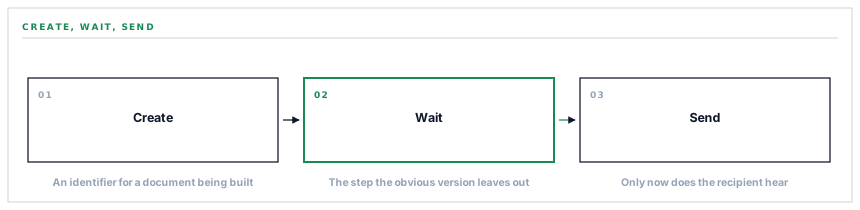
Three calls in a fixed order
-
Create from a template
The template, the recipient and the values to merge in. What comes back is an identifier for a document that is being built.
-
Wait for it to be ready
The document is polled until the provider reports it as a finished draft. This is the step that does not appear in the obvious version of the code.
-
Send it
A separate call with the subject and covering message. Only now does the recipient hear about it.
The middle step is the whole post. Skip it and the send is attempted against a document that is still being assembled, which is refused — intermittently, depending on how quickly the provider happened to finish.
A race you win most of the time is not a race you have avoided. It is a bug with good luck attached.
What happens when the wait runs out
The poll does not wait forever. When it gives up, the failure is reported — and the document identifier is returned with it.
That detail matters more than it looks. The document was created. It exists in the provider's account, half-made, possibly finished a moment after we stopped waiting. Returning the identifier means it can be found rather than being an orphan nobody can name.
The instinct on a failure is to return nothing, because nothing succeeded. The right instinct is to return whatever was established before the failure, because that is exactly what somebody investigating needs and it is free to carry.
The values that make it a document about something
A template with nothing merged into it is a blank form. What makes a document specific are the values dropped into it — an order number, a supplier, a total, a date.
Those are sent with the creation call and merged into the template body. So a purchase order acknowledgement carries its own figures rather than being an identical page with a signature block, which is the difference between a document worth signing and a formality.
Empty values are removed before sending, because the provider refuses null values. That is the same absent-versus-empty rule this series keeps meeting, in a fourth context: a value you do not have is not a value of nothing, and providers routinely reject the second while accepting the absence of the first.
Defaults that keep a document sendable
Several fields have fallbacks, and they exist for one reason: a missing optional value should not stop a contract going out.
| If this is missing | What is used |
|---|---|
| A document name | The email subject |
| A subject | A plain request to sign |
| A covering message | A short standard line |
| A recipient first name | A neutral placeholder |
None of these produces a better document than a supplied value would. All of them produce a document that sends, and a slightly generic subject line is a much smaller problem than a contract that did not go because a field was blank.
The three things that have no fallback are the ones where a default would be wrong: the credential, the template, and the recipient's address. Each is refused separately with a message naming it, because cannot send covering all three costs whoever is fixing it the specificity they needed.
Why the loop is worth the complexity
It would be simpler to create the document and stop, leaving somebody to open the provider and press send.
That version has a real cost: the document exists and nobody has been told. It sits as a draft until a person remembers, and the whole point of triggering a signature request from an operational event is that nobody has to remember.
So the connector carries the wait rather than handing the last step back. The complexity is real and it lives in one place, which is the right place for it — a signature request that reaches its recipient without anybody doing anything is worth a polling loop.
What is in place, layer by layer
From template to signature request
A three-step send
Create, wait for the provider to finish building the document, then send — because a document that is still being assembled cannot be sent.
A bounded wait
The poll gives up rather than hanging, so a provider having a slow afternoon does not hold the operation that raised the request.
The identifier returned on failure
A document that was created but not sent can still be found, because the identifier established before the failure is carried back with it.
Values merged into the template
The order number, supplier and total travel with the creation call, so the document is about something rather than a blank with a signature block.
Empty values removed
The provider refuses nulls, so fields with nothing in them are dropped rather than sent empty.
Fallbacks for the optional fields
A missing name, subject or covering message produces a plainer document rather than a failure, because a generic subject beats a contract that did not go.
Three refusals with three reasons
No credential, no template and no recipient are separate messages, because each has a different fix and a single failure message covers none of them.
A created document with no identifier refused
Treated as a failure rather than proceeding, because sending against an identifier that is not there fails later and less clearly.
The wait is what makes this a loop rather than a one-way push. The alternative is a document that exists as a draft until somebody remembers to open the provider and send it.
Three positions held on purpose
- The wait is carried here rather than handed back to a person. A signature request that reaches its recipient without anybody doing anything is the whole point, and it is worth a polling loop in one place.
- What was established before a failure is returned with the failure. A created document that could not be sent is findable rather than orphaned, and carrying the identifier costs nothing at the moment it is free.
- Optional fields have fallbacks and required ones do not. A generic subject line is a small problem; a contract that did not go out because a covering message was blank is a large one.
Five questions about an e-signature integration
Is sending one call?
A good answer sounds like
No — three.
What ours actually is
Create, wait for the document to finish processing, then send.
What if the provider is slow?
A good answer sounds like
It gives up cleanly.
What ours actually is
The wait is bounded, and the document identifier comes back so the half-made document can be found.
Is the document specific to the record?
A good answer sounds like
Yes.
What ours actually is
Order number, supplier and total are merged into the template rather than sending a blank.
What if an optional field is empty?
A good answer sounds like
It still sends.
What ours actually is
Fallbacks for name, subject and message; empty values dropped because the provider refuses nulls.
What do we see when it fails?
A good answer sounds like
A specific reason.
What ours actually is
Separate messages for a missing credential, template or recipient, and the provider's own error otherwise.
Our take
Asynchronous creation is one of the easiest things to miss in an integration, because the synchronous version usually works. The provider finishes in a few hundred milliseconds, your next call succeeds, and nothing suggests there was a gap. Then one day the provider is busy, or the document is larger, or the network adds a beat — and the second call arrives before the first finished its work. The tell to watch for is any operation where the provider returns an identifier rather than a result, because that is them saying they will get to it. When you see that, there is a state to wait for, and it is worth finding out what it is called before you assume otherwise.
Signature requests that send themselves
A purchase order approved, a prequalification passed, a contract ready — and the document reaches the signer without anybody opening another tab.
Talk through e-signatureFrequently asked questions
Why does sending a document take a few seconds?
Because the provider assembles the document before it can be sent — merging your values into the template, laying out pages and placing signature fields. The connector waits for that to finish rather than attempting a send against a document that is still being built, which is refused intermittently depending on timing.
What happens if the document is created but not sent?
The failure is reported with the document identifier, so the half-made document can be found in your PandaDoc account rather than being an orphan nobody can name. It usually finishes processing a moment later and can be sent from there.
Are documents personalised to the record?
Yes. The values that make a document specific — an order number, a supplier, a total — are merged into the template as the document is created, so an acknowledgement carries its own figures rather than being an identical blank with a signature block.
What happens if we leave the covering message blank?
A short standard line is used. Optional fields have fallbacks so a missing value produces a plainer document rather than a failure — a slightly generic subject is a much smaller problem than a contract that did not go out.
What is required before a document can be sent?
Three things with no defaults: the credential, a chosen template, and a recipient address. Each is checked separately and refused with a message naming it, because each has a different fix and a single failure message would cover none of them.
