
A GUID From Nineteen Ninety-Six
Attaching a private key to an Outlook calendar event means naming it with an identifier from the Messaging API of the 1990s. Microsoft's modern interface carries it forward unchanged, and once you know why, it stops looking like an accident.
There is a string in this connector that looks like somebody pasted the wrong thing. It is a fixed identifier in braces, followed by a word, and it is how you say "attach my own property to this calendar event" through an interface released in the last decade. It is not a mistake, it is not legacy code, and the reason it is there is more interesting than the string.
What the identifier is
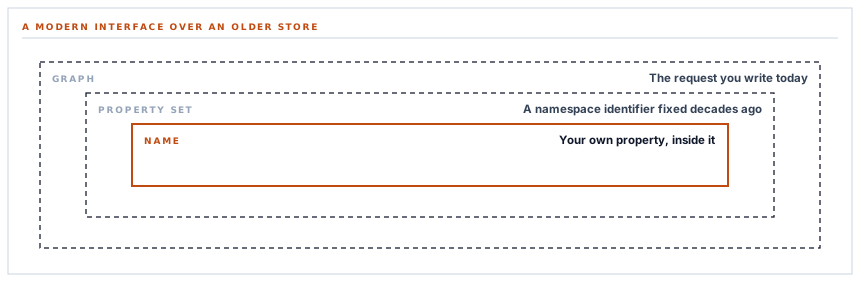
Long before the current interface existed, Microsoft's messaging system let applications attach named properties to items — a mail, an appointment, a contact. Names could collide between applications, so each name lived inside a namespace identified by a fixed identifier, and one of those namespaces was reserved for general-purpose named properties anybody could use.
That namespace identifier is the string in the braces. It has not changed, because changing it would orphan every property ever stored under it — in every mailbox, in every archive, going back decades.
The modern interface did not replace that system. It exposes it. So attaching a custom property today means naming it the way the underlying store has always named them, which is why a request written this year carries an identifier from a specification most people integrating with it have never heard of.
It is not legacy in the sense of being deprecated. It is the actual mechanism, reached through a newer door.
Why this is worth knowing rather than resenting
Because it tells you what kind of system you are integrating with, and that changes what you should expect.
-
The store is older than the interface
Concepts that look odd usually come from underneath rather than from the interface layer, and they are stable precisely because they are old.
-
Stability is the reward
A mechanism that has survived thirty years of product changes is not going to be quietly redesigned. That is worth more than elegance.
-
The documentation is in two places
The interface documents the field; what may go in it is documented by the older specification. Reading only the first leaves you guessing.
-
And it interoperates
A property attached this way is visible to anything else that speaks the underlying system, which is a far larger set of tools than speaks the modern interface.
The comparison with the equivalent Google connector is instructive. There, private application data is a first-class feature of the calendar interface with a name that describes itself. Here it is the same capability reached through a much older mechanism. Both work; only one of them is guessable, and the difference is entirely about how old the thing underneath is.
Finding it again is a query language
Writing the property is simple. Searching for it is where the second surprise lives.
The filter is written in a query language with its own syntax — a expression asking for events where any of their extended properties has both this identifier and this value. It is closer to a database query than to a set of parameters.
And like a database query, it has a quoting problem. Values sit inside single quotes, and a value containing a single quote would end the string early and leave the rest of the expression as syntax.
The escape is to double the quote — exactly the convention used in the database languages this syntax borrowed from. So a key containing an apostrophe is doubled before it goes into the filter.
It is worth naming what that is. It is the same class of problem as any injection into a query language, in a place nobody thinks of as one because it arrives as a request parameter. The keys this connector uses are its own and structured, so the risk is theoretical — and it costs one function call to make it stay theoretical.
Asking for less
Two small parameters on that search are worth pointing at because they are free and routinely omitted.
One asks for a single result — there can only be one, so anything more is bandwidth. The other asks for only the identifier field, rather than the whole event with its subject, body, attendees and organiser.
The lookup needs one value: does an event with this key exist, and what is its identifier. Requesting the entire event to read one field of it is the version everybody writes first, and on a calendar with a few thousand deadlines it is a real cost paid on every single push.
A time zone on an all-day event
One more shape difference from the equivalent Google connector, and it is the sort that produces off-by-one dates.
Where one provider takes a bare date for an all-day event, this one takes a moment and a time zone, and the event is marked as all-day separately.
So the dates are sent as midnight in a fixed, explicit zone rather than as dates. Leaving the zone to a default means the event is anchored to whatever zone the mailbox is configured for, which is how a deadline lands on the wrong day for somebody working in a different country.
And the same exclusive-end rule applies as on the other calendar: a one-day event ends the following day. That one is consistent across both, and it catches people on both.
What the permission covers
Stated plainly, because it differs from the equivalent Google connector and a reader comparing them deserves the difference rather than a reassurance.
The calendar permission here covers the signed-in user's calendars — reading and writing, not only the events this application created. The equivalent Google scope is narrower: it reaches only what the application made.
What the connector does inside that permission is the same in both cases: it writes deadline events carrying its own key, and reads only to find them. There is no traversal of a calendar and no delete path.
Where the difference between what a grant permits and what an application does matters — and in a regulated organisation it should — the effective control is on your side. Microsoft lets an administrator govern which applications may be consented to and by whom, which is more durable than any assurance a vendor gives about their own restraint.
What is in place, layer by layer
Deadlines on an Outlook calendar
A private key on every event
Attached as a named property through the mechanism the underlying store has always used, and invisible in any calendar interface.
Upsert by that key
An existing event carrying the key is updated and a new one created otherwise, so repeated pushes correct rather than duplicate.
Filter values escaped
A value going into the query expression has its quotes doubled, so a key containing an apostrophe cannot break the filter.
One field, one row requested
The lookup asks for a single identifier rather than whole events, which is the cost paid on every push and is free to avoid.
An explicit time zone
All-day dates are anchored to a fixed zone rather than the mailbox's, so a deadline does not shift a day for somebody in another country.
Exclusive end dates
A single-day deadline ends the following day, which is what the format requires and what makes it render on the right day.
Event identifiers encoded for the path
An identifier travelling in the request address is encoded, because these contain characters that would otherwise change the address.
Reminders left to the calendar
The event is marked as having a reminder and the specifics are left to the calendar's own settings rather than imposed.
Any Microsoft account, chosen at consent
Work, school and personal accounts alike, decided in Microsoft's own dialog rather than in a configuration field.
The calendar permission here covers the signed-in user's calendars rather than only events this application created, which is broader than the equivalent Google scope. What the connector does inside it is the same: write its own events, read only to find them.
Three positions held on purpose
- Values going into a query expression are escaped for that expression. It arrives as a request parameter and is a query language underneath, which is exactly the kind of place this class of problem survives unexamined.
- A lookup asks for the smallest answer that settles the question. Fetching whole events to read one identifier is the version everybody writes first and is paid on every push, on every calendar, forever.
- The scope difference from the equivalent Google connector is stated rather than glossed. A reader comparing two connectors deserves the actual difference, and the effective control for it is on their side rather than ours.
Five questions about calendar integration
How do you avoid duplicate events?
A good answer sounds like
A key on the event.
What ours actually is
A private named property identifying the record, searched before writing.
What permission does it need?
A good answer sounds like
The literal scope.
What ours actually is
Read and write to the signed-in user's calendars — broader than the equivalent Google scope, and stated as such.
Do deadlines land on the right day everywhere?
A good answer sounds like
Yes — the zone is explicit.
What ours actually is
All-day dates are anchored to a fixed zone rather than the mailbox's configured one.
What if a key contains an apostrophe?
A good answer sounds like
Escaped.
What ours actually is
Quotes are doubled for the query expression, which is where an unescaped one would break the filter.
How much data does a lookup fetch?
A good answer sounds like
As little as possible.
What ours actually is
One row, one field — enough to answer whether the event exists and what its identifier is.
Our take
Integrating with a very old system through a very new interface is a specific skill, and the main part of it is recognising when something odd is a window onto what is underneath rather than a quirk of the layer you are looking at. An identifier from a thirty-year-old specification is not a wart; it is the actual mechanism, and it is stable for the same reason it is old. The practical consequence is that the documentation you need is in two places and only one of them is the one you are reading. Fifteen minutes finding the older specification usually explains three things that made no sense.
Deadlines in the calendar your organisation runs on
Delivery dates, approval windows and RFQ closes in Outlook — corrected rather than duplicated, and anchored so they land on the right day everywhere.
Talk through calendar deadlinesFrequently asked questions
Will pushing deadlines twice create duplicate calendar entries?
No. Each event carries a private named property identifying the record it came from, and the connector searches for that before writing — updating the existing event rather than adding another. The property does not appear in any calendar interface.
What permission does the calendar connection need?
Read and write access to the signed-in user's calendars, along with the ability to send mail and to keep the connection alive. That is broader than the equivalent Google permission, which reaches only events the application created — worth stating plainly if you are comparing the two.
Can an administrator restrict what this connection may do?
Yes, and that is the right place for the control. Microsoft lets administrators govern which applications can be consented to and by whom across the whole Microsoft 365 organization, which is more durable than any assurance we give about our own restraint.
Do deadlines appear on the right day for people in other countries?
Yes. All-day dates are anchored to an explicit time zone rather than to whatever the mailbox is configured for, which is what would otherwise shift a deadline by a day for somebody working elsewhere.
Why do single-day events end on the following day?
Because an all-day event's end is exclusive, which is true on both calendar providers. An event on the fourteenth ends on the fifteenth; setting the end to the same day gives it no duration and it renders on the wrong day or not at all.
