
The Copy in Your Sent Folder
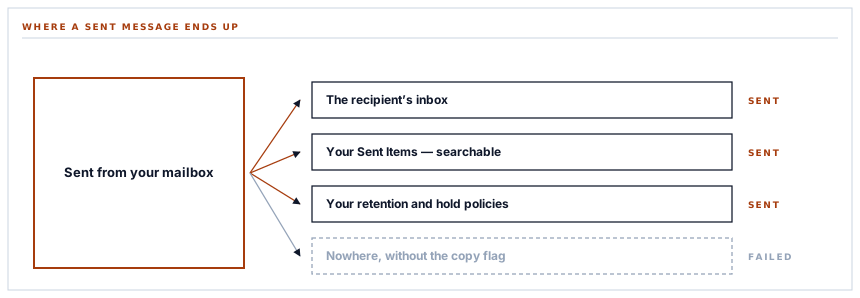
When this connector sends a purchase order from your Outlook mailbox, a copy lands in your Sent Items. Not a log entry, not a record on our side — the actual message, in the actual folder, exactly as though the person had typed it.
There is a difference between an email that appears to come from you and an email that came from you, and it is not rhetorical. One is a message with your address in a header, sent by somebody else's infrastructure. The other is in your mailbox, in your Sent folder, findable by search, quotable in a reply, part of the record your organisation keeps. This connector does the second, and it is one flag.
What the flag does
The send request carries an instruction to keep a copy in the sending mailbox. With it, the message is filed in Sent Items as part of being sent.
The consequences are all the ordinary ones, which is exactly the point.
| Without the copy | With it | |
|---|---|---|
| Findable by mailbox search | No | Yes |
| Visible to a colleague with delegated access | No | Yes |
| Included in a mailbox export or legal hold | No | Yes |
| Quotable when the supplier replies | Not from your side | Yes |
| Part of your organisation's retention | No | Yes |
A purchase order that is not in anybody's Sent folder is a message your organisation has no copy of.
That third row is the one that matters in a regulated organisation. Mailbox retention, discovery and hold policies operate on what is in mailboxes. A message sent from your address that never entered a mailbox is outside all of them — which is fine until somebody has to produce it.
Two providers, two entirely different models
This connector and its Google equivalent do the same job through opposite mechanisms, and the contrast is worth seeing because it decides what each one can get wrong.
-
One assembles the message itself
Headers, body, attachments and boundaries built by hand into a single document, encoded, and handed over. Complete control, and every part of a decades-old format is yours to get right.
-
The other describes the message
A structured object naming the subject, the body, the recipients and the attachments. The provider assembles it.
-
The failures differ accordingly
The first can produce a technically malformed message. The second cannot, and instead refuses a structure it does not understand.
-
And so does the work
One connector encodes headers for non-ASCII characters and handles blind copies by hand. The other names them as fields and stops.
Neither is better in the abstract. The structured version is harder to get subtly wrong and the raw version is harder to be limited by, and which matters depends entirely on whether you need something the structure does not offer.
A type name on every attachment
One consequence of the structured model that catches people, because it has no equivalent anywhere else in this series.
An attachment is not simply a name and some bytes. It carries an explicit declaration of what kind of attachment it is — a file, as opposed to an item from a mailbox or a reference to something stored elsewhere.
The provider cannot infer it, because the alternatives are legitimate and take different fields. Omit the declaration and the attachment is rejected with a message about a missing type, which reads as a problem with the file rather than with the description of it.
It is the same shape as the Teams envelope earlier in this series: a field carrying no content, declaring what kind of thing the content is, and mandatory. Those are consistently the fields that get left out, because they look like ceremony.
Accepted, not delivered
The response to a successful send is an acceptance rather than a confirmation — the provider has taken the message and will send it.
That is the honest reading and it is what gets recorded. It is the same distinction the chat connectors make, and it recurs because it is true of most modern interfaces: the provider queues rather than blocking, and the response is a receipt for the handover.
What makes it comfortable here is precisely the copy in Sent Items. The acceptance is a promise; the message in the folder is evidence. Between them you have something better than either — a fast answer for the code and a durable record for the person.
Refusing before the call
A message with no usable recipient is refused before anything is sent, with a reason naming that.
It is a small check and it is the difference between a clear message and a provider validation error about a required field, which sends whoever is reading it into the documentation rather than to the address list.
And copy lists are omitted entirely when empty rather than sent as empty arrays — the absent-versus-empty rule that has now appeared in every connector family in this series, in six different contexts, because providers genuinely treat the two differently and the version that sends empties is the one that looks tidier.
What is in place, layer by layer
Sending from your own mailbox
A copy in Sent Items
The message is filed in the sending mailbox as part of being sent, so it is searchable, exportable and covered by your own retention.
A send-only permission
The connection can send from the mailbox and cannot read, list or search it — enforced by the provider and readable in your own account settings.
A structured message
Subject, body, recipients and attachments named as fields and assembled by the provider, rather than a document built by hand.
Attachments with an explicit type
Each carries the declaration the provider requires, because it cannot infer which kind of attachment is meant.
Recipients validated first
A message with no usable address is refused here with a reason, rather than as a provider validation error about a required field.
Copy lists omitted when empty
Absent rather than empty, because providers treat those differently and the tidier-looking version is the one that misbehaves.
Acceptance recorded as acceptance
The provider queues the message and answers accordingly, and that is what is recorded rather than a claim of delivery.
The provider's rejection surfaced
A refused send reports the provider's own status and response rather than a generic failure, so a policy refusal reads differently from a malformed message.
Any Microsoft account, chosen at consent
Which mailbox sends is decided in Microsoft's own dialog rather than in a configuration field, and the account is displayed afterwards.
A copy in Sent Items is what brings these messages inside your organisation's own retention, discovery and hold policies. Mail sent from an address without entering a mailbox is outside all of them.
Three positions held on purpose
- Sent mail is filed in the sending mailbox. A message with your address on it that exists nowhere in your organisation is a record you do not have, and the cost of having it is one flag.
- Acceptance is recorded as acceptance rather than as delivery. The copy in the folder is the durable evidence, which is a better arrangement than a stronger word in a log.
- A message with no usable recipient is refused before the call. The provider would refuse it too, in language about a required field, which sends the reader to the documentation instead of the address list.
Five questions about sending from your own mailbox
Does the message appear in our Sent folder?
A good answer sounds like
Yes.
What ours actually is
Filed in the sending mailbox as part of being sent, so it is searchable and exportable.
Is it covered by our retention policy?
A good answer sounds like
Yes, because it is in a mailbox.
What ours actually is
Those policies operate on mailbox contents, which is exactly what the copy makes it.
Can the connection read our mail?
A good answer sounds like
No — send only.
What ours actually is
The permission covers sending. No reading, listing or searching.
Does a successful send mean delivered?
A good answer sounds like
Accepted.
What ours actually is
The provider queues it and answers with an acceptance, which is what gets recorded.
What happens with a bad recipient address?
A good answer sounds like
A clear refusal.
What ours actually is
Refused before the call with a reason naming the address, rather than a provider error about a field.
Our take
Sending as somebody is a bigger claim than it sounds, and the copy in Sent Items is what makes it honest. Without it the message exists in the recipient's inbox and nowhere else in your organisation — it looks like it came from a person, and that person has no record of it, cannot find it, cannot quote it in a reply, and cannot produce it if asked. With it, the message is simply an email that person sent, with all the ordinary consequences. If a product offers to send from your mailbox, that is the question worth asking: not whether it can, but whether you end up with a copy.
Mail your team actually has a copy of
Purchase orders and invoices sent from your own mailbox, filed in Sent Items, inside your own retention — rather than existing only in the recipient's inbox.
Talk through email deliveryFrequently asked questions
Will messages sent this way appear in our Sent folder?
Yes. The send instruction asks the provider to file a copy in the sending mailbox, so it is a normal sent message — searchable, visible to anyone with delegated access, quotable when the recipient replies, and covered by your organisation's retention.
Can the connection read our mailbox?
No. The mail permission is send-only, and a scope is fixed at the moment of consent so it cannot be widened later. The exact wording is readable in your own Microsoft account settings.
Does a successful send mean the message was delivered?
It means Microsoft accepted it for sending. Delivery happens moments later in their infrastructure, and no immediate response can report it. What makes that comfortable here is the copy in Sent Items — the acceptance is a promise, and the filed message is evidence.
Why does this connector describe the message rather than build it?
Because the provider takes a structured message and assembles it, where the equivalent Google connector takes a document you build by hand. The structured version is harder to get subtly wrong; the raw version is harder to be limited by. They are different models for the same operation.
What happens if a recipient address is invalid?
The send is refused before the request, with a reason naming the address. The provider would refuse it too, but in language about a missing required field — which sends whoever is reading it into the documentation rather than to the address list.
