
You Cannot Just Send a WhatsApp
WhatsApp will not let a business send you a message it has not read first. Every business-initiated notification has to use wording submitted to Meta and approved in advance — which makes the connector's job less about sending and more about fitting an operational alert into a sentence somebody signed off weeks ago.
Most notification channels take whatever you give them. Post a string to a webhook and it appears. WhatsApp is the exception in the family, and the exception is not a technical limit — it is a policy, enforced in the API, that a business cannot open a conversation with words nobody has reviewed. Once you know that, everything about how this connector is shaped follows.
The rule, and why it exists
WhatsApp splits messages into two kinds. If a person messaged you first, you may reply freely for a while — a service window, opened by them. Outside that window, anything the business initiates must be a template: wording submitted to Meta, reviewed, and approved before it can be sent.
A template is not a fixed sentence. It has slots — placeholders that get filled in at send time — so one approved template covers many actual messages. What is approved is the shape and the tone, not the specific values.
The reason is straightforward and, if you have a phone, welcome: WhatsApp is a personal messaging app. Meta made unsolicited business messaging require a review step because the alternative is what happened to email. Whether the review is well-executed is a separate argument. That it exists is the constraint every WhatsApp integration is built around.
An operational alert has to be squeezed into wording that was approved before the event it describes had happened.
What the connector does with that
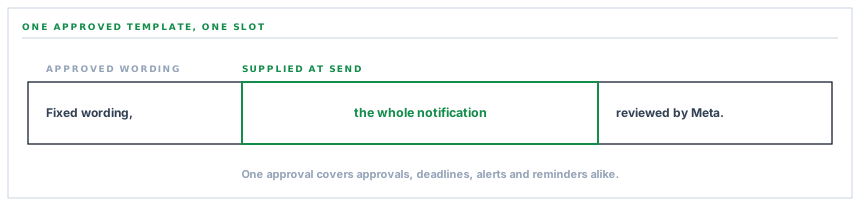
It takes the plainest possible approach: one template, one slot, and the whole notification goes in the slot.
Every notification in this system is built from a title and an optional body. For WhatsApp those two are joined into a single string — the title, then a dash, then the detail — and handed over as the one parameter the template expects.
The advantage is that a single approved template serves every event type. An approval request, an RFQ deadline, a stock alert and a payment reminder are one template with different text in the slot, which means one review rather than a review per event, and no new approval when a new notification is added.
The trade is that the template's fixed wording has to make sense around any of them. That is a copywriting problem rather than an engineering one, and it is genuinely the hardest part of a WhatsApp integration — the sentence around your slot has to be true for every message that will ever fill it.
The three things you have to bring
This connector needs more from you than any of the other five chat destinations, and it is worth being straight about that before anyone starts.
-
A WhatsApp Business account, verified
Meta's own onboarding — a business account, a verified business, and a phone number registered to it that is not being used in the ordinary WhatsApp app.
-
An approved template with one body slot
Submitted in Meta's console and approved. The wording is yours; the requirement is a single body parameter for the notification text to go into.
-
An access token and the number's identifier
From your own Meta app. The identifier names which number sends, and the token authorises it. Both go into your workspace settings and are stored encrypted.
-
Recipients, as numbers in international format
The people who should get operational alerts. This is a notification channel to a known list rather than a way to message customers, and keeping it that way is deliberate.
The connector refuses in two distinguishable ways rather than one, which matters more than it sounds. An incomplete configuration says so. A complete configuration with no template named says that — a different sentence, pointing at the one remaining step.
Collapsing those into a single not configured is the ordinary shortcut, and it costs somebody who has done nine tenths of a genuinely tedious setup an hour of re-checking the nine tenths that were right.
The test message uses a template you already have
There is a chicken-and-egg problem in testing a WhatsApp connection, and it is solved by a small piece of Meta trivia.
You want to prove the credential, the number and the recipient list before you commit to a template — but you cannot send anything without a template. Meta's answer is a built-in one that exists on every business account from the moment it is created, carrying fixed wording and no slots.
So the connection test sends that rather than yours. If it arrives, the token is good, the sending number is live, and the recipient numbers are correct. What remains untested is your own template, and that is the honest reading of a successful test rather than a caveat — the two are separate steps and separating them is what makes the first one useful.
Language is part of the identity
One detail that catches people: a template is identified by its name and its language code together. The same name approved in two languages is two templates, and asking for the wrong code produces a refusal that reads as though the template does not exist.
The connector carries the language alongside the name and falls back to a common default when none is set. If your template was approved under a regional variant, that variant is what has to be configured — the base language is a different template as far as the API is concerned.
It is a five-second fix and a forty-minute diagnosis, which is exactly the ratio that makes it worth writing down.
What is in place, layer by layer
The WhatsApp connector as it stands
Template messaging, as Meta requires
Business-initiated notifications go out as an approved template with the notification text supplied as its one body parameter.
One template for every event
Title and detail are combined into a single value, so one approval covers approvals, deadlines, alerts and reminders rather than one per event type.
Language carried with the name
The template's language code is configured alongside its name, because the two together are what identifies it, with a sensible default when none is set.
Two distinct refusals
An incomplete configuration and a complete one with no template named produce different messages, so the reason names the remaining step.
A test that needs no template of yours
The connection test uses the built-in template every business account already has, so credentials and recipients can be proved before a word is submitted for review.
Your own business account
The number, the token and the templates are yours in your own Meta app. Messages come from your business, and the relationship with Meta is yours.
Credentials encrypted at rest
The access token is stored through an encrypted cast on the row for one workspace, and is never written into a log line or an error message.
A pinned API version
The Meta API version is configuration rather than a literal, so a version move is a deliberate change instead of an upgrade that arrives on its own.
Inbound messages land as tickets
Since October 2026 a message sent to a workspace that has connected its Meta app for intake opens a helpdesk ticket or threads onto the sender’s open one, and an agent replies freely inside the 24-hour window the customer opened.
A bounded wait per recipient
Each send has a twelve-second ceiling, so a slow response on one number does not hold up the rest of the list or the work that raised the alert.
This is a channel for operational notifications to a known list of your own people. It is not a marketing or customer-messaging tool, and the recipient list is configured rather than derived from your customer records.
Three positions held on purpose
- Recipients are configured explicitly rather than resolved from customer or supplier records. A notification channel that could quietly acquire an audience from a data import is one bad afternoon away from being a bulk messaging incident on somebody's personal phone.
- The template belongs to you, not to us. Your business account, your submission, your approved wording — which means messages come from your business and Meta's relationship is with you rather than mediated by a vendor.
- The connection test is honest about what it proves. It uses a template that already exists so that credentials can be verified independently, and it is described as testing the credential rather than the message.
Five questions about a WhatsApp integration
Whose WhatsApp business account is it?
A good answer sounds like
Yours.
What ours actually is
Your account, your number, your templates, your token. Messages come from your business.
How many templates do I have to get approved?
A good answer sounds like
As few as possible.
What ours actually is
One, with a single body slot. Every event type fills the same slot.
Can I test before submitting a template?
A good answer sounds like
Yes.
What ours actually is
The test uses the built-in template every business account has, so credentials and recipients are proved first.
Who receives the messages?
A good answer sounds like
A list you set.
What ours actually is
Numbers configured explicitly. Nothing is derived from customer or supplier records.
What happens if the template is rejected by Meta?
A good answer sounds like
The connector says so.
What ours actually is
Meta's own error message is surfaced, which names the reason rather than reporting a generic failure.
Our take
WhatsApp is the most useful notification channel on this list in a lot of markets and the most work to set up, and those two facts are the same fact. The review step that makes it valuable — people actually read WhatsApp messages, because businesses cannot flood it — is the step that turns a fifteen-minute webhook paste into a week with Meta's console. Anyone telling you otherwise has either not done it or is planning to send from their own number rather than yours, which solves the problem by making the messages come from somebody else. The honest advice is to start the account verification early and treat the template wording as a real piece of copywriting, because it is the one sentence that has to be true for every alert you will ever send.
Reach people where they actually look
In a lot of markets WhatsApp is the channel with the highest chance of an alert being read the same hour. It takes the most setup of any connector here, and it is usually worth it.
Talk through WhatsApp notificationsFrequently asked questions
Can we send WhatsApp messages to customers from this?
The connector sends to a configured list of recipients — your own people, on numbers you set. It is not wired to customer or supplier records, deliberately, because a notification channel that can acquire an audience from a data import is a bulk messaging incident waiting for a bad afternoon.
What does an approved template actually look like?
Fixed wording with a placeholder in the body. Something like a short line naming your organisation followed by the slot. What matters is that the fixed part is true for every alert that will fill the slot, since one template carries approvals, deadlines and exceptions alike.
How long does Meta take to approve a template?
That is Meta's process and it varies — often quickly, sometimes not. It is the reason to submit the template early rather than at the end of a rollout, and the reason the connection test is built to work without it.
Our template was approved but sends are refused — why?
Check the language code first. A template is identified by its name and its language together, so a name approved under a regional variant is a different template from the same name under the base language. The refusal reads as though the template does not exist, which sends people looking at the name.
Does WhatsApp cost per message?
Meta prices business-initiated messages, and that relationship is between you and Meta on your own account. It is worth knowing before routing a high-volume event type here — approvals and exceptions are a good fit, and per-transaction notifications usually are not.
