
Four Photos, and the Sixth the Server Would Take
The server will take six photos on an asset movement. The phone stops you at four, compresses every one to 1280 pixels, and shows you the total in kilobytes while you shoot. All three of those are the same decision.
- Written by
- AWRA OpsHub TeamOperations Insights
- Issued
- Build
- Initial
A signature says a named person accepted custody. It says nothing about the state the thing was in when they did — which is the entire subject of a disputed handover, and the whole of what a damage report is. That is the job a photo does, and on a phone in a loading bay with no signal it turns out to be a storage problem before it is a photography one.
The chain is short and unforgiving. A movement captured offline is one row in the device's key-value store, written whole. A photo has to travel inside that row, as text, because a multipart upload cannot be paused for six hours and replayed on Monday. Text means base64, and base64 costs a third more bytes than the picture it encodes. And a phone camera, left alone, will hand you eight megapixels of loading bay.
Multiply that out honestly and you arrive at the failure worth designing against: a queued handover that cannot be written to disk at all. Not a photo lost — the movement lost, with the photos it was carrying.
The arithmetic that sets the cap
What a full set of evidence costs a queue row
Against a queue ceiling of six megabytes for everything the device is holding. One movement with a full set of evidence is a sixth of the whole budget — which is why the number is four rather than the six the server would happily accept.
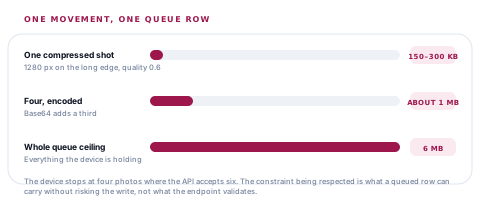
The cap that matters is not the server's
The API takes six. The phone stops at four, and the gap is the point: the constraint being respected is what a queued row can carry without risking the write, not what the endpoint will validate. Four still covers the shots that actually get taken — the damage, the serial plate, the wider context, and one spare.
Compression at 0.6 and 1280 pixels is aggressive by the standards of a photo library and exactly right for the job. This is evidence of a dent or a serial number, not a print. The test is whether a reviewer three weeks later can see what was wrong, and a 1280-pixel frame of a scratched panel answers that question as well as a four-thousand-pixel one, at a twentieth of the cost.
Which movements ask for a photo, and which insist
| Movement | What the prompt asks for | Insisted on? |
|---|---|---|
| Check out | The condition the asset is leaving in | Offered |
| Check in | The condition it came back in | Offered |
| Transfer | The condition at handover | Offered |
| Retire | The asset being retired, and its serial plate | Offered |
| Mark damaged | The damage — this is the record of what was wrong | Expected |
| Mark lost | Where it was last seen, or the paperwork about the loss | Expected |
| Verify | The asset as you found it | Only for high-risk and critical assets |
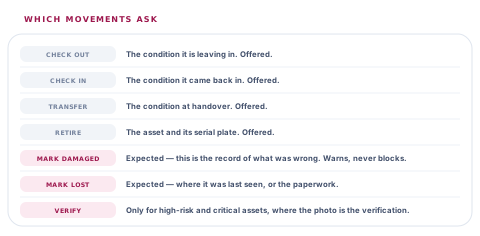
That last row is the one with a real argument behind it. Verification is the highest-frequency action in the whole module — a scan resolves straight to it — and a photo prompt on every single one is a prompt people learn to dismiss without reading. Which costs you the prompts that matter, on the damage report three weeks later.
A prompt everybody dismisses is worse than no prompt, because it trains the dismissal.
So verification asks for a photo only where the photo is the whole record: a high-risk or critical asset, where the picture is the only evidence the thing was seen at all. On everything else, verification stays a two-second action, which is the reason people actually do it.
Expected, and never required
Damage and loss are the two where a report with no photo is a claim with nothing behind it. The app says so. It does not refuse the report.
The camera is dead, or the asset is already gone
Record it anyway
A damage report with no photograph is much better than a damage report that was never made because the person could not make one.
You have the shots but no signal
Capture and queue
The photos travel with the movement in the queue and land together. Nothing is uploaded separately and nothing can arrive half-attached.
You are on the fourth photo and want a fifth
Take the best four
The cap is a device constraint rather than an opinion about your evidence. A multi-select that overruns it is told which shots were attached rather than silently truncated.
Watching the number climb
While you are attaching, the app shows the approximate total in kilobytes. That is not a developer detail leaking onto a screen — it is the only warning available before a failure that would otherwise be silent and total.
The alternative is an operator finishing a handover in a bay with no signal, tapping save, and meeting a failed offline write with no explanation and no way to reason about it. A visible number turns that into "these are getting large", which is a thought somebody can act on while there is still something to do about it.
Why photos travel differently from documents
An ordinary attachment — a PDF somebody emailed, a signed delivery note — is moved into app-owned storage and travels as a durable path, because encoding a document into the queue row is precisely the failure the row-size ceiling exists to prevent. Photos are the exception, and only because they are small, compressed hard and capped at four. It is the same rule applied twice, not two different rules.
What a camera permission refusal should do
Backing out of a camera is the most common thing that happens in one, so a cancelled capture is not an error and is not reported as one. A refused permission is different: it is a state the person can change, so it is named, with the reason the app wanted the camera in the first place. And an image the picker hands back with nothing readable in it produces a message rather than a silently attached empty photo — the failure being avoided there is a movement that appears to carry evidence and does not.
Three questions about photo evidence
Can I attach photos to a movement with no signal?
What you will hear
"Photos upload in the background."
How to read it
Ask what happens if the app is closed before that background upload runs. A photo that uploads separately from the movement can arrive without it, or never — the honest design carries both in the same queued record so they land together or not at all.
How many photos, and what is the limit protecting?
What you will hear
A number, with no reason attached.
How to read it
The number matters less than whether anybody knows why it is that number. A cap chosen to protect the offline queue behaves differently from a cap chosen to protect the API, and only one of them prevents you losing a movement in a loading bay.
Does every action prompt for a photo?
What you will hear
"Yes, on everything."
How to read it
That is a system whose prompts get dismissed by reflex within a fortnight. Ask which actions insist, which offer, and what makes the difference — a prompt is only worth having where somebody will read it.
Our take
Photo evidence looks like a feature and behaves like a storage decision. Four photos at 1280 pixels is not a limit on what you may record — it is the number at which a movement captured in a bay with no signal can still be written to the device, which is the only property that matters at the moment it matters. We would rather ship a cap with the arithmetic printed beside it than an unbounded field that works in every demonstration and loses a handover on the day somebody photographs a whole pallet.
Evidence rules are among the most commissionable things here
What counts as evidence differs by industry more than almost anything else in the product. These are the extensions people ask for, and each has a known shape.
Required photos on chosen actions
Your own list of movements where a photo is mandatory rather than expected, so a regulated handover cannot be recorded without one.
Full-resolution originals kept alongside
The compressed copy travels in the queue and the original uploads when there is a connection, for assets where the detail in the picture is the record.
Stamped capture metadata
Time, place and device burned into the image at capture, for evidence that will be read by somebody outside your organisation.
Short video for a damage report
A few seconds of footage where a still cannot show the fault — with the same honest ceilings, sized for a queue rather than a gallery.
The caps, the compression settings and the action table each live in one place with the reason written beside them, which is what makes moving any of them a defined piece of work.
Tell us what your evidence has to proveTry it in the worst place you have
Photograph a handover in the bay where nobody has a bar of signal, close the app, and open it again on Monday. What comes back — and whether the photos are still attached to the movement — is the answer.
Talk to us about asset evidenceFrequently asked questions
Why only four photos when the server accepts six?
Because the constraint that decides this is the offline queue, not the API. A movement captured with no signal is stored as a single row on the device, photos included, and the encoding adds a third to their size. Four compressed shots come to roughly a megabyte, against a six-megabyte ceiling for everything queued. Six would work most days and lose a handover on the day somebody photographs a whole pallet.
Are my photos compressed, and does that matter for a damage claim?
They are — 1280 pixels on the long edge at moderate quality, which puts a typical shot between 150 and 300 kilobytes. The test that matters is whether a reviewer weeks later can see the dent or read the serial plate, and at that size they can. Keeping full-resolution originals alongside the compressed copy is a defined piece of commissionable work for assets where the detail itself is the record.
Does verifying an asset ask for a photo every time?
Only for high-risk and critical assets. Verification is the most frequent action in the module — a scan goes straight to it — and prompting on every one produces a prompt people dismiss without reading, which costs you the prompts that matter. Where the asset is high-risk, the photo is the verification, so it is asked for.
Can I file a damage report without a photo?
Yes. Damage and loss are the two actions where a photo is expected, and the app says so, but it is a warning rather than a block. A report with no picture is weaker evidence; a report that was never made because somebody could not make one is no evidence at all.
What happens to the photos if the movement is queued for days?
They travel inside the queued movement itself and land with it, so there is no window where the movement exists on the server without its evidence. Ordinary file attachments work differently — those are moved into the app's own storage and referenced by a durable path, because encoding a PDF into a queue row is the failure the size ceiling exists to prevent.
Why does the app show me the size while I am attaching photos?
So the only warning available arrives while you can still act on it. Without it, the first sign of trouble is a save that fails on a device with no signal and no explanation to offer. Watching the number climb turns a silent total failure into an ordinary decision about which shots to keep.
