
The First Fix Is the Worst One
A phone hands you a location instantly and it is usually the worst one it will have all minute. Waiting eight seconds for a better one is the difference between a movement that lands and a movement your own policy refuses.
- Written by
- AWRA OpsHub TeamOperations Insights
- Issued
- Build
- Initial
Ask a phone where it is and it answers immediately. That first answer is assembled from whatever is cheapest — the last known position, a cell tower, a Wi-Fi network it recognises — and it can be hundreds of metres out. The satellites are still converging. Thirty seconds later the same phone would have told you something far better, and nobody asked it again.
For a map that is fine; the pin drifts into place while you look at it. For a recorded asset movement it is not fine at all, because the number is written down once, stapled to a handover, and read months later by somebody settling a dispute. And if your workspace has set a maximum accuracy, that first coarse fix is not merely vague — it is refused.
Two ways to ask, and when each is right
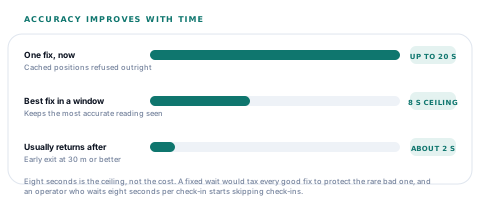
One fix, now
- High accuracy requested, twenty seconds to produce something.
- Cached positions explicitly refused — the age allowance is zero, so it can never hand back where you were an hour ago.
- Right where a location is context rather than evidence, and the operator is waiting on it.
- Whatever the platform returns is what is recorded, including its own statement of how accurate it thinks it is.
The best fix in a short window
- Watches for eight seconds, keeping the most accurate reading it has seen.
- Stops early the moment a fix comes in at 30 metres or better — usually well inside the window.
- A transient provider error part way through does not end the capture. Indoors, "provider warming up" is the normal first answer.
- Right where the number will be judged later — which is every movement your policy attaches a threshold to.
The early exit is the whole design
Eight seconds is the ceiling, not the cost. Outdoors on a clear morning the target is met in two and the capture returns; the full window is only ever spent by a device that genuinely needs it. A fixed wait would tax every good fix to protect the rare bad one, and an operator who waits eight seconds for every check-in starts skipping check-ins.
What actually gets written down
| Field | What it holds | Why it is recorded |
|---|---|---|
| Latitude and longitude | The best fix in the window | The claim being made. |
| Accuracy in metres | The platform's own confidence, or nothing where it offers none | A coordinate without it is a claim with no error bar, and the policy check has nothing to compare. |
| Recorded at | The moment of the fix, not the moment of the save | A movement queued for six hours must not appear to have been located when it synced. |
| Source | That this came from a handset | A web-entered location and a device fix are different kinds of evidence and are not stored as the same thing. |
The accuracy field is the one people leave out, and leaving it out is what turns a location into an assertion. Twelve metres and twelve hundred metres are both "a location". Only one of them places somebody in a yard.
A coordinate with no accuracy beside it is not a measurement. It is a rumour with decimal places.
Where the device rule and the server rule meet
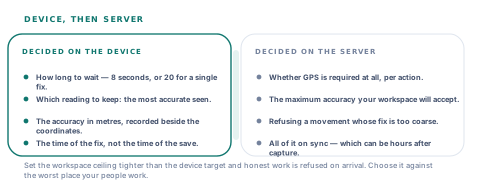
GPS on a movement is not on or off — it is four independent switches, one per action, plus an optional accuracy ceiling. A workspace can insist on a fix for check-out and not for verification, or on both with nothing tighter than "some fix". Set the ceiling and two refusals become possible: a movement with no accuracy reported at all, and a movement whose accuracy is worse than the number you chose.
The two thresholds in one movement
Set the workspace ceiling tighter than the device target and you have built a policy that a converging phone will meet only sometimes. That is survivable online — the operator sees the refusal, walks into the yard and tries again. Offline it is worse, and the next section is why.
The refusal that arrives six hours late
GPS policy is enforced by the server. It has to be — a rule that a device could waive is not a rule — and the device honestly says so: an asset resolved from the offline cache carries the statement that approval requirements and GPS policy are checked on sync, not now.
Which produces the case worth planning for. A check-out captured in a bay with no signal, with a fix the phone considered acceptable but your policy does not, is queued, sits until the van reaches coverage, and is refused on arrival — hours after the person who could have walked ten metres into the open has finished their shift.
You are setting a maximum accuracy
Choose it against the worst place you work
A cold store, a basement bay, a metal-sided workshop. The right number is the one that passes there, not the one that sounds rigorous in an office.
You need tight accuracy on a specific action
Put the requirement where the person is outdoors
Check-out at a vehicle and verification on a shelf are different physical situations. The switches are per action so that they can be set differently.
Your crews work where fixes are poor
Require the fix, leave the ceiling open
Recording accuracy without refusing on it still gives you the error bar on every movement, and lets a reviewer weigh a hundred-metre fix for what it is.
Failures that are not the same failure
When a capture cannot produce anything, the reason survives rather than being flattened into "location unavailable". Permission refused, provider unavailable, and nothing good enough in time are three different situations with three different next steps — and only the first can be fixed by the person holding the phone.
That distinction is also why a provider error during the watch does not end the capture. Indoors, a first error while the receiver warms up is ordinary; treating it as fatal would abandon a capture that was about to succeed. The error is remembered, the window runs out, and the real reason is reported if nothing better arrived.
Questions worth asking about location capture
Do you record how accurate the fix was?
What you will hear
"We record the GPS coordinates."
How to read it
Coordinates without accuracy cannot be audited and cannot be enforced against. If the field does not exist, no policy about accuracy can exist either, whatever the settings screen suggests.
Can the app return a cached position?
What you will hear
"It uses the device location."
How to read it
Every platform will happily hand back a fix from an hour ago unless you refuse it explicitly. Ask whether the age allowance is zero — otherwise a movement can be stamped with where the phone was at lunchtime.
When is the GPS rule enforced on work captured offline?
What you will hear
"The app checks it."
How to read it
A rule enforced only on the device is a rule any device can decline. It has to be checked on the server, which means a refusal can arrive hours after capture — so ask what the operator is told at capture time about that.
Our take
Location on a mobile app is nearly always presented as a switch, and it is really three decisions: how long you are willing to wait for a fix, how good it has to be, and who refuses one that is not good enough. We wait up to eight seconds and stop early at thirty metres, we record the accuracy beside every coordinate, and we enforce the ceiling on the server because that is the only place a rule holds. The one thing we would press any buyer on is the pairing: a workspace accuracy ceiling tighter than what a converging phone reaches in a real yard is a policy that quietly refuses honest work, and the refusal will arrive long after the person could have done anything about it.
Location rules are per-operation by nature, which makes them commissionable
The thresholds here are constants and settings in known places. These are the extensions people ask for once GPS is switched on in earnest.
Geofences on sites and warehouses
A boundary per location, with a movement outside it flagged for review rather than merely recorded — the natural next step once accuracy is being enforced.
Accuracy targets tuned per action
Your own device-side target and window per movement type, so a yard check-out and a bench verification are not held to one number.
Capture-time policy warnings offline
The workspace GPS rules cached on the device so an operator is warned at capture that this fix will be refused, instead of finding out at sync.
Movement trails for a shift
The sequence of located movements for a person or a vehicle across a day, read as a route rather than as separate rows.
The device capture is one function with two entry points and the server policy is one check with four switches, so each of these is a defined change in a known place.
Tell us where your crews actually standTest it in the bay, not the car park
Capture a check-out inside your worst building and look at the accuracy recorded beside it. That number, in that place, is the only sensible input to whatever ceiling you set.
Talk to us about asset movementsFrequently asked questions
Why does the app take a few seconds to record a location?
Because the instant answer is usually the worst one. A phone gives you a coarse position immediately and improves it as the receiver converges, so the app watches for up to eight seconds and keeps the best fix it sees — returning early, often in a second or two, as soon as one arrives at thirty metres or better. The wait is a ceiling, not a cost.
Can a movement be stamped with an old location?
No. The cached-position allowance is set to zero, so the platform is never permitted to hand back where the phone was earlier. The time recorded is the moment of the fix rather than the moment of the save, which matters for a movement captured offline and synced hours later.
What happens if the fix is not accurate enough?
That depends on your workspace. GPS can be required per action — check-out, check-in, transfer, verification — and you can set a maximum accuracy in metres. With a ceiling set, a movement whose accuracy is worse than it, or which reports no accuracy at all, is refused with a message asking the person to move to a stronger signal area.
Is the GPS rule checked on the phone or on the server?
On the server, because a rule a device could waive would not be a rule. The app is explicit about this on an asset it resolved from its offline cache: approval requirements and GPS policy are checked on sync. The practical consequence is that a movement captured with a poor fix in a bay with no signal is refused when it lands, so the accuracy ceiling should be chosen against the worst place your people work.
What is stored alongside the coordinates?
The accuracy the platform reported in metres, the time of the fix, and the fact that it came from a handset rather than being typed on the web. The accuracy is the field that turns a coordinate into a measurement — twelve metres and twelve hundred metres are both "a location", and only one of them places somebody in a yard.
Does a GPS error indoors abandon the whole capture?
No. A transient error while the receiver warms up is the normal first answer indoors, so it is recorded and the watch continues; a fix arriving a second later still counts. Only if the window closes with nothing usable does the capture fail, and it reports the real reason — permission refused, provider unavailable, or nothing good enough in time — rather than one generic message.
