
The Permission That Is the Policy
Most approval controls ship as a settings toggle nobody finds, defaulted off so as not to break anybody. Expense approval here works differently: it switches itself on the moment you grant the permission to a role, which makes the grant itself the policy decision.
Segregation of duties on spend is the least glamorous control in a business and the one auditors ask about first. The question is simple — can the person who raises a cost also be the person who pays it? — and in a very large number of small and mid-sized firms the honest answer is yes, not because anybody decided that but because the software made recording and paying the same permission and nobody noticed.
That was true here too, and it is written down as such in two of our own articles. It is no longer true, and the way it was fixed is more interesting than the fix — because the hardest part of shipping an approval control is not the approving. It is switching it on without breaking every organisation that was working fine without it.
The switching-on problem
Consider what happens if approval simply becomes mandatory on deploy. Every existing organisation wakes up to a payables queue that nobody can clear. A sole trader raises an expense and discovers they are not permitted to approve their own, which is correct in principle and absurd for a business of one. Support tickets, emergency rollback, and a control that everybody now associates with an outage.
The standard answer is a settings toggle, defaulted off. It avoids the outage and it fails in a quieter way: the toggle sits in a settings page nobody visits, the control is never turned on, and the firm believes it has segregation of duties because the feature exists. A control that is off by default and undiscoverable is worse than no control, because it produces a false answer to the audit question.
The approach taken here removes the toggle entirely. Approval is active for an organisation once that organisation has granted the approve-expense permission to any role. Nothing else. No setting, no configuration screen, no migration flag.
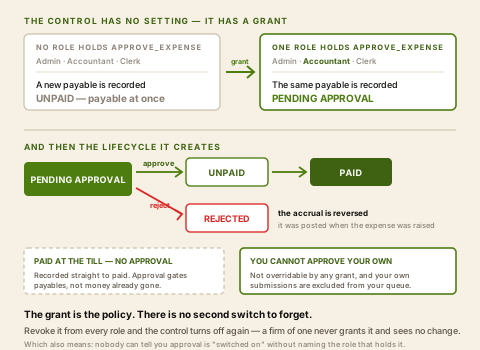
Granting the permission is the decision to require approval. Revoking it everywhere is the decision to stop. The control cannot get out of step with the intention, because the grant is the intention.
The properties this buys are worth naming, because they are the reason the design is better than a toggle rather than merely different:
- It is self-documenting. "Do we require expense approval?" is answered by looking at which roles hold the permission — the same place you would look to find out who approves. There is no second source of truth to disagree with the first.
- It cannot be half-configured. A toggle switched on with nobody holding the permission is a deadlock. That state is unreachable here, because the grant is what turns it on.
- It degrades correctly for a one-person business. They never grant it, so nothing changes for them, and they have not opted out of anything or dismissed a warning.
- It is reversible without data cleanup. Revoke the permission from every role and new expenses stop being held for approval.
- It is honest in a demonstration. Nobody can claim approval is "switched on" without naming the role that holds it.
What the control actually enforces
Four rules, and the second is the one that makes this a segregation of duties rather than a formality.
-
A payable is raised as pending approval
Where approval is active, a new expense that has not been paid yet is recorded as pending approval rather than as a payable ready to settle. It is a request, and it is visibly one.
-
You cannot approve your own — ever
Whoever raised the expense is refused approval on it regardless of what permissions they hold. This is not a configurable rule and no grant buys past it, which is deliberate: a permission that lets you approve your own spend is not a control, it is paperwork. The refusal says so in plain words.
-
A pending expense cannot be paid
The payment path checks separately and refuses an expense that is awaiting approval, and refuses one that was rejected. So the control is not only on the approve button — it is on the money.
-
Approval and rejection are both recorded on the expense
Approving stamps the approver and the time onto the record and clears any prior rejection. Rejecting stamps who rejected it, when, and the reason. "Who signed this off?" is answered by the document rather than reconstructed from an audit log.
An expense paid at the till is not a request
Approval gates payables — costs where the money has not moved and a signature still means something. An expense recorded as already paid, the receipt from the hardware shop this morning, goes straight to paid whatever the policy is. That is the right boundary: asking someone to approve a payment that has already happened teaches everyone that approval is theatre, and it would make the queue useless within a fortnight.
The rejection that has to reach the ledger
This is the part that is easy to get wrong and it is worth spelling out, because it is where a naive implementation of the same feature quietly corrupts the accounts.
The accrual for an expense is posted when the expense is raised — expense debited, payable credited — because that is when the obligation was incurred. If a rejection then only changed a status column, the accounting entry would stay on the books forever: expenses overstated, payables overstated, by the value of everything anybody ever refused. Nobody would notice until a year-end review, and the discrepancy would have no obvious cause.
So rejection reverses the recognition as part of the same transaction as the status change. The status and the ledger cannot disagree, because they move together or not at all.
What a rejection does to the books
The expense record survives as rejected, with the rejecter, the timestamp and the reason on it — which is what you want, because "we looked at this and refused it" is more useful evidence than a deleted row. What does not survive is any trace of it in the expense or payable balances.
Where it still stops short
This is a single-step approval, and the honest framing is that it solves the audit question — can one person raise and settle their own spend? — without being a spend-authorisation framework.
Expense governance, layer by layer
A second pair of eyes on every payable
One approver, never the raiser, stamped on the record. This is the layer that was missing and it is now closed.
Whether approval applies at all
Determined by whether any role holds the permission — your decision, expressed as a grant rather than a setting.
Who approves what
A matter of which roles you grant it to. There is no routing by category, by department or by amount — anyone holding the permission can approve anything they did not raise.
Thresholds — a bigger cost needing a bigger signature
There is no amount band on expense approval. A courier charge and a six-figure consultancy fee take the same single approval. Procurement can have them, through approval rules a workspace adds for requisitions, quotation awards and supplier bills; expenses do not.
Multi-step or sequential approval
One step only. There is no manager-then-partner chain on an expense, and no parallel sign-off.
A mandatory receipt before approval
Documents attach to the expense itself and every download is logged, but a receipt cannot be made a condition of approving. The reviewer has to look.
Delegation while a procurement approver is away
An approver names a delegate for a set of dates under Settings › Out of Office. The delegate signs the requisition, quotation-award and supplier-bill steps waiting on that person, is told about them, and the decision records on whose behalf it was made.
Delegation on an expense approval
Expense approval runs on a permission rather than a named step, so cover on it still means granting the permission to somebody else and revoking it afterwards — which does at least leave a record of the change. Extending the procurement delegate to it is the work.
The threshold gap is the one worth planning around, and it has a workaround with real teeth: procurement can enforce amount bands — a workspace can add approval rules that route a requisition, quotation award or supplier bill by amount to an ordered chain of signers — so routing significant committed spend through a requisition and a purchase order rather than through an expense claim gets you the banding that expenses lack. That is not a fudge — it is what purchase orders are for.
Two of our own articles were wrong about this
Both our professional-services pieces carried a flat statement that recording and paying an expense were the same grant, that no approver was held on the record, and that a second pair of eyes was therefore unavailable through permissions. That was accurate when it was written and it is false now, and a stale limitation is still a false claim about a product — the direction of the error does not make it harmless. Both have been corrected, and the same discipline applies as when a claim runs the other way: check the code path, not the previous article.
It is worth saying why this particular kind of drift is easy to miss. A vendor has every incentive to hunt down claims that overstate the product, because those get found by customers. Claims that understate it are found by nobody, sit indefinitely, and quietly cost you the buyers who read the limitation and went elsewhere. The only defence is the same one either way: verify against the code on a schedule, not against what you wrote last quarter.
What AWRA OpsHub does today
- A dedicated approve-expense permission, separate from the grant that records and pays.
- The control activating on the grant itself — active once any role in the organisation holds the permission, with no settings toggle to find or forget.
- Payables raised as pending approval where the control is active, and released to payable on approval.
- Self-approval refused unconditionally. The raiser cannot approve, and no permission overrides that.
- Payment blocked for an expense that is pending approval or was rejected, checked on the payment path rather than only on the button.
- Approver and timestamp stamped on the expense, and a prior rejection cleared when it is approved.
- Rejecter, timestamp and written reason stamped on a refused expense.
- The accrual reversed as part of the rejection, in the same transaction, so status and ledger cannot diverge.
- A pending queue and count that excludes your own submissions, so the badge shows work you can actually do.
- Expenses paid outright recorded as paid, bypassing approval, because the money has already gone.
- Out-of-office cover on procurement approval steps — a named delegate for a set of dates, with the decision recorded on whose behalf.
More we can add to your workspace
- Approval thresholds on expenses: amount bands, so a payable stops taking the same single approval regardless of size.
- A multi-step or sequential approval, and no parallel sign-off.
- Routing rules. Approval is not directed by category, department, project or vendor; anyone with the permission can approve anything they did not raise.
- A mandatory receipt before approval, rather than one that can only be attached.
- Out-of-office cover on expense approval, the same dated delegate that procurement approval steps already honour.
- A reminder escalation on an expense that has sat in the queue too long.
- An approval on the client-recoverable question. Whether a cost is rechargeable to a client is a custom field you define, not something the approver is asked to decide.
- An automatic recovery of a client-recoverable cost onto an invoice, which remains a manual step.
What has closed is the audit question, and it has closed properly — including the two details that separate a real control from a checkbox, which are the unconditional self-approval bar and the ledger reversal on rejection. What has not closed is spend authorisation by size, and for that the honest route is procurement, where a workspace can add approval rules that route by amount band and enforce them. A firm whose real exposure is large committed costs should be running those through requisitions and orders rather than expense claims regardless of what any approval feature does.
Anything above that you need, we can build for you
Everything listed above as something we can add describes what ships in the standard product today — it is a starting point, not a limit on what AWRA OpsHub can do for your organisation. Kenya's eTIMS integration and its maintained payroll engine are both in the product because clients needed them and commissioned them; neither appeared by itself, and the same door is open for whatever you just read about. One qualification so this is worth what it claims: a small number of things on this blog we deliberately leave to a specialist rather than build — a statutory ledger we will not sign our name to, a rule that would decide a tax question for you, a clinical or member-funds record that belongs in a regulated system — and where that is true the post says so in those words. Everything else is a scope, a timeline and a price.
The operational work, which is what most commissions actually are
An extra approval stage in a chain that does not match the standard one, a custom field set on employees or assets that only your sector needs, an expiry that has to block an order rather than send an email, a report your board asks for in a shape nothing produces, or a scanner or weighbridge feeding the goods-in door. These are the commissions we are asked for most often and the smallest ones we quote — and unlike a revenue-authority pipeline, none of them waits on a regulator.
The module-shaped additions, which are the ones readers ask for most often
A price list with real discount authority, a customer-facing quotation that expires, a bill of materials or recipe costing, a staff advance that is issued, acquitted and chased, a member or unit ledger, a matching rule that holds a payment. Each of these is a build rather than a setting, and each has been quoted before — a bigger piece of work than a custom field, with a written spec and a date instead of a roadmap slide.
The report, document or pack nothing currently produces
The board pack in the shape your board actually asks for, a donor or funder layout, an invoice or receipt template carrying what your regulator or your customer expects, a dataset the report builder cannot reach yet. Usually the fastest thing on this list to deliver, because the data is already in the system.
Systems, rails and hardware you already run
The accounting package, CRM, online store, core banking or custom database you intend to keep — connected through our API so a fact is entered once and appears everywhere it is needed. Plus the physical edge: a scanner, a scale, a weighbridge or a till peripheral feeding the door it belongs to.
How it works: you describe the requirement, we return a written scope, timeline and cost, and once agreed it is built into your environment and maintained as part of the product. Nothing here waits on a regulator or a published specification, which is why operational builds are the ones we quote fastest. Tell us the requirement that would otherwise rule us out — that is a better first conversation than a demo.
Tell us what your operation needsOur take
The design lesson here generalises beyond expenses: when a control has to be optional, make the thing you already have to configure be the switch. A toggle beside a permission is two sources of truth for one intention, and one of them will be wrong. Tie the behaviour to the grant and the question "is this control on?" stops being a separate thing anyone can answer incorrectly.
Answer the audit question today
Grant approve-expense to one role that does not raise expenses. That single action turns the control on, and the next payable somebody raises will need a second pair of eyes.
See expense management