
Rent & Service-Charge Collection: Billing, Arrears & M-Pesa
Collection is the heartbeat of a property agency — and the place most of them quietly bleed time and money. Here is the collection cycle that ends the monthly matching game, turns arrears into a managed list, and reconciles every channel to one ledger.
For a property agency, the first week of every month is defined by one activity: working out who has paid. Rent and service charge arrive across an M-Pesa paybill, two or three bank accounts, and the occasional cash payment, usually with a reference that says "rent" or a name that half-matches an occupant. Someone then reconciles all of it against a mental or spreadsheet model of who owes what, and chases the gaps. It works, in the way that manual reconciliation always works — expensively, and only as well as the person doing it. The whole point of a collection system is to make that week disappear.
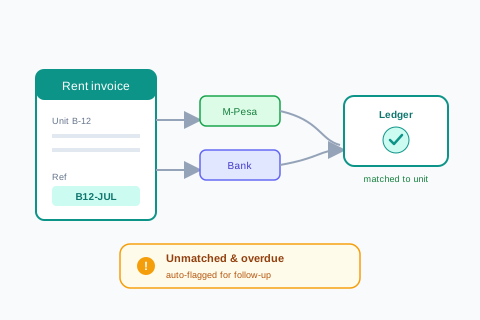
The collection cycle, step by step
A clean collection process is a repeatable monthly cycle, not a scramble. Each step exists to make the next one automatic.
-
Bill every unit once, with a reference
One invoice per unit per period — rent, service charge, and any recurring extras — each carrying a unique payment reference (unit code + month). The reference is what makes everything downstream reconcile itself.
-
Collect through channels tied to the reference
Renters pay by M-Pesa or bank using their reference. Because the reference identifies the unit, the payment lands against the right invoice without anyone deciphering a narration.
-
Auto-match to the ledger
Referenced payments match automatically; only the unreferenced or partial ones surface in an exceptions queue with suggestions. You review a short list, not a full bank statement.
-
Flag arrears by age
Anything unpaid past its due date moves onto an arrears list, aged by how long it has been outstanding — so follow-up is prioritised, not guessed.
-
Remit and report
What is collected reconciles cleanly into landlord remittances and owner statements, because it was captured correctly at the point of payment.
Service charge is not just rent by another name
Rent belongs to a landlord; service charge belongs to the building and its shared costs — security, cleaning, water, common-area repairs. Blending them into one figure is a common and costly mistake, because owners and residents are entitled to see that service charge was collected and spent on the building, not absorbed into rent or the agency's float. Billing service charge as its own line, collecting it against its own reference, and accounting for it separately is what lets you answer the service-charge AGM question every managed building eventually asks: what did we pay in, and where did it go?
Arrears: a managed list, not a feeling
Every agency has arrears; the difference between a healthy one and a struggling one is whether arrears are visible and aged or vague and dreaded. An aged arrears list — 30, 60, 90 days overdue, per unit, per building — turns collection from anxiety into routine: the 60-day balances get a firmer call than the 30-day ones, patterns in a particular building surface early, and the landlord conversation is backed by exact figures rather than impressions. This is the same discipline as receivables aging in any business, applied to rent.
The reference is the whole trick: identify the unit at the moment of payment, and reconciliation stops being a job.
Why referenced billing changes everything
Reliable collection is the foundation the rest of property management is built on — you cannot report honestly to owners or fund maintenance predictably if you cannot say cleanly what came in. Get the cycle right, and the monthly matching week becomes a daily glance at an exceptions queue and an arrears list. That reclaimed time is the first and clearest return a property agency gets from running on a real system.
What AWRA OpsHub does today
- Step 2 and step 3 are genuinely built for M-Pesa. A renter paying your Paybill or Till and quoting the invoice number has that payment matched to the invoice automatically — the balance updates from the callback, with the receipt recorded idempotently so a retry cannot double-count it.
- Unmatched receipts are not lost. A payment with no usable reference still lands in the sales payments ledger as a recorded receipt for you to attach by hand.
- Step 4 exists in general form — an aged receivables report with automated invoice reminders, behind its own permission.
- Invoices with line items, part-payments and running balances, so rent and service charge can at least be separate lines on one document.
- Recurring invoices for step 1 — a template per tenant raises rent and service charge on its date, weekly, monthly, quarterly or yearly, and can issue and email it.
More we can add to your workspace
- A unit entity behind step 1, so each unit’s invoice carries its unit code and payment reference by construction rather than by naming convention.
- Bank receipts matched onto the invoice they pay. M-Pesa already lands on its invoice, and an imported bank statement reconciles against the ledger with suggested matches and an auto-match pass; applying a bank receipt straight to the rent invoice by its reference is the addition, and it is a large part of the matching game this post promises to end.
- An exceptions queue with suggestions. Unmatched receipts sit in a list; nothing proposes a likely invoice.
- Arrears ageing by unit and building. They age by invoice and customer today, and the unit entity is what a per-building arrears view needs.
- Rent and service charge are lines, not ledgers. They cannot be separately accounted, separately reported, or separately remitted.
- A landlord remittance or owner statement at the end of the cycle.
The single sharpest claim in this post — that the reference is the whole trick — is one we do meet on the M-Pesa side, and it is worth seeing. The rest of the cycle assumes units, recurring bills and bank matching. Recurring bills run, and a bank statement reconciles against the ledger; units, and bank receipts landing on the invoice itself, are what we can add. Weigh that as an agency against the five steps above.
Anything above that you need, we can build for you
Everything listed above as something we can add describes what ships in the standard product today — it is a starting point, not a limit on what AWRA OpsHub can do for your organisation. Kenya's eTIMS integration and its maintained payroll engine are both in the product because clients needed them and commissioned them; neither appeared by itself, and the same door is open for whatever you just read about. One qualification so this is worth what it claims: a small number of things on this blog we deliberately leave to a specialist rather than build — a statutory ledger we will not sign our name to, a rule that would decide a tax question for you, a clinical or member-funds record that belongs in a regulated system — and where that is true the post says so in those words. Everything else is a scope, a timeline and a price.
The operational work, which is what most commissions actually are
An extra approval stage in a chain that does not match the standard one, a custom field set on employees or assets that only your sector needs, an expiry that has to block an order rather than send an email, a report your board asks for in a shape nothing produces, or a scanner or weighbridge feeding the goods-in door. These are the commissions we are asked for most often and the smallest ones we quote — and unlike a revenue-authority pipeline, none of them waits on a regulator.
The module-shaped additions, which are the ones readers ask for most often
A price list with real discount authority, a customer-facing quotation that expires, a bill of materials or recipe costing, a staff advance that is issued, acquitted and chased, a member or unit ledger, a matching rule that holds a payment. Each of these is a build rather than a setting, and each has been quoted before — a bigger piece of work than a custom field, with a written spec and a date instead of a roadmap slide.
The report, document or pack nothing currently produces
The board pack in the shape your board actually asks for, a donor or funder layout, an invoice or receipt template carrying what your regulator or your customer expects, a dataset the report builder cannot reach yet. Usually the fastest thing on this list to deliver, because the data is already in the system.
Systems, rails and hardware you already run
The accounting package, CRM, online store, core banking or custom database you intend to keep — connected through our API so a fact is entered once and appears everywhere it is needed. Plus the physical edge: a scanner, a scale, a weighbridge or a till peripheral feeding the door it belongs to.
How it works: you describe the requirement, we return a written scope, timeline and cost, and once agreed it is built into your environment and maintained as part of the product. Nothing here waits on a regulator or a published specification, which is why operational builds are the ones we quote fastest. Tell us the requirement that would otherwise rule us out — that is a better first conversation than a demo.
Tell us what your operation needsEnd the monthly matching game
Referenced M-Pesa payments matched to the invoice automatically, unmatched receipts captured rather than lost, and aged arrears with reminders. Recurring invoices raise each tenant’s bill and bank statements reconcile against the ledger; units and invoice-level bank matching are covered in the note above.
Explore property management operationsFrequently asked questions
How does referenced billing make reconciliation automatic?
Each unit's invoice carries a unique payment reference (typically unit code plus period). When a renter pays by M-Pesa or bank using that reference, the payment identifies the unit and matches to the right invoice on its own. Only unreferenced or partial payments need human attention, so you review a short exceptions queue instead of decoding a whole bank statement.
Why bill service charge separately from rent?
Because they are different money: rent belongs to the landlord, while service charge belongs to the building and its shared costs. Keeping them separate — own line, own reference, own accounting — lets you prove to owners and residents that service charge was collected and spent on the building, which is exactly what a service-charge review will demand.
What is the point of an aged arrears list?
It turns arrears from a vague worry into a prioritised, factual list — balances grouped by how long they have been overdue (30/60/90 days), per unit and building. Follow-up becomes proportionate, problem buildings surface early, and landlord conversations rest on exact figures rather than impressions.
Can one system handle M-Pesa, bank, and cash together?
Yes — that is the point. All channels flow into one ledger against the same referenced invoices, so however a renter pays, the payment lands against the correct unit. Cash is recorded at receipt, M-Pesa and bank match by reference, and the exceptions queue catches anything that does not reconcile cleanly.
