
Reporting & BI in Kenya: Reports People Actually Read
Every Kenyan business that buys a system asks for reporting, and most end up with reports nobody opens. The difference between a report and a decision, and why reporting problems are nearly always records problems wearing a costume.
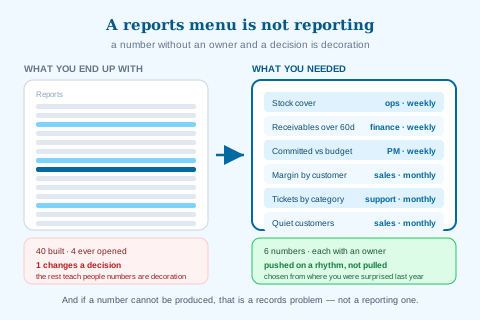
Ask a Kenyan business what they want from a new system and reporting is always near the top. Come back a year later and there will be a reports menu with forty entries, of which four get opened and one gets acted on. Nobody is at fault; the demand was real and the delivery was competent. The problem is that "reporting" is not actually what anybody wanted.
What they wanted was to stop being surprised — by a stockout, a customer who quietly stopped buying, a project that lost money, a month that came in worse than expected. That is a much narrower requirement than reporting, and it is met by a small number of specific numbers arriving on a rhythm, not by a menu.
Three tests a report has to pass
Before building or requesting any report, run it through these. Most existing reports fail at least one, which is exactly why they go unread.
-
Whose decision is this?
A report with no owner has no audience. If you cannot name the person and the decision they will make differently, you are building a document rather than a control.
-
What action follows each outcome?
If the number is high you do X, if low you do Y. A report where every outcome leads to "interesting" is a report that will stop being opened by month three.
-
Does it arrive before the decision, or after?
A monthly report on a weekly decision is history. This is the most commonly failed test and the least often noticed — accuracy gets attention while timing does not.
A report nobody acts on is not a small waste. It teaches the organization that numbers are decoration, which makes the reports that do matter harder to land.
Reporting problems are usually records problems
This is the most useful thing in this guide. When a business says its reporting is bad, the reporting layer is rarely the fault. Consider the reports Kenyan businesses most often cannot produce, and what actually blocks each one.
| The report they want | Why it cannot be produced | The actual fix |
|---|---|---|
| Margin by product or customer | Cost is an assumption; imported cost lacks landed cost | Record the rate paid and load duty and freight — landed cost |
| Profit by project or job | Costs arrive without a project attached and fall into overhead | Require a project on issues, POs and claims — cost allocation |
| Which customers are drifting away | Customer records are duplicated, so history is fragmented | Deduplicate and enforce selection — customer records |
| Real stock position by location | Transfers recorded at one end; sales not linked to stock | Link every sale to stock; govern transfers with dispatch and receipt |
| What our support workload is | Requests live in inboxes and phones | Log them as tickets — helpdesk |
| Payroll cost by department | Payroll is a monthly lump outside every cost centre | Allocate at the run — HR software in Kenya |
Not one of those is solved by a better reporting tool. Each is solved by capturing one more fact at the moment a transaction happens — which is why buying a BI layer on top of incomplete records produces beautifully formatted uncertainty. Get the records right and most of the reporting people wanted becomes available almost incidentally.
Six numbers, not sixty
The reporting that changes behaviour in an SME is a handful of numbers on a rhythm, with a named owner. Six is a good discipline because it forces choices; ten is usually the point at which nobody remembers what they are watching.
The right six differ by business, but the selection method does not: pick the numbers where you have been surprised in the last year. Surprise is the signal. If you were caught out by a stockout, stock cover belongs on the list; if by a cash squeeze, the receivables position does; if by a project loss, committed cost does. The method is worked through in operational dashboards.
Push beats pull, decisively
A report that requires somebody to log in, navigate and run it will be looked at when things are calm — which is exactly when it matters least. The same report arriving in an inbox on a schedule gets read.
This is not a small effect. In our experience the difference between a report that exists and a report that is scheduled to the people who act on it is most of the value. Scheduling turns reporting from a thing people do when they remember into a thing that happens whether or not anyone remembers, which is the only version that survives a busy quarter. The mechanics are in scheduled reports.
What we do and do not do
What AWRA OpsHub does today
- Reports built from live operational records, so figures are not transcribed or re-keyed.
- A report builder — define your own reports with your own filters and fields rather than waiting for a developer.
- Saved definitions and saved filters, so a useful view is kept rather than rebuilt.
- Scheduled delivery — by cadence, to named users or whole roles, in your chosen formats.
- Exports for the cases where somebody genuinely needs the data elsewhere.
- Dashboard pinning, so the handful of numbers you actually watch sit together.
- Sharing, so a report has an audience rather than an author.
More we can add to your workspace
- External data sources. We report on your operational data, not on marketing platforms, bank feeds or third-party systems.
- Predictive modelling you can author. Insight features ship today; authoring your own forecasting models is the build.
- A pixel-level report design — this is not a report-layout tool for statutory or client-branded documents.
Where we point you to a specialist
- We are not a data warehouse. No modelling layer, no SQL workbench, no dimensional star schemas to design.
If your requirement is genuinely enterprise BI — blending several source systems, a semantic model, analyst-authored SQL — treat this as the operational reporting layer and expect to export into a dedicated BI tool for that work.
Anything above that you need, we can build for you
Everything listed above as something we can add describes what ships in the standard product today — it is a starting point, not a limit on what AWRA OpsHub can do for your organisation. Kenya's eTIMS integration and its maintained payroll engine are both in the product because clients needed them and commissioned them; neither appeared by itself, and the same door is open for whatever you just read about. One qualification so this is worth what it claims: a small number of things on this blog we deliberately leave to a specialist rather than build — a statutory ledger we will not sign our name to, a rule that would decide a tax question for you, a clinical or member-funds record that belongs in a regulated system — and where that is true the post says so in those words. Everything else is a scope, a timeline and a price.
The operational work, which is what most commissions actually are
An extra approval stage in a chain that does not match the standard one, a custom field set on employees or assets that only your sector needs, an expiry that has to block an order rather than send an email, a report your board asks for in a shape nothing produces, or a scanner or weighbridge feeding the goods-in door. These are the commissions we are asked for most often and the smallest ones we quote — and unlike a revenue-authority pipeline, none of them waits on a regulator.
The module-shaped additions, which are the ones readers ask for most often
A price list with real discount authority, a customer-facing quotation that expires, a bill of materials or recipe costing, a staff advance that is issued, acquitted and chased, a member or unit ledger, a matching rule that holds a payment. Each of these is a build rather than a setting, and each has been quoted before — a bigger piece of work than a custom field, with a written spec and a date instead of a roadmap slide.
The report, document or pack nothing currently produces
The board pack in the shape your board actually asks for, a donor or funder layout, an invoice or receipt template carrying what your regulator or your customer expects, a dataset the report builder cannot reach yet. Usually the fastest thing on this list to deliver, because the data is already in the system.
Systems, rails and hardware you already run
The accounting package, CRM, online store, core banking or custom database you intend to keep — connected through our API so a fact is entered once and appears everywhere it is needed. Plus the physical edge: a scanner, a scale, a weighbridge or a till peripheral feeding the door it belongs to.
How it works: you describe the requirement, we return a written scope, timeline and cost, and once agreed it is built into your environment and maintained as part of the product. Nothing here waits on a regulator or a published specification, which is why operational builds are the ones we quote fastest. Tell us the requirement that would otherwise rule us out — that is a better first conversation than a demo.
Tell us what your operation needsThe order to do this in
If your numbers are disputed
Fix records, not reports
Nothing built on contested data will be believed. Link sales to stock, require reasons on adjustments, code costs at entry — see financial management software in Kenya.
If reports exist but go unread
Fix ownership and timing
Give each report a named owner and a decision, then schedule it to them. Most unread reports are unowned or arrive after the decision.
If you have too many reports
Cut to six and pin them
Choose from where you were surprised last year. Archive the rest — they can be rebuilt in minutes if genuinely needed.
If people keep asking finance for numbers
Give them the report, not the answer
A recurring internal request for the same figure is a self-service gap. Build it once, share it, and the requests stop.
Our take
Assume your reporting problem is a records problem until proven otherwise — it usually is. Then choose six numbers based on where you were surprised last year, give each a named owner and a decision, and schedule them rather than hoping people log in. A reports menu is not reporting; it is a filing cabinet with better fonts.
See reports that reach the people who act
Reports built from live records, your own definitions and filters, scheduled delivery to users or roles, dashboard pinning and sharing.
Explore Reports & BI StudioFrequently asked questions
Why do our reports go unread?
Almost always one of three reasons: nobody owns the report so it has no audience, no action follows from the numbers so reading it changes nothing, or it arrives after the decision it was supposed to inform. The third is the most common and least noticed, because accuracy gets attention during design while timing does not. A monthly report supporting a weekly decision is history rather than information.
Is this a BI tool?
It is an operational reporting layer, not enterprise BI. You can define your own reports, filters and fields, save them, pin them to a dashboard, share them and schedule delivery — all from live operational records. What it is not is a data warehouse with a modelling layer, a SQL workbench, or a way to blend external sources like marketing platforms and bank feeds. If you need that, export from here into a dedicated BI tool.
How many reports should we actually have?
Six numbers watched on a rhythm beats sixty available on demand. Six forces you to choose, and the selection method that works is to pick the areas where you were genuinely surprised in the last year — a stockout, a cash squeeze, a project loss, a customer who drifted away. Surprise is the signal that a number was not being watched. Everything else can be built in minutes when a specific question arises.
Can we build reports ourselves without a developer?
Yes — that is the point of the report builder. You define the fields, filters and grouping, save the definition, and share or schedule it. This matters mostly because it removes the queue: a recurring internal request for the same figure is a self-service gap, and building the report once ends the requests permanently rather than answering them repeatedly.
Our numbers get disputed between departments. Will reporting fix that?
No, and reporting layered over contested data makes it worse, because now the disagreement has charts. Disputes almost always mean the same fact is recorded in more than one place — stock in one system and sales in another, costs coded after the fact by someone interpreting descriptions. Fix the records so each transaction is captured once by the person closest to it, and the dispute disappears because there is only one set of numbers.
