
Ask AwraIQ about features, pricing, onboarding, login, integrations, security, demos, mobile apps, automation, reports, or support.
Now on Google Play
AWRA OpsHub Android
Built for warehouse teams, field custodians, approvers, and mobile operators who need scanning, GPS proof, offline work, and secure sync without waiting for stable internet.
Where to get it Google Play
Requires Android 8.0+
Updates Automatic
Installed from Google Play, so the build is store-signed and updates arrive automatically. You need an AWRA OpsHub account to sign in — the app is a companion to your workspace, not a standalone product.
Offline Ready GPS Field Proof Barcode Scan Secure Sync Android 8+
Package com.awra.opshub
Integrity Play-signed
Built for field operations
The mobile workflows your teams use when work leaves the desk.
AWRA OpsHub Android brings high-frequency operational work into a focused mobile interface: inventory movement, asset custody, scanning, GPS proof, approvals, and offline queueing for sales, counts, stock and asset movements and approvals.
Inventory Movements
Check in, check out, transfer stock and move assets from the warehouse floor with cached item registers, queued and synced when the device reconnects. Counting and adjusting stock run on the phone too, and both queue offline the same way.
Asset GPS Proof
Capture latitude, longitude, accuracy, timestamp, and mobile source at movement time so asset custody has field evidence.
Scan & Act
Resolve item and asset labels quickly, then open the right detail screen or allowed next action without hunting through menus.
Approval Queue
Review pending operational decisions from mobile while permissions and plan access remain enforced by the platform.
Offline Queue
Work completed without internet is stored as a queued operation, then retried with clear success, failure, and conflict states.
Secure Mobile Access
Offline unlock depends on a previously trusted session, while server-side policy remains the final authority on sync.
Light, dark, or match the device
Set under Settings → Appearance, and stored on the handset rather than the account — so a night-shift phone or a dim store room stays dark without changing anything for the person who signs in next. Every screen is converted, scanner panels and status badges included, so a dark app is still readable at arm’s length.
Inside the app
What it looks like in the hand.
Screens from the published Android build — how you sign in, what the app opens on, what it holds while there is no connection, and how you reach the rest of the workspace. Shown in the light theme; the app follows the device, so a handset set to dark renders the same layouts in dark.
Swipe to see all six screens →

Sign in
Password, or a one-time link and code emailed to you. The same ladder the browser uses, so the same policy applies.

Your existing identity
Google, Microsoft, LinkedIn, GitHub and Slack sign-in reach the phone too. Nobody types a workspace password onto a warehouse handset.
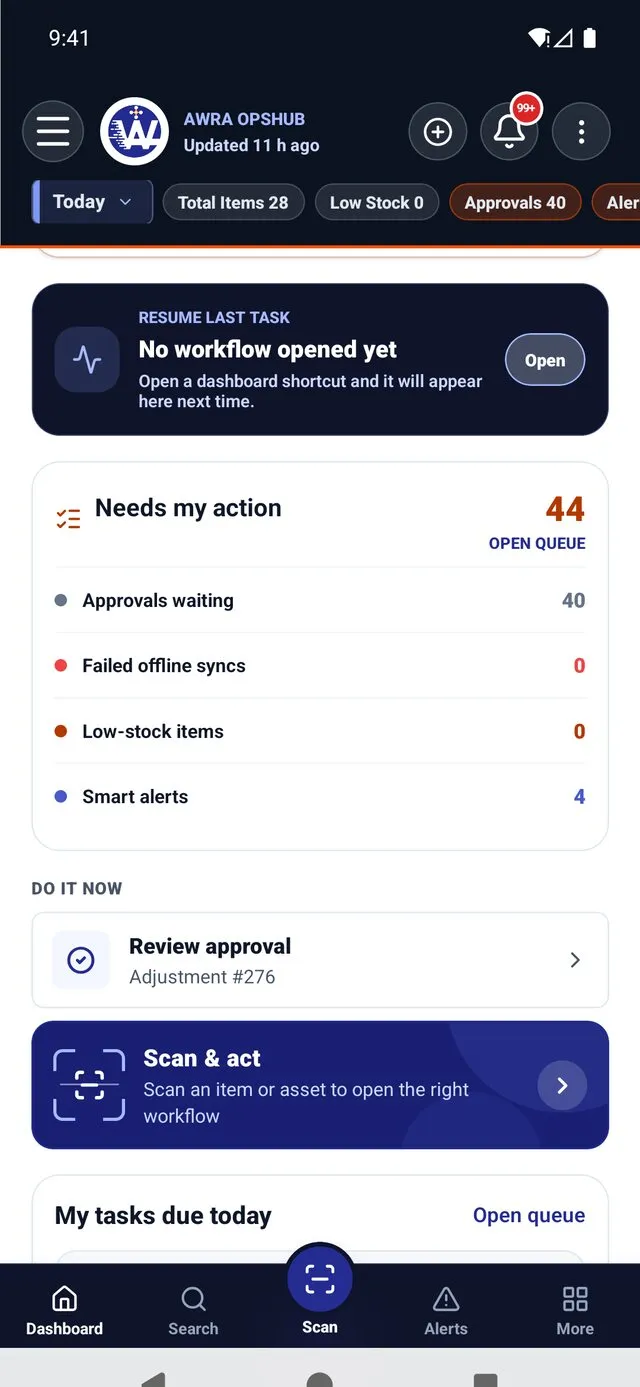
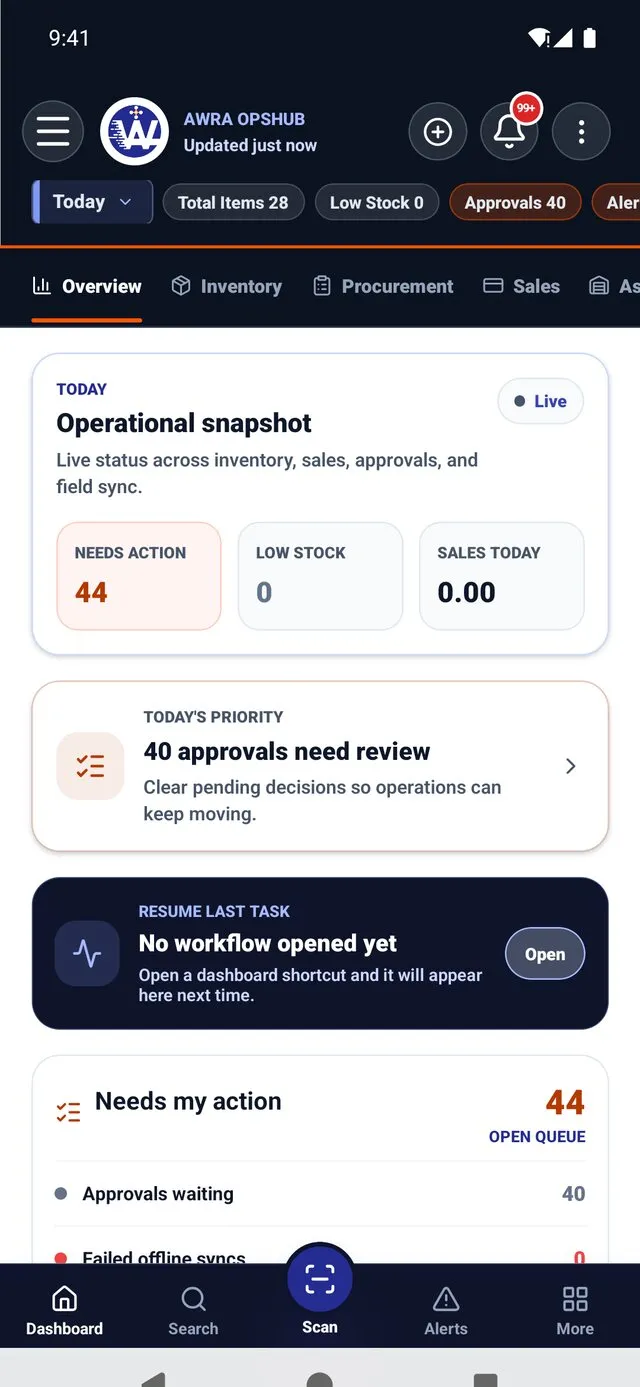
The next thing to do
One named decision at the top, a scan shortcut under it, then approvals, pending adjustments, requests and failed syncs as counts you can open.

What is still queued
Check-ins, check-outs and transfers waiting to reach the server, counted separately from the ones that tried and failed. Nothing is queued silently.
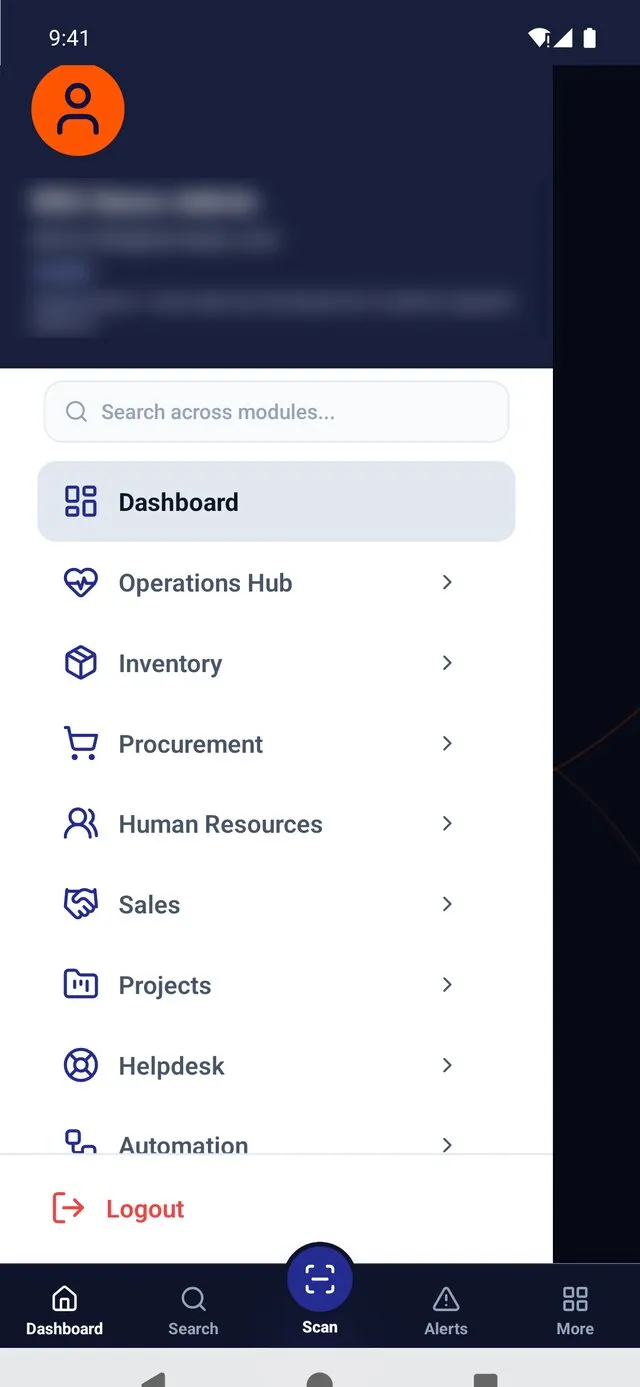
The whole workspace
Inventory, procurement, HR, projects, helpdesk, sales, accounting and automation, gated by the same permissions your account carries on the web.

Reachable from anywhere
Scan and act, a linked hardware scanner, support, theme, and locking the app — one tap away from whatever screen you are on.
See it on your own data.
Install it free, sign in to your workspace, and the app fills with your items, assets and queues.
Distribution
One channel, and it is the one your phone already trusts.
AWRA OpsHub Android is published on Google Play. Version history, release notes, permissions and the data safety declaration all live on the store listing, which means they stay current without anyone remembering to update a web page.
The direct download that preceded this is retired. Teams already running a manually installed build should move to the Play version — installs do not carry over automatically, and only the store copy receives further updates.
Channel Google Play
Category Business
Price Free
What the store install changes
- Updates arrive on their own. No one has to send a file round the team or chase who is on which build.
- No unknown-sources prompt. Devices under a mobile device management policy that blocks off-store installs can now run the app.
- Play Protect scans the build, and the store publishes the data safety declaration alongside it.
- Managed rollout to your fleet is possible through Managed Google Play if your organization already uses it.
Offline inventory Asset movements Scan routing Approval queues
Package name com.awra.opshub
Setup flow
Simple installation, then offline readiness in the background.
The app is designed so teams sign in online once, prepare the data needed for mobile work, and continue using supported workflows when the connection drops.

The device tells you what it is holding, when it last refreshed, and how long offline sign-in stays valid.
01
Install from Google Play
Search "AWRA OpsHub", or open the listing from this page.
02
Grant Permissions
Camera for scanning, location when GPS proof is required.
03
Sign In Online
Create the trusted one-day offline session.
04
Prepare Offline
Reference data and latest records cache quietly.
05
Sync Later
Queued work syncs when internet returns.
Before step one
You need a workspace to sign in to.
The app is a companion to an AWRA OpsHub account, not a standalone product — installing it does not create an organization. Any Android 8.0+ handset with a camera runs it.
Fleet deployment
Fifty handsets, configured before anybody touches one.
A shared ward tablet, a warehouse scanner on a charging rack, a pool phone that three shifts sign into — none of those should arrive needing somebody to type a server address correctly. AWRA OpsHub reads its configuration from your mobile device management console, so an enrolled device opens already pointing at the right place.
It works with any Android MDM that supports managed app configuration — Microsoft Intune, VMware Workspace ONE, Google Workspace, SOTI, Scalefusion and the rest all read the same published schema. There is nothing to install on our side and no separate agent on the device.
Managed configuration — as your console renders it
5 keys apiBaseUrl string
Which AWRA installation the app talks to. Set this and nobody in the field ever types a URL, mistypes one, or reaches a staging server by accident.
tenantId string
Which workspace the device belongs to, so a handset issued to one site cannot be signed in to another organization’s data by whoever picks it up.
defaultEmailDomain string
Pre-fills the part of the sign-in every member of staff shares. On a shared device this is the difference between typing four characters and typing thirty on a cracked screen wearing gloves.
blockScreenCapture bool
Blocks screenshots, screen recording and the app’s appearance in the recent-apps switcher. Enforced by Android itself rather than by us asking politely.
blockCompromisedDevices bool
Refuses to run on a handset that reports as rooted, and revokes its session. Read the honest limits of this one below before you rely on it.
These key names are a contract. A profile deployed to your fleet references them by name, so we add keys and never rename them.
Two policies, one device
Whichever setting is stricter is the one that applies.
Your workspace policy travels from the server to every device. Your MDM profile applies to the devices it is deployed to. Where the two disagree, the app takes the tighter value in each direction — so neither can be used to weaken the other.
Workspace Lock after 5 min
MDM profile Lock after 60 sec
Applied 60 sec
Which is what a hospital needs: harden the shared tablets on the ward without forcing a sixty-second lock onto every district officer’s personal phone.
When something goes wrong
Three fail-safe choices, made deliberately.
Every one of these is a choice between locking a field worker out and leaving a gap. We would rather publish how we chose than let you discover it.
- Server unreachable → keep the last known policy. Never fall back to permissive. Losing signal in a basement must not switch protections off.
- Cannot tell → report nothing. Where the platform offers no root detection, the app reports no verdict rather than claiming the device is clean. Treating “unknown” as “compromised” would lock out every user of a platform we have not written that check for yet.
- Missing background timestamp → lock. It means the process was killed or a write failed, and re-authenticating is the safer answer.
A real guarantee
Screen-capture blocking holds.
It is enforced by the Android window compositor, not by the app. Screenshots fail, screen recordings capture a blank surface, and the app’s content is hidden in the recent-apps switcher. This is why an organization would turn it on for payroll and financial screens.
It ships off rather than on, because it is genuinely disruptive: staff legitimately screenshot a stock count to send to a supervisor. Turning it on is a decision about which screens matter more than that convenience, and it belongs to you.
Not a real guarantee
Compromised-device detection is a speed bump.
The app checks three independent signals for root and reports what it finds to your audit trail. That is worth having. But it is a heuristic running on a device whose owner — if it really is rooted — already has more privilege than our app process. Anyone determined defeats it.
So it raises the cost of casual misuse and gives you an honest record of what each device reported. It is not a control that holds against an attacker, and you should not enter it in a security questionnaire as one. The controls that hold are the server-side ones: permissions, session policy, device approval and the audit trail.
Scope, stated plainly
Android today. iOS when that app ships.
Android is the live platform, and all of the above applies to it. iOS is still on the roadmap, so the device-side hardening for it — managed configuration, jailbreak checks, blurring the app in the task switcher — is deferred until that app exists rather than described here as though it were waiting for you. Everything server-side (session limits, password policy, device approval, IP allowlisting, the audit trail) is platform-independent and already applies wherever you sign in.
Security and offline data
Offline does not mean uncontrolled.
Mobile work can continue without internet, but every operation keeps audit context and still has to pass server-side permission, plan, asset policy, GPS accuracy, and workflow validation when it syncs.
Trusted Device
Offline unlock requires a previously trusted device/session and expires after one day.
Preserved Payloads
Queued movements keep GPS coordinates, accuracy, timestamp, source, notes, and selected records.
Conflict Feedback
Failed syncs can explain action no longer allowed, GPS rejected, invalid custodian, or changed asset state.
Server Authority
The backend remains the final authority for permissions, policy, plan access, and data integrity.
Who it supports
One mobile app for the teams closest to the work.
Warehouse Teams
Scan, move, count, and validate stock.
Asset Custodians
Check out, verify, relocate, and prove location.
Approvers
Review movement and procurement queues.
Managers
Track alerts, failed syncs, and field activity.
Common questions
Is it on Google Play?
Yes. AWRA OpsHub is published on Google Play under the package com.awra.opshub, free to install, and it updates itself from there.
We installed the APK directly. What now?
Install the Play version and remove the old one. The direct download is retired, so a manually installed build will not receive further updates. Your data lives in the workspace, not on the handset, so nothing is lost in the switch — sign in again and the device re-prepares its offline cache.
Do we need an account first?
Yes. The app signs in to an existing AWRA OpsHub workspace and enforces the same permissions and plan access as the web product. Installing it does not create an organization.
Can users work without internet?
Yes, for supported offline workflows after the device has signed in online and prepared offline data.
What happens if sync fails?
The operation remains visible in the sync center with retry, discard, and conflict messaging where available.
Does GPS capture automatically?
When policy requires GPS, the app asks for location permission and captures coordinates, accuracy, timestamp, and source before submit.
Can we configure the app from our MDM?
Yes — the app publishes an Android managed-configuration schema with five keys: server address, workspace, default email domain, screen-capture blocking and compromised-device blocking. Any MDM that supports managed app configuration will render a form for them. See fleet deployment above.
Can we stop staff screenshotting sensitive screens?
On Android, yes, and it is enforced by the operating system rather than by the app: screenshots and screen recording fail and the app is hidden in the recent-apps switcher. It is off by default because it also blocks the legitimate screenshot of a stock count, so it is an opt-in decision per organization or per fleet.
Does the app lock itself when idle?
It always has. What is new is that the timing comes from your workspace policy rather than being fixed in the app, and the lock now also applies when the app is brought back from the background after that period has elapsed. Requiring biometric unlock is a policy setting too.
Do you detect rooted or jailbroken devices?
On Android the app checks three signals for root and reports the result into your audit trail, and can optionally refuse to run. Read it as a speed bump rather than a guarantee: it runs on a device whose owner already holds more privilege than the app, so anyone determined defeats it. We would rather say that than let you enter it in a questionnaire as a control that holds.
Help Center
Need a quick answer while you read?
Run inventory, procurement, assets, sales, and field work with approved AWRA guidance for setup, migration, integrations, security, pricing, and support.