
Eight Minutes of the Ten
The queue used to move only while somebody was looking at it. Now it drains with the app closed — inside an eight-minute budget, on a schedule that costs nothing when there is nothing to send.
- Written by
- AWRA OpsHub TeamOperations Insights
- Issued
- Build
- Initial
A crew finishes at four, swipes the app away, and drives home. The phone finds Wi-Fi at six. Whether anything happens at six is not a detail of the app — it is the difference between "synced overnight" and a manager opening a dashboard on Monday to find Friday afternoon missing, with nothing wrong anywhere except that nobody reopened an app.
For a long time our answer was the second one. Sync fired when the network changed, when the session changed, and once at startup — all excellent triggers, all of which require the app to be alive. Kill it with a full queue on a Friday and the queue sat there being perfectly intact and completely stationary until Monday.
The wrong way to fix it, which is the obvious way
The obvious fix is a periodic job: every fifteen minutes, wake up and drain. It is the first thing anyone reaches for, and it is worse than it looks in three separate ways.
- Fifteen minutes is a floor, not a choice. A periodic job cannot run more often than that on Android, so the moment connectivity returns is not the moment anything happens — the queue waits for the next tick.
- It keeps firing on an empty queue. Most of the day there is nothing to send, and a job that wakes anyway is a battery cost with no work behind it.
- It cannot switch itself off cleanly. Cancelling periodic work from inside its own worker means asking the system to interrupt the drain that is still running.
So the schedule is not periodic at all. It is a single request that waits for a network — enqueued once, held by the system until the device has a connection, fired the moment one arrives, retried on its own backoff while rows remain, and gone entirely once the queue is empty.
It survives things the app does not
The request lives in the operating system's own scheduling database rather than in the app's memory. It outlives the process being killed, and it outlives a reboot — which is precisely the case that matters, because a phone that runs flat in a van is not a phone anyone reopens the app on before it charges.
Eight minutes of the ten
A background worker gets roughly ten minutes before the system stops being patient. The drain is budgeted at eight.
Where the two minutes go
A drain that overruns is not a drain that fails. Everything that landed is gone from the queue — each entry is removed as it succeeds, not at the end — so the next run starts where this one stopped. The two minutes exist so the worker can write down what happened instead of being killed mid-sentence.
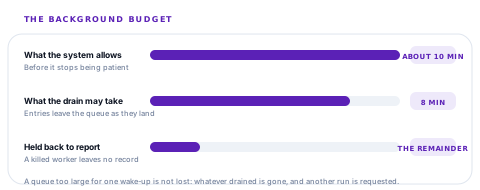
A worker killed mid-write leaves no record, and a background job with no record is indistinguishable from a background job that never ran.
Six things a wake-up can conclude
| Outcome | What happened | What it means for you |
|---|---|---|
| Drained | The drain ran | Check what was left afterwards — that is the number that says whether it finished. |
| Idle | Nothing was queued | The cheapest possible wake-up, and the most common one. |
| Offline | Woken with no usable connection | The system's network constraint can be briefly optimistic. Nothing is lost; it waits again. |
| Signed out | No session on the device | Queued rows stay exactly where they are for whoever signs in next. |
| Timeout | The drain outlived its budget | Part of the queue moved and another run was asked for. |
| Error | The task itself threw | Recorded rather than swallowed, which is the only reason it can be investigated. |
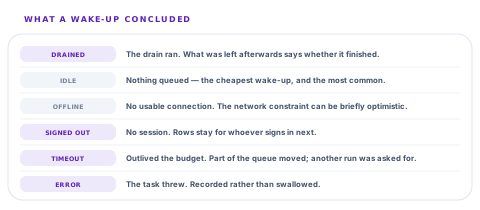
The distinction between idle and signed out looks pedantic and is not. Both leave the queue untouched, and only one of them is a problem: a device that reports "signed out" every night is a device whose work is waiting for a person to log back in, and no queue depth on any screen would tell you that.
The question a queue cannot answer about itself
An empty queue on Monday morning looks identical whether it drained at six on Friday evening or whether somebody opened the app at nine on Monday and drained it while the kettle boiled. Same screen, same zero.
So each background run writes down what it did: when it started, when it finished, how long it took, what it concluded, and how many entries were waiting before and after. That last pair is the useful one — a run that started with forty and ended with forty is a very different night from one that started with forty and ended with none.
The recording is deliberately incapable of failing the work. If writing the record throws, the drain still happened and the entries are still gone; an observation that can break the thing it observes is worse than no observation.
Where this holds, and where it does not
The scheduler is Android, and it is honest about that everywhere. Every one of its methods is safe to call on any platform and on a build without the native piece, because the background schedule is an optimisation and never a precondition — the in-app triggers still drain the queue whenever somebody opens the app, exactly as they did before any of this existed.
Why asking for a drain repeatedly is free
The request is enqueued under a unique name and keeps whatever is already scheduled, so asking on every queue change does not restart a retry backoff that is already counting down. That property is what lets the app ask casually — every enqueue, every status change — instead of trying to be clever about when to ask.
-
Something is queued
The app asks for a drain as soon as there is a connection. If one is already scheduled, nothing changes and no timer is reset.
-
The system waits
The request sits in the operating system's scheduler, through the app being killed and through a reboot, until the device has a network.
-
The worker wakes
A headless task drains the queue with the app closed, inside its eight-minute budget, and each entry leaves the queue as it lands.
-
It writes down what happened
Outcome, duration, and the queue depth before and after — so Monday morning's zero can be explained rather than assumed.
Questions about background sync worth pressing on
Does the queue move when the app is closed?
What you will hear
"It syncs in the background."
How to read it
Ask what wakes it. "When the app is opened" is a legitimate answer and a very different product — it means a phone left in a van all weekend has sent nothing. Both are defensible; only one matches what most people picture.
How do I know a background sync actually ran?
What you will hear
A shrug, or a queue count.
How to read it
A queue count cannot answer this: an empty queue looks the same whether it drained overnight or was drained by hand this morning. There should be a record of the last run with an outcome and the depth before and after.
What if the queue is too big to finish in one wake-up?
What you will hear
"It syncs everything."
How to read it
No background task gets unlimited time. The right answer names a budget and says what happens at the end of it — entries removed as they land, and another run requested — rather than implying a limit that does not exist.
Which platforms is this on?
What you will hear
"Both, of course."
How to read it
The two platforms give very different background guarantees, and a vendor claiming identical behaviour on each has usually not looked. Ours runs the scheduled drain on Android; on iOS the queue drains on the app's own triggers, and we would rather say so than imply otherwise.
Our take
Background sync is one of those phrases that everybody uses and almost nobody defines. The definition that matters has four parts: what wakes it, how long it gets, what happens when the work does not fit, and how anyone finds out afterwards. Ours wakes on connectivity through a request the operating system holds across reboots, gets eight minutes of the ten it is allowed, removes each entry as it lands so an overrun costs nothing, and writes down the outcome with the queue depth on either side. The part we would draw a buyer's attention to is the last one, because a system that cannot tell you whether it ran is one you will end up checking by hand every Monday anyway.
The scheduler is a small surface, which makes it extensible
The budget, the trigger and the run record each live in one place. These are the extensions field teams ask for once the queue is genuinely draining unattended.
Fleet visibility of background runs
Every device's last run — outcome, depth before and after — on one screen, so a handset that has been reporting "signed out" for three nights is visible without anybody phoning its owner.
Windows you choose
Draining on your own schedule — overnight only, or outside shift hours — for fleets on metered connections where sending at four in the afternoon is a cost.
Connection conditions of your own
Unmetered networks only, or charging only, expressed as a workspace policy rather than as a per-device habit.
A prompt when a device goes quiet
An alert to a supervisor when a handset has queued work and no successful drain for longer than you are comfortable with.
Each of these builds on the run record that already exists, which is the piece that usually has to be invented first — the difference between a schedule you can extend and one you can only hope about.
Tell us how your devices end their dayThe Friday test
Queue a few movements with the network off, swipe the app away, and put the phone on charge overnight. On Saturday morning, look at what the last background run says it did. That is the whole test, and it takes no setup.
Talk to us about field devicesFrequently asked questions
Does the app sync when it is closed?
On Android, yes: a request held by the operating system fires as soon as the device has a network, and a headless task drains the queue with the app closed. It survives the app being killed and survives a reboot, because the request lives in the system's own scheduler rather than in the app. On iOS the queue drains on the app's own triggers — when it is opened, when the network changes, when the session changes.
Why not just sync every fifteen minutes?
Because fifteen minutes is the floor a periodic job cannot beat, so the moment a connection returns is not the moment anything happens. It also keeps waking on an empty queue, which is most of the day, and it cannot cancel itself cleanly from inside its own worker. A single request that waits for connectivity fires immediately, retries while there is work, and costs nothing when the queue is empty.
What happens if there is more queued work than one wake-up can send?
The drain gets eight minutes of the roughly ten a background worker is allowed, and each entry leaves the queue as it lands rather than at the end. So an overrun means part of the queue moved and another run is requested — nothing is repeated and nothing is lost. The two minutes held back exist so the worker can record what happened instead of being killed mid-write.
How can I tell whether a sync ran overnight or somebody drained it by hand?
By the last-run record: when it started and finished, how long it took, what it concluded, and how many entries were waiting before and after. An empty queue on Monday morning looks identical either way, which is exactly why the record exists.
What does it mean if a device reports "signed out" overnight?
That there is no session on it, so queued rows stay untouched for whoever signs in next. Nothing is lost, but nothing moves either — and it is the one outcome that looks identical to "nothing was queued" if you are only watching queue depth. It usually means somebody signed out at the end of a shift with work still waiting.
Does asking for a background sync repeatedly cause problems?
No. The request is enqueued under a unique name and keeps whatever is already scheduled, so asking on every queue change cannot reset a retry backoff that is already counting down. That is what lets the app ask casually rather than trying to guess the right moment.
