
The Envelope Is the Hard Part
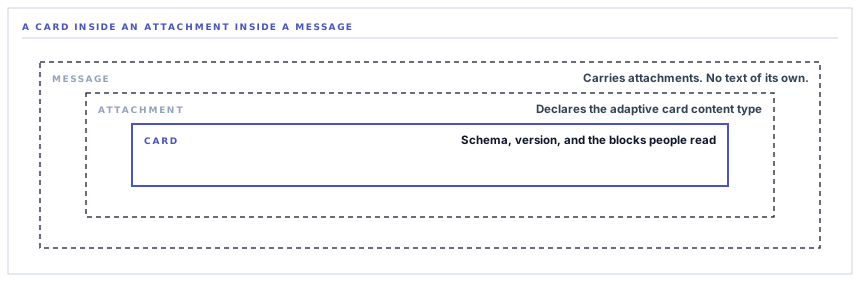
A Teams notification is a card inside an attachment inside a message. Get the innermost part perfect and the outer wrapper wrong and nothing arrives — and the two mistakes look identical from your side, because the failure is silent in one direction and unhelpful in the other.
Posting a message to Slack is one JSON object. Posting the same message to Teams is three, nested. That sounds like an implementation detail and it is the single most common reason a Teams integration built from a blog post does not work, because two of the three layers carry no information at all — they are envelope, and an envelope is exactly the kind of thing that gets left out when somebody is copying the interesting part.
Three layers, and only one of them says anything
From the outside in, a Teams notification is built like this.
-
A message
The outermost object declares itself a message and carries a list of attachments. It holds no text of its own. This is the layer people leave out.
-
An attachment, declaring its own type
Each attachment names the content type it holds — the identifier for an adaptive card — and then holds it. Get this string wrong and Teams has no idea what it has been handed.
-
The card
Finally the part with content: a schema reference, a version, and a list of blocks that make up what a person reads.
Every layer is mandatory and only the third does any work. That ratio is what makes it easy to get wrong: two thirds of the structure exists to say what kind of thing the remaining third is.
The layers that carry no content are the layers nobody copies, and they are the ones that decide whether anything arrives.
Why Teams is like this and Slack is not
It is worth understanding rather than resenting, because it explains a few other things about the connector.
Adaptive Cards are not a Teams feature. They are a card format Microsoft uses across several products, with its own schema, its own versioning and its own renderers. A card is a self-contained document that happens to be being delivered through Teams today.
So the envelope is doing real work: it is the part that says this is a Teams message, and what it contains is a card of this type. Slack's blocks, by contrast, are Slack's own and live at the top level because there is nothing else they could be.
The practical consequence is the version number. The card declares which version of the format it is written to, and that declaration is what a renderer uses to decide whether it can display it. A card claiming a version newer than the client supports is a card the client may decline to draw. Declaring a well-supported version rather than the newest is a deliberate choice in favour of the message arriving.
The one-word default that truncates your message
Here is a detail that costs nothing to get right and is invisible until it is wrong.
A text block in an Adaptive Card does not wrap by default. Text longer than the width available is cut off, with an ellipsis, and that is the specified behaviour rather than a bug.
For a notification with a short title that is unnoticeable. For a body saying which purchase order, from which supplier, for what value, awaiting whose approval, it is fatal — and it is fatal in a way that reads as a design choice, because a truncated line looks tidy. So every text block in these cards sets wrapping on explicitly.
It joins a small family of defaults worth knowing about across this family of connectors: the plain-text fallback Slack needs for phone notifications, the widget a Google Chat card cannot be empty of, the length ceilings Discord enforces. None of them produce an error. All of them produce a message that is quietly less than what you sent.
What is deliberately not done here
The Slack connector escapes three characters before putting text into a message, because Slack's text format reserves them. The Teams connector escapes nothing, and that is correct rather than an oversight.
An Adaptive Card text block is a JSON string value in a structured document. It is not markup, so an ampersand in a supplier name is just an ampersand, and the JSON encoder handles anything that needs handling. Applying Slack-style escaping here would put the escape codes themselves on screen — the reader would see the literal sequence instead of the character.
It is the same principle as the Slack post's button label. Escaping belongs to a format, not to a habit, and a helper applied uniformly across six chat providers would be right on two of them and visibly wrong on the rest.
A word about which webhook you are creating
Teams has had more than one thing called an incoming webhook, and if you are following instructions written a few years ago you may create the older kind, which expects a different payload format entirely.
The current route is through a workflow — Microsoft's automation product — where you create a flow triggered by a request and it hands you a URL. That is the shape this connector sends to, and it is the one Microsoft is carrying forward.
If a Teams connector anywhere refuses your messages with a complaint about the payload, that mismatch is the first thing worth checking, and it is a two-minute check rather than a debugging session.
What is in place, layer by layer
The Teams message, end to end
The full three-layer envelope
A message carrying an attachment that declares the adaptive card content type and holds the card, which is the shape the current Teams webhook accepts.
A conservatively declared card version
The card names a well-supported version of the format rather than the newest, so a client that has not caught up still draws it.
Wrapping switched on everywhere
Every text block sets wrapping explicitly, because the format's default is to truncate and a truncated notification looks deliberate.
A visual hierarchy in the card
A bolder, larger title, the detail beneath it, and a subtle small line for the source — so a channel receiving several a day stays scannable.
A link back as a card action
Where the notification is about one record, the card carries an open-link action with a caller-supplied label rather than a bare URL in the text.
No escaping, deliberately
Card text is a JSON string rather than markup, so the characters Slack reserves are passed through as themselves instead of being turned into escape codes on screen.
Optional pieces omitted, not blanked
No body means no second text block; no link means no action. A short notification arrives short rather than with empty furniture beneath it.
A bounded wait
A twelve-second ceiling on the request, so a slow response cannot hold up the work that raised the notification.
A refusal before the call
An unconfigured destination returns a reason instead of attempting a request, so a half-set-up connector reads as unconfigured rather than as failing.
The same four ingredients — title, body, link, source — feed five other chat destinations. Only the envelope differs, and on Teams the envelope is most of the structure.
Three positions held on purpose
- The card declares a version that is widely renderable rather than the latest available. A newer schema buys layout options this notification does not need, at the price of a client somewhere refusing to draw it.
- Text handling follows each provider's own format. One shared escaping helper across six chat connectors would be correct on two and put visible escape codes in front of readers on the rest.
- Every optional element is genuinely absent when there is nothing for it. A card with an empty action row or a blank subtitle reads as broken, and readers are right to read it that way.
Five questions about a Teams integration
Which kind of Teams webhook does it need?
A good answer sounds like
The current one, named.
What ours actually is
A workflow-based incoming webhook, which is the shape Microsoft is carrying forward.
What card version does it declare?
A good answer sounds like
A specific one, chosen.
What ours actually is
A well-supported version rather than the newest, so older clients still render it.
Does long text get cut off?
A good answer sounds like
No — wrapping is set.
What ours actually is
Every text block enables wrapping explicitly, because the format truncates by default.
How is an ampersand in a name handled?
A good answer sounds like
Passed through.
What ours actually is
Card text is a JSON string, not markup. No escaping is applied, deliberately.
Can the reader get to the record?
A good answer sounds like
A card action.
What ours actually is
An open-link action with a label the notification supplies, present whenever there is one destination.
Our take
Integration code is mostly translation, and translation errors cluster in the parts that carry no meaning. Everybody gets the title right. What goes wrong is the wrapper that says what kind of document this is, the version number nobody thought was load-bearing, the boolean whose default is the opposite of what you would guess. None of those are hard once you know, and none of them are discoverable from a working example that omits them — which is why the useful thing to ask about an integration is not whether it works, but which of the provider's defaults its author went and read.
Put approvals where your team already works
If the day happens in Teams, the approval request and the exception should arrive in Teams — with the detail intact and a way back to the record.
Talk through operational alertsFrequently asked questions
My Teams webhook rejects the message — what should I check first?
Which kind of webhook it is. Teams has had more than one, and the older style expects a different payload shape entirely. A URL created by following older instructions will refuse a modern card, and the error will be about the payload rather than about the URL, which sends people looking in the wrong place.
Can we style the card with our brand colours?
Adaptive Cards offer limited styling by design — Microsoft wants cards to look like Teams rather than like the sender. The hierarchy that is available is used: a bolder, larger title, normal body text, and a subtle source line. Trying to fight past that produces cards that render inconsistently across clients.
Why does the same notification look different in Slack and Teams?
Because the same four ingredients go into two different envelopes. A Slack message is a set of blocks with a plain-text twin; a Teams message is a card inside an attachment inside a message. Both carry the title, the detail, the link and the source — they simply arrange them the way their own platform expects.
Does the card work on the Teams mobile app?
Yes, which is part of why the declared card version is a conservative one. Mobile clients update on their own schedule, and a card written to a very new schema is exactly the sort of thing that renders on a desktop and not on a phone.
Can Teams messages trigger an approval without opening the workspace?
The card links back to the record, and the approval is recorded there under the approver's own account and permissions. That is deliberate: an approval is a decision with an audit trail attached, and a chat client is a good place to be told about one rather than a good place to store it.
